Free, all-in-one AI media tools now pack dozens of features into a single browser tab, which shifts the real question from what a tool can do to what it does well enough to publish. Unlucid AI and PixNova AI both promise image generation, editing, and video in one place, yet they pull in opposite directions the moment a real project starts: one leans into animated short-form video and looser creative limits, the other into photo editing, face swaps, and frictionless access.
Quick Verdict
For readers who want the answer first, the decision snapshot below covers most cases, followed by the short reasoning.
| Choose Unlucid AI if | Choose PixNova AI if |
• Short-form video and motion effects are the main output • Text-to-video or image-to-video is a core need • Mainstream tools keep blocking surreal or experimental prompts • Animated TikTok, Reels, or Shorts content matters most | • Photo editing, retouching, and quick swaps are the priority • Face swap across photos, GIFs, or video is needed • Zero-login, instant access matters • A clear data-deletion and privacy stance is important |
| The verdict. PixNova AI is the stronger all-round pick, taking 4 of the 6 factors on the strength of its editing suite, face swap reliability, no-login access, and clearer privacy stance. Unlucid AI wins decisively on video and motion, and suits creators who keep hitting content filters elsewhere. Neither tool matches a paid specialist such as Midjourney on raw image sharpness, and both gate their video and high-resolution exports behind a credit system. Many creators will get the most value from running both. |
The Two Tools at a Glance
Both tools sit in the same all-in-one category, but their centre of gravity is different.
Unlucid AI
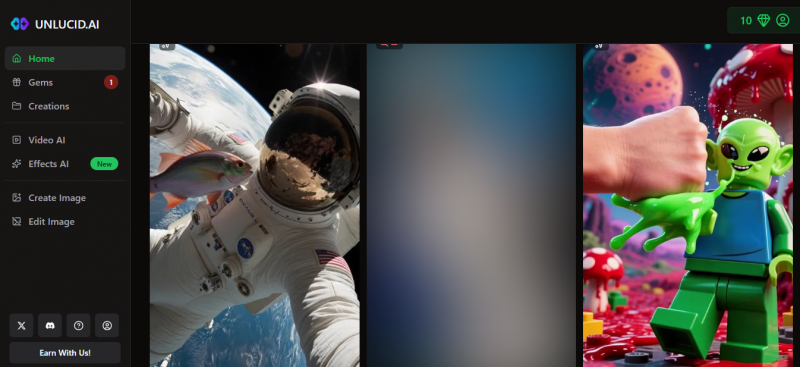
Unlucid AI markets itself as a creative platform built for dreamers, and a deeper Unlucid AI Explained guide can help users understand why it sits in a different lane from more restrictive image and video generators. It turns text prompts into images across styles that range from photorealistic to anime, fantasy, and surreal, then lets users animate stills or generate clips outright through 15+ video effects such as dance, zoom, smash, and reveal. A set of editing tools handles background and object removal plus upscaling. Access runs on a gems credit system, most tools require an account, and exports are tuned for short-form social video in MP4. Its defining trait, and its biggest risk, is a deliberately lighter approach to content filtering than mainstream generators apply.
PixNova AI
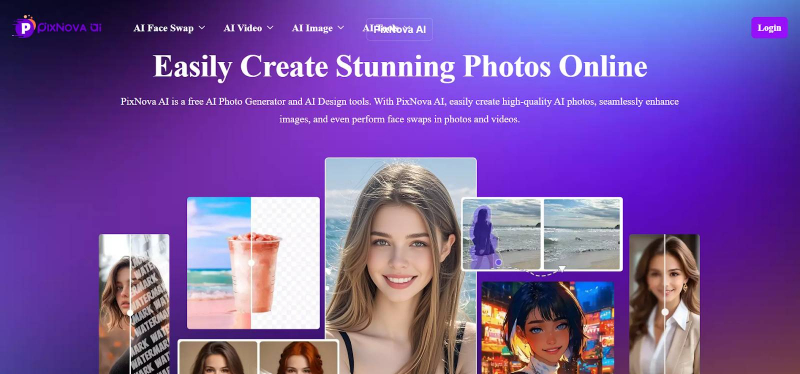
PixNova AI is a browser-based image and video suite built around editing as much as generation, and a full Pixnova AI Review helps explain why it has become useful for quick visual edits rather than only prompt-based image creation. Alongside text-to-image, it offers face swap across photos, GIFs, and video, including several faces in one shot, a 4x upscaler, a photo enhancer, and one-click background, object, and watermark removal. Styling tools cover hairstyles, clothing, and tattoos, and a set of novelty video features animate photos with talking and lip-sync effects. It is marketed as free with no sign-up and no watermark on basic use, and the company states that uploads are encrypted, deleted after processing, and not used for training. Higher-resolution and video tasks draw on credits.
How This Comparison Was Scored
Every tool here was assessed against the same rubric, the Prompt-to-Publish Benchmark, which rates a platform on how reliably it carries a creator from an idea to a finished, shareable asset. 6 equally weighted factors make up the score:
• Image generation: prompt accuracy, style range, and detail at common export sizes.
• Video and animation: breadth of effects, text-to-video support, and output suited to social platforms.
• Editing and retouch: how broad and dependable the cleanup, swap, enhance, and styling tools are.
• Ease and access: sign-up friction, mobile support, and how quickly a beginner reaches a usable result.
• Privacy and safety: clarity of data handling, content policy, and safeguards against misuse.
• Value: how much usable output the free tier delivers before credits or paid plans are needed.
Scores reflect editorial evaluation of publicly available features and typical creator workflows as of June 2026, not laboratory testing. Output quality varies with the prompt, the source image, and ongoing model updates, and pricing changes often, so current figures should be confirmed on each tool's official site.
Head-to-Head Scorecard
The table below summarises the scoring. The radar chart underneath shows the same 6 factors as an at-a-glance shape, where a larger area means a stronger all-round profile.
| Factor (scored out of 10) | Unlucid AI | PixNova AI | Edge |
|---|---|---|---|
| Image generation | 7 | 7 | Tie |
| Video and animation | 8 | 6 | Unlucid AI |
| Editing and retouch | 6 | 8 | PixNova AI |
| Ease and access | 7 | 8 | PixNova AI |
| Privacy and safety | 5 | 6 | PixNova AI |
| Value | 7 | 8 | PixNova AI |
| Overall average | 6.7 | 7.2 | PixNova AI |
Image Generation
On core text-to-image quality the two are close. Unlucid AI leans into stylistic range, handling realism, anime, fantasy, sci-fi, and surreal prompts, and adds seed control and reference images for more repeatable results. PixNova AI's generator is solid and, more importantly, sits next to a full editing suite, so a generated image can be cleaned up, upscaled, or restyled without leaving the tab. Neither reaches the sharpness or fine control of a paid specialist at high resolution. The practical read: Unlucid AI edges ahead on creative and surreal range, PixNova AI on producing edit-ready, social-ready output, which nets out to a tie.
Video and Motion Effects
This is Unlucid AI's clearest advantage. Its 15+ motion effects animate a still image into a short clip, and text-to-video generates a scene with no source footage at all, with MP4 exports aimed squarely at TikTok, Reels, and Shorts. PixNova AI does offer video, but it is centred on face and voice-driven novelty, such as talking photos and lip-sync clips, rather than a general motion-effects engine, and video output leans on credits. For creators whose deliverable is animated short-form content, Unlucid AI is the more capable option.
Editing and Cleanup Tools
PixNova AI is built for this, and it shows. Face swap works across photos, GIFs, and video and can handle several faces at once, the 4x upscaler and photo enhancer lift low-resolution shots, and one-click removal clears backgrounds, objects, and watermarks. Styling tools extend to hairstyles, clothing, and tattoos. Unlucid AI covers the essentials, background and object removal plus upscaling, but its retouch toolkit is narrower and less specialised. For editing breadth and dependability, PixNova AI is the stronger choice.
Face Swap, Likeness, and Consent
The features that make these tools powerful also carry real responsibility. Face swap, clothing changes, and body generation can convincingly alter images of real, identifiable people, and using someone's likeness without consent can break the law and breaches the terms of most platforms. Non-consensual intimate imagery, defamation, and misuse of a person's likeness all carry legal and reputational risk, and deepfake misuse is drawing tighter regulation worldwide.
| Responsible use, in short. Only edit or swap images of people who have given consent, never create sexual or compromising content of real people, and never use these tools on images of minors, which is illegal and a serious crime. When in doubt, check the law in the relevant jurisdiction before publishing. Most listicles skip this point; for these particular tools, it matters more than any single feature. |
Content Moderation and Safe Use
This is where the two tools differ most in philosophy. Unlucid AI's lighter content filtering is a genuine draw for artists who hit false positives on mainstream generators, but it shifts more responsibility onto the user and widens the surface area for misuse. PixNova AI applies more conventional guardrails, though its face and body tools still demand the care described above. For most individual creators, and especially for brands and teams, clearer policies and stronger safeguards are the safer default, which is what the privacy and safety score reflects.
Access, Credits, and Cost
Both tools are free to start, and both put their expensive work behind credits. Unlucid AI runs on a gems system, asks for an account to use most tools, and consumes credits for heavier video and high-resolution jobs, with paid tiers available. PixNova AI is marketed as free with no login and no watermark on basic use, then draws on credits for higher-resolution exports and video. Exact prices change often and are not reproduced here; they should be confirmed on each official site. On entry friction alone, PixNova AI's no-login claim gives it a slight edge.
Privacy and Output Rights
PixNova AI is the more transparent of the two on data: the company states that uploaded images and videos are encrypted, deleted from its servers after processing, and not used for training, which is a creator-friendly position if it holds in practice. Unlucid AI documents its data handling less clearly in public, so anyone uploading personal photos should read its policy first. On output rights, commercial-use terms vary by tool and plan for both, so licensing should be checked before any commercial release.
Where Each Tool Wins
The chart below distils the scoring into a single view of who leads on each factor, and by how much.
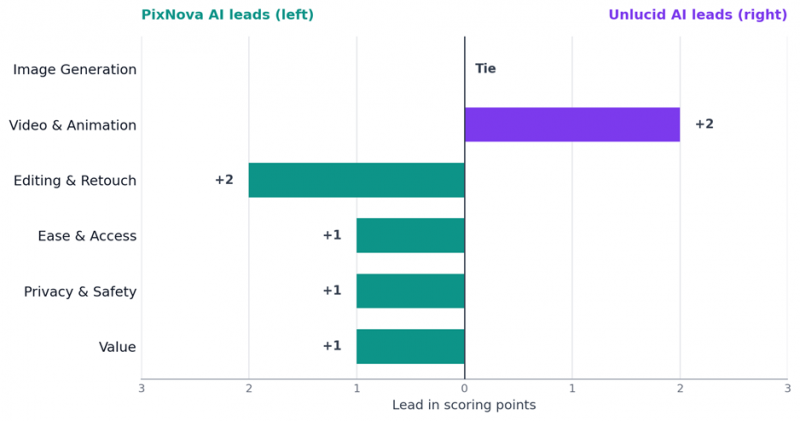
Figure 2. Scoring lead by factor. Bars to the right favour Unlucid AI; bars to the left favour PixNova AI.
Where Unlucid AI pulls ahead
• Animated short-form video, with 15+ motion effects and text-to-video.
• Creative and surreal range across more experimental styles.
• Fewer content blocks for artists hitting false positives elsewhere.
Where PixNova AI pulls ahead
• Editing and retouch breadth, from upscaling to one-click cleanup.
• Reliable multi-face swap across photos, GIFs, and video.
• Zero-login access and a clearer data-deletion stance.
• More usable output on the free tier for everyday photo work.
Which Tool Fits Which Creator
Matching the tool to the job is usually clearer than picking an overall winner. The mapping below is a quick guide.
| If this describes you | Best pick |
|---|---|
| Short-form video creator (TikTok, Reels, Shorts) | Unlucid AI |
| Social media manager needing fast edits and swaps | PixNova AI |
| Product or e-commerce photographer | PixNova AI |
| Digital artist exploring surreal or experimental work | Unlucid AI |
| Brand or team that needs predictable guardrails | PixNova AI |
| Budget creator wanting the most free utility | PixNova AI, plus Unlucid AI for video |
Final Verdict
PixNova AI takes the overall edge as the more complete free toolkit for photo work, edits, and quick social assets, helped by low entry friction and a clearer privacy stance. Unlucid AI is the better pick when the output is short-form video and motion, or when content filters elsewhere keep getting in the way. The two are not really rivals for every creator: a common, practical setup is PixNova AI for stills and cleanup and Unlucid AI for animating the result. Whichever wins a place in the workflow, the consent and licensing cautions covered above carry more weight than any single feature.
Final scores: Unlucid AI 6.7, PixNova AI 7.2 out of 10.
Post Comment
Share your thoughts about this article.
Be the first to post a comment!