Table of Content
- Unlucid AI Features
- How Does Unlucid AI Actually Work?
- Popular Use Cases of Unlucid AI
- Unlucid AI vs Alternatives: Which One Should You Choose?
- Pricing Breakdown: How Much Does Unlucid AI Cost?
- User Experiences and Community Feedback
- Is Unlucid AI Safe and Legit?
- Final Takeaway: Should You Try Unlucid AI?
- FAQs About Unlucid AI
The past few years have been filled with AI tools promising to change how we edit images, design animations, and create content. But most of them come with limits, whether it’s filters, restrictions, or paywalls.
Unlucid AI presents itself differently. It claims to be an “uncensored” creative platform, letting users push boundaries and test edits in ways traditional editors don’t allow.
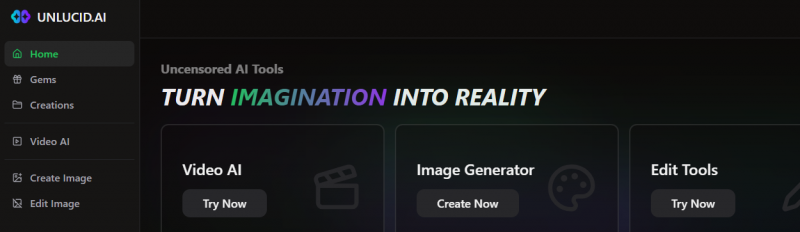
Now that we know what the platform claims to be, let’s look at how it actually works behind the scenes.
Unlucid AI Features
Video AI & Effects
Unlucid allows users to animate still images using preset effects such as:
- Dance
- Fly
- Squish
- Smash
- Reveal
- Transform
These effects generate short motion clips (typically 3–5 seconds).
Best suited for:
- Social media edits
- TikTok/Reels content
- Quick animated visuals
Limitations:
- Limited manual control
- Occasional distortion in faces or limbs
- Less precision than professional animation tools
AI Image Generation
Includes style modes like:
- Realistic
- Cartoon
- 3D
- Anime
- Pencil sketch
Additional options:
- Seed control
- Image reference blending
- Upscaling
Results vary depending on prompt complexity.
AI Image Editing
Editing features include:
- Object removal
- Outfit modification
- Retouching
- Style transfer
The editing workflow is simplified for non-technical users.
How Does Unlucid AI Actually Work?
The platform uses a Gems credit system as its currency. Users can try out free edits, but advanced options, such as high-quality renders, video tips, and batch processing, usually require Gems. When you first sign in, you’ll find a mix of AI image editing tools, video tutorials like AI tips for video editing, and even an entire section dedicated to image transformations, such as object removal and style swaps.
But functionality alone doesn’t explain why people are drawn to it. To really understand its appeal, we need to see what makes Unlucid stand apart from other AI editors.
What Makes Unlucid AI Different From Other AI Editors?
While tools like Runway ML and Canva AI focus on guardrails and content moderation, Unlucid takes a bold stance: it calls itself an “uncensored” creative platform.
That doesn’t mean chaos; it means control. Artists can experiment with reference blending, style fusion, and AI interpolation without strict content filters.
This approach has drawn attention from creators who once relied on open frameworks like Stable Diffusion or ComfyUI but wanted something easier to use. A similar mindset drives the innovation behind TensorArt AI, a model hub that helps creators access pre-built templates and Stable Diffusion tools without complex setup.
Both platforms reflect the same trend: AI as a collaborator, not a constraint.
Popular Use Cases of Unlucid AI
- Social media creators are experimenting with unique visuals.
- Digital artists are testing out reference-based compositions.
- Animators use interpolation to bring still images to life.
- Casual hobbyists curious about “uncensored” AI results.
These varied use cases highlight its versatility. But to really assess its value, we need to weigh its advantages against its limitations.
The Advantages of Using Unlucid AI
- Greater creative freedom compared to filtered AI editors.
- A free entry point so you can test features without paying immediately.
- Tools covering both images and videos, unlike single-purpose apps.
- Quick access to editing tutorials that make onboarding easier.
Of course, no tool is perfect. Alongside these positives, Unlucid comes with drawbacks and risks you should be aware of.
Unlucid AI Limitations and Concerns You Should Know
Unrestricted creativity has trade-offs. Some countries block Unlucid’s access entirely due to its open policies.
Also, while it advertises “unlimited” use, features often depend on how many Gems you buy. And like other emerging AI tools, its data handling transparency remains uncertain, raising concerns around privacy and content ownership.
These issues echo discussions across the AI Tool Testing Reddit community, where users share both praise for Unlucid’s openness and caution about its vague trust structure.
These concerns echo user discussions in AI Tool Testing communities. Platforms like Udio AI, in contrast, offer clearer trust structures and ongoing developer transparency, something Unlucid lacks.
Unlucid AI vs Alternatives: Which One Should You Choose?
| Tool | Restrictions | Pricing Model | Ease of Use | Best For |
| Unlucid AI | Minimal, uncensored | Free + Gems credits | Easy | Creative freedom |
| Runway | Strict filters | Paid plans only | Easy | Professional video editing |
| Stable Diffusion UIs | Open-source, customizable | Free but requires setup | Technical | Developers & tinkerers |
| TopView Alternatives | Varies | Mixed models | Moderate | Balanced safety & flexibility |
Once you know how it compares, the next big factor becomes cost. So, how much should you expect to spend?
If you’re curious how Kupon AI fits into the evolving creative ecosystem, our in-depth Kupon AI analysis explores how it blends accessibility with ethical controls, something Unlucid currently struggles with.
Pricing Breakdown: How Much Does Unlucid AI Cost?
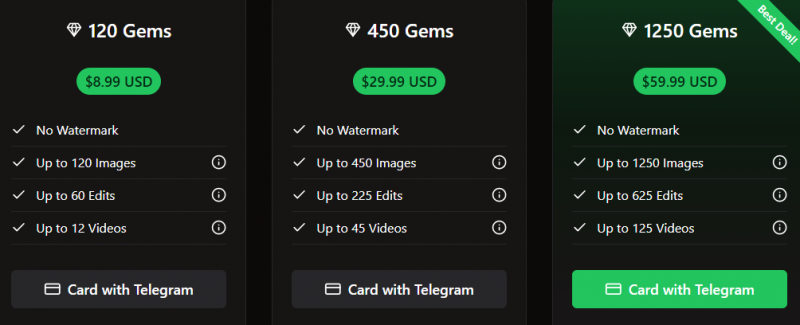
The tool works on a freemium model. You can explore basic edits for free, but for higher-quality outputs or multiple renders, you’ll need Gems. While the platform doesn’t list transparent pricing like other AI alternatives, expect to pay if you plan on using it regularly.
But cost isn’t the only deciding factor, real-world experiences tell us more. Let’s check what actual users are saying.
User Experiences and Community Feedback
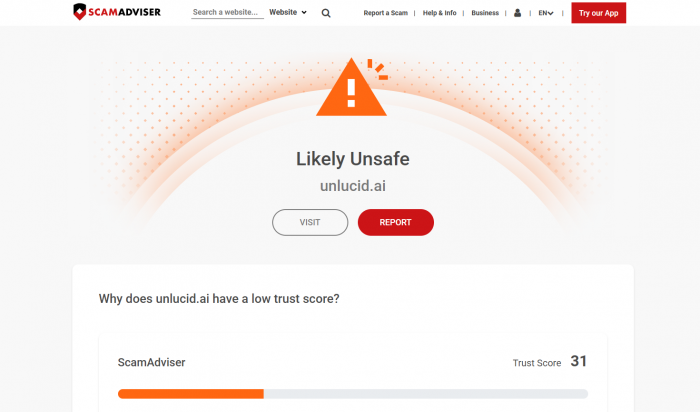
Feedback is mixed. Some Reddit users in the ComfyUI community say Unlucid is refreshing because it allows experiments without coding. Others worry about its lack of clear safety guidelines. ScamAdvisor even lists Unlucid.ai under its “caution” category, highlighting low trust scores.
That makes it clear this isn’t a one-size-fits-all solution. The real question becomes — who is Unlucid best suited for?
Which leads us to the core issue many people ask: is Unlucid actually safe and legit to use?
Is Unlucid AI Safe and Legit?
This is where Unlucid AI stumbles, and why users should be cautious.
Security & Legitimacy Red Flags
ScamAdviser: Flags it as suspicious (anonymous ownership, new domain).
Gridinsoft: Assigns 1/100 trust score, citing:
- possible blacklisting
- adult-content risk
- unclear legitimacy
- high-traffic but low transparency
These do NOT confirm it is a scam, but they raise important concerns about:
- Payment security
- Data privacy
- Long-term reliability
- Content ownership
If you plan to upload sensitive photos, run commercial projects, or store assets inside the platform, proceed carefully.
Final Takeaway: Should You Try Unlucid AI?
Unlucid AI represents a newer generation of browser-based creative editing tools designed for fast experimentation rather than polished production workflows. It combines AI image generation, lightweight editing features, and short animation effects into a single, easy-to-access platform.
As a new name in creative editing, its appeal lies in flexibility and simplicity. Users can test visual ideas quickly, animate static images, and experiment with styles without complex setup or heavy software installations.
However, its strengths in creative freedom come with trade-offs. Output consistency varies, advanced control is limited, and transparency around platform ownership and long-term reliability remains unclear. It is best suited for casual creators, experimental artists, and social media users rather than enterprise teams or regulated industries.
In short:
Unlucid AI is an emerging creative playground, innovative, flexible, and accessible, but not yet a fully mature professional editing suite.
For curious creators, it’s worth exploring.
For mission-critical projects, more established platforms may provide stronger stability and trust.
FAQs About Unlucid AI
Is Unlucid AI completely free?
No, the free tier is limited. Advanced use requires Gems.
Can I use Unlucid AI on mobile?
Yes, but functionality is smoother on desktop browsers.
Are there risks in using uncensored AI platforms?
Yes, content misuse, data privacy issues, and unclear ownership of generated outputs.
What’s the best alternative to Unlucid AI?
For professional use, Runway is safer. For technical users, Stable Diffusion offers more customization.
Post Comment
Be the first to post comment!