Table of Content
- What Exactly is Pixnova AI?
- Pixnova AI Credit Packs (Pay Once – Never Expires)
- Pixnova AI reviews
- 1. SourceForge – “Reliable, User-Friendly, Realistic Results”
- 2. Slashdot – “5.0/5 from Early Adopters”
- 3. ScoutForge Reddit Review – “3.8/5 for Free Creative Play”
- 4. Pixnova’s Own Blog – “Average 4.3/5 Across Platforms”
- 5. BestAIToolSpot & Similar Tool Blogs – “Free, Accessible, Surprisingly Strong”
- 6. Aixploria – “Versatile Suite, Strong for Editing & Face Swap”
- Synthesised Review Picture
- Pixnova AI: What It Does Brilliantly (and Where It Falls Short)
When I first stumbled upon Pixnova AI while searching for affordable image editing tools, I wasn't expecting much. The market is saturated with AI image generators that promise the world but deliver mediocre results wrapped in expensive subscription plans. But after spending considerable time testing Pixnova AI's features—from face swapping to image upscaling—I discovered a tool that genuinely surprised me with its versatility and accessibility.
Let me walk you through my personal experience with Pixnova AI, breaking down what works, what doesn't, and whether this Singapore-based platform founded in 2024 deserves a spot in your creative toolkit.
What Exactly is Pixnova AI?
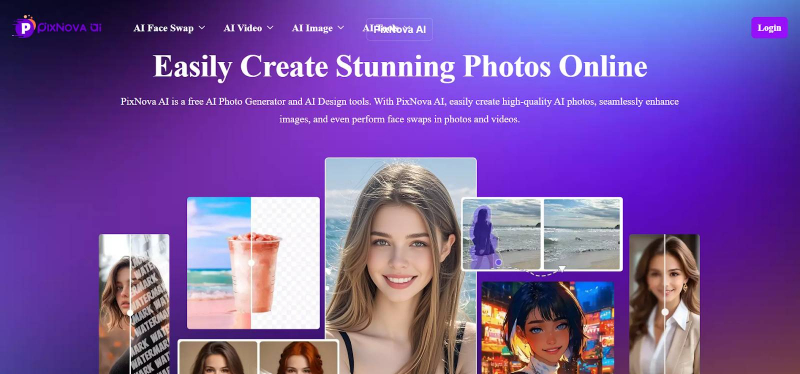
Pixnova AI positions itself as an all-in-one photo generator and editor, offering more than 20 free and easy-to-use AI photo tools. The name itself combines "Pix" (referring to pictures or pixels) and "Nova" (symbolizing a new and bright star), which reflects the platform's mission to provide innovative AI tools that empower users to create and edit photos effortlessly.
Unlike specialized tools that focus on just one feature, Pixnova AI bundles image generation, face swapping, photo enhancement, image upscaling, object removal, and even video generation into a single web-based platform. No downloads, no installations—just open your browser and start creating.
My Hands-On Testing Experience
I tried Pixnova AI on my laptop, tablet, and phone to see how it handles everyday creative tasks. Overall, it felt fast, simple to use, and reliable enough for regular content creation.
AI Image Generation: Text-to-Image
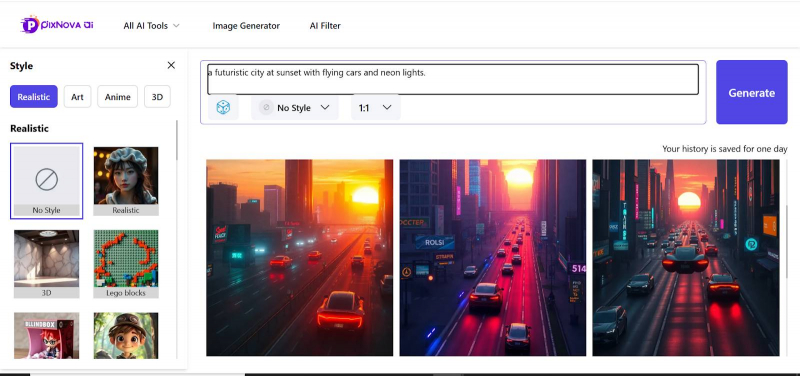
I started with the text-to-image tool using prompts like “a futuristic city at sunset with flying cars and neon lights.” It produced good-looking, vibrant images in about 10–15 seconds that were perfectly fine for blogs, social media, and thumbnails. They weren’t on the same level as premium tools like Midjourney or GPT‑grade image models, though—you don’t get that ultra‑polished, photorealistic finish professionals often need.
Face Swap Technology: The Real Game-Changer
The face swap feature is where Pixnova really surprised me. Swapping my face onto celebrity photos and movie stills gave surprisingly natural results, with expressions, lighting, and skin tone blending better than I expected. It felt close to what I usually see from paid tools like Fotor or Remaker, but with the big advantage that Pixnova lets you do this without immediately locking everything behind a paywall.
AI Image Upscaler: Transforming Low-Res Photos
With the AI Image Upscaler, I ran a bunch of low‑res photos from my archive through the tool and upscaled them up to 4x. The upgraded images were sharper, cleaner, and noticeably clearer, especially for small 500×500 pixel files. It doesn’t invent new detail, but it does a solid job of rescuing old photos or prepping images for print or higher‑quality use.
Photo Enhancer: One-Click Improvements
The Photo Enhancer became my quick fix button for dull or underexposed shots. In one click, it adjusted brightness, contrast, color, and sharpness, making images instantly more usable. It reminded me of an intelligent Instagram-style filter—not a full replacement for pro editing software, but more than enough for fast content workflows.
AI Object Remover: Clean Edits in Seconds
With the Object Remover, I erased things like trash bins and random people from my photos. On simple backgrounds, the fill looked clean and natural, and you wouldn’t notice anything at a glance. On busy, patterned areas, it sometimes left small artifacts, which is fine for casual content but might bother someone doing high-end, detailed retouching.
Video Generation: A New Addition
Pixnova’s video tools feel like a bonus rather than the main attraction. I created a short 10‑second clip, and the transitions and quality were good enough for a quick social post or story. However, free users are limited to very short videos and need credits, and it still doesn’t compete with heavyweights like HeyGen or Reelcraft.ai if you rely heavily on AI video in your workflow.
Pixnova AI Credit Packs (Pay Once – Never Expires)
| Plan / Offer Tag | Credits | Discounted Price (Pay Once) | Face Swap Video Time (Max) | Combined Usage (Per Pack) |
| 20% OFF Pack 1 | 1,600 | $7.99 | Up to 13.3 minutes | Up to 13 AI video generations, 133s AI talking photo video, 160 AI image editor tasks, unlimited photo face swap & AI image generation |
| 20% OFF Pack 2 | 9,000 | $23.99 | Up to 75 minutes | Up to 75 AI video generations, 750s AI talking photo video, 900 AI image editor tasks, unlimited photo face swap & AI image generation |
| 30% OFF Pack 3 (Most popular) | 16,000 | $34.99 | Up to 133.3 minutes | Up to 133 AI video generations, 1,333s AI talking photo video, 1,600 AI image editor tasks, unlimited photo face swap & AI image generation |
| 30% OFF Pack 4 | 33,000 | $69.99 | Up to 275 minutes | Up to 275 AI video generations, 2,750s AI talking photo video, 3,300 AI image editor tasks, unlimited photo face swap & AI image generation |
| 35% OFF Pack 5 | 100,000 | $194.35 | Up to 833.3 minutes | Up to 833 AI video generations, 8,333s AI talking photo video, 10,000 AI image editor tasks, unlimited photo face swap & AI image generation |
Pixnova AI reviews
Across platforms, Pixnova AI is generally rated good to very good, with most users praising its ease of use, realistic face swaps, and generous free features. Average sentiment sits around 4.0–4.3 out of 5 for image tools, with slightly lower enthusiasm for its basic video features.
| Platform / Source | Rating (if available) | Main Verdict / Tone |
| SourceForge | 4.0–4.5 / 5 (2026, small sample) | Very positive on realism, ease of use, and value; some complaints about video limits. |
| Slashdot | 5.0 / 5 (2 reviews) | Extremely positive; positioned as a top AI image tool option among its peers. |
| ScoutForge Reddit Review | 3.8 / 5 | Great free toolkit for memes, anime art, and casual creators; lacks depth for advanced power users. |
| Pixnova official blog (aggregated) | 4.3 / 5 (average across platforms) | Highest scores for UI and output quality; lower scores tied to video processing speed. |
| BestAIToolSpot / Best AI tools blogs | No numeric score, but effectively “highly recommended” | Praised as a “free, all‑in‑one creative suite” with strong face swap and enhancement. |
| Aixploria | No explicit star rating | Described as a versatile all‑in‑one photo/video AI suite with strong face swap and editor tools. |
| Trustpilot (photoai.com – different brand) | Mixed reviews, not Pixnova‑specific | Data here refers to a different domain; not reliable for Pixnova AI itself. |
1. SourceForge – “Reliable, User-Friendly, Realistic Results”
SourceForge’s Pixnova AI page highlights it as an all‑in‑one AI photo generator and editor that simplifies tasks like face swaps, upscaling, and enhancements. User reviews there emphasize:
● Pros:
● Very realistic face swaps and image edits “with minimal effort.”
● Web-based, no install, easy interface.
● Good processing speed and wide toolset (generator, enhancer, remover, etc.).
● Cons:
● Longer or more advanced video generation is locked behind paid credits.
● Some users mention mild lag on complex edits or large uploads.
Overall tone: solid 4+ / 5, particularly strong for casual creators and small teams who prioritize ease-of-use over deep customization.
2. Slashdot – “5.0/5 from Early Adopters”
Slashdot lists Pixnova AI with a 5.0 out of 5 stars rating based on 2 reviews, positioning it favourably among AI image generator tools. While the sample size is very small, the sentiment from reviewers is:
● Very impressed by quality of face swaps and edits.
● Appreciative of the value for money, given the free core features and one‑time credit packs rather than recurring subscriptions.
Tone here is enthusiastically positive, but it should be read as early‑adopter feedback rather than a large-scale user survey.
3. ScoutForge Reddit Review – “3.8/5 for Free Creative Play”
A detailed independent review on the ScoutForge subreddit explicitly rates Pixnova AI 3.8 out of 5.
Key points from that review:
● Described as “20+ free creative tools for memes & anime art”, ideal for social media content, anime-style avatars, and playful face swaps.
● Highlights its no-signup, free, browser-based model as a big plus for casual users.
● Notes that while it’s great for experimentation, those wanting advanced professional controls or ultra‑fine-tuned outputs may find it limited.
So, community view here: very good for fun, fast, free creativity; less built for deep pro use.
4. Pixnova’s Own Blog – “Average 4.3/5 Across Platforms”
Pixnova’s official blog post on face swapping includes a section summarizing aggregated external ratings:
● Average rating: 4.3 / 5 across major review platforms.
● Highest scores:
● User interface (UI) – people like how simple and clean it is.
● Output quality – especially for face swap and photo enhancement.
● Lower scores:
● Video processing times and limitations (length caps, credit use).
This matches external reviews: strong marks for UX and image results, some friction around video and heavier workloads.
5. BestAIToolSpot & Similar Tool Blogs – “Free, Accessible, Surprisingly Strong”
BestAIToolSpot and similar tool-review blogs don’t always give numeric ratings but their tone is clearly strongly positive.
In one 2025 article, BestAIToolSpot describes Pixnova as:
● A “free, all-in-one creative suite” for generating photorealistic images, swapping faces accurately, and upscaling low-res shots “with a few clicks.”
● Standouts:
● Accessibility: no sign-up, no hidden fees for core use.
● Strong AI photo generator and AI body generator for characters, fashion, and concept work.
● Clean interface and privacy focus (no persistent storage of user data claimed).
They do acknowledge limitations:
● Reliance on good internet connectivity.
● Variable realism on niche or complex prompts.
● Fewer “pro-level” manual editing controls compared to full-blown desktop suites.
Overall positioning: an excellent zero-cost starting point for creators, with huge value for money.
6. Aixploria – “Versatile Suite, Strong for Editing & Face Swap”
Aixploria’s Pixnova AI page frames it as:
● “A suite of AI tools specially designed for photo and video editing.”
● Highlights: generate images, retouch photos, create face swaps instantly; aimed at both beginners and more experienced content creators.
While Aixploria doesn’t show a numeric star rating, the language is clearly positive—focusing on versatility, ease-of-use, and the fact that it consolidates multiple tools (generator, enhancer, remover, etc.) in one place.
Synthesised Review Picture
Putting all these sources together:
● Typical rating band:
● Roughly 3.8 / 5 (Reddit) to 5 / 5 (Slashdot, small sample), with a central tendency around 4.0–4.3 / 5 once you factor in Pixnova’s own cross‑platform average.
● What users consistently like:
● Very user-friendly, web-based interface; no installation or sign‑ups needed for basic use.
● Face swap quality that often rivals paid alternatives, especially for photos and short clips.
● Broad tool coverage (generation, enhancement, upscaling, removal, styling) in a single place.
● Strong value for money, thanks to free core tools and non-expiring, pay-once credit packs.
● What people criticise or flag as limitations:
● Video generation is more limited and slower than dedicated AI video tools; longer or more frequent videos require credits.
● Results can be less consistent or less photorealistic on very complex prompts compared to top-tier models like Midjourney or GPT‑grade image models.
● Reliance on internet: no offline mode; performance depends on network quality.
Pixnova AI: What It Does Brilliantly (and Where It Falls Short)
What It Does Brilliantly
● Genuinely free to start with a wide toolbox: Many core tools—photo face swap, AI image generation, enhancement, upscaling, background and watermark removal—are accessible in the browser without upfront payment or installation, which reviewers repeatedly highlight as a major advantage for casual and budget‑conscious users.
● Exceptionally easy and fast for beginners: External reviews from HitPaw, SourceForge, and Reddit emphasize Pixnova’s simple workflows, minimal steps, clear UI, and fast processing, making it a strong choice for non‑technical creators who want quick results without a learning curve.
● Strong face swap quality when inputs are good: Detailed tests show photo face swap scoring around 8/10, with realistic blending, solid skin tone matching, and clean edges, often rivaling paid tools—as long as you respect its limits on lighting, resolution, and motion.
● All‑in‑one platform for everyday content: With image generation, editing, enhancement, and video features under one roof, reviewers describe Pixnova as a practical “one‑stop” creative space for memes, social content, avatars, simple promos, and experiments.
● Pay‑once credit model (no forced subscription): For heavier video use, Pixnova uses credit packs that never expire instead of mandatory monthly subscriptions, which reviewers see as budget‑friendly and flexible compared to strictly subscription‑based competitors.
Where It Falls Short
● Watermarks and credits on advanced usage: Free users often get watermarked or lower‑resolution outputs, especially for high‑quality exports and videos, and multiple reviews note that unlocking full functionality requires buying credits or upgraded tiers, which can feel restrictive for heavy users.
● Web‑dependent, limited offline and platform flexibility: Being browser‑based means Pixnova relies on a stable internet and offers no true offline workflow; some guides note iOS app support, but Android users must stick to the web version, and performance dips on weak networks.
● Limited pro‑level control and consistency: Power users and technical reviewers point out the lack of advanced sliders and controls for fine‑tuning face blending, motion, or image parameters, plus occasional inconsistencies in output quality compared to top‑tier AI models.
● Video face swap and image‑to‑video are fragile on complex motion: Independent testing shows video face swap works best on short, controlled clips or templates; fast motion, dynamic talking, or occlusions often cause warping, drifting, or identity breaks, which makes it unreliable for serious video projects.
● Stability and support not at enterprise level: Some aggregators and reviews mention software errors, occasional crashes, and uneven support response times, especially for users on the free tier or relying solely on documentation.
Privacy and Security: Can You Trust Pixnova?
Privacy was a concern when I first used Pixnova, especially for face-swapping features that require uploading personal photos. According to the official website, Pixnova takes privacy seriously: "All uploaded images and videos are encrypted and automatically deleted from our servers after processing. We do not use your content for training or sharing."
The payment system is provided by Stripe, a well-known and trusted payment provider, which offers 100% secure and private transactions. None of your payment information is leaked, and there's no risk of fraud according to their FAQ.
While I couldn't independently verify the encryption and deletion claims, the transparency in their privacy policy and use of established payment infrastructure (Stripe) provided reasonable confidence. However, as with any online tool handling personal images, users should exercise caution and avoid uploading highly sensitive or private photos unless absolutely necessary.
My Final Verdict: Is Pixnova AI Worth Using?
For casual users, content creators, and small business owners, Pixnova AI is absolutely worth using. Its free core features, intuitive web-based interface, fast processing, and strong face swap, upscaler, enhancer, and object remover make it excellent for social media, blogs, and everyday visuals. Image quality doesn’t match premium tools like Midjourney or GPT‑grade models, and free-tier watermarks limit high-end commercial use, so professional designers and agencies should still lean on top-tier paid solutions. But as a budget-friendly, accessible all‑in‑one AI image toolkit in 2026, Pixnova delivers outstanding value.
Post Comment
Share your thoughts about this article.
Be the first to post a comment!