The verdict in 30 seconds • Choose Midjourney for the best out-of-the-box image quality: photorealism, cinematic polish, and a distinctive look that professional creatives rate the best on the market. • Choose SeaArt AI for value and range: a real free tier, the lowest entry price, strong anime and stylized output, and an all-in-one suite that adds video, voice, face-swap, and custom model training. • Read the ratings carefully. Midjourney scores just 1.5 out of 5 on Trustpilot because of its refund policy and support, even though pros consider it best in class. SeaArt sits near 4.3, with content moderation as its top complaint. • On price they are closer than people think: almost identical at the mid and pro tiers, so the right pick comes down to the job, not the bill. |
Why This Comparison Is Different
![Best AI Girl Generator: How to Make Realistic AI Girls Images FREE [2026]](https://plugins-media.makeupar.com/smb/blog/post/2026-01-09/webp_4b7444cd-6e3f-48f9-9e1a-4fb1c500c068.jpg)
Most SeaArt versus Midjourney articles read like a spec sheet. They list features in two columns and call it a day. This guide takes a different route. It is organized around two things that actually predict whether you will be happy with a tool: what thousands of real users report after living with each platform, and how each one performs on the specific jobs people hire an AI art generator to do. So we start with the reviews, then build full profiles of both tools, then run them through five concrete use cases before landing on pricing, drawbacks, and a clear recommendation. The result is longer than a quick listicle, but it answers the question you are really asking, which is not just which tool is better in the abstract, but which is better for you.
What Real Users Actually Say
Before any of our own scoring, here is the picture that emerges from public review platforms in 2026. It is more revealing than a feature list, and it contains a genuine surprise.
The headline numbers
The aggregate ratings look lopsided at first glance, but the story underneath is what matters.
| Review platform | Midjourney | SeaArt AI |
|---|---|---|
| Trustpilot | 1.5 / 5 | 4.3 / 5 |
| Apple App Store | Not applicable | 4.1 / 5 |
| Google Play | Not applicable | 3.3 / 5 |
| Pro communities | Rated best in class | Broadly positive |
Note that Midjourney has no consumer mobile app to rate, since it runs through a web app and Discord, which is why the app stores show as not applicable. The more important point is the gap on Trustpilot, and that gap is the heart of the review paradox.
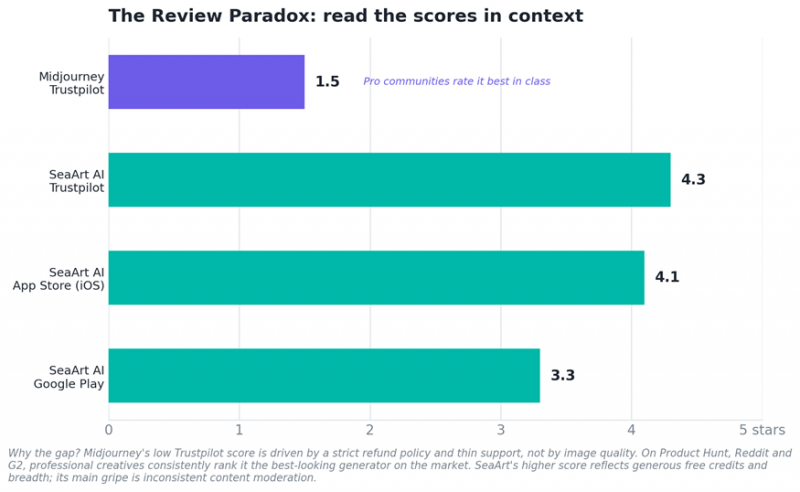
Figure 1. Real platform ratings. Midjourney's low Trustpilot score is about policy and support, not picture quality.
The review paradox, explained
Here is the twist that catches people off guard. Midjourney is widely regarded as the best-looking AI image generator on the market, yet it sits at just 1.5 out of 5 on Trustpilot. The contradiction is real, and it has a clear cause. Trustpilot reviews are dominated by billing and policy complaints, especially a strict refund rule under which refunds are only available if your lifetime usage stays under roughly twenty minutes of generation time, plus reports of images being removed from accounts without warning and thin customer support. Meanwhile, on the platforms where working creatives gather, such as Product Hunt, Reddit, and G2, the same tool is praised as a class leader for its distinctive aesthetic and prompt adherence. One Reddit user summed up the appeal of its output in two words.
“It feels boutique.” (Reddit user, on Midjourney)
SeaArt shows a gentler version of the same split. Its Trustpilot score near 4.3 reflects real affection for its generous free credits, its enormous model library, and its constant stream of updates and events. As one reviewer put it, what stood out was simply how generous the daily allowance felt.
“how generous they are with the daily credits” (Trustpilot reviewer, on SeaArt)
The lesson is to read scores in context. A single star rating can hide the fact that the same product delights one audience and frustrates another. That is exactly why the rest of this guide leans on themes and use cases rather than one headline number.
What people love and what they flag
Cluster the thousands of reviews into themes and clear patterns appear. The chart below distills the praise and the complaints that recur most often for each tool.
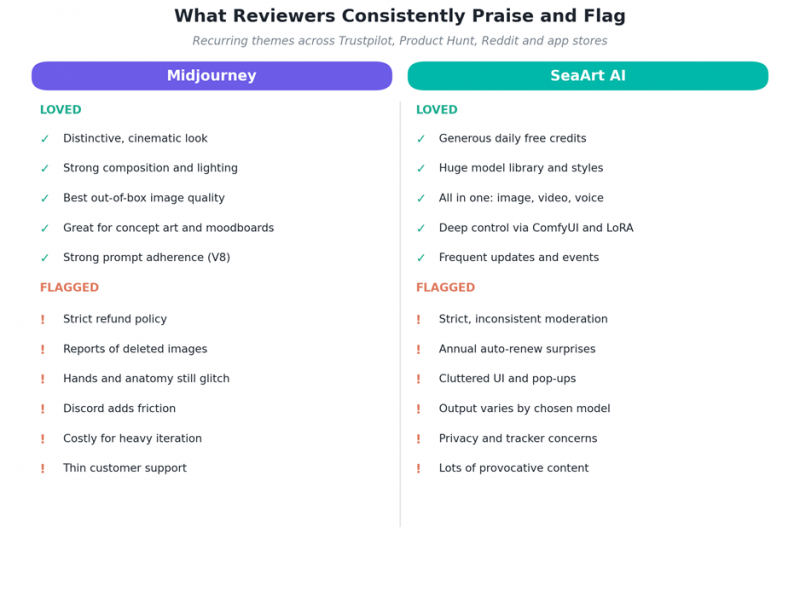
Figure 2. The recurring praise and complaints behind the ratings.
For Midjourney, the love is almost entirely about the images themselves: cinematic lighting, painterly texture, strong composition, and a coherence in complex scenes that competitors struggle to match. The complaints cluster around the business rather than the art. Reviewers point to the refund policy, the deleted-image reports, the friction of working through Discord, the cost of heavy iteration, and a persistent weakness with hands and anatomy. One Trustpilot reviewer captured the anatomy issue bluntly, describing repeated retries to avoid extra fingers.
“floating fingers or a random 6th finger” (Trustpilot reviewer, on Midjourney)
For SeaArt, the praise is about breadth and generosity: the free daily credits, the huge model library spanning anime to photorealism, the all-in-one feature set, and the depth available through ComfyUI and LoRA. The complaints are different in kind. The most consistent is moderation that users find strict and inconsistent, sometimes blocking legitimate creative work and still consuming credits when a generation is refused. Reviewers also flag annual auto-renewal surprises, a cluttered interface full of pop-ups and gacha-style reward boxes, output that varies depending on which model you pick, and privacy concerns around third-party trackers. Some longtime users were unhappy when content rules tightened, with one calling the change a serious problem for how they worked.
“killer for my workflow” (Reddit user, on SeaArt moderation changes)
Midjourney Up Close
Midjourney is an independent research lab based in San Francisco, founded by David Holz, with no ties to Google or OpenAI. It launched in open beta in 2022 and has stayed deliberately focused on one mission, which is making the most beautiful images possible, rather than chasing every adjacent feature. That focus is the key to understanding both its strengths and its frustrations.
| Type | Single in-house image model, focused on quality |
| Founded | 2022, San Francisco (David Holz) |
| Current model | V7 default, with the V8 series rolling out and Niji 7 for anime |
| Access | Web app and Discord bot |
| Pricing | $10 to $120 per month, no permanent free tier |
| Best known for | Photorealism, cinematic style, concept art |
| Trustpilot | 1.5 / 5 (driven by policy and support, not quality) |
How it works in practice. You generate through a clean web interface or the long-standing Discord bot, and your settings sync between them. Time is metered in GPU minutes rather than a flat image count, and you choose a speed mode: Fast for quick results, Relax for unlimited but slower generation on the Standard plan and above, and Turbo for the quickest output at roughly double the cost. New users sometimes burn through their Fast hours without realizing it, which is one source of the billing surprises that show up in reviews.
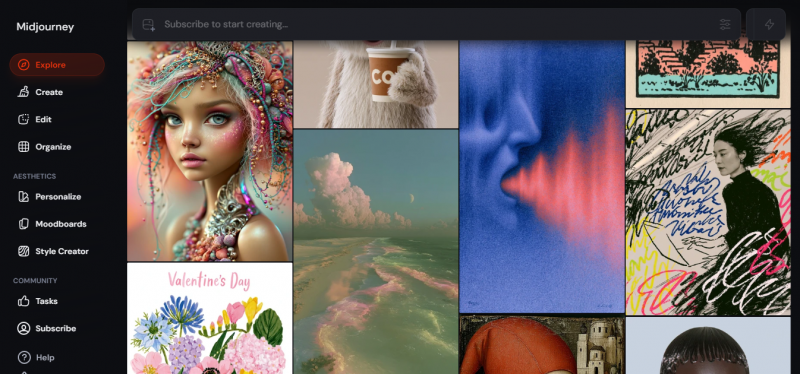
On models, V7 is the documented default, with the newer V8 series arriving for users who enable it and a dedicated anime model, Niji 7, released in early 2026. V7 introduced features like Omni Reference for stronger character consistency, and independent testing found it noticeably more photorealistic than the previous version across most prompts. The platform also added video generation in 2025.
Who it is for. Midjourney suits brand and agency designers, photographers and product visualizers, concept artists, and anyone whose work is judged on the polish of the final image. It is less ideal for people who want a free entry point, granular technical control, or a single subscription that also handles video and editing.
SeaArt AI Up Close
SeaArt AI began as a Stable Diffusion based image generator and has grown into something broader: a multi-modal creative suite that behaves like an aggregator, bundling many models and engines under one login. Rather than building everything in-house, it integrates a large catalog of community and third-party models and lets you pick from the menu, which is both its greatest strength and the source of its complexity.
| Type | Multi-modal aggregator suite (images, video, voice, editing) |
| Model library | Hundreds of thousands of models (estimates range from 200,000 to 700,000-plus), including FLUX, SDXL, and Stable Diffusion variants |
| Access | Web, plus iOS and Android apps |
| Pricing | Free tier, then about $5.99 to $149.99 per month |
| Best known for | Anime and stylized art, video, all-in-one breadth, low cost |
| Trustpilot | 4.3 / 5 (top complaint is content moderation) |
How it works in practice. A useful starting point for any SeaArt AI Review is the platform’s hybrid economy of Stamina and Credits. Stamina is a free daily allowance, roughly 130 to 150 points on the free tier, that refreshes every 24 hours and is spent first. Credits are bought separately, never expire, and kick in once Stamina runs out. A typical image costs around six credits, and a short video can run from thirty to ninety, depending on the model and quality. A daily Lucky Box hands out bonus Stamina and Credits, and notably the ComfyUI node editor is free to use and does not consume your allowance.
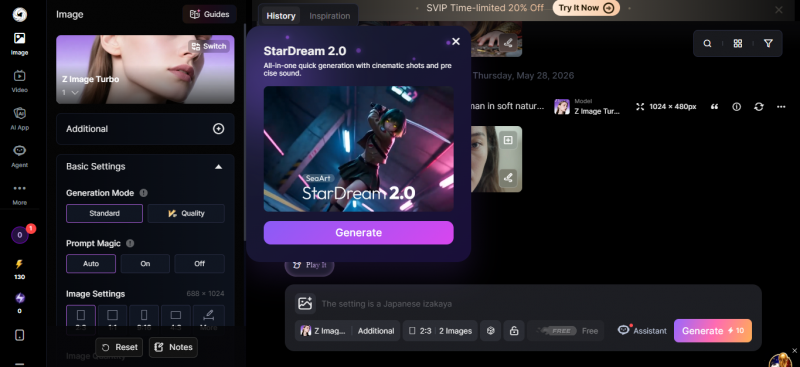
On features, SeaArt is unusually broad. Beyond text-to-image, it offers text-to-video and image-to-video through a mix of its own and third-party engines, 4K upscaling, inpainting and outpainting, face swap for images and video, background removal, AI voice, and interactive AI characters. Its LoRA training is a standout, letting you build a custom model from as few as twenty to thirty reference images rather than the hundred or more that many platforms require. There is also a model marketplace where creators can publish and monetize their own models.
Who it is for. SeaArt suits hobbyists and beginners drawn by the free tier, anime and character artists, indie game and asset makers, and social and marketing creators who want stills, video, and editing in one place. The tradeoffs are a busier interface, output quality that depends on the model you choose, and the billing and moderation concerns that surface in reviews.
Head-to-Head by Use Case
Abstract scores only go so far. What usually decides the question is the kind of work you make. We scored both tools across five common jobs, and the pattern is clear: Midjourney owns the quality-led jobs, while SeaArt owns the range-led ones.
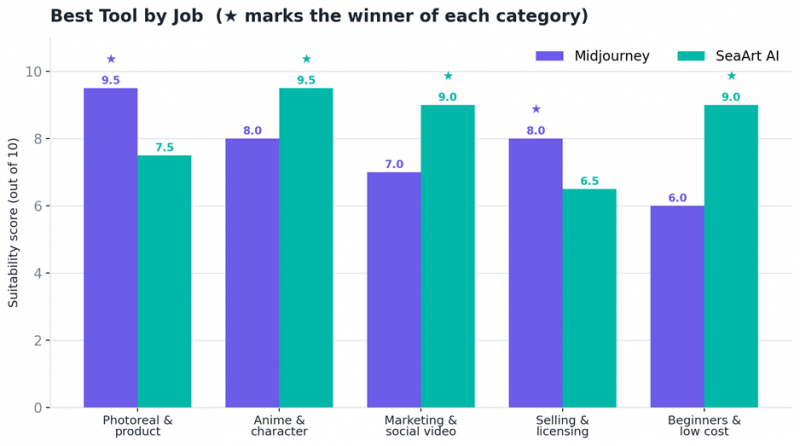
Figure 3. Suitability by job. The star marks the better fit in each category.
1. Photorealistic and product imagery
If you need realistic skin, fabric, lighting, and believable product shots, Midjourney is the stronger choice. Its model leads on fine detail with minimal effort, and its results are consistent enough for commercial visualization, portraits, and cinematic scenes. SeaArt can reach similar quality, but usually only after you find the right photorealistic model and tune it, and outputs vary more from run to run. For dependable realism out of the box, Midjourney wins.
Verdict for this job: Midjourney
2. Anime, manga, and character art
This is SeaArt territory. Its vast library of anime and stylized community models, combined with easy LoRA training for consistent characters, makes it the go-to for anime, illustration, and character design. Indie creators routinely report producing large volumes of game and comic assets affordably. Midjourney is no slouch here, especially with its dedicated Niji anime model, but SeaArt gives you more direct control over a specific look and far more stylistic variety. SeaArt wins.
Verdict for this job: SeaArt AI
3. Marketing and social content, including video
For social and marketing teams, versatility and turnaround matter as much as raw image quality. SeaArt bundles short-form video, 4K upscaling, face swap, background removal, and voice alongside image generation, so a single tool can carry a content pipeline from idea to posted clip. Midjourney produces gorgeous still visuals and has added video, but it is narrower and pricier for high-volume, multi-format work. For everyday content at scale, SeaArt wins, with the caveat that its video is best for short clips rather than long, perfectly consistent sequences.
Verdict for this job: SeaArt AI
4. Selling work, licensing, and safety
If you sell what you make, the calculus shifts toward clarity and risk. Both tools grant commercial-use rights to paying users, and Midjourney treats paid subscribers as owners of their outputs, with higher-revenue companies required to use its upper tiers. SeaArt grants commercial rights for art you generate yourself, though using another creator's shared model may require their permission, and its terms are worth reading closely. Two cautions apply across the board. First, in the United States, purely AI-generated images may not be copyrightable without meaningful human input, and lawsuits were active in 2026. Second, SeaArt has faced criticism over content moderation and the volume of explicit material on the platform, which matters for brand-safe or family contexts. For clearer, more battle-tested commercial footing, Midjourney is the safer default, even though no AI tool is risk-free here.
Verdict for this job: Midjourney
5. Beginners and cost-conscious creators
For newcomers and anyone watching the budget, SeaArt is the easier yes. A genuine free tier with daily credits lets you learn without a card on file, the entry plan undercuts Midjourney, and Easy Mode smooths the first steps. Midjourney has no permanent free tier and starts at a paid subscription, so the cheapest way to try it is the entry plan. The main caution with SeaArt is its busy interface and the billing traps reviewers describe, so use the free tier first and, if you subscribe, watch the auto-renewal terms. For low-risk, low-cost starting out, SeaArt wins.
Verdict for this job: SeaArt AI
Pattern: Midjourney takes the jobs where final polish and commercial clarity decide the outcome. SeaArt takes the jobs where variety, video, anime, and budget matter most. Neither sweeps the board, which is why so many creators end up using both.
Pricing
Pricing is where lazy comparisons go wrong. The common claim is that SeaArt is far cheaper. The truth, tier by tier, is more nuanced, and getting it right can save you real money.
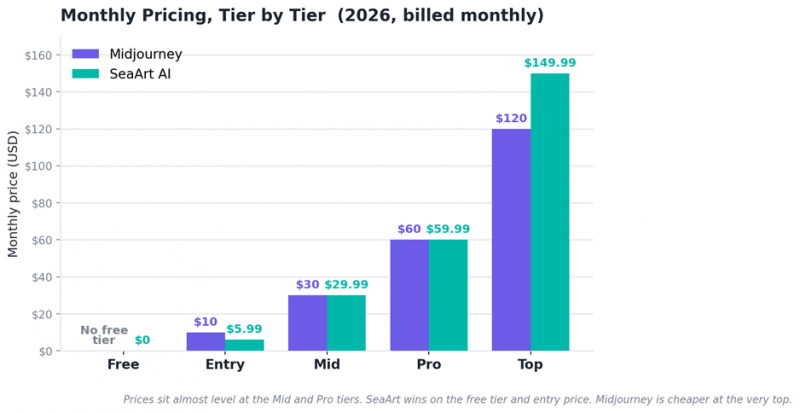
Figure 4. Monthly pricing by tier. Note how close the mid and pro tiers are.
At the bottom, SeaArt clearly wins. It offers a real free tier and a roughly $5.99 entry plan, while Midjourney has no free option and starts at $10. But move up to the mid tier and the gap nearly vanishes, with both landing around $30. At the pro tier they are about $60 each, and SeaArt's top plan is actually the more expensive of the two at roughly $150 versus $120. So SeaArt's price advantage is real for beginners and light users, and for anyone who needs bundled video and editing, but it is not a blanket discount once you are paying for serious volume.
The hidden costs to watch
The sticker price is only part of the story. Each platform has cost mechanics that surprise people, and reviews are full of the evidence.
• Midjourney burns GPU time. Fast hours deplete with use and Turbo costs roughly double, so heavy iteration can outrun a plan faster than expected. The refund policy is strict, so test on a month-to-month basis first.
• SeaArt runs on credits and Stamina. Heavier tasks like video and LoRA training consume credits you may need to buy, and refused generations can still spend them. Pricing varies by model, so costs are less predictable than a flat plan.
• Annual billing traps. Reviewers report being charged for a full year upfront and auto-renewals firing near the end of short trials on SeaArt. Use the free tier to evaluate, set a reminder, and read the checkout terms before you confirm.
A rough rule of thumb: if you generate occasionally or want video bundled in, SeaArt is the better value. If you generate polished images at volume and want predictable monthly access, Midjourney's flat tiers can actually be simpler to budget than a credit economy.
The Honest Drawbacks
A useful comparison names the weaknesses too. Drawing on the reviews above, here is where each tool tends to frustrate people.
Where Midjourney frustrates people
• No permanent free tier, so you pay before creating anything.
• A strict refund policy and reports of images deleted from accounts without notice.
• Hands, feet, and full-body anatomy still glitch often enough to disrupt professional work.
• Discord-rooted workflow adds friction compared with a pure web app, even though a web app now exists.
• Fast GPU hours and Turbo pricing make heavy iteration costly, and customer support is widely described as thin.
• In the United States, purely AI-generated images may not be copyrightable without human authorship.
Where SeaArt frustrates people
• Default photorealism trails Midjourney, and quality depends heavily on which model you choose.
• Content moderation is described as strict and inconsistent, sometimes blocking legitimate work while still spending credits.
• Billing complaints recur, including full-year upfront charges and auto-renewals near the end of short trials.
• The interface can feel cluttered, with pop-ups and gacha-style Lucky Box mechanics.
• Privacy-minded users have flagged third-party trackers, and questions persist about how some community models were sourced.
• There is a notable amount of explicit and provocative content, and reviewers have raised moderation concerns, so weigh this carefully for brand-safe, educational, or family use and enable available filters.
Should You Use Both? The Hybrid Workflow
Plenty of working creators never pick a single winner. They run a stack and let each tool do what it does best, which is cheaper than it sounds, since the two entry plans together land around $16 per month, less than many single design subscriptions.
A practical workflow looks like this:
1. Ideate and explore in SeaArt. Use the free or entry tier to generate dozens of rough directions, test styles, and storyboard quickly.
2. Finish hero shots in Midjourney. Take your best direction and render the final, polished image where realism and aesthetics matter most.
3. Return to SeaArt for everything around the image. Upscale to 4K, fix or swap faces, remove backgrounds, animate a short clip, or add an AI voiceover, all in one place.
Used this way, the tools stop competing and start complementing each other. SeaArt's breadth feeds Midjourney's polish, and you sidestep most of the weaknesses each one has on its own.
Which One Fits You?
If you want a fast answer, match yourself to the column below, or follow the decision flow that turns the whole comparison into a single path.
| Choose Midjourney if you... | Choose SeaArt AI if you... |
|---|---|
Want the most polished, realistic look with the least effort Produce client work, branding, posters, or fine art Value a clean, focused workflow over a big toolbox Prefer clearer commercial licensing and are fine paying for it | Want a free way to start and the lowest entry price Make anime, characters, or stylized art at volume Need video, voice, face-swap, upscaling, and training in one place Like deep control through ComfyUI and custom LoRA models |
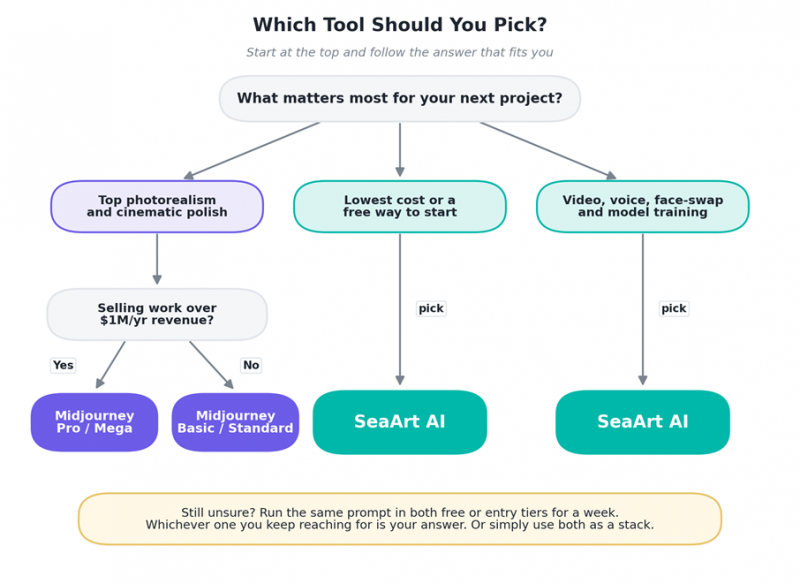
Figure 5. From your main priority to a recommended plan in a few steps.
The Final Verdict
After the reviews, the profiles, five use cases, and an honest look at the flaws, the conclusion is refreshingly simple. There is no single best AI art tool here, only the best tool for a given job. Midjourney wins when polish, realism, and a distinctive look decide the outcome, and it offers clearer commercial footing, but its policies and support frustrate paying users. SeaArt wins on price at the entry level, on raw versatility, and on anime and stylized work, all wrapped in an open, model-rich ecosystem, though its moderation and billing draw the most complaints.
If you must choose one: beginners, social creators, and stylized or anime artists should start with SeaArt AI, while brand designers, photographers, and fine-art sellers should reach for Midjourney. And if your work is varied enough, the smartest move is often to run both as a complementary stack and take the best of each.
Whichever you choose, the gap between these two tools is smaller than the internet suggests, and both are more than good enough to make work you are proud of.
Post Comment
Share your thoughts about this article.
Be the first to post a comment!





