Rather than describe five tools, this gives all five the same eight second job and follows it through every stage. Two finish it. Three drop out, and not one of them drops out for making a bad video.
The brief
Comparisons of these tools usually run showcase prompts. Dragons over cities, impossible camera moves, things designed to make a model look good. That tells you what a tool can do at its best and almost nothing about whether it can do your job.
So here is one ordinary brief, run through all five free tiers from signup to publication.
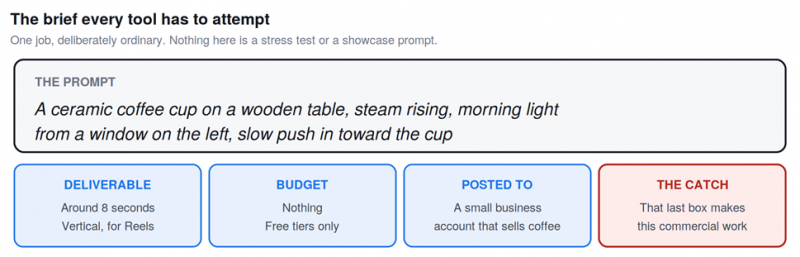
The brief. Deliberately dull, and that last box turns out to matter more than everything else combined.
Five tools attempt it: Kling, PixVerse, Hailuo, Pika and Runway. All five have free tiers people recommend. What follows is what happens to each one at every stage of the job.
Stage 1: Signing up
Before any video exists, five accounts. This stage separates the tools less than you would expect, which is worth knowing because it is the stage most guides spend time on.
| PixVerse | Email only, no card. Ninety credits appear on first login rather than the usual sixty, which is a small bonus aimed at getting you generating immediately. |
| Kling | Email only, no card. Sixty-six credits waiting, refreshing every twenty four hours. |
| Hailuo | Email only, no card. Two hundred credits on signup, which looks generous until you learn the daily refresh is around three generations. |
| Pika | Email only, no card. Eighty credits, monthly rather than daily, and unused credits roll over. |
| Runway | Email only, no card. One hundred and twenty five credits. This is the entire free allocation, forever, and nothing about the signup screen says so. |
WHAT STAGE ONE TELLS YOU Nothing asks for a card, which removes the usual trial risk of a surprise charge. But two of these numbers behave completely differently from the other three, and the interface does not distinguish between them. Runway hands you 125 credits the way Kling hands you 66, and only one of those comes back tomorrow. |
Stage 2: Writing the prompt

The same text goes into all five. A ceramic coffee cup on a wooden table, steam rising, morning light from a window on the left, slow push in toward the cup.
This is where the tools first diverge, because they are not all built for the same kind of instruction.
| Kling | Takes the prompt as written and interprets camera language reasonably. It is built for this kind of descriptive scene instruction. |
| PixVerse | Offers an agent mode that lets you describe what you want conversationally rather than engineering a prompt. Useful if you are not fluent in prompt syntax, and it also offers templates aimed at social formats. |
| Hailuo | Handles the physical description well. Its strength is physics and real-world motion, which suits steam and light more than it suits abstract prompts. |
| Pika | Accepts it, though the tool is oriented toward effects and short social pieces rather than a slow cinematic push. |
| Runway | The most control here by a distance. Camera moves, motion brushes and a proper editing suite. Every one of those tools costs credits from a pool that never refills. |
One practical note that applies to all five. Interfaces vary in how much English they assume, and at least one is Chinese-first with partial translation, so allow time for that on your first attempt.
Stage 3: The first generation
Press generate and wait. The wait is the first real separator, and it is larger than the marketing suggests.
| PixVerse | Thirty to sixty seconds. Fast enough that iterating feels like editing rather than submitting a job and leaving. |
| Runway | Around two to five minutes, and the clip carries a watermark. |
| Kling | Two to five minutes normally, and peak hours have been reported at twenty minutes or more on the free queue. The output is watermarked and capped around 720p. |
| Hailuo | The slowest renders in this group, with free users limited to a single generation running at a time. Output is watermarked. |
| Pika | Consistent timing, and the output arrives clean with no watermark at 480p. |
THE FIRST SURPRISE On a first attempt at an ordinary brief, the tool with the best raw quality is not the most useful one. Kling produced the most natural motion, which independent image to video testing also found. But at four attempts on a twenty minute queue, that is most of an afternoon. PixVerse got four attempts done in under five minutes. |
Stage 4: The second attempt
No first generation is right. The steam moves oddly, the push-in is too fast, the light comes from the wrong side. This is normal and every guide that shows you one perfect output is hiding it.
Attempt two is where the free tiers start behaving very differently from each other.
| PixVerse | Sixty credits a day absorbs four attempts comfortably. Nothing about this stage is stressful. |
| Kling | Sixty-six credits a day covers roughly two to six videos depending on quality settings. Four attempts is within budget, if you accept the queue. |
| Pika | Eighty credits a month at roughly twenty credits a video means four attempts spends about half your month. The allowance is monthly, so this is a real constraint rather than an inconvenience. |
| Hailuo | Around three generations a day means the fourth attempt happens tomorrow. The brief now spans two days for reasons that have nothing to do with the tool being slow. |
| Runway | One hundred and twenty five credits is roughly five videos in total. Four attempts consumes most of the free tier permanently. There is no attempt five next week. |
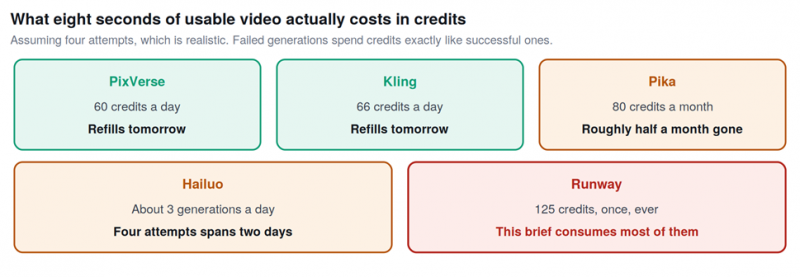
Four attempts at one clip, measured against what each free tier actually replenishes.
RUNWAY IS ELIMINATED HERE Not for output quality, which is among the best available. It is eliminated because a one time grant of 125 credits is a trial rather than a free tier, and one ordinary brief with realistic iteration nearly exhausts it. Spend those credits deliberately on a decision about whether to subscribe, not on a coffee cup. |
Stage 5: Getting it to 1080p
The clip works. Now it needs to be good enough for a business account rather than a test folder, and this stage removes options quietly.
| Tool | Free resolution | What that means for the brief |
|---|---|---|
| Kling | Around 720p | Acceptable on a phone, soft on anything larger |
| PixVerse | Free tier capped, 4K upscale is paid | Fine for vertical social, not for a hero asset |
| Hailuo | Around 720p | Same as Kling |
| Pika | 480p | The lowest here and visibly so on a large screen |
| Runway | Capped around 720p | Academic now, since the credits are gone |
No free tier in this comparison delivers 1080p. That is worth stating plainly because a great many articles imply otherwise. For a vertical clip watched on a phone the gap is survivable, and for anything shown larger it is not.
Stage 6: Exporting it
Now the watermark question, which decides whether the file is usable or merely viewable.
| PixVerse | Exports clean. No watermark on the free tier, which is rare enough to be the single strongest argument for using it. |
| Pika | Exports clean. No watermark on free output either. |
| Kling | Watermarked. Removing it requires a paid plan. |
| Hailuo | Watermarked on the free tier. |
| Runway | Watermarked, and out of credits regardless. |
Two of five come out clean. For a personal experiment that difference is cosmetic. For a business account posting to customers, a watermark from a video generator reads as a corner cut, and that is a judgement customers make in a second.
Stage 7: Checking if you can post it
This is the stage nobody runs, and it is the one that decides the whole exercise.
The brief specified a business account that sells coffee. That single detail makes this commercial work, and commercial work runs into terms that most free tier roundups do not mention at all.
| Pika | Permits commercial use on the free tier per its own pricing page. It is the exception in this group and the only tool that finishes the brief without a caveat. |
| Hailuo | Reporting on its free tier commercial rights is more favourable than most rivals, which makes it the one worth verifying yourself against current terms before relying on it. |
| PixVerse | Commercial rights come with paid plans. The free tier gives you a clean export you are not licensed to monetise, which is an awkward combination. |
| Kling | Free tier output is restricted to non commercial use. The best looking clip in this test is the one you cannot post. |
| Runway | Free tier output is non commercial, on top of everything else. |
THE RESULT OF THE BRIEF Two tools completed the job. Pika finished it cleanly at 480p with commercial use permitted. Hailuo finished it subject to checking current terms, having taken two days to get four attempts done. Kling produced the best video in the test and could not license it. PixVerse was the most pleasant to use and needs a paid plan to publish. Runway ran out of credits at stage four. |
Where each tool dropped out
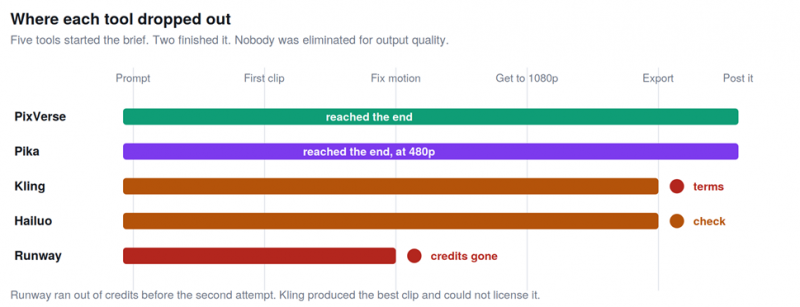
Five tools started. Two finished. Nobody was eliminated for output quality.
That last point is the finding. Across an ordinary brief, output quality eliminated nobody. What eliminated tools was credit structure, resolution ceilings and licence terms, none of which appear in a demo reel and all of which are decided before you generate anything.
What the brief cost in credits
| Tool | Spent | Left after | Back tomorrow? |
|---|---|---|---|
| PixVerse | Four generations | Comfortable margin | Yes, 60 daily |
| Kling | Four generations | Within the daily 66 | Yes, 66 daily |
| Hailuo | Four generations | Spanned two days | Yes, about 3 daily |
| Pika | About half the month | Roughly 40 credits | No, monthly |
| Runway | Most of the lifetime grant | Almost nothing | Never |
One clip. Not a campaign, not a series, one eight second clip with four attempts, which is a conservative estimate of what a real brief takes. Read the right hand column and the difference between a free tier and a trial becomes obvious in a way no feature list conveys.
Running the brief again tomorrow
The test that matters is not whether a tool can do the job once. It is whether it can do it again next week, because that is what a posting schedule requires.
• PixVerse and Kling can run this brief every day indefinitely. Sixty and sixty-six daily credits absorb a four attempt clip without strain, which makes both genuinely sustainable for personal or learning work.
• Hailuo can run it roughly every other day at three generations daily, and its allowance already shrank dramatically once, from unlimited at launch to about three a day within six months.
• Pika can run it twice a month. The monthly structure and rollover suit occasional use rather than a schedule.
• Runway cannot run it again at all. Not tomorrow, not next month.
THE THING THAT MAKES ALL OF THIS PROVISIONAL Hailuo went from unlimited free generations to roughly three a day within six months of launch. OpenAI discontinued Sora outright on 26 April 2026. Every number in this document is a snapshot, and the correct posture is to export finished work as flat files and keep them somewhere the platform cannot reach. |
What this changes about the usual advice
The standard recommendation in this category is Kling, on the strength of having the most generous free allowance and among the best output. Running one ordinary brief through it produces a more specific answer.
| If you are | Use | Because the brief showed |
|---|---|---|
| Learning what these tools do | PixVerse | Four attempts in five minutes beats four attempts across an afternoon |
| Making personal videos, no revenue | Kling | Best motion quality, and the licence restriction does not apply to you |
| Posting to an account that earns money | Pika | The only one that finished the brief with commercial use permitted |
| Testing photorealism specifically | Hailuo | Strongest physics, if you can work around three a day |
| Deciding whether to pay for something | Runway | Spend the 125 credits on that decision and nothing else |
The wider point is that quality stopped being the differentiator in this category some time ago. Every tool here made a serviceable coffee cup clip. What separated them was how many attempts they allowed, what resolution they returned, whether they branded the output, and whether the terms let you use it. None of that is visible in a sample reel, and all of it is decided before you write a prompt.
If you take one habit from this, make it the last stage. Before you build anything around a free tier, read what its terms say about commercial use, because the tool that produced the best video in this test is the one you are not allowed to post.
Post Comment
Share your thoughts about this article.
Be the first to post a comment!





