Gamma gives you 400 AI credits when you sign up. What the pricing page does not say plainly is that those credits are the only ones you will ever get without paying. Not 400 a month. Four hundred, total, for the life of the account.
The short answer
Gamma is free the way a sample is free. You get enough to judge whether you want the thing, and then it stops. That is not a criticism of the product, which is genuinely good at what it does. It is a correction to the word free, which in Gamma case means a one-time allocation rather than a recurring allowance.
The specifics: every new account receives 400 AI credits at signup. Gamma help centre states directly that these do not refill. Generating a presentation costs 40 credits. Adding an AI image costs 10. A chat suggestion costs 10. Extending a deck by one card costs 5.
Nothing about the account expires. Decks you have already made stay editable, presentable, shareable and exportable forever. What stops is the AI, which is the entire reason people choose Gamma over PowerPoint.
| QUESTION | ANSWER |
|---|---|
| Is there a free plan | Yes, permanent, no card required |
| Do free credits refresh | No, one-time grant at signup |
| What happens at zero | AI features stop, existing decks stay usable |
| Can free users buy credits | No, upgrading is required first |
| Can you earn more free credits | Yes, 200 per referral, capped at 2,000 lifetime |
Watch the 400 credits disappear
Most guides divide 400 by 40 and tell you the free plan is worth ten presentations. That arithmetic ignores how anyone actually works.
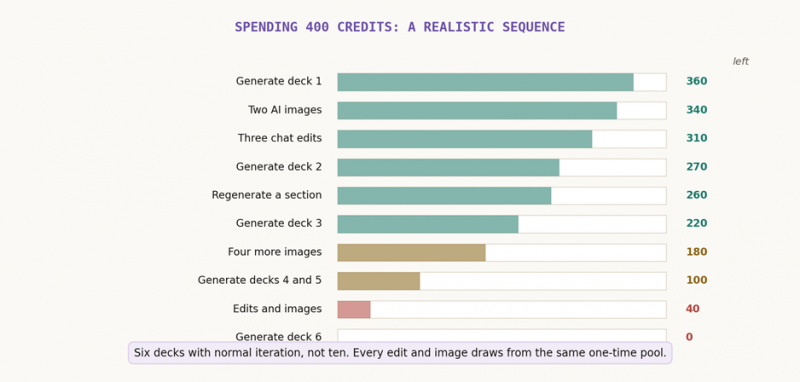
Figure 1. A realistic sequence of actions against the 400-credit pool.
Nobody generates a deck and ships it untouched. You regenerate a weak section, swap two images, ask the chat to tighten the wording on three cards. Each of those draws from the same pool as the generation itself. Run the sequence above and the free plan delivers six real presentations, not ten.
That number drops further if you work in a language other than English. Gamma caps input at 50,000 tokens per generation on free, and non-English text consumes more tokens per word, so longer source material hits the ceiling sooner.
THE TRAP IN THE ARITHMETIC
The published credit costs make the free plan look predictable. Forty per deck feels manageable when you have 400. What breaks the estimate is that revision costs the same currency as creation, and revision is most of the work.
Treat 400 credits as roughly five to six finished deliverables. If that covers your project, free is genuinely sufficient. If your answer is that you would need more, you are looking at a paid tool and it is better to know that on day one.
Four myths worth correcting
Gamma has been covered heavily enough that outdated claims now circulate as fact. These four come up constantly and all four are wrong.
Myth 1: PowerPoint export requires a paid plan
This was true once and is repeated everywhere. Gamma current pricing page lists PPTX export on the free tier, alongside PDF, PNG and Google Slides. Import from PDF and PPTX is also free.
The real limitation is fidelity, not access. Gamma builds web-native cards that expand to fit their content. Forcing that into fixed PowerPoint slides flattens layouts, and export quality is the most repeated complaint across reviews. You can export to PPTX for free. You may then spend twenty minutes fixing it.
Myth 2: the 400 credits refresh monthly
Several reputable pricing sites state 400 monthly credits, and at least one describes the free tier as offering unlimited AI for trial purposes. Gamma help centre contradicts both. The grant is one-time.
This is the single most consequential error in circulation, because it turns a trial into what looks like a sustainable free tier. Anyone planning around 400 credits a month is planning around something that does not exist.
Myth 3: Pro gives you unlimited AI
Older comparisons describe Pro as unlimited. The current public pricing page lists a specific monthly allowance for every paid tier: 1,000 credits on Plus, 4,000 on Pro, 20,000 on Ultra.
The confusion has a grain of truth in it, which the next myth explains.
Myth 4: paid credits work like free credits
They do not, and the difference runs in the buyer favour. On free, every AI action costs credits. On paid plans, standard-model presentations and standard-model images are included with the subscription. Only three things still draw down the allowance: the Agent used for post-generation edits, Ultra-tier models, and API calls.
That is why Pro feels unlimited to most people who buy it. Ordinary deck generation never touches the meter. It is also why sizing a paid plan from your free-tier burn rate will lead you to overbuy.
THE PRACTICAL CONSEQUENCE
If you exhausted 400 credits in a week on free, do not conclude that you need Ultra. The same workload on Pro might consume almost nothing, because the actions that drained your free pool stopped costing credits the moment you subscribed.
Size a paid plan on three questions instead: how often you use the Agent for post-generation edits, whether you need the highest-tier image and video models, and whether you are calling the API.
Why every guide quotes a different price
Search Gamma pricing and you will find Plus at $8, $9, $10 and $12, all published confidently. None of them is a typo.
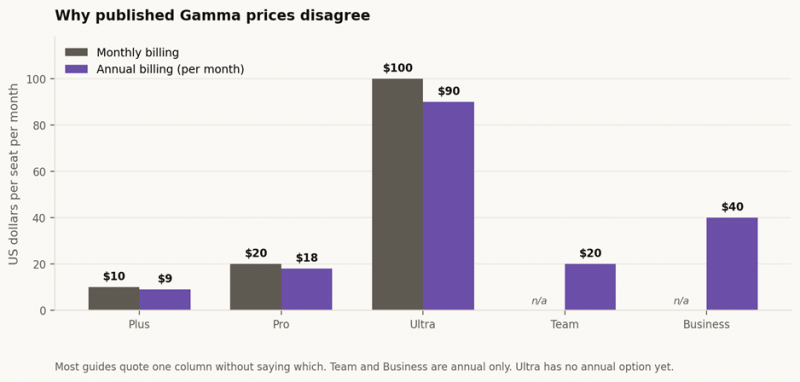
Figure 2. Monthly against annual rates. Most guides quote one column without saying which.
Gamma runs two billing cadences with roughly a 20 to 28 percent gap between them, and most coverage quotes one without labelling it. Add regional pricing, currency, tax and periodic promotions, and the same plan legitimately appears at four different numbers across four sites on the same day.
| PLAN | MONTHLY | ANNUAL | STRUCTURAL NOTE |
|---|---|---|---|
| Free | $0 | $0 | 400 one-time credits |
| Plus | $10 | $9 | 1,000 credits, removes Gamma badge |
| Pro | $20 | $18 | 4,000 credits, branding, API, analytics |
| Ultra | $100 | Not offered | 20,000 credits, monthly only for now |
| Team | Not offered | $20/seat | Annual only, 2-seat minimum |
| Business | Not offered | $40/seat | Annual only, 10-seat minimum |
Two structural details hide inside that table. Ultra has no annual option at present, so the 28 percent discount available on Plus and Pro does not apply to it. And Team at $20 a seat requires two seats minimum on annual billing, making its real floor $480 a year rather than $240.
That second point matters for anyone comparing Team against individual Pro seats. Two people on monthly Pro costs $40 a month with no commitment. Team costs $480 up front. The Team plan buys shared folders, central billing and admin controls, so the question is whether those are worth the lock-in rather than whether the per-seat price looks lower.
The upgrade decision
Four questions, answered in order. Stop at the first one you answer yes to.
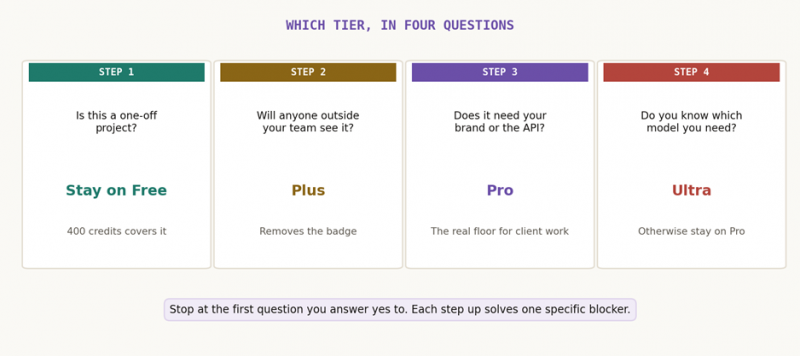
Figure 3. Each tier solves one specific blocker rather than offering more of everything.
Is this a one-off project?
Stay on free. A student presentation, a single pitch, a one-time client proposal: 400 credits covers it comfortably, and export to PDF, PowerPoint and Google Slides is included. There is no reason to pay for a project you will not repeat.
Will anyone outside your team see it?
Then you want Plus at $9 annual or $10 monthly. The Made with Gamma badge appears on every share and every export on the free tier, and removing it is the single most cited reason people upgrade. Plus also doubles cards per prompt from 10 to 20 and input tokens from 50,000 to 100,000.
Does it need your brand, or the API?
Pro at $18 annual or $20 monthly. Custom branding and fonts are gated here rather than at Plus, which surprises people who upgraded to Plus expecting branded output. Pro is also the lowest tier with API access, and it adds per-viewer analytics, workspace templates and up to 10 custom domains.
For client-facing work, Pro is the floor rather than the upgrade. If a deck carries your logo in front of someone paying you, Plus will not do it.
Do you know which model you need?
If you cannot name it, stay on Pro. Ultra costs five times Pro and delivers five times the credits, so the rate per thousand credits is identical at roughly $4.50. Ultra is not a volume discount. It buys access to the most advanced image, text and video models plus early feature access, and it is worth paying for only when you can identify the specific capability you are buying.
BEFORE YOU COMMIT TO AN ANNUAL PLAN
Run one month on monthly billing first. It costs a dollar or two more and it tells you your real credit burn under paid-plan rules, which as established behave nothing like free-tier rules.
This matters more than usual with Gamma because of the refund window, covered next.
What you are actually risking
Gamma review scores split in a way that looks contradictory until you notice what each platform measures.
| PLATFORM | RATING | WHAT IT CAPTURES |
|---|---|---|
| Product Hunt | 4.5 to 4.7 / 5 | Whether the product works |
| G2 | 4.3 / 5 | Product experience |
| Capterra | 4.3 / 5 | Value for money |
| Microsoft Store | 4.3 / 5 | App experience |
| Trustpilot | 1.7 to 1.9 / 5 | Billing and support experience |
A product rated 4.5 in one place and 1.8 in another is not being reviewed inconsistently. Product Hunt and G2 attract people evaluating whether a tool does its job. Trustpilot attracts people who wanted their money back and did not get it. Both populations are describing Gamma accurately; they are just describing different parts of it.
Almost nobody criticises what Gamma produces. The complaints concentrate on three commercial mechanics, and all three are documented rather than anecdotal.
| MECHANIC | WHAT IT MEANS FOR YOU |
|---|---|
| Three-day refund window | Refunds only within 3 days of subscribing, and only under a per-plan credit threshold. Applies identically to annual plans |
| Cancellation clears credits | Dropping to free removes any credits above 400, including purchased and rolled-over ones |
| No pause option | Subscriptions cannot be suspended. The only route is cancel and resubscribe |
| Per-member billing | Adding a user bills their full seat immediately. Removing one mid-cycle does not refund that month |
| Rollover cap | Unused credits accumulate to twice the monthly allowance and no further |
| Deferred downgrades | A downgrade takes effect at the end of the billing period, not when you click it |
The refund window is the one that generates the complaints. Three days is short, it applies to annual subscriptions the same as monthly ones, and cancelling does not trigger a refund automatically. Someone who pays for a year, uses Gamma for two months and then stops has no route to a partial refund.
THE HEDGE THAT COSTS ALMOST NOTHING
Subscribe monthly first. Note the three-day window in your calendar the day you subscribe. Move to annual only after a full month of real use, when you know both your credit burn and whether the export fidelity works for your review process.
If you are still deciding whether Gamma suits your workflow at all rather than which tier to buy, this detailed walkthrough of Gamma features and use cases covers the product side, including how consultants, marketers and educators actually use it.
Verdict
A generous trial wearing the label of a free tier.
Judged as a trial, 400 credits is more than most AI tools offer. You can produce five or six finished presentations, export them in four formats, and form a real opinion without entering a card number. Very few products let you get that far for nothing.
Judged as a free tier, it runs out in a week and leaves people feeling misled, which is where the frustration in the reviews comes from. The word free implies recurrence. Gamma allocation does not recur, and the pricing page does not make that prominent.
The genuinely good news sits on the other side of the paywall. Paid plans are better value than the free experience suggests, because standard generation stops consuming credits once you subscribe. Most Pro users never approach their ceiling. Gamma communicates this poorly, which is a shame, because it is the strongest argument for paying.
Post Comment
Share your thoughts about this article.
Be the first to post a comment!





