The average knowledge worker now keeps more than two dozen browser tabs open at once, and a growing share of them are AI tools: one for drafting, one for summarizing, one for translation. Browser AI assistants exist to collapse that clutter into a single panel that follows you across the web. Two of the most popular options are Monica AI and Merlin AI.
On the surface they look almost identical. Both bundle several frontier AI models into one interface, both work on any webpage, and both promise to replace a stack of separate subscriptions. Underneath, they are built around two different philosophies. This guide walks through how each one is designed, what they actually cost in 2026, how their feature sets diverge, and which type of user each one rewards.
Short Answer First
Pick Monica AI if your work is writing, translating, and creating, and you want a visual sidebar with built-in image and video generation at a lower entry price.
Pick Merlin AI if your day is mostly research, reading, and summarizing, and you want the widest model lineup plus the strongest video summaries, accessed through a single keyboard shortcut.
Both run usable free tiers, so the safest path is to install each and run your real tasks through them for a week. The rest of this article explains the reasoning behind that recommendation in depth.
Two Different Design Philosophies
The clearest difference between these tools is not the model list. It is how you summon and use the assistant.
Monica AI: The Persistent Sidebar

Monica lives in a panel that opens alongside whatever page you are viewing. Highlight any text and a smart toolbar appears with quick actions to explain, summarize, translate, or rewrite. Because the panel stays visible, Monica feels like a companion that is always within reach, which is one reason Monica AI reviews often focus on its convenience for everyday browsing and writing. It integrates directly into web apps such as Gmail, Notion, and WordPress, so you can draft and edit inside the field you are already working in.
Merlin AI: The Command Bar
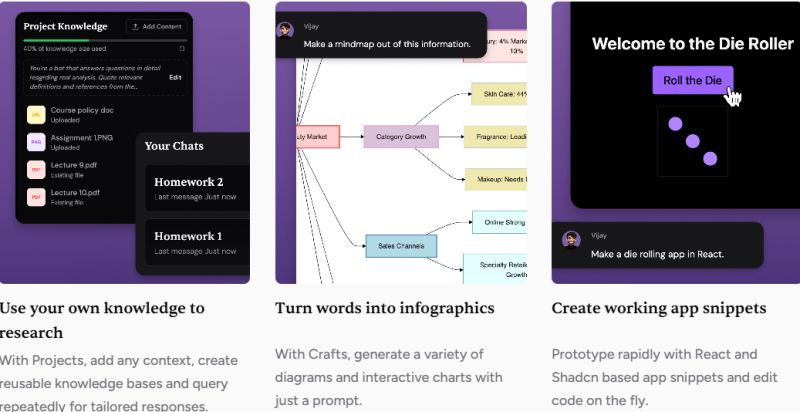
Merlin takes the opposite approach. Instead of a permanent panel, you press Ctrl+M on Windows or Cmd+M on Mac and a command bar slides in, ready for a question or task, then disappears when you are done. It is faster for keyboard-driven users and stays out of the way until called. Merlin also pairs with a fuller web app that adds reusable knowledge bases called Projects, a diagram and chart feature called Crafts, and document and CSV analysis.
In practice, Monica suits people who like a visible workspace and click-based actions, while Merlin suits people who prefer a quick shortcut and a clean screen between tasks.
Model Access and Flexibility
Both assistants let you switch between multiple AI engines, but they emphasize different things.
• Monica AI provides a curated set of leading models, including GPT-5, GPT-5.2, Claude 4.5 Sonnet, Gemini 3 Pro, and GPT-4o, plus Sora 2 for video. You can switch models mid-conversation to compare answers or match a model to a task.
• Merlin AI leans into sheer variety, advertising access to 70 or more models that span GPT, Claude, Gemini, Llama, Mistral, and Deepseek. For users who like to experiment across many engines, this breadth is a genuine advantage.
The practical takeaway: if you want maximum model choice and frequent comparisons, Merlin pulls ahead. If you want a strong shortlist of top models tied to creative tools in one place, Monica is the tidier package.
Feature-by-Feature Comparison
Here is how the two assistants compare across the factors that matter most when choosing a browser AI tool.
| Factor | Monica AI | Merlin AI |
| Format | Always-on sidebar that opens beside the page | Command bar summoned with a shortcut |
| Shortcut | Click the sidebar icon or highlight text | Ctrl+M (Windows) or Cmd+M (Mac) |
| Models | GPT-5, GPT-5.2, Claude 4.5 Sonnet, Gemini 3 Pro, GPT-4o, Sora 2 | 70+ models incl. GPT, Claude, Gemini, Llama, Mistral, Deepseek |
| Reported users | Over 10 million | Around 5 million |
| Free plan | About 40 basic queries/day, basic models only | About 102 queries/day, no credit card needed |
| Entry paid price | Pro from about $8.30-$9.90/month | Pro about $19/month annual, $29/month monthly |
| Billing model | Advanced Credits system (since Jan 2026) | Query/credit system, no rollover |
| Creative tools | Image and video gen (Sora 2, DALL-E, Runway, Kling) | Basic image gen (DALL-E, Stable Diffusion) |
| Standout strength | On-page writing, translation, media generation | YouTube and video summaries with timestamps |
| Platforms | Chrome, Edge, desktop, iOS, Android | Chrome extension, web app, iOS, Android |
| Known limitation | Daily resets and credit burn on free tier | $100/month soft cap on 'unlimited' Pro plan |
Figures reflect publicly reported details in early 2026. Plans, limits, and model lineups change frequently, so confirm current specifics on each provider's website.
Summarization and Research in Depth
Summarization is where the gap is widest. Merlin's video and webpage summaries are repeatedly rated best in class for this category, and a standout detail is timestamped YouTube summaries that let you jump straight to the relevant part of a video. For students and researchers who process long articles, papers, and videos every day, that single feature can be the deciding factor.
Merlin's web app extends this further with document and CSV analysis, so you can move from a quick summary to a deeper breakdown without leaving the tool. Monica summarizes articles and videos competently and offers full-page translation, but its summarization is one capability among many rather than the headline act. If condensing content is your primary job, Merlin is the more focused choice.
Writing, Content, and Creative Media
Monica is built to help you produce, not just consume. It drafts and rewrites inside the field you are already in, generates images through models like DALL-E and Runway, and even creates short video clips. For content creators and marketers who want writing help and visuals in the same place, that integrated toolkit is a real strength.
Merlin handles writing, emails, and social posts capably and includes basic image generation through Stable Diffusion and DALL-E, but reviewers note its responses can feel lighter or shorter than going directly to a model, and its image tools are convenient rather than advanced. For pure content creation with media generation, Monica has the edge.
Pricing Broken Down
Both tools run a credit-style system, and both have genuinely usable free tiers, but the structures differ in ways worth understanding before you pay.
Monica AI Plans
Since January 2026, Monica uses an Advanced Credits system where heavier models consume more credits per query, giving you flexibility to spend credits where they matter. The free plan resets daily rather than monthly, which is fine for moderate use but can run out on a heavy research day.
| Plan | Approx. Price | What You Get |
| Free | $0 | ~40 basic queries/day, standard models, no advanced access |
| Pro | ~$8.30-$9.90/mo | Thousands of basic queries, ~200 advanced queries, extra credits |
| Pro+ | ~$19.90/mo | Higher monthly credits and heavier advanced model use |
| Unlimited | ~$39.90/mo | Unlimited standard and advanced queries, image allowances |
Tip: match the model to the task. Use lighter models for simple queries and save advanced credits for reasoning, writing, or analysis.
Merlin AI Plans
Merlin's free tier is unusually generous at around 102 queries per day with no credit card required, which is more than several paid competitors offer. The catch sits on the paid side: the Pro plan is marketed as unlimited but carries a soft usage cap of roughly $100 per month in model usage that is not clearly shown at signup, and unused queries do not roll over.
| Plan | Approx. Price | What You Get |
| Free | $0 | ~102 queries/day, basic model access, no card required |
| Pro | ~$19/mo annual ($29 monthly) | High limits, all models, projects, faster responses |
| Teams | ~$15-$19/seat | Shared access for teams, cheaper than separate subscriptions |
Watch for: the 'unlimited' fair-use cap, no query rollover, and occasional throttling during peak hours.
Strengths and Trade-offs
Monica AI
| Strengths | Trade-offs |
› Friendly, always-visible sidebar › Strong on-page writing and rewriting › Built-in image and video generation › Lower entry price and wide platform support › Over 10 million users and a mature, stable product | › Curated model list rather than the widest › Daily free resets limit heavy sessions › Advanced credits can burn quickly on media tasks › Browser focus is mainly Chrome and Edge |
Merlin AI
| Strengths | Trade-offs |
› Very large model lineup to choose from › Best-in-class timestamped video summaries › Fast keyboard-driven command bar › Generous 102-query free tier, no card needed › Projects, Crafts, and document analysis in the web app | › 'Unlimited' Pro plan has a soft $100/month cap › No query rollover between periods › Responses can feel lighter than going direct › Chromium-focused, no Firefox or Safari extension |
Category Scorecard
A simple side-by-side rating across the dimensions most users care about.
| Category | Monica AI | Merlin AI |
| Ease of use | Excellent | Very good |
| Model variety | Very good | Excellent |
| Summarization | Good | Excellent |
| Writing and content | Excellent | Very good |
| Creative media | Excellent | Basic |
| Free tier value | Good | Excellent |
| Pricing | Excellent | Good |
| Best overall fit | Creators and writers | Researchers and students |
What Real Users Say in Reviews
Spec sheets and editorial testing only tell half the story. The other half comes from the people who use these assistants every day and leave ratings behind on app stores and review platforms. Here is where Monica AI and Merlin AI stand with real users as of mid-2026, and what the recurring praise and complaints reveal.
Ratings at a Glance
| Platform | Monica AI | Merlin AI |
|---|---|---|
| Chrome Web Store | ~4.9/5, Featured badge | ~4.8/5 across 9,000+ ratings, Featured badge |
| Google Play | ~3.8/5 across 110,000+ reviews | Smaller mobile footprint, extension-first user base |
| Trustpilot | Mixed, small sample (~25 reviews) | Low (~2/5), very small sample (~16 reviews) |
| Deal/SaaS platforms | ~4.4/5 on SaaSworthy, strong G2 sentiment | ~4.2/5 from 232 AppSumo reviews |
Ratings are a snapshot from June 2026 and shift as new reviews land. Sample sizes vary enormously between platforms, so weigh the big-number store ratings more heavily than tiny review pools.
Monica AI: Praise and Pain Points
The browser extension is where Monica shines with users. Reviewers on the Chrome Web Store and G2 consistently highlight how easy it is to set up, how naturally the sidebar fits into everyday browsing, and how convenient it is to reach several frontier models without juggling separate accounts. Writers and students mention real time savings on rewriting, summarizing, and translation.
The criticism clusters in two places. First, usage limits: even paying subscribers complain that credits burn faster than expected, especially on media generation. Second, billing and support: across Trustpilot and Product Hunt, the sharpest complaints involve refund handling, auto-renewal surprises, and slow responses from customer service. The noticeably lower Google Play score also suggests the mobile apps trail the polish of the extension.
Merlin AI: Praise and Pain Points
Merlin's fans sound like power users. The recurring compliments are the speed of the Ctrl+M workflow, the time saved by timestamped YouTube and PDF summaries, and the value of accessing dozens of models for less than the cost of multiple direct subscriptions. The Chrome listing's 4.8 average across thousands of ratings reflects years of goodwill.
Recent feedback is rougher. One extension tracker notes the average of Merlin's last hundred Chrome reviews has slipped to roughly 3.3, with users citing slowdowns, features breaking after updates, and confusion over query limits. Trustpilot reviewers, though few, echo complaints about performance regressions and difficult refund experiences, and several reviewers across platforms flag the gap between the “unlimited” label on the Pro plan and its fair-use cap.
Which One Fits Your Role?
1. Content creators and marketers: Monica. On-page writing plus image and video generation keep creation in one place.
2. Students and researchers: Merlin. Timestamped video summaries and document analysis save hours of reading and watching.
3. Translators and multilingual users: Monica. Full-page translation and inline rewriting are core strengths.
4. Model tinkerers and power users: Merlin. The 70-plus model lineup and quick switching reward experimentation.
5. Budget-conscious individuals: Either, starting free. Monica's lower paid entry helps light users; Merlin's larger free allowance suits steady daily use.
6. Small teams: Merlin's Teams plan can be cheaper than buying separate subscriptions per person.
A Note on Privacy
Both tools process your requests on their servers, which means the content of pages you interact with is sent to their backend and on to the underlying model providers. For everyday tasks this is normal, but if you handle sensitive or confidential information, review each provider's privacy policy before connecting the assistant to work accounts.
Final Verdict
Monica AI and Merlin AI both deliver on the core promise of a browser assistant: less tab-switching and faster help wherever you already work. The decision comes down to what you do most.
Monica wins on creative work, on-page writing, translation, and value, thanks to its always-on sidebar and built-in media generation at a lower starting price.
Merlin wins on research, summarization, and model variety, thanks to its best-in-class video summaries, huge model lineup, and unusually generous free tier.
There is no single best pick, only the best fit for your routine. Install both, spend a week running your actual tasks through each, and keep the one that disappears into your workflow most naturally.
Bottom Line
If you create, write, and translate, Monica AI is the more natural daily companion and the better value at entry. If you read, research, and summarize, Merlin AI is the sharper tool with broader model choice. Try both free, match the tool to your real work, and the right assistant will be obvious within a few days.
Post Comment
Share your thoughts about this article.
Be the first to post a comment!