One relies on human eyes and judgment, the other on scripts that never sleep. This guide defines both, compares them criteria by criteria, does the honest cost math, and shows the hybrid strategy that mature QA teams actually run.
Quick Answer
Neither strategy is "better" on its own; they solve different problems. Automated testing wins at repetition: running the same checks thousands of times, fast, on every code change. Manual testing wins at discovery: finding the bugs, usability problems, and weird edge cases no one thought to script. Mature teams don't choose one; they automate the repetitive checks and spend the freed-up human time on exploration.
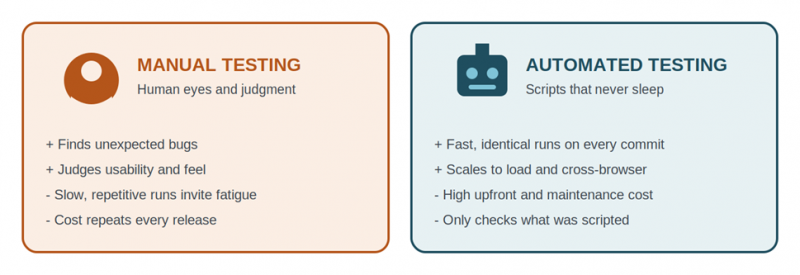
The two approaches at a glance: human judgment vs machine repetition.
Manual Testing · Best for discovery and judgment A human executes test cases and explores the product by hand. Cheap to start, zero setup, catches usability and visual issues. But it's slow, repetitive runs invite fatigue errors, and cost scales with every release. |
Automated Testing · Best for repetition and speed Scripts execute the checks: unit, API, and UI tests running on every commit. High upfront cost and constant maintenance, but each run afterward is nearly free, fast, and identical every time. |
Key takeaways 1) Automation verifies what you expect; humans discover what you didn't. 2) Manual is cheaper at the start; automation is cheaper over time. 3) Automate stable, repetitive, high-value tests first (smoke and regression). 4) Keep exploratory, usability, and one-off tests manual. 5) The testing pyramid, plus a manual layer on top, is the standard hybrid model. |
What Is Manual Testing?

Manual testing is the process of checking software for defects by hand, with a human executing test cases, clicking through the product, and judging the results without automation tools. The tester follows written test cases or explores freely, comparing what the software does against what it should do.
It covers several distinct activities, and confusing them causes most bad decisions in this debate:
• Scripted manual testing: following a documented test case step by step. This is the part automation replaces best.
• Exploratory testing: unscripted investigation where the tester designs and executes tests on the fly, following hunches. This is where humans find the bugs nobody predicted.
• Usability and visual testing: judging whether the product feels right: layout, wording, flow, accessibility. Scripts can compare pixels; they cannot judge experience.
• Ad-hoc and one-off checks: quick verification of a fix or a feature that will change next sprint. Automating these costs more than it saves.
The core strength A human tester brings context, intuition, and irritation. They notice that a button works but is confusing, that a flow passes but feels slow, that an error message is technically correct but useless. No assertion library checks for "annoying." |
What Is Automated Testing?

Automated testing uses scripts and tools to execute test cases, compare actual results against expected results, and report pass or fail without human intervention. Once written, the same tests run on every code change, at any hour, at machine speed.
It spans several layers, each with different speed and cost characteristics:
• Unit tests: tiny, fast checks of individual functions. Written by developers, they run in milliseconds and form the bulk of a healthy suite.
• Integration and API tests: verify that components and services talk to each other correctly, without a browser. Fast and stable.
• End-to-end (E2E) UI tests: drive a real browser through user flows with tools like Selenium, Cypress, or Playwright. Most realistic, but slowest and most fragile.
• Non-functional automation: performance, load, and security scans that are impossible to run manually at scale, like simulating 10,000 concurrent users.
The core strength Consistency at scale. A script executes the 400-step regression suite identically at 2 a.m. on release day, on the tenth run and the thousandth, with zero fatigue. That reliability is what makes daily deployments possible at all. |
Comparison Table
| Criteria | Manual Testing | Automated Testing |
|---|---|---|
| Who executes | Human tester | Scripts and CI pipelines |
| Upfront cost | Low: no tools or framework needed | High: tools, framework setup, script writing |
| Cost per repeat run | Same human hours every cycle | Near zero once written |
| Speed of execution | Hours to days per full pass | Minutes; runs in parallel on every commit |
| Consistency | Fatigue and skipped steps creep in | Identical execution every run |
| Finding unexpected bugs | Strong: exploration and intuition | Weak: only checks what was scripted |
| Usability and visual judgment | Human perception of layout, flow, tone | Limited to pixel and snapshot comparison |
| Frequently changing UI | Adapts instantly | Scripts break; maintenance cost spikes |
| Regression coverage | Shrinks under deadline pressure | Full suite on every build, no shortcuts |
| Performance / load testing | Not feasible at scale | Thousands of simulated users on demand |
| Skill requirement | Domain knowledge, test design | Programming plus test design |
| Maintenance burden | Test cases only | Scripts, framework, flaky-test triage |
| Best fit | Exploratory, usability, one-off, early-stage features | Regression, smoke, API, performance, stable flows |
Rust = manual advantage. Teal = automated advantage. Manual wins every judgment row; automation wins every repetition row.
When Manual Testing Wins
Exploratory sessions A tester following hunches through an app finds the bug that appears only when you paste an emoji into the search box mid-payment. No one scripts that in advance, because no one predicted it. |
Usability and first impressions Whether onboarding feels confusing, an error message reads as hostile, or a flow takes two taps too many is a human judgment. This is unautomatable by definition. |
Features still changing weekly Automating a UI that gets redesigned every sprint means rewriting scripts every sprint. Until the feature stabilizes, manual checks are faster and cheaper. |
Small projects and short timelines A two-week project or an MVP with one release doesn't live long enough to recover automation's setup cost. Manual testing delivers coverage from day one for the price of a tester's time. |
When Automated Testing Wins
Regression on every release Re-verifying that 300 existing features still work after each change is soul-crushing by hand and trivial for a script. This is automation's home turf and the first thing every team should automate. |
CI/CD and frequent deployments Teams shipping daily or weekly can't wait two days for a manual pass. Automated suites gate every merge in minutes, which is the only way continuous delivery works. |
Performance and load testing Simulating 10,000 concurrent users, measuring response times under stress, and repeating it identically after every optimization is impossible manually. Tools like JMeter or k6 exist precisely for this. |
Cross-browser and cross-device matrices The same suite running against Chrome, Firefox, Safari, and four screen sizes overnight replaces what would be a week of manual repetition per release. |
Cost and ROI
The cost question has a shape, not a single answer. Manual testing costs roughly the same human hours every cycle: a straight rising line. Automation starts with a large upfront spend on tools, framework setup, and script writing, then each additional run costs almost nothing: a high step, then nearly flat.
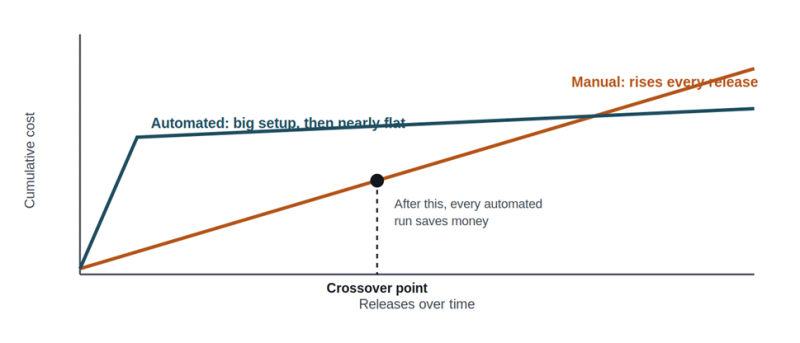
Fig 1. The cost crossover: automation loses early and wins late.
Three factors decide where that crossover lands for a specific test:
• Run frequency. A test executed on every commit crosses over in weeks. A test run once a quarter may never pay back its script.
• Stability of the feature. Every UI change forces script maintenance. Volatile features push the crossover further away; stable core flows pull it closer.
• Cost of failure. A broken checkout or login costs real revenue per hour. High-stakes flows justify automation even before the raw hours break even, because they get checked every single time.
The honest budget line nobody mentions Automation is not "write once, free forever." Industry experience puts ongoing maintenance (fixing broken selectors, updating flows, triaging flaky tests) at a significant share of the initial build effort, every year. Budget for it, or the suite rots and the team stops trusting it. |
The Hybrid Strategy: The Testing Pyramid
The industry-standard answer to "manual or automated" is a shape: automate heavily at the cheap, fast, stable bottom, automate sparingly at the expensive, fragile top, and keep humans exploring above it all.
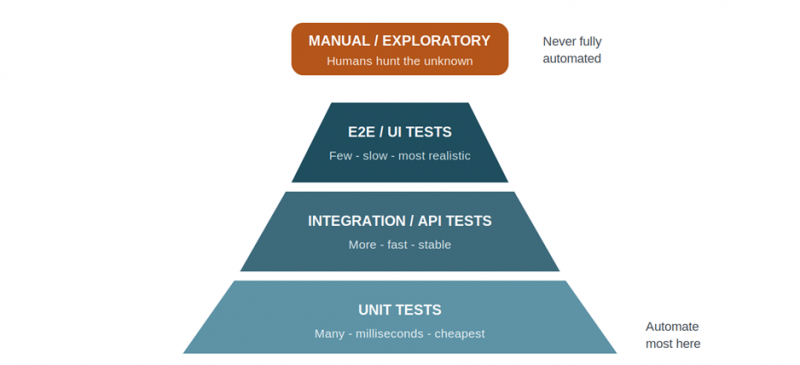
Fig 2. The testing pyramid with the manual layer where it belongs: on top, not replaced.
A practical rollout order for a team starting from all-manual:
1. Automate the smoke tests first: the 10 to 20 checks that answer "is the app fundamentally alive?" They run on every deploy.
2. Automate regression for the money paths: login, signup, search, checkout, payment. Stable, high-stakes, run constantly.
3. Push tests down the pyramid: wherever an E2E test can become an API or unit test, move it down. Lower is faster and less flaky.
4. Reinvest the saved hours in exploratory testing: the point of automation is not to remove humans; it's to stop wasting them on repetition.
Mistakes to Avoid
• Trying to automate 100% of testing. The goal is unreachable and the attempt burns budget on fragile UI scripts while exploratory coverage drops to zero.
• Automating an unstable feature. Scripts written against a UI that changes weekly spend more time broken than running. Wait for stability.
• Measuring testers by test cases executed. This rewards repetitive scripted work (which machines do better) and punishes exploration (which finds the expensive bugs).
• Ignoring flaky tests. A suite that fails randomly trains the team to ignore red builds. One tolerated flaky test quietly kills trust in the other five hundred.
• Skipping the maintenance budget. An automation suite with no upkeep time allocated decays within months and gets abandoned, making the whole investment a loss.
• Framing it as testers vs tools. Automation replaces repetitive execution, not testers. Teams that reframe QA roles around test design plus automation keep their domain knowledge and gain speed.
Final Verdict: Which Strategy Is Better?
The question has a trick in it: "which" assumes you must choose, and you shouldn't. The comparison table above shows a clean split: manual testing wins every row that involves judgment, discovery, or change; automation wins every row that involves repetition, speed, or scale. Those are complements, not competitors.
If forced to weight them, the deciding factor is repetition. Count how many times a test will run over its lifetime. Run once or twice: manual, always. Run on every commit for two years: automate, always. Everything in between is a judgment call governed by the crossover chart in Fig 1: frequency, stability, and cost of failure.
The trap to avoid is total conversion in either direction. All-manual teams drown in regression work and slow every release to a crawl. All-automation teams ship pixel-perfect products with confusing flows and miss the bugs nobody scripted. The published failure stories in QA almost all come from one of these two extremes.
The strategy that actually wins is the pyramid plus people: automate heavily at the unit and API layers, sparingly at the UI layer, and spend the human hours that automation frees on exploratory and usability testing. That is not a compromise between the two approaches. It is each one doing the only job it's genuinely better at.
Lean manual if... You're testing an MVP or short-lived project, the UI changes every sprint, the team has no coding capacity, or the questions you need answered are about usability and feel. Add automation only when the same checks start repeating release after release. |
Lean automated if... You ship frequently, run the same regression checks every cycle, need cross-browser or load coverage, or your release bottleneck is waiting on manual passes. Start with smoke tests and the money paths, budget real maintenance time, and reinvest saved hours in exploration. |
Post Comment
Share your thoughts about this article.
Be the first to post a comment!