Akool has built a strong reputation as an all-in-one AI video suite, valued for realistic face swaps, live streaming avatars, and fast video translation. Even so, its credit-based pricing, rendering speed at peak times, and enterprise focus lead many creators to look elsewhere. The encouraging news is that the AI video market in 2026 is full of capable platforms, each tuned to a different kind of work.
What Is Akool AI?
Akool is a generative AI platform built for visual content creation, helping users move from Static Snapshots to Studio-Quality Videos without needing a full production setup. Rather than focusing on a single trick, it bundles several tools into one workspace: AI avatars, photorealistic face swap, talking photos, real-time streaming avatars, video translation, background replacement, and text or image to video generation. Language support is broad, and output reaches up to 4K resolution on higher tiers.
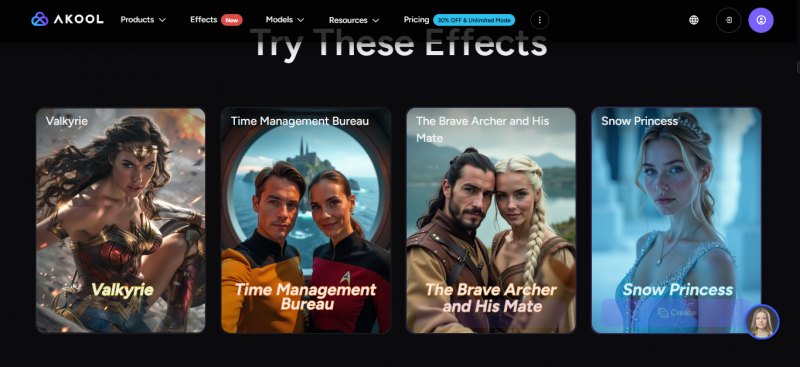
The platform runs on a credit system, where each task deducts credits based on its type and length. Paid plans open with a Pro tier and scale to Pro Max, Business, and custom Enterprise contracts, with annual billing trimming the cost by roughly thirty percent. Reviews regularly praise the realism of its avatars and the quality of its face-swap engine, while noting slower rendering during busy periods and costs that climb quickly for teams producing video at volume.
Why Creators Look for Akool Alternatives
No single tool fits every project, and Akool is no exception. A handful of recurring reasons send creators toward other platforms:
• Pricing structure: credit pools can be hard to forecast, and busier production schedules drain them faster than expected.
• Rendering speed: queues and slower exports surface for some users during high-traffic periods.
• Specialized needs: a filmmaker chasing cinematic, generative shots has very different requirements than a training team producing scripted videos.
• Editing depth: teams that want a full timeline editor alongside AI features sometimes prefer a browser-based studio.
• Developer access: products that rely on real-time avatars or programmatic video tend to prioritize API performance and clear commercial licensing.
Each platform below answers one or more of these gaps without sacrificing output quality.
How the Top Alternatives Were Selected
This shortlist favors established platforms with proven track records over newer entrants that have limited histories. Every option was measured against a consistent set of criteria:
• Output quality across avatars, generative video, or both
• Language and translation coverage for global audiences
• Pricing transparency and value at entry and at scale
• Ease of use for non-technical creators
• Adoption signals such as verified reviews and recognizable customers
The result is a balanced set that spans corporate video, marketing, cinematic production, conversational avatars, and all-in-one editing. Pricing and feature details reflect publicly available information as of June 2026 and may change, so confirming current terms on each official site is recommended before any purchase.
Top 5 Akool Alternatives at a Glance
The table below summarizes how the five alternatives compare with Akool at a high level. Each platform is strongest in a different area, so the best fit depends on the type of video and the budget involved.
| Platform | Best For | Standout Strength | Starting Price | Free Option |
|---|---|---|---|---|
| Akool | All-in-one suite | Face swap and live avatars | From $18/mo | Yes (watermark) |
| Synthesia | Corporate training | Language reach and polish | From $18/mo | Yes (3 min/mo) |
| HeyGen | Marketing and social | Avatar realism and translation | From $24/mo | Yes (3 videos/mo) |
| Runway | Cinematic creation | Generative video quality | From $12/mo | Yes (trial credits) |
| D-ID | Developers and agents | Real-time avatars and API | From $4.70/mo | 14-day trial |
| VEED | All-in-one editing | Browser editor plus AI | From $24/mo | Yes (watermark) |
Starting prices reflect the lowest paid tier billed annually. Full plan ranges appear in the pricing section further below.
Editorial Scorecard: How They Rate
Numbers turn a long feature list into a quick read. Each platform earned a score from one to ten across six criteria that weigh most when choosing AI video software. The final column averages those six marks, and the chart that follows ranks every tool on that single figure. Treat the ratings as an informed editorial view rather than a laboratory measurement, since the right weighting always depends on the project at hand.
| Platform | Output Quality | Ease of Use | Languages & Voice | Pricing Value | Developer API | Versatility | Overall /10 |
|---|---|---|---|---|---|---|---|
| Akool | 8 | 7 | 9 | 6 | 7 | 9 | 7.7 |
| Synthesia | 8 | 9 | 9 | 7 | 7 | 6 | 7.7 |
| HeyGen | 9 | 8 | 10 | 7 | 9 | 8 | 8.5 |
| Runway | 9 | 7 | 3 | 7 | 7 | 9 | 7.0 |
| D-ID | 7 | 7 | 6 | 9 | 9 | 6 | 7.3 |
| VEED | 7 | 9 | 8 | 8 | 5 | 9 | 7.7 |
Scoring key: green marks a clear strength (seven and above), amber marks an average result (five to six), and red flags a notable gap (below five). Akool appears as the baseline, shaded in orange.
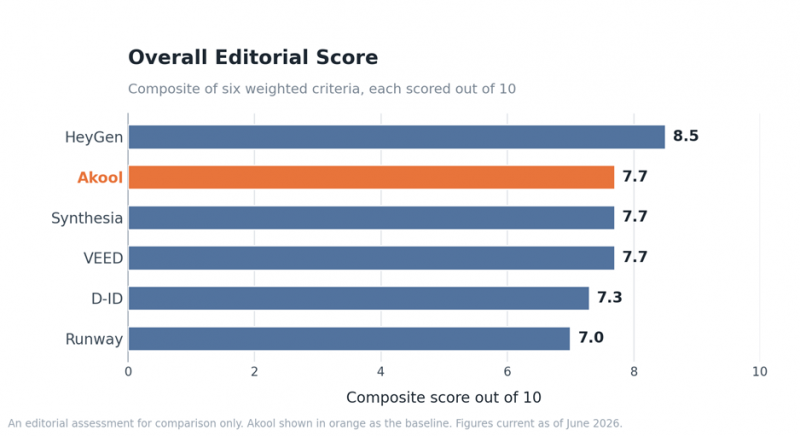
HeyGen leads the field on the combined strength of avatar realism, translation reach, and developer tooling. Synthesia, VEED, and the Akool baseline land level on the composite, yet they earn their marks in different columns, which is why the use case decides the winner far more than the average does. Runway scores lowest only because language and voice fall outside its purpose, not because its output disappoints.
1. Synthesia
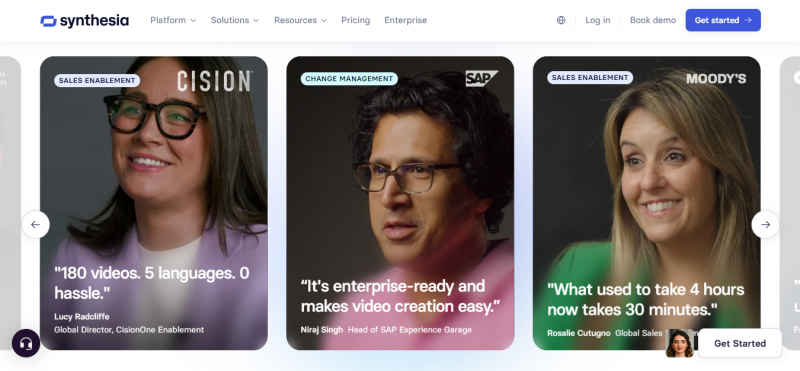
Synthesia sits at the top of the corporate AI video category and is used by tens of thousands of teams, including a large share of the Fortune 100. The platform turns a written script into a polished, presenter-led video, drawing on a library of more than 230 stock avatars and voiceovers in over 140 languages. A clean, template-driven editor and a PowerPoint import feature make it a natural fit for training, onboarding, and internal communication at scale.
| Feature | Details |
|---|---|
| AI avatars | More than 230 stock avatars, with custom personal avatars on higher tiers |
| Languages and voices | 140+ languages and 400+ voices for global reach |
| Templates | 250+ ready-made layouts for business video |
| Output quality | 1080p Full HD |
| Standout tools | PowerPoint to video, AI script assistant, one-click translation on Enterprise |
| Ideal use case | Scripted training, learning and development, multilingual corporate video |
Pricing: a free Basic plan offers three minutes of video per month with a watermark. Paid plans open with Starter at roughly $18 per month billed annually, then move up to Creator near $64 per month billed annually. Unlimited minutes, SCORM export for learning systems, and studio-grade avatars are reserved for custom Enterprise contracts.
| Strengths | Limitations to Weigh |
|---|---|
• Widest language and voice coverage for avatars • Professional, beginner-friendly editor • No watermark on paid plans • Reliable for repeatable training content • PowerPoint import speeds production | • Annual video-minute caps on lower tiers • Steep jump in price from Starter to Creator • SCORM and one-click translation locked to Enterprise • Avatars can show occasional lip-sync gaps |
Best for: enterprises and learning teams that need consistent, multilingual training video with minimal editing effort.
Edge over Akool: a deeper template library and SCORM export for structured learning programs, areas Akool does not specialize in.
2. HeyGen
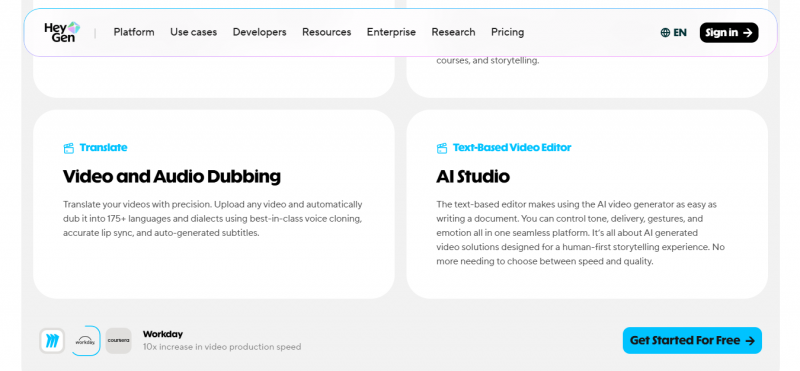
HeyGen has become the favorite for creators who want avatars that read as convincingly human, which is why any HeyGen AI Video Generator Review usually starts with its avatar quality. Its Avatar IV and V models produce natural body movement and expressions, and its video translation feature localizes a clip into more than 175 languages with matching lip-sync. Adoption is enormous, with over 137 million videos generated across more than 100,000 businesses, including HubSpot, Shopify, and Salesforce, alongside a 4.8 out of 5 rating on G2.
| Feature | Details |
|---|---|
| AI avatars | 150+ stock avatars, Avatar IV and V, plus instant custom avatars from photos |
| Voices | 300+ voices across many languages |
| Video translation | 175+ languages with synchronized lip movement |
| Interactive video | Clickable, branching video experiences |
| Developer access | Robust API for programmatic and large-scale video |
| Ideal use case | Marketing, social content, and personalized video at scale |
Pricing: a free plan covers three short videos per month with a watermark. The Creator plan runs about $24 per month billed annually and includes 200 monthly credits, Pro adds far more credits near $99 per month, and Business introduces 4K export, single sign-on, and team controls at $149 per month plus per-seat fees. Premium features such as Avatar IV draw from a credit pool, so heavy avatar or translation use raises the effective cost.
| Strengths | Limitations to Weigh |
|---|---|
• Industry-leading avatar realism • Best-in-class video translation • Very easy to learn and use • Massive adoption and review base • Strong, flexible API | • Premium credit system can complicate budgeting • Daily rendering caps reported by heavy users • Custom avatar creation may carry an extra fee • Costs scale quickly at high volume |
Best for: marketers and content teams that want lifelike avatars and fast, accurate video translation.
Edge over Akool: more lifelike avatars and broader lip-synced translation, with clearer per-credit costs as a team scales.
3. Runway
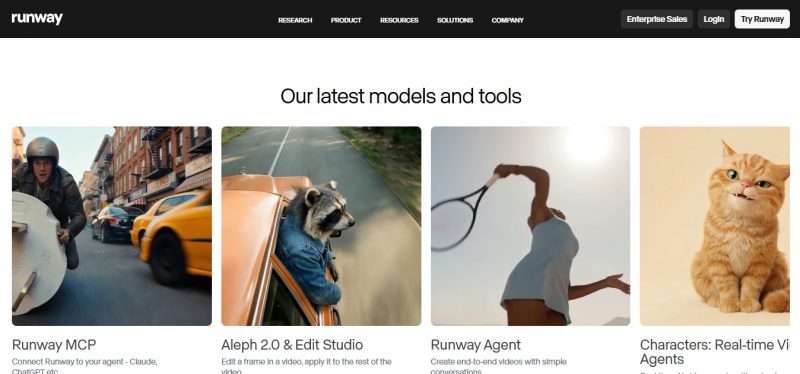
Runway approaches AI video from a different angle. Instead of talking-head avatars, it generates original footage from text or images, and its Gen-4.5 model currently leads independent text-to-video benchmarks. Filmmakers, agencies, and studios reach for it to create cinematic shots, visual effects, and stylized b-roll, and the company holds partnerships with Netflix, NVIDIA, and Lionsgate. Its Aleph feature even allows edits to a generated clip through text prompts, without a full re-render.
| Feature | Details |
|---|---|
| Generative models | Gen-4.5, Gen-4, and Gen-3 |
| In-video editing | Aleph text-based edits applied after generation |
| Creative controls | Motion brush and director-style camera tools |
| Output quality | Up to 4K on higher tiers |
| Editing suite | Polished, professional timeline interface |
| Ideal use case | Cinematic footage, visual effects, and creative b-roll |
Pricing: a free plan provides 125 one-time credits limited to the Gen-3 model. Standard starts near $12 per month billed annually, Pro at roughly $28 per month adds 2,250 credits and native 4K, and Unlimited reaches about $76 per month for high-volume work, with custom Enterprise terms above that. Credits are consumed per second of video and do not roll over, so careful planning of each generation matters.
| Strengths | Limitations to Weigh |
|---|---|
• Best generative video quality available • Powerful in-video editing with Aleph • Rich creative and camera controls • Polished, capable editing interface | • No avatars or talking-head presenters • No built-in voiceover or audio • Monthly credits expire and regenerations consume them • Support leans heavily on community resources |
Best for: filmmakers and creative teams that need original, cinematic AI footage rather than avatar narration.
Edge over Akool: true generative footage and cinematic control, a domain Akool's avatar-centric toolkit does not attempt.
4. D-ID
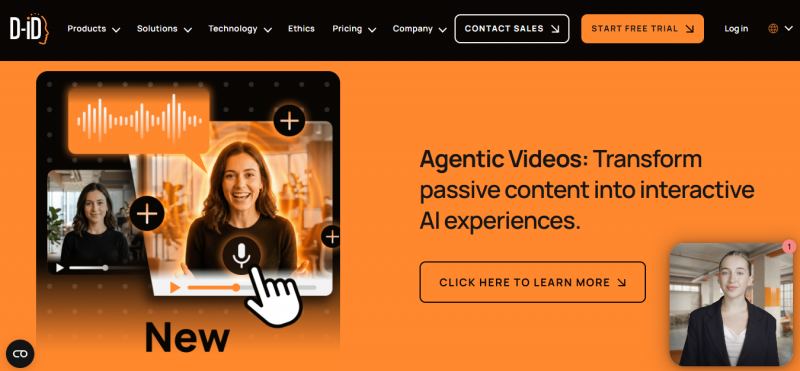
D-ID, founded in 2017, specializes in turning a single photo into a talking avatar and, more recently, in real-time conversational agents. Its Creative Reality Studio animates any portrait with lip-synced speech, while its Visual AI Agents stream live, interactive avatars over an API at up to 100 frames per second. That developer-first design, backed by a Microsoft Azure partnership and enterprise customers such as Deloitte and PWC, makes it a frequent choice for support bots, virtual assistants, and personalized video pipelines.
| Feature | Details |
|---|---|
| Photo-to-avatar | Animate any single image into a talking video |
| Real-time agents | Live streaming avatars for two-way conversations |
| Video translation | Dubbing into 30+ languages with lip-sync |
| Developer access | Comprehensive REST API built for scale |
| Voice cloning | Available from the Pro plan upward |
| Ideal use case | Conversational AI, developer integrations, personalized video |
Pricing: a 14-day trial provides about five minutes of watermarked video. The Lite plan is among the cheapest entry points in the category at roughly $4.70 to $5.90 per month, though it keeps the watermark, while Pro near $29.90 per month removes it and adds a voice clone. Advanced, around $80 to $108 per month, unlocks API access and more cloning, and Enterprise pricing is custom. Minutes are deducted in fifteen-second increments.
| Strengths | Limitations to Weigh |
|---|---|
• Lowest entry price in the avatar category • Genuine real-time conversational avatars • Single-photo avatar creation • Fast rendering and a strong API • Solid enterprise distribution | • Watermark on the Lite plan • Some reports of billing and transparency issues • Fewer translation languages than the leaders • Credit model can feel confusing |
Best for: developers and businesses building real-time avatars, chat agents, or large-scale personalized video.
Edge over Akool: a far lower entry price and production-grade real-time avatar streaming over a developer API.
5. VEED
VEED brings AI video creation and a full editing timeline together in one browser tab. Used by more than ten million creators and backed by Sequoia, it pairs drag-and-drop editing with AI avatars, auto-subtitles in over 125 languages, background removal, voice cloning, and AI dubbing. Because everything runs in the browser, projects open on almost any device with no installation, which suits social creators, educators, and marketing teams that value speed and collaboration.

| Feature | Details |
|---|---|
| AI avatars | Stock avatars plus custom avatars from a photo on the Pro tier |
| Subtitles | Auto-captions in 125+ languages at roughly 98 percent accuracy |
| Translation and dubbing | AI dubbing across 50+ languages |
| Editing tools | Magic Cut, background removal, eye-contact correction, screen and webcam recording |
| Media and teamwork | 2M+ stock assets, brand kits, and real-time collaboration |
| Ideal use case | Social content, tutorials, and team video projects |
Pricing: a free plan includes watermarked exports at 720p. Entry paid plans begin around $12 to $18 per month, the Pro tier that unlocks AI avatars sits near $24 to $30 per month, and a higher Studio or Business tier runs about $55 to $59 per month, with custom Enterprise options above that. Generative AI features draw on credit allowances, so prompt-heavy workflows should account for usage limits.
| Strengths | Limitations to Weigh |
|---|---|
• Editing and AI combined in one accessible browser tool • Excellent captions and dubbing • No installation on any device • Affordable entry pricing • Strong collaboration features | • AI avatars require the Pro tier • Generative features run on a credit economy • Performance can slow on very large projects • Free tier adds a watermark |
Best for: social creators and teams that want a browser-based editor with built-in avatars, captions, and translation.
Edge over Akool: a complete timeline editor wrapped around the AI features, removing the need for a separate editing app.
Akool Versus the Alternatives
When to Switch
Switching tools pays off only when the new platform closes a real gap. The split below shows where Akool still earns its place and where a focused alternative pulls ahead.
| Reasons to Stay with Akool | Reasons to Switch to an Alternative |
|---|---|
• Face swap sits at the center of the work, where Akool's engine remains the most realistic option. • A single subscription needs to cover avatars, translation, face swap, and live streaming at once. • Live, multilingual streaming avatars are a core, everyday requirement. • An established credit workflow already fits the team's output and budget. | • Avatar realism for marketing is the priority, which points to HeyGen. • Structured, multilingual training video is the goal, which favors Synthesia. • Original cinematic footage matters more than presenters, the domain of Runway. • A low entry price or real-time API avatars are essential, where D-ID leads. • Editing and AI need to live in one browser studio, the strength of VEED. |
Many teams settle on a pair rather than a single winner, keeping Akool for face swap and routing each remaining task to whichever specialist tool handles it best.
Pricing Comparison
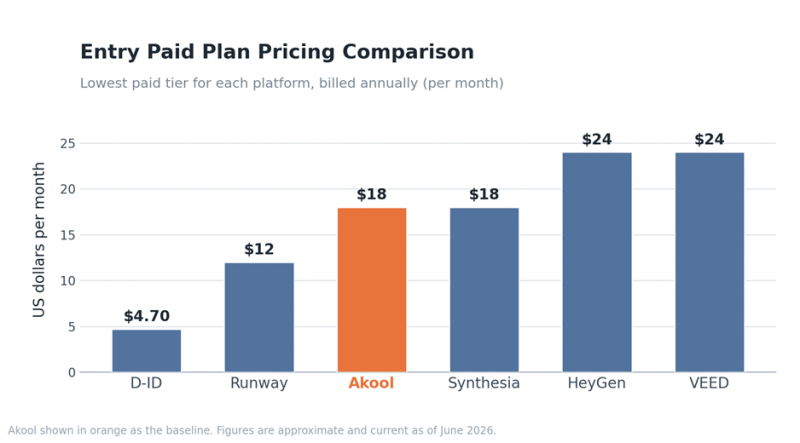
AI video pricing varies widely, both in structure and in what each tier unlocks. The chart and table below compare entry costs and full plan ranges so the trade-offs are easy to see at a glance.
| Platform | Free Option | Entry Plan | Mid Tier | Top Tier and Enterprise |
|---|---|---|---|---|
| Akool | Watermark, 720p | Pro about $18 to $30/mo | Pro Max about $119/mo | Business about $500/mo, Enterprise custom |
| Synthesia | 3 min/mo | Starter about $18/mo | Creator about $64/mo | Enterprise custom |
| HeyGen | 3 videos/mo | Creator about $24/mo | Pro about $99/mo | Business $149/mo plus seats, Enterprise custom |
| Runway | 125 credits | Standard about $12/mo | Pro about $28/mo | Unlimited about $76/mo, Enterprise custom |
| D-ID | 14-day trial | Lite about $4.70/mo | Pro about $29.90/mo | Advanced about $80/mo, Enterprise custom |
| VEED | Watermark, 720p | From about $12 to $18/mo | Pro about $24 to $30/mo | Studio about $55 to $59/mo, Enterprise custom |
Prices reflect annual billing where applicable and were checked in June 2026. Credit-based features can add to the totals shown, so confirming current pricing on each official site is sensible before subscribing.
Real-World Cost Scenarios
Sticker prices rarely match real bills, because credits, seats, and output limits shift the total once production starts. The scenarios below estimate a sensible monthly spend for five common situations, using annual billing where it lowers the rate.
| Scenario | Suggested Platform | Estimated Monthly Cost | Why It Fits |
|---|---|---|---|
| Solo creator, 8 to 12 short videos a month | VEED Pro or HeyGen Creator | About $24 | Avatars, captions, and quick edits at a single, predictable rate. |
| Marketing team, 40 to 60 multilingual videos | HeyGen Pro | About $99 | A large credit pool plus lip-synced translation across 175+ languages. |
| Structured training library at scale | Synthesia Creator or Enterprise | $64 to custom | Templates, SCORM export, and consistent multilingual narration. |
| Cinematic footage and generative b-roll | Runway Pro | About $28 | Benchmark-leading generation with native 4K and no avatars needed. |
| App with real-time avatars over an API | D-ID Advanced | About $80 and up | Production API access and live streaming agents at a low base cost. |
Estimates assume moderate usage on annual billing and exclude per-seat add-ons and overage credits. Confirm live pricing on each platform before committing.
Feature and Language Comparison
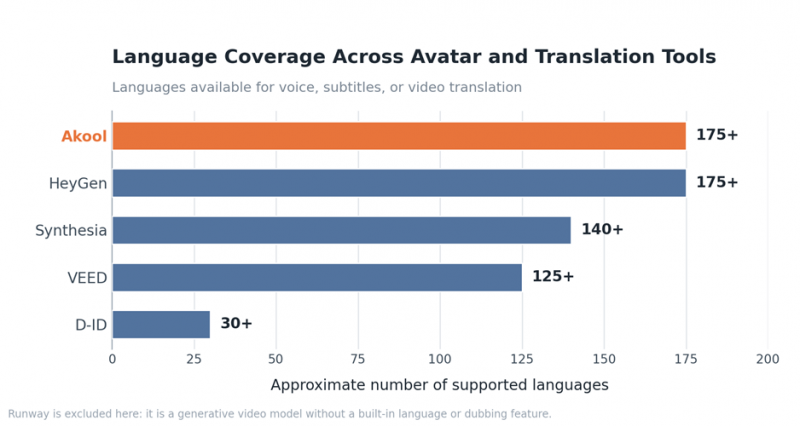
Beyond price, the right choice depends on what each platform actually does well. Language reach matters for global audiences, while the split between avatar video and generative footage often decides the shortlist on its own.
| Platform | AI Avatars | Video Translation | Generative Video | Face Swap | Max Output |
|---|---|---|---|---|---|
| Akool | Yes | Yes (150+) | Yes | Yes (leading) | 4K |
| Synthesia | Yes (230+) | Yes (Enterprise) | Limited | No | 1080p |
| HeyGen | Yes (IV and V) | Yes (175+) | Limited | No | 4K |
| Runway | No | No | Yes (Gen-4.5) | No | 4K |
| D-ID | Yes (photo) | Yes (30+) | No | No | Up to 4K |
| VEED | Yes (Pro) | Yes (50+) | Basic | No | 4K |
A clear pattern emerges from the matrix. Synthesia, HeyGen, and D-ID are avatar-first platforms, Runway is generation-first, and VEED blends editing with light generation. Akool remains the broad all-rounder, and it keeps a clear edge in face swap, a capability the alternatives generally leave aside.
Recommendations by Use Case
Most decisions come down to one dominant use case. The pairings below name a primary pick and a strong runner-up for each, so a shortlist forms in seconds.
| Use Case | Top Pick | Runner-Up |
|---|---|---|
| Corporate training and onboarding | Synthesia | HeyGen |
| Social media and short-form marketing | HeyGen | VEED |
| Multilingual dubbing and localization | HeyGen | VEED |
| Cinematic and generative video | Runway | Akool |
| Developer and real-time avatars | D-ID | HeyGen |
| All-in-one editing with AI | VEED | Akool |
A few names recur for good reason. HeyGen and VEED stretch comfortably across marketing, social, and localization, while Synthesia owns the training niche and Runway stands alone for generative work. D-ID becomes the default the moment an API or a live avatar enters the picture.
How to Choose
Three Questions
Three questions narrow the field faster than any feature chart, and answering them in order usually surfaces one or two clear candidates.
1. Does the video need a human presenter? If yes, the avatar tools lead: HeyGen, Synthesia, D-ID, and VEED. If no, Runway handles original generative footage best.
2. How many languages must it reach? For wide localization, HeyGen and Synthesia set the pace. For a handful of languages alongside fast editing, VEED is more than enough.
3. Who is building it, a creator or a developer? Creators are best served by VEED, HeyGen, or Synthesia in the browser, while developers embedding avatars should start with D-ID's API.
Once those answers point to a shortlist, a quick test on each free plan settles the rest.
Switching from Akool: A Practical Checklist
Moving a workflow does not have to be disruptive. A short, deliberate transition protects existing assets and surfaces any quality gaps before a subscription lapses.
• Audit current output: list the templates, avatars, and languages in active use so the replacement can match them.
• Export brand assets: gather logos, color codes, fonts, and voice preferences for a quick setup elsewhere.
• Test on a free tier first: run a real script through one or two shortlisted tools rather than a generic demo.
• Check language and voice parity: confirm the new platform covers every language the audience needs.
• Map the credit math: weigh monthly volume against each plan's allowance to avoid surprise overages.
• Run a short parallel period: keep both tools active for one cycle, then cancel only after the new output proves itself.
A pilot of about two weeks is usually enough to confirm whether the switch holds up under a normal production load.
Mistakes to Avoid When Choosing AI Video Software
A few predictable missteps cost teams time and money. Sidestepping them is often the difference between a tool that sticks and one abandoned after a month.
• Judging on sticker price alone: a low headline rate can hide steep credit costs once avatars or translation run at volume.
• Skipping the free trial: output quality varies by face, accent, and language, so a quick real-world test beats any feature list.
• Overlooking voice and language quality: weak dubbing or robotic narration undermines an otherwise polished video.
• Committing to an annual plan too early: monthly billing during evaluation avoids a long lock-in to the wrong platform.
• Ignoring credit consumption: premium models often cost several credits per minute, which drains an allowance faster than expected.
• Forgetting commercial licensing: free tiers usually restrict commercial use, so paid plans are typically required for client or monetized work.
Weighing these factors up front keeps the focus on long-term fit rather than a tempting first impression.
Conclusion
No single platform wins every project, which is exactly why this comparison scores each tool by criteria rather than crowning one champion. HeyGen takes the top composite on avatar realism and translation, Synthesia anchors structured training, Runway stands alone for generative footage, D-ID leads on price and real-time APIs, and VEED unifies editing with AI in the browser.
The fastest path forward is to read the scorecard against the primary use case, check the cost scenario that matches the team, then test the top one or two picks on a free plan. Akool remains a strong all-rounder, especially for face swap, so in many setups the smartest move is not replacing it outright but pairing it with whichever specialist tool closes the remaining gap.
Post Comment
Share your thoughts about this article.
Be the first to post a comment!





