Table of Content
- Why I First Decided to Try HeyGen
- What I Learned About HeyGen Pricing
- What HeyGen Did Shockingly Well (My Personal Wins)
- What HeyGen DIDN’T Do Well (My Honest Complaints)
- What Other Users Are Saying (Summaries I Found Helpful)
- Who HeyGen is PERFECT For (According to My Use)
- My Final Verdict on HeyGen
I’ve been experimenting with AI video tools a lot lately, and when I saw people talking about HeyGen, especially its AI avatars and text-to-video magic, I knew I had to test it myself. This is my full first-person breakdown: how HeyGen works, what it does brilliantly, where it falls short, and whether it’s worth your money.

Why I First Decided to Try HeyGen
I initially came across HeyGen while browsing the HeyGen official website and the HeyGen AI Avatars app on Canva. The pitch sounded almost too good:
“Turn your script into a full video using AI avatars, no camera, no actors, no editing.”
That caught my attention. As someone who often needs product reviews, explainers, and social media clips, the idea of automating the recording process felt like a huge time-saver.
Then I checked the App Store page and saw that people were actually using HeyGen to create professional-looking videos from plain text. That’s when I decided:
“Okay, I need to try this myself.”
How HeyGen Actually Works
My workflow started inside the HeyGen dashboard, which instantly felt clean and beginner-friendly. To make a video, I simply:
- Choose an AI avatar (or upload my own reference photo)
- Paste my script
- Select a voice
- Hit generate
HeyGen’s video builder reminds me of a hybrid between Canva and a teleprompter app, but without awkward recording moments.
I also played with their AI lip-sync tech, which HeyGen’s own creators showcase heavily on their use-cases page. The syncing was surprisingly accurate. Not perfect — but accurate enough that I didn’t cringe while watching.
Even EasyWithAI notes that HeyGen stands out because of how natural the avatars and voices look for business-style videos.
What I Learned About HeyGen Pricing
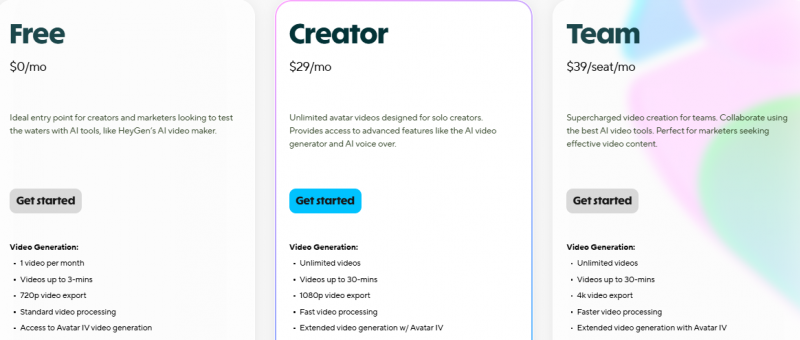
I started on the free plan because I wanted to see if HeyGen was even worth paying for. Spoiler: the free version is usable, but limited.
From everything I saw on Capterra’s HeyGen reviews and G2’s HeyGen page:
Free Plan
- A few basic avatars
- Limited video minutes
- Lower resolution
- Watermarked
- Enough to test the platform
Paid Plans (~$24–30/month)
Unlocks everything that matters:
- Premium / photorealistic avatars
- Multilingual voices
- Lip-sync accuracy
- Custom avatars
- HD exports
- Faster rendering
Several creators on ProductHunt mentioned that the upgrade feels “mandatory” if you're making regular content.
My verdict:
If you’re serious about using HeyGen for business, skip the free plan and go straight to paid.
What HeyGen Did Shockingly Well (My Personal Wins)
1. It’s ridiculously easy to use
HeyGen genuinely feels like it was built for non-editors.
Even reviewers on G2 call it “effortless”, and I completely agree.
2. Perfect for product reviews, explainers & testimonials
Their templates, especially in the HeyGen video creator, make it easy to generate marketing-style videos that feel polished without needing a studio.
3. AI avatars actually look professional
They’re not Hollywood-real, but they’re convincing enough for corporate, SaaS, training, or ecommerce content.
4. Multilingual support is legit useful
I tested Spanish + Hindi, and the adaptations were surprisingly smooth.
Even EasyWithAI’s review praises HeyGen for this.
5. Huge time-saver for camera-shy people
If you don’t like recording yourself every time?
HeyGen is basically a clone that does it for you.
What HeyGen DIDN’T Do Well (My Honest Complaints)
1. Emotion & realism are still limited
The avatars feel a bit stiff when expressing emotions.
Reviewers on Primotly highlight the same thing, great for corporate content, but not expressive storytelling.
2. Free plan is too restrictive
Several people on Capterra complain about this, and I agree.
If you want HD videos or custom avatars, you have to pay.
3. Not ideal for YouTubers or filmmakers
The output feels too “studio-corporate” for vloggers or cinematic creators.
I still prefer real recorded content for storytelling.
4. Creativity is capped
You can’t control camera movement, lighting, scene complexity, or custom motions like you can in Runway or Pika.
5. Some avatars still feel uncanny
Not often — but when it happens, it’s noticeable.
Even a few comments on Reddit mention that the avatars look stiff or robotic.
What Other Users Are Saying (Summaries I Found Helpful)
Trustpilot
On Trustpilot, users praise customer support and business use cases, but mention pricing concerns.
G2
G2 reviewers love the simplicity, avatar quality, and multilingual accuracy — giving HeyGen a near-perfect score.
Capterra
Users on Capterra highlight speed + ease, but note that realism depends heavily on the avatar chosen.
Product Hunt
On Product Hunt, people praise it for being a game-changer for solopreneurs and businesses.
Canva users
Creators who use HeyGen inside Canva love it for quick edits and simple visual projects.
Who HeyGen is PERFECT For (According to My Use)
Great for:
- SaaS founders
- E-commerce brands
- Small businesses
- Educators
- Product reviewers
- Corporate trainers
- Camera-shy creators
- Teams needing multiple videos per week
Not great for:
- YouTubers needing personality
- Cinematic creators
- Influencers who rely on human emotion
- Anyone expecting real human acting
- People on a tight budget
My Final Verdict on HeyGen
After testing HeyGen with scripts, avatars, multilingual videos, and various templates:
My rating: 4.6/5
This tool is phenomenal if your goal is business-friendly video content — like product demos, onboarding videos, explainer clips, presentations, and testimonial-style content.
It saves an insane amount of time, eliminates the need to film yourself, and makes video creation scalable.
But if you want emotional connection, cinematic storytelling, or personality-driven content ,real video still wins.
Post Comment
Be the first to post comment!