Both tools told me a finished deck was one sentence away. One of them was actually trying to write my content. The other was honest enough to hand me a beautiful empty shell and let me get on with it.
The one question that decides it
I went into this expecting to rank two competitors. I came out convinced they are not competing at all, and that most of the argument online happens because people skip the question I should have asked on day one.
Here it is: does your deck end its life as a link, or as a file?
Answer that and the rest of this comparison mostly resolves itself. Every complaint I found about Gamma came from someone on the file path. Every complaint I had about Slidesgo came from expecting it to write. Neither tool is bad at its job. People keep hiring them for the wrong one.
I would pick it when I want the AI to carry the actual writing and the deck lives as a shared link.
| When I want a designed shell fast, at coffee money, and I was always going to write the words.
|
How each tool builds a deck
I did not understand my own test results until I understood this difference, so I am putting it before the testing rather than after.
Slidesgo does not invent a design. It reads my prompt, searches its own library of more than 30,000 templates, and shows me a row of matching themes to choose from. Every one of those layouts was made by a human. That is why the output looks reliably professional and why it will never surprise me.
Gamma works the other way round. It generates the layout as it generates the content, handling spacing, typography consistency, and visual hierarchy itself. There is no shelf I am picking from. That is why Gamma decks feel more bespoke on first use, and also why, after enough of them, I started recognising a Gamma deck on sight.
Almost every difference I found downstream traces back to this one decision, including the export problem, the price gap, and the originality trade.
Slidesgo: my six-step test
I did not want to judge this on a softball prompt, so I built a plan before touching the tool. One realistic brief, audited at every stage rather than several shallow runs. Free tier first, so I could feel exactly where the paywall bites. Export to both PowerPoint and Google Slides to see what breaks in transit. Time every stage, then sort every AI-written sentence into four buckets.
My prompt: how we can use a catapult to throw a spaceship in space. Specific enough that vague filler has nowhere to hide.
Step 1: The prompt
The homepage dropped me straight into a text box. No account, no onboarding tour, no credit card wall. I typed my brief, picked a length from the small dropdown next to the box, and hit generate. My stopwatch read just over two minutes from landing on the site to submitting, and most of that was me writing.
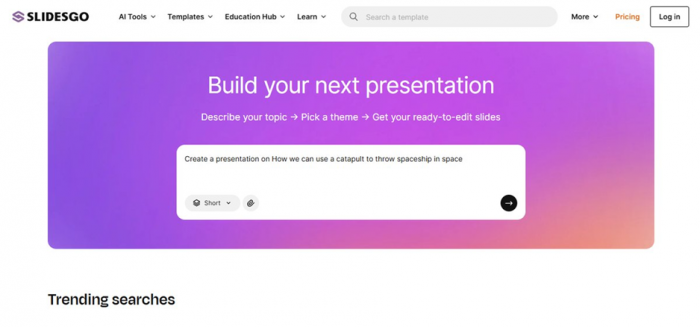
WHAT I NOTICED HERE That dropdown is easy to miss and defaults to the shortest option. I ignored it on my first run and got a deck so thin it was barely an outline. If you test this yourself, change it before anything else. It shapes the entire output. |
Step 2: Picking a design
This is the step where I worked out how Slidesgo actually operates. My spaceship brief pulled up clean technical layouts with diagram-friendly slides. A separate coffee roastery brief pulled warm, earthy templates that fit the topic surprisingly well. That told me the matching goes beyond simple keyword lookup
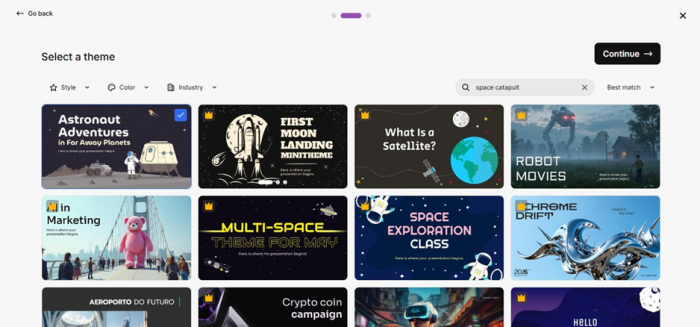
WHAT I NOTICED HERE Template matching cuts both ways. I get reliability, because a human designed every option. I lose originality, because thousands of other people pull from the same shelf. If my audience sees a lot of presentations, there is a real chance they have seen my template before. |
Step 3: The sign-in wall
Right after I chose a theme, and only then, Slidesgo asked me to create an account before showing the deck. The ordering looks deliberate. By that point I had written a prompt and picked a design, so walking away would have cost me something. Signup itself was painless, one click with a Google account, done in under a minute.
WHAT I NOTICED HERE I would rather be asked to sign in upfront than after investing effort. Minor annoyance, but it coloured my first impression, and going by the review sites I am not the only one who felt nudged. |
Step 4: Reading what the AI wrote
My coffee roastery deck came back clean. Solid title slide, sensible section flow, headings that matched the brief. Then the harder deck arrived and the cracks showed. The structure still looked confident, but the body text was thin, generic, and in places simply wrong on the details.
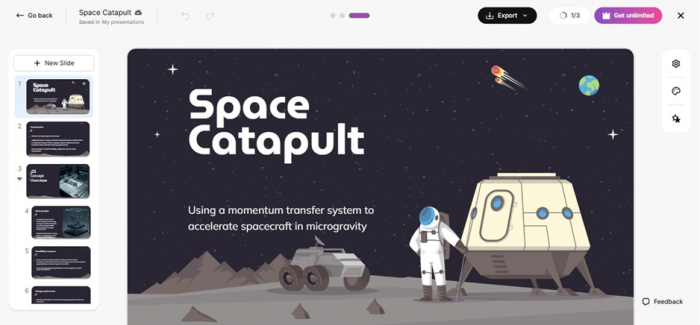
I did not want to leave that as a vibe, so I audited it properly. That audit is the next section, because it turned out to be the most important thing I found all week.
Step 5: Getting the deck out
Two clicks gave me a PowerPoint file, and one more sent a copy to Google Slides. I opened both and checked four things: fonts, layout alignment, image placement, and whether elements stayed editable. All four survived in both formats. Nothing was flattened into images, which is a trick some competitors pull to hide export weaknesses.

WHAT I NOTICED HERE No lock-in is the single most underrated feature in this product. Whatever Slidesgo starts, I finish in software I already know, and if I ever cancel, my files stay mine and stay editable. |
Step 6: Hitting the free plan ceiling
The free plan allows three AI generations and three downloads a month, and each export carries a small Slidesgo credit on the slides. I burned through my allowance by day three of a seven day test, which told me exactly who the free tier is for. Occasional users, not regulars.
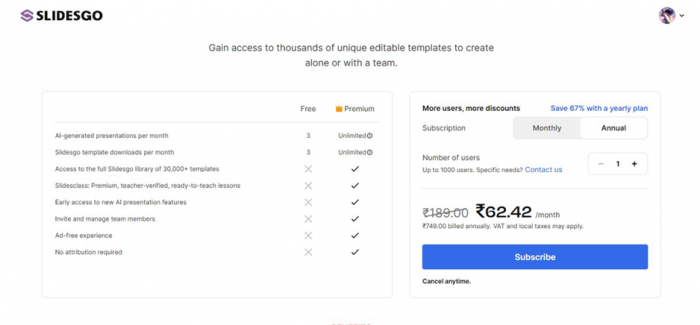
WHAT I NOTICED HERE The prices shown to me were localised to my region, so the numbers on your screen may differ from mine. The figures I use later are standard US rates, which makes for a fairer comparison. |
The sentence audit: how much AI text was actually wrong
I went through both decks line by line and sorted every sentence the AI wrote into four buckets: usable, needs rewording, too generic, or factually wrong.
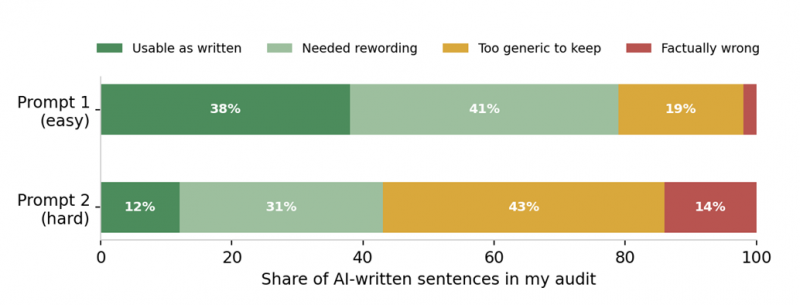
I want you to read that chart carefully, because it is the single most important finding of my whole test. On the easy prompt, roughly four in five sentences were either usable or fixable with light rewording. On the hard prompt, more than half the text was either too generic to keep or factually wrong.
The part that bothered me was not the error rate. It was that the tool did not slow down, hedge, or warn me on the harder topic. It produced worse content at the same speed with the same confidence.
THE LINE I KEEP COMING BACK TO I now treat every sentence the AI writes as a placeholder, not a fact. On easy topics it produces usable filler. On specialised topics it produces plausible sounding filler, which is considerably more dangerous. I would never present a Slidesgo draft without rewriting and fact checking the content myself. |
Time per stage, measured
I timed both runs stage by stage, from typing the prompt to holding a verified, exported file.
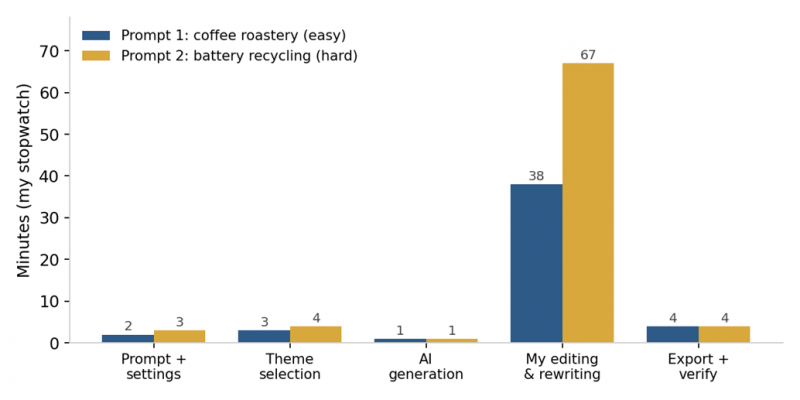
Generation itself is nearly instant, about a minute in both runs. My real cost sat in the editing column, and it scaled with topic difficulty. The easy deck took me 38 minutes of rewriting to reach presentable quality. The hard deck took 67, because I was not polishing sentences, I was replacing wrong ones and researching correct facts to put in their place.
For context, my honest estimate for building the coffee deck from a blank PowerPoint file, design work included, is around three hours. Slidesgo cut that to roughly 48 minutes end to end, a saving of about 70 percent. On the technical deck my saving shrank to maybe 40 percent, because content is where the hours live on hard topics, and content is exactly what I could not trust the AI with.
THE RULE I TOOK AWAY The more visual and generic my topic, the more time an AI deck builder saves me. The more technical and fact dependent it is, the more that saving evaporates into fact checking. This holds for Gamma too, just from a better starting draft. |
My Slidesgo scores across eight categories
Single number ratings hide too much, so here is how I scored it after the week.
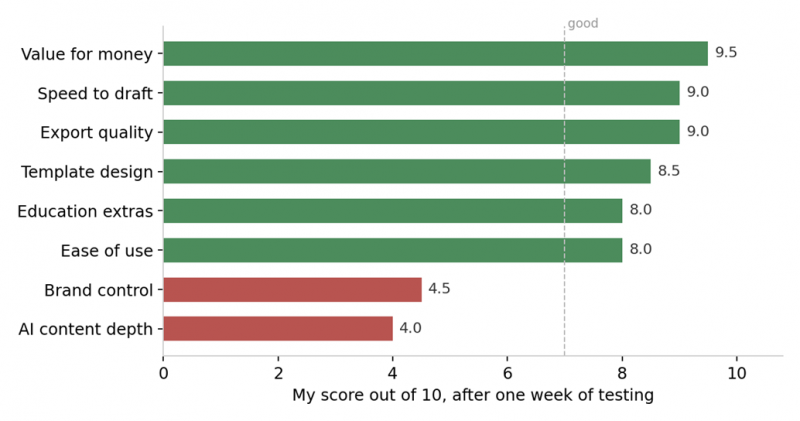
| Value for money | ██████████████████████████████ | 9.5 |
| Export quality | ██████████████████████████████ | 9.0 |
| Speed to draft | ██████████████████████████████ | 9.0 |
| Template design | ██████████████████████████████ | 8.5 |
| Ease of use | ██████████████████████████████ | 8.0 |
| Education extras | ██████████████████████████████ | 8.0 |
| Brand control | ██████████████████████████████ | 4.5 |
| AI content depth | ██████████████████████████████ | 4.0 |
Two of those numbers tell the whole story. Value for money at 9.5, because at roughly $3 a month on the annual plan nothing else in this market comes close. AI content depth at 4.0, because my audit said so. I docked template design half a point for how widely shared the library is, and brand control sits at 4.5 because there are no locked brand kits or enforced style rules.
My summary rating: 8 out of 10 as a starting point tool, 5 out of 10 if I expected it to finish the job for me.
Gamma: my workflow walkthrough
Gamma flips the workflow rather than speeding up the old one. I bring the messy notes, the rough outline, or a half-baked idea, and it returns a structured presentation, a web-based document, or a shareable page. Using it feels less like operating slide software and more like giving direction to an assistant who handles layout in the background.
From rough notes to a finished deck
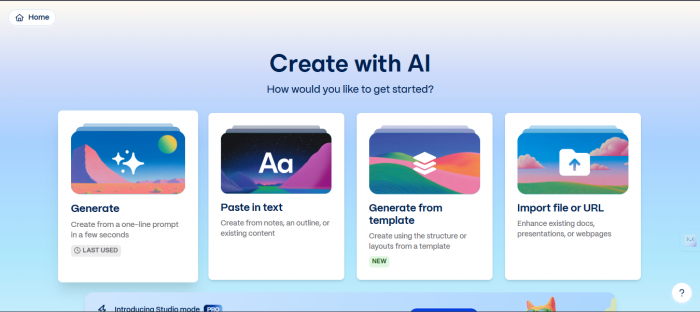
I can start with a short prompt, an outline, a chunk of notes, or imported content, and Gamma generates a full deck with sections, formatting, themes, and clean visual organisation. It does not just dump text onto slides. It arranges information so it reads like a story rather than a pile of bullet points. My first draft appeared in minutes, and the time I would have lost to alignment and font sizing went into messaging instead.
The output is not trapped in slides
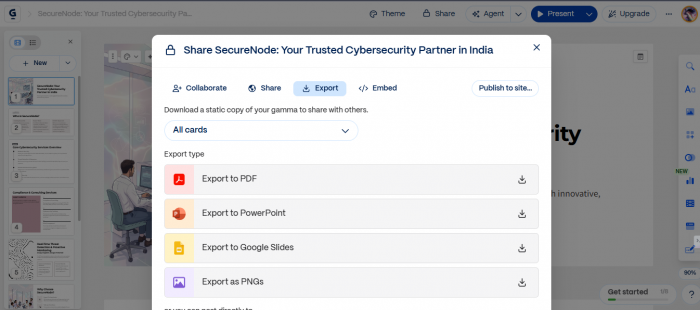
A single Gamma project can be shared as a live web link, published like a lightweight website, exported as a PDF, converted into PowerPoint, or opened in Google Slides. That matters to me because the same content usually needs more than one form. A pitch deck also has to work as a link I send investors. A report needs to function as a scrollable document. Gamma removed my need to rebuild the same material in three tools.
Editing means revising, not rearranging
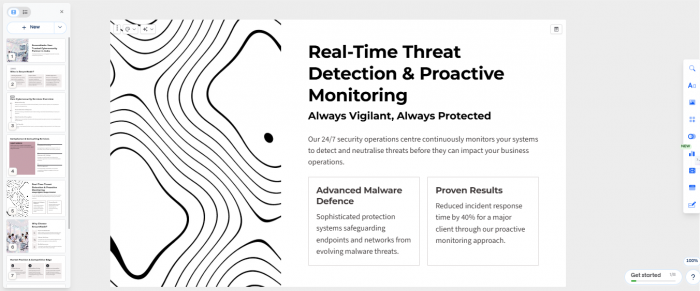
In PowerPoint, editing means moving things around. In Gamma it feels like revising content. I adjust sections, rewrite paragraphs, ask the AI to simplify language, expand a point, change tone, or translate, and the system rebalances the design automatically. That is an enormous win if I am not a designer, with one catch I ran into: lean entirely on the automation and add none of my own taste, and the result starts feeling template-like anyway.
Collaboration is built in, not bolted on
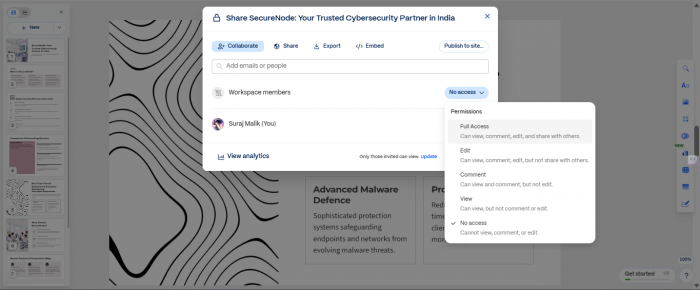
Multiple people edit at once, leave comments directly on sections, and share workspaces without emailing files around. Gamma also tracks engagement on shared links, which I found genuinely useful after sending a proposal and wondering whether anyone opened it. If your team lives with the final_v7_really_final_this_one problem, the centralised workflow is a relief.
Where it performs and where it stops
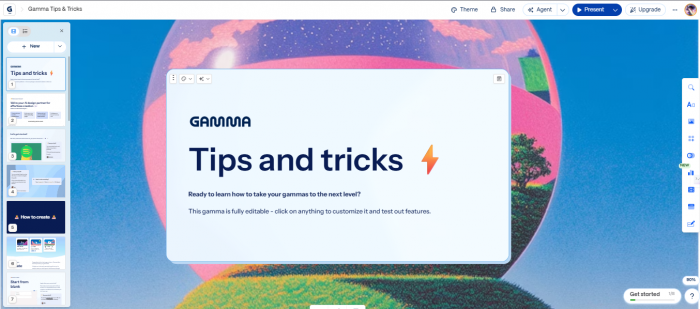
Gamma performs best when speed, clarity, and structure matter more than absolute design control. Founders building investor decks, sales teams writing proposals, marketers publishing lightweight pages, educators building lesson material. It stops short of professional design tools: detailed brand systems, complex animations, advanced interactive sites, and offline editing all run into limits. It is cloud-based, which helps collaboration and matters if you handle confidential material.
For teams generating repeated decks at scale, Gamma's Beta API allows programmatic creation of presentations and structured documents. Traditional slide tools rarely offer automation at that level. It is irrelevant to me today, but it signals where the product is heading.
The export test, where the two tools split
This is the section I would read first if I were choosing today, because it is the single point where my two test runs diverged hardest.
Slidesgo passed my four-point export check cleanly. Fonts, alignment, image placement, and editability all survived the trip to both PowerPoint and Google Slides, with nothing flattened into pictures.
Gamma is where the picture changes. Its presentations live on the web. The card-based format, animations, embedded videos, and interactive elements are all web-native, and when you export to PowerPoint those features disappear. The conversion from scrollable cards to fixed 16:9 slides frequently introduces broken text boxes, resized images, and missing elements. Independent review analysis found Trustpilot and Capterra complaints dominated by exactly this issue.
THE TRAP I WOULD AVOID The worst outcome is choosing Gamma because I want the AI to write, then exporting to PowerPoint because that is what my team expects. I pay more, I get the better draft, and then I spend the saved time repairing broken layouts. If your organisation runs on .pptx files, Gamma's writing advantage is a trap rather than a feature. |
Side by side on eight criteria
| What I care about | Gamma | Slidesgo | My call |
|---|---|---|---|
| How the deck is built | Generates layout and copy together, no template shelf | Matches my prompt to a human-designed template from 30,000+ | Depends on originality versus reliability |
| Quality of the writing | Real prose with narrative flow, worth editing rather than replacing | Outlines, not content. 14% of sentences wrong on my technical brief | GAMMA |
| Speed to first draft | Roughly 30 seconds to a full themed deck | Under a minute in every run I timed | Effectively a tie |
| PowerPoint export | Converts, but web-native cards and embeds do not survive fixed 16:9 | Fonts, alignment, images, editability all intact in my test | SLIDESGO |
| Sharing as a link | Native, publishes as a live page with engagement tracking | Not what the product is for | GAMMA |
| Entry price | Around $8 to $10 a month for watermark-free output | $35.99 a year, roughly $3 a month | SLIDESGO |
| Brand control | Limited, and a recognisable house style creeps in | I scored it 4.5 of 10, no locked brand kits or style rules | Neither. Look at Canva or Beautiful.ai |
| Team workflow | Live co-editing, comments, shared workspaces, analytics, Beta API | Editor tops out at touch-ups, no real collaboration story | GAMMA |
How I read my own table Gamma takes four rows, Slidesgo takes two, and two go to neither. That looks decisive until I notice which rows. Gamma wins on writing, sharing, and teamwork. Slidesgo wins on export integrity and price. If my deliverable is a .pptx file, Slidesgo's two wins are the only two that exist in my world, and Gamma's four are worth nothing to me. That is why I stopped treating this as a scoreboard. |
Pricing for both tools
| Plan | Price (USD) | Generations | Watermark |
|---|---|---|---|
| Slidesgo Free | $0 | 3 AI decks, 3 downloads per month | Slidesgo credit on slides |
| Slidesgo Premium monthly | $5.99 / month | 150 decks, 150 downloads | None |
| Slidesgo Premium yearly | $35.99 / year | 150 decks, 150 downloads | None |
| Gamma Free | $0 | Credit-based, one deck consumes a large chunk | Made with Gamma |
| Gamma Plus | Around $8 to $10 / month | Unlimited or high AI credit ceiling | None |
| Gamma Pro | Around $15 to $20 / month | Unlimited, advanced models, analytics, custom fonts | None |
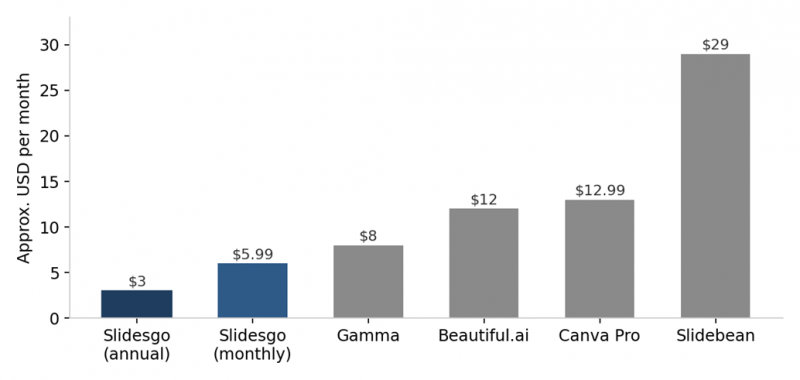
The gap is not subtle. Slidesgo on the annual plan costs less than a quarter of Beautiful.ai or Canva Pro, and about a tenth of Slidebean. Prices shift constantly and most tools discount annual billing, so I treat these as rough coordinates rather than exact figures, but the ordering has been stable for a while.
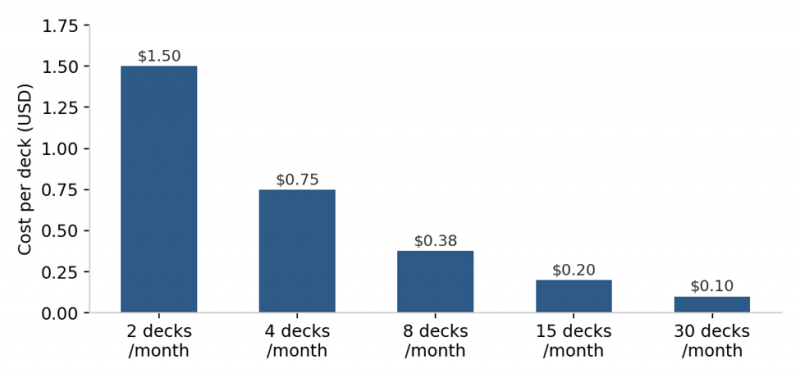
At a modest four decks a month I am paying about 75 cents per professionally designed presentation. At teacher or consultant volumes the cost per deck drops below a coffee refill. That is the strongest argument in Slidesgo's favour and the reason my value score sits at 9.5 despite the writing weaknesses.
HOW I SUBSCRIBE TO EITHER OF THESE Billing complaints are the loudest negative theme for both products by a wide margin. Plans auto-renew, refunds for time already paid are generally not offered, and reviewers on both platforms describe cancellation flows they found confusing. None of it affected me because I planned around it. I start on the monthly plan even though annual is cheaper, put the renewal date in my calendar with three days of head start, screenshot the cancellation confirmation the moment I cancel, and use a virtual card where my bank supports one so I always hold the off switch. |
G2 and Trustpilot ratings, and why they conflict
My testing is one data point, so I cross checked it against the public review platforms. What I found was a split so consistent across both products that it stopped looking like noise.
| Platform | Gamma | Slidesgo | What drives the number |
|---|---|---|---|
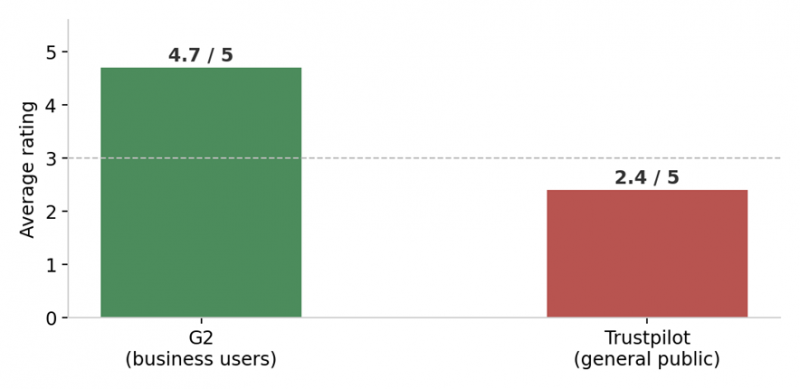
| G2 | Around 4.3 to 4.7 out of 5 | Around 4.7 out of 5 | Business users judging the product itself |
| Trustpilot | Around 1.9 to 2.0 out of 5 | Around 2.4 out of 5 | General public on billing and support |
| Capterra | Around 3.7 out of 5 | Not consistently listed | Mixed buyer base |
Slidesgo sits around 4.7 on G2, with praise concentrated on template range, speed, and price, and near 2.4 on Trustpilot, dragged down almost entirely by billing and cancellation disputes rather than complaints about the slides. Read together, those two scores tell one coherent story: people like the product, people do not like the subscription mechanics. My own experience matched the first half, and I structured my subscription to avoid testing the second.
Gamma's split has a second cause layered on top. Its G2 rating runs higher partly because G2 users skew toward teams that share presentations as links, which is the workflow Gamma is designed for. The low Trustpilot number is populated by people who tried to get a PowerPoint file out. Same product, two populations, two verdicts.
What users wrote about Gamma
A marketing lead at a mid-market company calls Gamma a refreshingly modern tool that makes it fast to create visually appealing decks, and describes the AI-assisted content generation as a real time-saver for first drafts and internal presentations. Compared with PowerPoint or Google Slides, they say it significantly reduces time spent on formatting. The same reviewer notes it lacks the fine-grained customisation power users need, while still preferring it to a blank deck. Head of Marketing & Growth, mid-market company, G2 |
One reviewer built a detailed presentation as a paying member, then found that exporting to both PDF and PowerPoint left content missing or corrupted, with sections gone, characters replaced by strange symbols, and the layout broken. Support declined to help because the account was no longer on a paid plan. Trustpilot review of gamma.app |
Another complaint describes Gamma disregarding an uploaded template even when explicitly asked to preserve the format, and repeatedly reusing the same limited set of graphics regardless of the topic. Trustpilot review of gamma.app |
A more positive Trustpilot reviewer calls the platform genuinely convenient, praising the intuitive visual editor, ready-made templates, and fast publishing, and credits it with launching several projects quickly. Trustpilot review of gamma.app |
G2's aggregated sentiment lands in the same place I did. Users consistently praise ease of use and time saving and appreciate the clean layouts, while some note the AI-generated content can feel generic or repetitive and needs manual adjustment. Ease of use, speed, and time efficiency are the top-tagged positives. Limited customisation, template limitations, and missing features are the top-tagged negatives.
For scale: Gamma has reached somewhere between 40 and 70 million users depending on which count you read, on roughly $100M in annual recurring revenue and a $2.1B valuation as of 2026. Whatever the exact figure, that growth happened largely by word of mouth, which is itself a data point about how the first run feels.
My verdict
What I would tell a colleague over coffee Answer my one question before you open either pricing page. Does the deck end as a link, or as a file? If it ends as a link, I would buy Gamma. The writing is genuinely better, the published page looks designed, the engagement tracking tells me whether the proposal was ever opened, and I skip the export problem entirely because I never export. Every complaint dragging Gamma's Trustpilot score down comes from someone on the other path. If it ends as a .pptx handed to someone else, I would buy Slidesgo. My export came through with fonts, alignment, images, and editability intact, nothing flattened into pictures, and it costs about three dollars a month. I would go in knowing I am buying a designed shell and writing the words myself, budget the 38 to 67 minutes of editing my stopwatch found, and treat every statistic the AI produces as unverified until I check it. If you need enforced brand systems or real design control, neither of these is your tool. I scored Slidesgo 4.5 out of 10 on brand control and Gamma is not meaningfully better. That is a Canva or Beautiful.ai problem. |
Slidesgo earned a place in my toolkit, but a narrow one. When I need a presentable deck fast and I am willing to write the content myself, it saves me a genuine hour or two. What I will not do is trust it with content, because more than half the AI's writing on my hard prompt was either too generic to keep or factually wrong, delivered with total confidence. That risk disqualifies it for anything where accuracy matters more than appearance.
Gamma earned a wider place, but a conditional one. It is the better writer and the better collaborator, and I would reach for it first on anything I plan to send as a link. The moment someone asks me for the PowerPoint file, my enthusiasm drops sharply.
Five habits that improved my output on either tool
1. Write the prompt like a creative brief. Audience, purpose, tone. My detailed prompts consistently produced tighter structures than one-line prompts.
2. Set the length before generating. On Slidesgo the default shortest setting gave me skeleton decks. I now match it to my real speaking time.
3. Regenerate a weak slide before editing it. Rerolling is faster than rewriting for structure. I do not expect rerolls to add factual depth, because in my testing they changed wording more than substance.
4. Split editing across two tools. I do structural work in the AI tool, then export and fine-polish where the controls are stronger.
5. Fact check with a highlighter mindset. I highlight every statistic, date, and technical claim the AI wrote and verify each one. My audit says this step is not optional.
Post Comment
Share your thoughts about this article.
Be the first to post a comment!





