Images do not always fit the space where people want to use them. An image in portrait mode may require a landscape banner and a product picture may require space around the image in a web site design. Some of the problems can be resolved by cropping, however, in most cases, it distorts the original image or eliminates valuable information. Another technique of AI outpainting is to expand an image beyond its current boundaries.
For beginners and experienced creators alike, learning how to ai expand image free tools can make everyday editing much easier. Rather than scaling up pixels or manually adding backgrounds, users can allow artificial intelligence to create new visuals that complement the original photograph. This allows them to resize pictures, add more background, and customise pictures to fit the various platforms without having to begin anew.
What Is AI Outpainting?
AI outpainting is an image-editing method whereby artificial intelligence is used to expand a picture past its original limits. It creates new contents to the blank spaces around an existing picture and tries to preserve the original style, light, colours, textures, and perspective.
Conventional image editing generally involves users copying and pasting background images, cloning parts or simply painting in more details. These methods can be effective when dealing with simple backgrounds but are complicated when a picture presents complicated objects, buildings, scenery, or people.
AI outpainting tackles the task in a different manner. It examines what is there to be seen, and guesses what can logically be assumed to be out of the frame. To illustrate, in case an individual posts a photo of an individual standing in a garden, an outpainting tool could be used to stretch the grass, trees, flowers, and other landscapes beyond the actual boundaries.
What is obtained is a larger composition that resembles a bigger picture as opposed to a picture with glaring blank areas.
What Is AI Image Expansion?
AI outpainting is based on machine learning models, which are trained using large sets of images. These models acquire knowledge of objects, colours, textures, shapes and other visual surroundings in the course of training.
During the uploading of an image by a user, who requests expansion, a number of processes occur.
1. Analysing the Original Image
The initial process is to make sense of the picture uploaded. The AI model analyses its visual aspects such as the primary subject matter, background, lighting, colours and total composition.
In the case of a photograph of a mountain landscape, it can identify mountains, clouds, trees, rivers and the natural direction of light.
This knowledge enables it to create more scenery that matches the given photograph.
2. Making More Canvas Space
After analysing the image, the tool creates extra space around its original boundaries. The user is normally given an option of whether to expand the picture either horizontally or vertically or both.
A square picture can be stretched into a landscape photograph and a portrait photograph may become a landscape photograph.
The original picture is used as the reference and the new spaces that are created occupy the rest of the canvas.
3. Extrapolating Missing Visual Information
The AI model then creates content to fill the blank spaces. It applies patterns in training to make predictions of what is to be seen outside the initial frame.
In case there is a picture with a wooden table, the area generated may be the continuation of its surface and the room around it. In case there is a blue sky, the model could extrapolate the clouds and colour gradients in a natural manner.
It is not merely a task of repeating the existing pixels. It is to generate new visual data that appears to be similar to the original scene.
4. Mingling the Expanded Areas
The last step is to mix the results with the original photo.
The system tries to match the lighting, shadows, textures, colours and perspective. An effective outpainting ought to lack an apparent edge between the original image and its extended environment.
But not everything works out. Sometimes, this can lead to visual inconsistencies due to the complicated patterns, human hands, reflections, and detailed architectural elements.
AI Outpainting and Traditional Image Resizing
Image expansion and image resizing can be used interchangeably, however, they address different issues.
Traditional resizing modifies the size of an image. It can either expand pixels, diminish quality or alter the overall resolution, depending on the process.
Outpainting creates more content beyond the frame.
Feature
Traditional resizing
AI outpainting
Main purpose
Change image dimensions
Extend image boundaries
New visual content
Usually no
Yes
Background expansion
Limited
AI-generated
Composition changes
Limited
More flexible
Best for
Basic size adjustments
Creative image expansion
To illustrate, consider a photograph of a product which has been trimmed down. The background of the product cannot be made by resizing. The AI outpainting is capable of creating more space without obstructing the original product.
The difference renders outpainting particularly handy to creative assignments, which may need various aspect ratios.
In Which Fields Can AI Outpainting Be Applied?
Image expansion using AI can be used practically in a variety of industries. It is able to assist creators to edit the existing photographs rather than have to conduct repeated photo shoots.
- Social Media Content
Different dimensions are used in social media sites. An image that appears fantastic on Instagram cannot be placed in a YouTube thumbnail, Facebook cover, or Pinterest graphic.
Outpainting enables artists to extend the background and manipulate the composition without the subjects being cut out.
As an illustration, a close-up portrait can be stretched horizontally to provide space to text, branding, or other graphic features.
- E-Commerce Product Photography
Product images must have varying layouts on the online stores. A product-listing photograph can be a photo in which there is insufficient background space to make a homepage banner or a promotion graphic.
The AI can be used to extend simple backgrounds, make more space around products, and assist in keeping the image dimensions constant throughout a catalogue.
Nonetheless, generated results should be examined closely by sellers. AI must not alter the real look, colour, form or character of the product being advertised.
- Digital Art and Illustration
Artists can use painting to experiment with larger compositions. The character description may be further elaborated by adding more scenery, environmental information or objects around the character.
This may be applicable in creating concept art, fantasy worlds, book illustrations, and digital storytelling.
- Blog and Web Site Photographs
Website designers are frequently required to have broad pictures of banners, header images, and thumbnails of articles. A given photograph can also have the appropriate subject but inappropriate size.
Enlarging the image may provide more background to the headings, descriptions and other design aspects.
- Personal Photography
Professional designers are not the only ones who outpaint. It can even be used by everyday people to enhance personal photographs.
One may desire to enlarge a vacation photo to have more landscape, a larger family shot, or to print an image.
It gives the chance to experiment with images that were initially taken with a narrow frame.
Recommended Tools for AI Image Expansion
There are a number of AI-driven tools that allow image expansion to users who have various editing needs. The correct decision varies according to the image type, output required, features available, and experience.
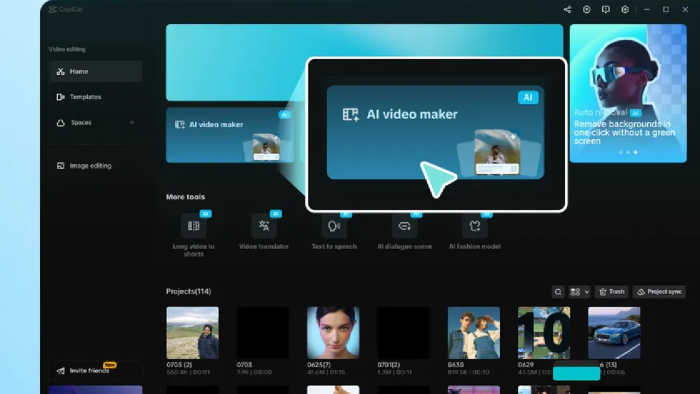
1. CapCut AI Image Expansion
CapCut is a convenient alternative in the hands of creators, who desire simple image-editing capabilities. Its AI-based image tools can assist users to make images fit in various formats and creative applications.
Individuals seeking an AI image expander can delve into image expansion as a component of a broader editing process.
This kind of tool may come in handy when creating social media graphics, promotional illustrations, and digital materials. Its strength lies in the fact that one can work with images without having to have a high level of experience in photo-editing.
2. Adobe Photoshop Generative Expand
Adobe Photoshop provides Generative Expand with the help of its AI-driven editing capabilities. It enables users to stretch an image bigger than it was before and create more visual information.
It is especially handy among photographers and designers who already utilize Photoshop.
Users are allowed to manipulate the canvas and create more scenery to an already existing subject. There might be several results and it is more convenient to compare various interpretations.
3. Canva Magic Expand
Canva offers AI-based design experiences to enable users to adjust images to various layouts.
Magic Expand would be especially applicable when an image should be expanded to accommodate a design. To illustrate this, a photograph may be manipulated to fit into a presentation, social media graphic or a web page design.
The design oriented environment allows it to be convenient to individuals that prefer to add image expansion to text, shapes and other visual contents.
4. Fotor AI Image Extender
Fotor provides online image-editing services, such as AI-assisted image expansion. It has the capacity to allow people to stretch pictures and explore alternative arrangements.
The web-based workflow is also user-friendly to those who do not want to install software to do the editing.
It can be considered for personal photographs, marketing graphics, and everyday creative projects.
Guidelines on achieving higher AI outpainting scores
Even though AI outpainting can save time, the quality of the resultant image is dependent on a number of factors. Some practical modifications can be taken to enhance the results.
- Start With a High-Quality Image
A high-resolution, clear photograph tends to have better visual data to analyse with the AI model.
It may be difficult to create realistic extensions because of blurry images, over-compression and bad lighting.
The best version of the original photograph should be used whenever an opportunity arises.
- Select the Appropriate Expansion Direction
Consider the ultimate use of the picture and then widen it.
Horizontal expansion might be suitable in the case of website banners. Vertical expansion may be better in the case of a vertical advertisement or mobile wallpaper.
When making a larger composition it can be helpful to expand both directions as well.
- Keep the Main Subject in Mind
When expanded, the main subject should continue to be important visually. Excessive unused space may cause a photograph to be in balance.
As an example, in the case of extending a portrait, ensure that there is sufficient space around the individual without making him/her look too small.
- Use Clear Prompts
Certain AI tools enable users to write in the enlarged space about what they desire.
Rather than having a general instruction, give specific details.
For example:
- Have a continuing green garden with natural trees and flowers.
- Sail clouds white soft Over the blue sky.
- Include additional neutral studio background of the product.
- Extend the wooden floor and interior walls.
Specific descriptions can help guide the generation process.
- Generate Multiple Versions
The same picture can be perceived differently with every use of AI models. One of them may be realistically lighted with a strange background, and another one may yield a more harmonious composition.
Creation of multiple versions will enable users to have a number of pictures to choose which one satisfies their expectation.
Common Problems With AI Image Expansion
Although it has its benefits, there are limitations to AI outpainting. Gaining insight into these problems can assist users in not being disappointed.
Inconsistent backgrounds: The background generated can have objects or patterns that are not similar to the original scene. This is especially pronounced in images of elaborate buildings or patterns.
Inaccurate proportions: AI can produce objects that have odd shapes or sizes. Buildings, furniture, and other structural features can even appear distorted.
Lighting variations: Newly created spaces can be somewhat different in terms of lighting or shadows, and the enlarged image will look unnatural.
Unrequested objects: There are instruments that can add undesired details. These may be other individuals, objects or ornaments.
Sudden artificial changes: There are possibilities that the border between the original photograph and the created material will not be completely erased.
It is always better to revise all the results and make some other corrections where it is needed. Extensions created by AI do not necessarily need to be perceived as the correct depiction of real-world places or events.
Is AI Painting Free?
Certain AI image expansion programs are free, have a limited credit option, or have a trial option. Others charge a subscription or payment of extra generations, more resolution exports, and editing capabilities.
Free features are not always available, and users should verify the available conditions prior to initiating a project.
The initial price is not the only thing to consider when comparing tools. Check the quality of exports, maximum image size, speed of generation, watermarks, privacy policy and attempts remaining.
An online free editor can work perfectly well on a few personal edits, whereas a service with more options over image quality and size might be preferable to professional creators.
The Future of AI Image Expansion
AI outpainting is an emerging valuable aspect of digital image editing. With the increase in the state of the generative models, they are likely to become more skilled at visual context, object proportions, and realistic extensions.
The expansion of complex scenes, the preservation of detailed elements, and the control of the look of the generated areas with the help of more specific instructions can also become easier in the future.
These enhancements would save time in editing pictures to fit the various platforms among photographers, marketers, designers, and the general users.
But human judgement will not be neglected. Even the most developed AI tools may err, especially when it comes to working with the intricate subjects or scenes that need visual facts.
Frequently Asked Questions
1. What does AI outpainting mean simply?
AI outpainting is a tool that extends an image to new dimensions, creating new visuals. It assists users to make larger or taller compositions without having to hand-draw more backgrounds.
2. Does AI outpain the same as generative fill?
They have a close relation to each other. The two rely on AI to create image material. Generative fill may add, delete or substitute the elements selected, and outpainting is particularly concerned with extending the image, but beyond its current limits.
3. Does AI have the ability to stretch an image and still keep the original subject?
Yes. Numerous applications exist to save the original photograph and create content around it. But this may not always happen, and the end user should look into the output to make sure that the main subject is not modified.
4. Is it possible to enlarge an image free of charge?
Yes, there are sites that have free image expansion or credits. Nevertheless, the quality of export, generation rates, and features available are determined on the service of each individual.
5. Does AI outpainting lower image quality?
Not necessarily. The original image can be preserved as new areas are produced. But it will rely on the quality of the expanded parts, which is determined by the AI model, the resolution of the original image, and the export settings.
Conclusion
The AI outpainting offers a convenient solution to enlarge photographs, add more background, and adjust pictures to suit various artistic needs. It provides an alternative to traditional resizing and manual editing by analysing the existing visual data and creating new information that falls outside the original constraints.
Image expansion can help to make graphic representation of social media and product photography more adaptable, as well as digital illustrations and banners on websites. Selecting an appropriate tool, beginning with a clear photograph and examining the generated details can assist users to get a better result.
With AI technology still in its early stages, outpainting will probably become a more accessible process in daily image generation and allow individuals to have more liberty in remaking and re-purposing their own images.