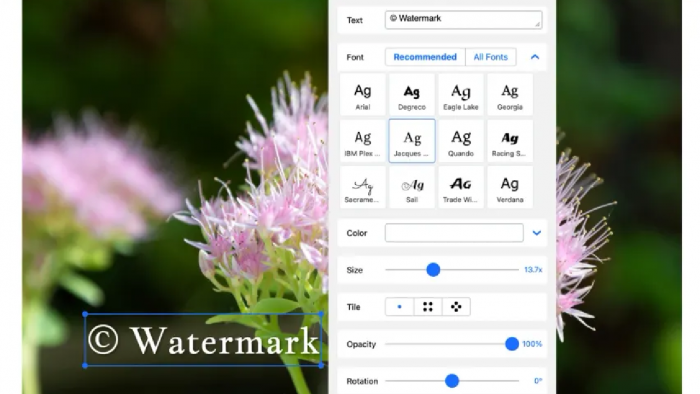
Watermarkly is an online image and document editing tool built mainly for adding watermarks to photos, PDFs, and videos. It also includes useful browser-based tools for resizing, cropping, compressing, converting, blurring, adding text, and removing backgrounds. The platform is especially useful for photographers, online sellers, creators, marketers, and small businesses that need quick batch editing without installing complex desktop software.
What Is Watermarkly?
Watermarkly is a web-based visual editing platform that helps users protect, brand, and prepare images for publishing. Its main strength is watermarking: users can add text, logos, image numbers, copyright symbols, and multi-part watermark designs to one photo or an entire batch.
Unlike many online tools that rely heavily on uploading files to servers, Watermarkly emphasizes browser-based processing and privacy. According to the company, photos stay private in the user’s browser, and the app does not store or access them during standard image watermarking.
Key Features of Watermarkly
1. Batch Watermarking
Watermarkly allows users to watermark multiple images at once. This is useful for photographers, real estate agents, eCommerce sellers, bloggers, and social media managers who regularly process large sets of visuals.
Users can apply the same watermark across a batch, preview the result on each image, and adjust placement or appearance before exporting.
2. Text and Logo Watermarks
The platform supports both text-based and logo-based watermarks. Users can customize font, color, opacity, size, rotation, placement, and effects. Watermarkly also offers a large font selection, visual effects, and built-in symbols for creating simple branded designs.
This makes it practical for users who do not already have a finished logo file.
3. Photo Editing Tools
In addition to watermarking, Watermarkly includes several everyday image tools:
Resize photos
Crop photos
Compress images
Convert to JPG, PNG, or WEBP
Add text to photos
Blur faces, license plates, or selected areas
Remove image backgrounds
These tools make Watermarkly more than a single-purpose watermark app. It can handle many common image preparation tasks from one browser interface.
4. PDF and Video Watermarking
Watermarkly also supports watermarking PDFs and videos. This is helpful for businesses, creators, teachers, and agencies that need to protect documents or video content before sharing it online.
5. Cross-Device Access
Watermarkly works in a browser and also offers mobile apps. Paid access includes web tools, mobile apps, and desktop apps for Windows and Mac, depending on the tool and platform.
How to Use Watermarkly
Go to the Watermarkly website.
Choose the tool you need, such as Watermark Images, Watermark PDF, Resize Photos, or Compress Images.
Upload files from your device or supported cloud storage.
Add a text watermark, logo watermark, or other edits.
Preview the result and adjust size, opacity, placement, or format.
Export and download the finished files.
The workflow is simple enough for beginners, but the customization options are detailed enough for regular content creators and business users.
Pricing Structure
Watermarkly offers free access with some limitations. The free version can process photos, but it adds a Watermarkly logo along with the user’s own watermark.
Paid plans remove this limitation and unlock full access to tools.
1-Year Access
Listed at $19.95
Paid annually
Does not renew automatically
Includes full access to all tools
Can be used on up to 10 devices
Removes the Watermarkly logo
Includes a 30-day money-back guarantee
Permanent Access
$39.95 one-time fee
Lifetime access
Includes full access to all tools
Can be used on up to 10 devices
Removes the Watermarkly logo
Includes a 30-day money-back guarantee
For users who only need watermarking once or twice, the free version may be enough. For regular use, the permanent access plan is the stronger value.
Top 5 Alternatives of Watermarkly
Visual Watermark: A desktop-focused tool for watermarking large photo and video batches.
Canva: A design platform with basic watermarking, templates, and social media graphics.
iLoveIMG: A simple online image toolkit for compression, resizing, cropping, and conversion.
Adobe Express: A beginner-friendly design and editing tool with branding features.
Fotor: A web-based photo editor with background removal, resizing, filters, and design tools.
Customer Reviews and Feedback
Watermarkly has a strong review profile on Trustpilot, with a 4.9 rating and thousands of reviews. Recent reviewers frequently mention that the app is easy to use, fast, reliable, and convenient for creating professional-looking watermarks.
Positive feedback often focuses on:
Simple interface
Fast watermarking process
Good customization options
Reliable batch editing
Useful free version
Good results without needing design experience
Critical feedback is less common, but some users mention:
The free version adds a Watermarkly logo
Some users have had issues with uploads or activation
Video workflows may be less smooth than image watermarking
Advanced users may still prefer desktop software for heavy production work
Pros and Cons
Pros
Cons
Easy to use for beginners
Free version adds Watermarkly branding
Strong batch watermarking tools
Not a full professional photo editor
Works directly in the browser
Some workflows may depend on browser/device performance
Supports images, PDFs, and videos
Advanced editing control is limited compared with Photoshop
Good pricing for long-term use
Video and large-batch work may be better in desktop tools
High Trustpilot rating
Some users report occasional login or upload issues
Final Verdict: Is Watermarkly Worth It?
Watermarkly is worth considering if you need a simple, reliable, and affordable way to add watermarks to photos, PDFs, or videos. Its biggest advantage is that it combines batch watermarking with practical image tools like resizing, cropping, compression, conversion, text overlays, and blur features.
It is not designed to replace advanced software like Photoshop, but that is also part of its appeal. Watermarkly works best for users who want quick results without a steep learning curve.
For photographers, online sellers, real estate agents, creators, and small businesses, Watermarkly is a practical choice. The permanent access plan is especially attractive for users who expect to watermark or prepare visual content regularly.
FAQs
Q1. Is Watermarkly free to use?
Yes. Watermarkly offers free access, but the free version adds a Watermarkly logo to processed images. Paid plans remove this limitation.
Q2. Can Watermarkly watermark photos in batches?
Yes. Batch watermarking is one of Watermarkly’s main features. Users can apply a watermark to multiple photos at once and preview the results before downloading.
Q3. Does Watermarkly work on mobile?
Yes. Watermarkly works in mobile browsers and also offers mobile apps for iOS and Android.
Q4. Can Watermarkly watermark PDFs and videos?
Yes. Watermarkly includes tools for watermarking images, PDFs, and videos.
Q5. Is Watermarkly suitable for businesses?
Yes. It is suitable for photographers, eCommerce sellers, agencies, real estate professionals, creators, and small businesses that need branded or protected visuals.