They both turn a prompt into video, so they get compared constantly. But they do almost opposite jobs. This guide breaks the difference down the way a creator actually decides: by what you are making, what it costs, and what real users report after the honeymoon ends.
The short answer
If you want short, original, eye-catching clips that look generated and cinematic, pick PixVerse AI. If you want a complete, narrated, ready-to-post video built from one prompt, pick InVideo AI. They are not really rivals. They are two different stages of making video.
PixVerse Choose it if you are • Making TikTok, Reels or Shorts with motion effects and trends • Animating a single photo into a moving clip • Producing cinematic b-roll, intros or product teasers • Working in anime, 3D or stylized looks • On the tightest budget and want the cheapest entry | InVideo Choose it if you are • Running a faceless YouTube channel with narration • Making marketing, promo or ad videos at length • Building explainers, training or educational content • Publishing in many languages with AI voiceover • A beginner who wants a finished video, not raw clips |
Bottom line PixVerse generates footage. InVideo assembles videos. The fastest way to choose is to finish this sentence: “I need the tool to hand me a ___.” If the blank is a clip, go PixVerse. If the blank is a whole video, go InVideo. |
Side-by-side at a glance
Everything that usually matters to a creator, in one scan. Color marks who leads each row: violet PixVerse or teal InVideo.
| Factor | PixVerse AI | InVideo AI |
|---|---|---|
| What it makes | Original AI-generated clips | Complete videos from stock plus AI |
| Best output | Short cinematic and effect clips | Narrated marketing and social videos |
| Typical length | 5 to 15 seconds (up to 30s upscaled) | Short or full length, many minutes |
| Resolution | 1080p, 4K upscale on higher tiers | 720p free, 1080p Plus, 4K on Max |
| Voiceover | Basic native audio and lip-sync | 50+ languages plus voice cloning |
| Stock library | None, it generates visuals | 16M+ licensed clips (iStock, Storyblocks) |
| Templates, effects | Viral effects, dances, transforms | 7,000+ marketing templates |
| Editing | Re-prompt, extend, restyle, modify | “Magic Box” text-command editing |
| Generation speed | 30 to 60 sec per clip | 1 to 5 min per draft |
| Free plan | Daily free credits, watermark | 10 AI min per week, watermark |
| Paid from | $10/mo (Standard) | $25/mo (Plus) |
| Frontier models | In-house V6, R1, C1 | Sora 2 + Veo 3.1 bundled |
| Platforms | Web, iOS, Android, API | Web (all browsers), API on Max |
| Trustpilot | 1.5 / 5 | 4.1 / 5 |
| Built for | Social creators, animators, effects | Marketers, faceless YouTube, business |
Figures researched June 2026 from official pages and independent reviews. Pricing and limits change often, so confirm on each tool’s site before buying.
Meet the tools
What each tool actually is
PixVerse AI, the generator
PixVerse AI (by AIsphere, now Singapore based) is a generative video engine. You type a scene or upload an image, and the model invents the footage frame by frame. Its latest model, V6, produces 15 second clips at 1080p with multi-shot continuity, native audio and more than 20 cinematic camera moves. It reached unicorn status in 2026 and reports over 100 million creators across 175 countries.
In practice it shines at short, expressive content: turning a product photo into a spinning hero shot, animating a portrait, or producing the kind of viral effect clips (dances, transformations, dramatic camera pushes) that do numbers on TikTok and Reels. It works on web, iOS and Android, with an API for teams.
In one line A short-form film studio in your browser: fast, cinematic, effect-heavy clips made from nothing but a prompt or a photo. |
InVideo AI, the producer
InVideo AI (founded 2017 in Mumbai by Sanket Shah, 50 million plus users) is a full production pipeline disguised as a text box. You describe the video you want, and it writes the script, picks footage from a library of 16 million plus licensed stock clips, records an AI voiceover, adds captions, music and transitions, and hands you a finished video. You refine it by typing commands into a “Magic Box,” with no timeline to learn.
Its 2026 headline is model access: it is the only platform that bundles both OpenAI’s Sora 2 and Google’s Veo 3.1 in one subscription, so you can drop genuinely generated clips into an otherwise stock-based edit. It also added e-commerce tools that turn a few product photos into a multi-shot ad while keeping your real packaging and logo.
In one line Type an idea, get a complete narrated video. Best treated as a fast first-draft engine for marketing and faceless content, not a frame-by-frame editor. |
The core difference that decides everything
Almost every other comparison point flows from this one idea: PixVerse creates pixels, InVideo arranges assets. PixVerse generates brand new footage that has never existed. InVideo writes a script and builds a video around mostly stock footage and AI voiceover. Here is the same job, run through both.
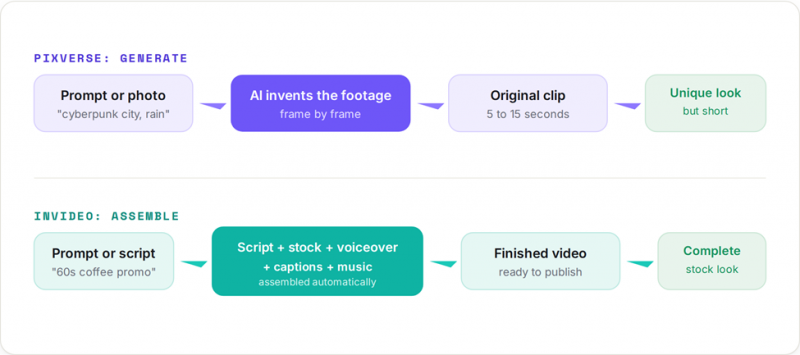
This is why a feature-by-feature box can mislead you. PixVerse will never have a 16 million clip stock library, because it does not use stock. InVideo will rarely match a pure generator on a single hero shot, because its strength is the whole edit. Judge them on the job, not the checklist.
9 rounds, head to head
Each round names a likely winner. “Depends” means the honest answer is that it changes with your use case, and a single trophy would mislead you.
Output type and visual quality
PixVerse Generates original, often striking footage. Reviewers praise the motion, lighting and cinematic feel, especially for landscapes, characters and stylized scenes. The trade-off is occasional logic glitches in complex prompts. | InVideo Output is a polished assembly of stock footage and AI voiceover. It looks clean and professional, but because it leans on shared stock and templates, your video can look like everyone else’s. |
Verdict: for a one-of-a-kind visual, PixVerse. For a finished, on-brand-enough marketing video, InVideo.
Video length and versatility
PixVerse Built for short form. Clips run 5 to 15 seconds, with upscaling to roughly 30 seconds. There is no real long-form memory, so stitching a coherent multi-minute story is hard. | InVideo Handles short clips and full-length videos in one pass, from a 15 second ad to a multi-minute explainer or faceless YouTube episode, all from a single prompt. |
Voiceover, audio and languages
PixVerse Newer models add native audio and lip-sync, which is great for self-contained effect clips, but it is not a narration engine. | InVideo A core strength: human-sounding AI voiceover in 50+ languages, voice cloning from a short sample, multiple voices per video, and one-click dubbing to other languages. |
Stock media and templates
PixVerse No stock library by design. Instead it offers trending effect templates (dances, transforms, beauty effects) that are perfect for social, less so for corporate work. | InVideo 16 million plus licensed clips plus 7,000 plus marketing templates sorted by platform and industry. If your video needs real-world b-roll, this is a major edge. |
Ease of use and learning curve
PixVerse Very beginner-friendly for clips. Pick a mode, write a prompt or drop a photo, generate. The skill is in prompt-writing to avoid wasted credits. | InVideo Equally beginner-friendly for finished videos. The catch is the chat-based editor: most people get a good first draft, then spend time coaxing the AI for the last fixes. |
Editing and creative control
PixVerse Control is prompt plus tools: re-prompt, extend, restyle, modify a region, motion reference. No frame timeline, so precision is limited. | InVideo Scene-by-scene edits via the Magic Box and precision controls on media, script and music. Still not a true editor: fixing the last 10 percent by hand is the common frustration. |
Verdict: neither replaces Premiere or DaVinci. If you need frame-precise control, both will frustrate you.
Generation speed
PixVerse Among the fastest in its class: a single clip often renders in 30 to 60 seconds, which makes rapid iteration on effects feel snappy. | InVideo A full draft takes about 1 to 5 minutes, which is remarkable for an entire narrated video, but slower per render than a single PixVerse clip. |
Pricing and entry cost
PixVerse Cheaper to start: paid plans from $10 per month, plus a daily free credit drip. Watch the credit burn from re-generating clips. | InVideo Starts at $25 per month, but a single subscription bundles Sora 2 and Veo 3.1, which would cost hundreds of dollars separately. Strong value if you use those models. |
Support, billing and trust
PixVerse Loved on the app stores, but its Trustpilot sits at 1.5 / 5, dominated by billing complaints: credits expiring, hard cancellation, slow support replies. | InVideo Trustpilot 4.1 / 5, with standout praise for fast human support. The recurring gripe is credit economics: regenerations cost credits and minutes do not roll over. |
Honest note on reviews Billing complaints follow this entire category. On Trustpilot, Runway sits near 1.2 and Kling near 1.3, so PixVerse’s 1.5 is typical of generators, while InVideo’s 4.1 is helped by active review prompts and genuinely praised support. Read scores as signal, not gospel. |
The scorecard
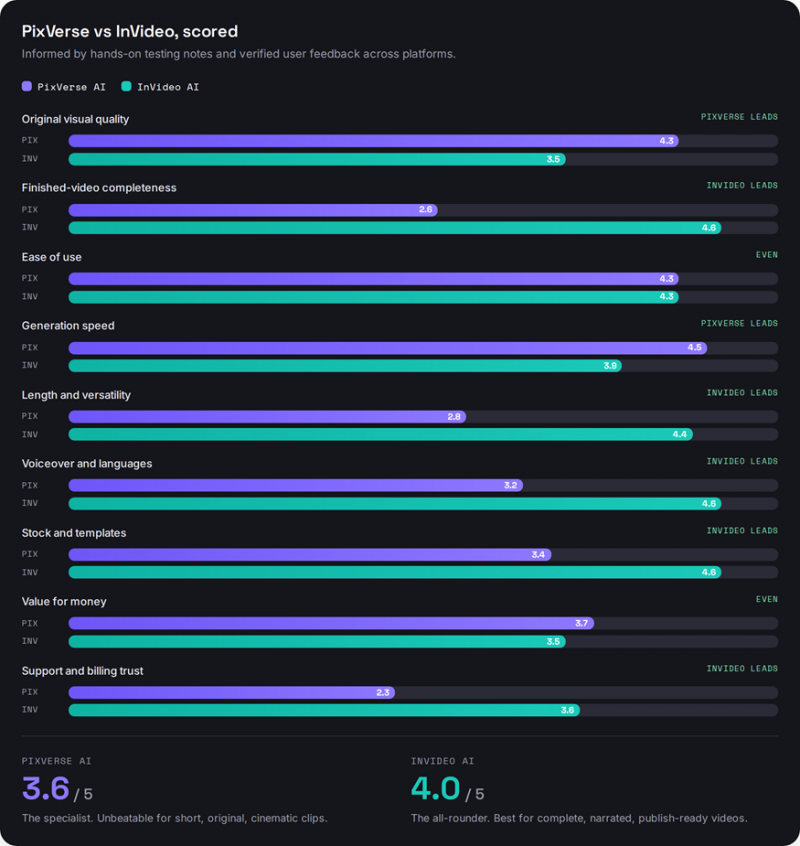
Our assessment across nine criteria, scored out of 5 and weighted toward what each tool is built to do. Longer bar is better.
Pricing compared
Both run on credits, and both attract the same complaint: the sticker price is not the real price, because re-generating burns credits. Here are the consumer tiers, then a visual of how entry costs stack up.
| Tier | PixVerse AI | InVideo AI |
|---|---|---|
| Free | 90 credits plus 60 daily, watermark, no commercial use | 10 AI min per week, 4 exports, watermark, no commercial use |
| Entry | Standard $10/mo. 1,200 credits, 720p, 3 jobs | Plus $25/mo. 50 AI min, 1080p, 2 voice clones, 80 iStock |
| Mid | Pro $30/mo. 6,000 credits, 1080p, 5 jobs, batch | Max $60/mo. 200 AI min, 4K, 5 voice clones, API |
| Top (consumer) | Premium $60/mo, Ultra $199/mo. off-peak savings, high volume | Generative ~$120/mo. bundles Sora 2 + Veo 3.1, about 5 min generative |
| Annual discount | About 20% (up to 40% on Ultra) | About 20% |
| The catch | Credits expire monthly; fast motion can double cost on older models | Minutes do not roll over; regeneration costs the same as generation |
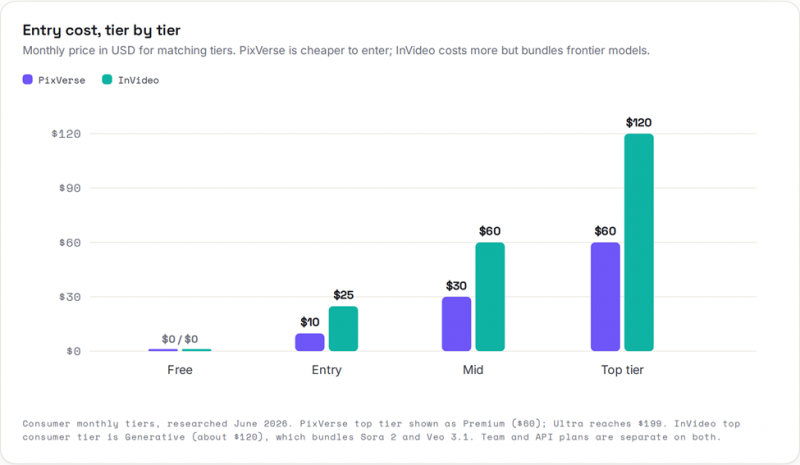
Consumer monthly tiers, researched June 2026. PixVerse top tier shown as Premium ($60); Ultra reaches $199. InVideo top consumer tier is Generative (about $120), which bundles Sora 2 and Veo 3.1. Team and API plans are separate on both.
Value depends entirely on output. If you need short clips, PixVerse’s $10 entry is hard to beat. If you need full narrated videos, or specifically want Sora 2 and Veo 3.1 in one place, InVideo’s higher price can still be the cheaper path overall.
What real users say
Paraphrased and shortened from public reviews on Trustpilot, G2, Product Hunt, Reddit and the app stores. Color marks the tool; the tag marks the sentiment.
PixVerse Positive ★★★★★ A fashion and beauty brand turns product photos into polished 15 second ads in under a minute, and reports cutting video production time and cost by over 70 percent. Trustpilot, verified buyer · E-commerce | InVideo Positive ★★★★★ After trying more than 25 tools, one creator pasted a full script and InVideo built the entire video, with voiceover, graphics, music, sound effects and footage, spot on. G2 reviewer · Social content |
PixVerse Mixed ★★★★☆ A hands-on tester found the detail and visual beauty live up to the hype, but flagged scene coherence and logic as the weak spot on complex prompts. Independent review · Output quality | InVideo Positive ★★★★★ Reviewers repeatedly single out fast support from real humans, not bots, calling it a rare mix of expertise and genuine care when something breaks. Trustpilot, many reviews · Support |
PixVerse Critical ★★☆☆☆ Simple prompts sometimes produce bizarre results, a head that explodes, a random object dropping in, and each failed attempt quietly burns credits. Trustpilot reviewer · Reliability | InVideo Critical ★★☆☆☆ Several buyers describe the credits as a trap that drains before you can export, with an AI editor that can feel like it speaks in code. Trustpilot reviewer · Credits |
PixVerse Critical ★★☆☆☆ App-store users love the speed and effects but call it expensive once you factor in re-making clips to land the result you wanted. Google Play · Pricing | InVideo Mixed ★★★★☆ In one tester’s runs, the first draft was usable about 70 percent of the time, with the rest needing minor scene swaps that took a few minutes. Independent review · Output quality |
Reading the ratings fairly PixVerse scores low on Trustpilot (1.5 / 5) yet strong on Google Play and Product Hunt, where casual creators love its effects. InVideo AI scores 4.1 / 5 on Trustpilot, while its legacy Studio editor carries roughly 4.7 on G2 and 4.8 on Capterra. The pattern across both: people love the speed and hate the billing surprises. |
Pick by use case
Which one wins for your content
Skip the theory. Find your kind of video and see who takes it.
| Faceless YouTube with narration | InVideo |
| Cinematic short clips and a film look | PixVerse |
| TikTok and Reels with viral effects | PixVerse |
| Marketing, promo and ad videos | InVideo |
| Explainers, training and education | InVideo |
| Animating a single photo | PixVerse |
| Multilingual or dubbed videos | InVideo |
| Anime and stylized motion | PixVerse |
| A finished video with zero editing skill | InVideo |
| B-roll, intros and transitions | PixVerse |
| Cheapest possible entry price | PixVerse |
| Full e-commerce product ads | InVideo |
Should you use both?
For many creators, yes, and it is cheaper than it sounds. The tools complement each other almost perfectly: one supplies original footage, the other assembles the finished piece.
A simple combined workflow Generate a few standout clips in PixVerse (a hero shot, an animated photo, a stylized intro), then drop them into InVideo as custom footage so your finished, narrated video does not look like pure stock. You get InVideo’s structure and voiceover with PixVerse’s original visuals. |
InVideo even leans this direction itself: its Generative tier embeds frontier models for original clips, and it lists generators among its tools. But for dedicated, fast, effect-rich generation, PixVerse remains the specialist. Used together, they cover the whole pipeline from raw shot to published video.
Final verdict
There is no single winner, because they answer different questions. The right question is not “which is better,” but “which stage am I solving?”
PixVerse Wins when The visual itself is the point You publish short-form, fast and often You want original, cinematic or stylized footage Budget is tight and clips are enough | InVideo Wins when You need a complete, narrated video You publish marketing, explainers or faceless YouTube You need many languages or voice cloning You want a finished draft with zero editing skill |
Our recommendation
Start free on both, since each has a no-card trial. Run your own real project through them once. If your work lives or dies on a striking shot, PixVerse earns its place. If your work is words and a clear message turned into a watchable video, InVideo will save you the most time. And if you do both kinds of content, run them side by side, generate in PixVerse and assemble in InVideo.
Post Comment
Share your thoughts about this article.
Be the first to post a comment!





