AI tools have moved into everyday content work, quietly and fast. A writer asks for an outline. A blogger gathers research notes. A marketer tests headlines. Students shape messy ideas into drafts. Social teams try captions, hooks, and quick video scripts. Useful? Often, yes. But a new issue appears. The draft may read clean and helpful, yet still feel strangely smooth, flat, or too close to standard AI copy.
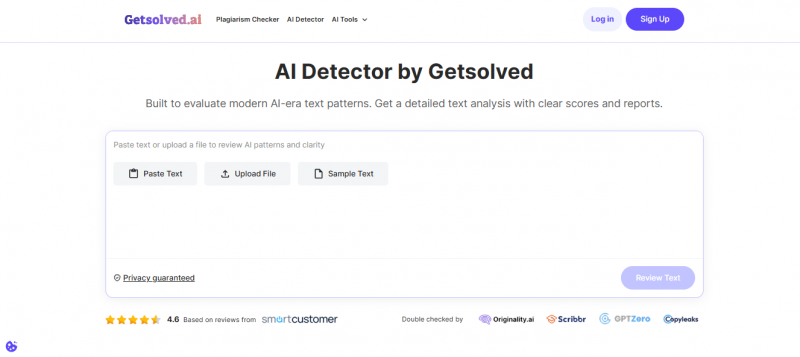
This is where an AI detector helps. It gives creators one more checkpoint before they publish, send, or submit a piece. Getsolved AI Detector does not stop at a plain human-or-AI label. It looks at patterns, tone, phrasing, structure, and readability. That review helps creators find weak spots, edit with more confidence, and keep the final text natural without slowing their process down.
What Getsolved AI Detector Is
An AI detector reads a draft and searches for signs that appear in machine-made text. It may catch repeated sentence patterns, stiff wording, a too-even rhythm, thin transitions, or claims that say little. Those clues do not prove that AI wrote the piece. A tired human writer can sound stiff too, especially near a deadline. Even so, the report can point to lines that need a sharper edit.
For bloggers, marketers, and social media teams, that matters. Readers expect content to feel clear, useful, and real. A product guide can lose trust fast. So can an email sequence, or landing page. If every sentence moves in the same way, the message feels dull. Teams can use Getsolved for AI detection, then revise weak parts, add detail, cut empty claims, and bring back a more natural voice before publication. Getsolved positions its detector as a review tool for AI-era content. It checks patterns, clarity, flow, tone, and readability. It also provides grammar, plagiarism, paraphrasing, summary, and fact-checking tools inside one cleaner content review space. These are some of the best ways to use AI in content work.
Why Content Creators Need This Extra Check
AI can speed up the first draft. It can help with outlines, summaries, headline options, and rough structure. Yet speed can create risk. A draft may include vague claims. It may repeat the same phrase in several sections. It may sound correct but lack depth. It may also include accidental overlap with existing content.
Creators who ask how to use AI often start with simple prompts. They want fast answers. Later, they face a harder question: how do you use AI without losing quality, originality, and brand voice? An AI detector can support that answer. It does not replace an editor, but it helps editors see where to look first.
For example, a social media manager may use AI to draft ten caption ideas. The detector may show that three captions sound too generic. A blogger may use AI to shape an article outline. The detector may flag a few sections with uniform phrasing. A student may use AI to organize notes. The report may show where the final text needs more personal analysis.
Main Value for Writers and Bloggers
Writers and bloggers often work alone. They may not have an editor who can review each draft. Getsolved can act as a practical checkpoint before publication. It helps them spot dull, stiff, or repetitive parts that a tired writer may miss.
For bloggers, the most useful benefits include:
- clearer tone across long articles;
- fewer awkward phrases;
- better flow between sections;
- a stronger final edit before publication;
- extra support for originality checks;
- more control over AI-assisted drafts.
This does not mean every flagged sentence is bad. A clear sentence may look simple because it is clear. A technical paragraph may sound formal because the topic requires it. The best way to use AI is not to chase a score. It is to combine AI support with human judgment. Getsolved helps by pointing to places that deserve attention.
Main Value for Marketers and Agencies
Marketing content must build trust fast. A weak sentence can make a brand sound careless. A generic landing page can make a product feel ordinary. Agencies also face a different problem. They produce content for several clients, each with a distinct voice. One client may want a friendly style. Another may prefer expert and direct copy. A third may need short, simple product text.
Getsolved can help agencies keep those voices separate. A team can check blog posts, ad drafts, email copy, product pages, and case studies before client review. If the detector highlights sections that feel too uniform, the copywriter can revise them before the client sees the draft.
Teams that publish every week need this kind of checkpoint. Output grows fast, and small patterns creep in: same rhythm, same hooks, same safe phrases. AI tips and tricks save time, yet shared prompts can make every draft sound related. Getsolved gives editors one review step, so they can catch repetition, protect quality, and keep the workflow moving without heavy delays or extra meetings weekly.
Main Value for Students and Beginners
Beginners often turn to AI when a blank page feels too wide. They may understand the topic, yet lose the thread once they try to arrange ideas. Students face the same problem. Notes pile up, deadlines move closer, and AI can turn rough points into a cleaner draft. That helps, still, the result may sound oddly polished, or worse, unlike the student at all.
Getsolved can teach new writers what natural text needs. It can flag stiff phrases, flat rhythm, and paragraphs that feel too smooth. For anyone learning how to work with AI, that kind of feedback gives a useful pause before the next edit.
Students should still treat the result with care. An AI detector does not prove quality, originality, or classroom safety. It only gives a signal. Writers must check sources, follow assignment rules, cite properly, and add their own thinking.
How Getsolved Fits Into a Content Workflow
A good review process should be simple. If it takes too long, busy teams will skip it. Getsolved works best as a step between the first edit and the final proofread.
| Workflow Step | What the Creator Does | How Getsolved Can Help |
| Draft | Create a first version with notes, research, or AI help | Give a later review point, not a replacement for drafting |
| Edit | Improve structure, tone, and clarity | Highlight sections that may sound stiff or repetitive |
| Check | Review originality, claims, and grammar | Support grammar, plagiarism, and fact checks through related tools |
| Final review | Prepare the content for publication | Help the creator make targeted changes before release |
This workflow suits freelancers, small teams, agencies, and students. It also works for creators who use AI only sometimes. The goal is not to remove every sign of AI assistance. The goal is to publish clearer, more reliable, and more authentic content.
What the Tool Does Well
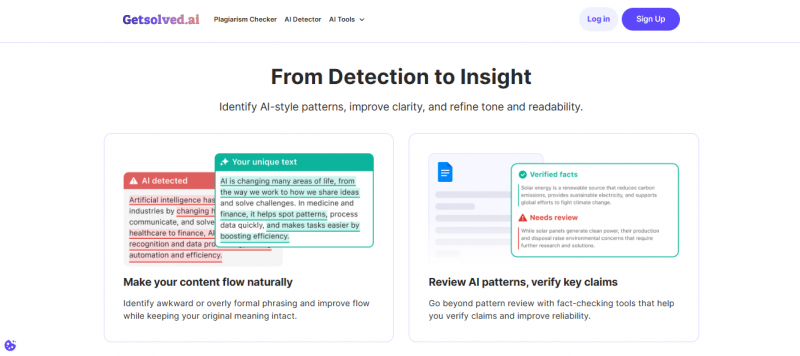
Getsolved’s main strength is its practical angle. It does not only focus on a simple percentage. It also points creators toward clarity, tone, and flow. That matters because most content teams care about the final reader. A reader does not ask, “What score did this text get?” A reader asks, “Can I trust this?” and “Is this useful?”
Getsolved also suits people who want a simple process. Beginners do not need a complex editorial system. Freelancers do not need another heavy platform. Agencies need tools that support speed without causing confusion. Getsolved seems built for that everyday use case.
Another plus is the wider toolset. A creator may detect AI-style patterns, then check grammar, review plagiarism risk, verify claims, or revise unclear phrasing. This helps because content quality rarely depends on one factor.
Where Users Should Stay Careful
No AI detector is perfect. This point matters. A detector can misread human text as AI-like. It can also miss AI-assisted text after heavy edits. Short texts can be harder to judge. Technical or academic text can sound uniform by nature. Non-native writers may also use simple sentence patterns, and that can affect how some tools read the text.
For this reason, Getsolved results should be used as guidance, not as final proof. A high AI score does not automatically mean the content is bad. A low score does not automatically mean the content is strong. The report should start a review, not end it.
Creators should also avoid using the tool only to chase a “safe” score. That is the wrong goal. The better goal is quality. Check the sections that the detector marks. Ask whether they sound clear, specific, and useful. Add examples. Replace vague claims. Remove empty phrases. Cite sources when needed. That approach improves the content for real readers.
Final Verdict
Getsolved AI Detector is a practical tool for creators who want to review AI-generated or AI-assisted content before publication. It suits writers, bloggers, marketers, students, freelancers, agencies, and social media teams.
The tool is not a judge. It should not decide whether a text is good by itself. It should not replace editors, teachers, brand managers, or source checks. Its best role is as a smart review assistant. It shows where a draft may need more care.
For creators who often ask how to use AI without losing trust, Getsolved offers a useful answer. Use AI for speed. Use your judgment for meaning. Use an AI detector for a second look. Then publish only after the text sounds clear, original, accurate, and true to the voice you want readers to remember.
Post Comment
Share your thoughts about this article.
Be the first to post a comment!