Table of Content
- How Does Unlucid AI Actually Work?
- Popular Use Cases of Unlucid AI
- Unlucid AI vs Alternatives: Which One Should You Choose?
- Pricing Breakdown: How Much Does Unlucid AI Cost?
- User Experiences and Community Feedback
- Is Unlucid AI Safe and Legit?
- Final Takeaway: Should You Try Unlucid AI?
- FAQs About Unlucid AI
The past few years have been filled with AI tools promising to change how we edit images, design animations, and create content. But most of them come with limits, whether it’s filters, restrictions, or paywalls.
Unlucid AI presents itself differently. It claims to be an “uncensored” creative platform, letting users push boundaries and test edits in ways traditional editors don’t allow.
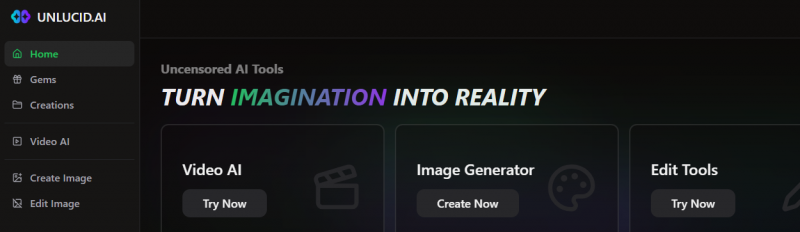
Unlucid AI is a browser-based image and video creation platform built around four main workspaces: Video AI, Effects AI, Create Image and Edit Image. It combines prompt-based video generation, image-to-video animation, preset motion effects, text-to-image generation and targeted photo editing inside one account.
Its use of the word “uncensored” refers to fewer content restrictions than many mainstream creative platforms. It does not mean every generation is free, unlimited or suitable for publication. Unlucid uses a currency called Gems, and different image, editing and video operations consume different amounts.
Video AI and Effects AI
Unlucid now separates its video tools into two workflows.
Video AI creates a clip from a written prompt. Users can also upload an optional starting image to guide the first frame, select portrait or landscape orientation and enable a Prompt Enhancer that expands a basic description into a more detailed generation prompt.
Effects AI applies preset transformations to an uploaded image. Available effects have included dancing, flying, smashing, squishing, zooming, revealing and other social-media-style motions. This workflow is easier than writing a detailed video prompt, but it gives users less control over movement, camera direction and scene progression.
Unlucid upgraded its video engine in September 2025 with faster processing, improved output quality, longer video durations and custom-prompt video generation. The same update renamed its older Video AI preset feature to Effects AI and introduced an experimental enhanced-content option.
The effect library has continued to expand. Unlucid announced nine new effects on January 21, 2026, seven more on February 25 and six more on April 12. The company does not publish a reliable current total, so “more than 15 effects” is safer than stating an exact number.
AI Image Generation
The image generator currently offers five documented styles:
- Realistic
- Cartoon
- 3D Render
- Anime
- Pencil
Users can enter a text description, upload a reference image and reuse a seed value to recreate or refine a similar composition. A face-reference option is designed to preserve recognizable facial characteristics across multiple generations.
The High Resolution Upscale tool increases image detail and can sometimes improve distorted faces, hands and smaller visual elements. It should not be described as a guaranteed repair tool, since the result still depends on the quality of the original generation.
How to Write Better Unlucid AI Image Prompts
Unlucid's official prompting guide recommends describing more than the basic subject.
Useful prompt elements include:
Subject
Who or what should appear?
Style
Realistic, cartoon, 3D render, anime, pencil, or another descriptive aesthetic.
Lighting
Soft studio light, sunset, dramatic lighting, neon light, daylight, etc.
Mood
Calm, cinematic, mysterious, playful, futuristic, dark, cheerful.
Composition
Close-up, full-body, centered portrait, wide scene, side view, or another framing instruction.
Unlucid specifically documents camera-related phrases such as:
- Extreme close-up
- Close-up shot
- Medium shot
- Long shot
- Full body shot
- Front on
- Side view
- From behind
- Bilaterally symmetrical
A weak prompt might be:
“A woman in a city.”
A more useful prompt would be:
“Full body shot of a woman wearing a black coat in a rainy futuristic city at night, neon storefront reflections, cinematic lighting, side view, realistic photography.”
The second prompt gives the generator more information about framing, environment, lighting, subject appearance, and visual style.
AI Image Editing
Unlucid’s documented editing tools focus on selected areas of an uploaded image. Users can identify an area with automatic selection or a brush and then apply one of three main operations:
Remove an unwanted person, object or visual element and reconstruct the space behind it.
Add a new object or replace an existing object using a written instruction.
Change a person’s clothing while attempting to retain the original pose, lighting and proportions.
The article should not currently list general retouching or style transfer as confirmed editing modes. Those features are not included in Unlucid’s current image-editing guide.
How Does Unlucid AI Actually Work?
The platform uses a Gems credit system as its currency. Users can try out free edits, but advanced options, such as high-quality renders, video tips, and batch processing, usually require Gems. When you first sign in, you’ll find a mix of AI image editing tools, video tutorials like AI tips for video editing, and even an entire section dedicated to image transformations, such as object removal and style swaps.
But functionality alone doesn’t explain why people are drawn to it. To really understand its appeal, we need to see what makes Unlucid stand apart from other AI editors.
A Better Way to Think About the Unlucid Workflow
Unlucid is easiest to understand as four connected creative paths.
| Goal | Best Starting Tool |
| Create a new picture from an idea | Create Image |
| Modify part of an existing picture | Edit Image |
| Animate an image using a preset transformation | Effects AI |
| Generate a custom video from text or a starting image | Video AI |
A practical workflow can move between them.
For example:
Create Image
Generate a character
Edit Image
Change clothing or remove an unwanted element
Effects AI
Animate the finished image
This is one of Unlucid's more useful characteristics: users do not necessarily need a completely separate service for every small creative step.
However, it is still not a replacement for a full timeline-based image or video editor when detailed post-production is required.
What Makes Unlucid AI Different From Other AI Editors?
While tools like Runway ML and Canva AI focus on guardrails and content moderation, Unlucid takes a bold stance: it calls itself an “uncensored” creative platform.
That doesn’t mean chaos; it means control. Artists can experiment with reference blending, style fusion, and AI interpolation without strict content filters.
This approach has drawn attention from creators who once relied on open frameworks like Stable Diffusion or ComfyUI but wanted something easier to use. A similar mindset drives the innovation behind TensorArt AI, a model hub that helps creators access pre-built templates and Stable Diffusion tools without complex setup.
Both platforms reflect the same trend: AI as a collaborator, not a constraint.
“Uncensored” Does Not Mean “No Rules”
This distinction deserves much more emphasis.
Unlucid markets itself around fewer creative restrictions, but its current Terms of Service contain an extensive Content Policy.
Among other restrictions, the Terms prohibit content involving:
- Minors in prohibited sexual or suggestive contexts
- Non-consensual intimate images
- Harmful impersonation or identity theft
- Fraudulent or deceptive content
- Intellectual-property infringement
- Hate content
- Certain graphic violence
- Terrorism promotion
- Other unlawful material
The platform therefore should not be described as having no moderation.
A more accurate description is:
Unlucid permits a wider range of creative material than some mainstream platforms while still imposing legal, consent, age, and harm-related boundaries.
Popular Use Cases of Unlucid AI
- Social media creators are experimenting with unique visuals.
- Digital artists are testing out reference-based compositions.
- Animators use interpolation to bring still images to life.
- Casual hobbyists curious about “uncensored” AI results.
These varied use cases highlight its versatility. But to really assess its value, we need to weigh its advantages against its limitations.
The Advantages of Using Unlucid AI
- Greater creative freedom compared to filtered AI editors.
- A free entry point so you can test features without paying immediately.
- Tools covering both images and videos, unlike single-purpose apps.
- Quick access to editing tutorials that make onboarding easier.
Of course, no tool is perfect. Alongside these positives, Unlucid comes with drawbacks and risks you should be aware of.
Unlucid AI Limitations and Concerns You Should Know
Unrestricted creativity has trade-offs. Some countries block Unlucid’s access entirely due to its open policies.
Also, while it advertises “unlimited” use, features often depend on how many Gems you buy. And like other emerging AI tools, its data handling transparency remains uncertain, raising concerns around privacy and content ownership.
These issues echo discussions across the AI Tool Testing Reddit community, where users share both praise for Unlucid’s openness and caution about its vague trust structure.
These concerns echo user discussions in AI Tool Testing communities. Platforms like Udio AI, in contrast, offer clearer trust structures and ongoing developer transparency, something Unlucid lacks.
Unlucid AI vs Alternatives: Which One Should You Choose?
| Tool | Free access | Main workflow | Creative control | Best fit |
|---|---|---|---|---|
| Unlucid AI | Daily free Gems | Images, targeted edits and short AI videos | Simple prompts and preset effects | Experimental and unrestricted visual creation |
| Runway | 125 one-time free credits | Advanced image and video generation | More model, camera and production controls | Professional creators and video teams |
| Pika | 80 monthly free video credits | Short videos, effects, swaps and scene tools | More effect choices, but still credit-based | Social video creators |
| ComfyUI | Free when run locally | Node-based image, video, 3D and audio workflows | Very high, depending on models and extensions | Technical users who want full workflow control |
Unlucid is easier to start with than ComfyUI, but it provides far less control over models, nodes and generation stages. Runway is more suitable for production work, while Pika offers a wider structured set of short-video tools. Unlucid’s clearest advantage is the combination of simple visual tools and fewer content restrictions.
Once you know how it compares, the next big factor becomes cost. So, how much should you expect to spend?
If you’re curious how Kupon AI fits into the evolving creative ecosystem, our in-depth Kupon AI analysis explores how it blends accessibility with ethical controls, something Unlucid currently struggles with.
Pricing Breakdown: How Much Does Unlucid AI Cost?
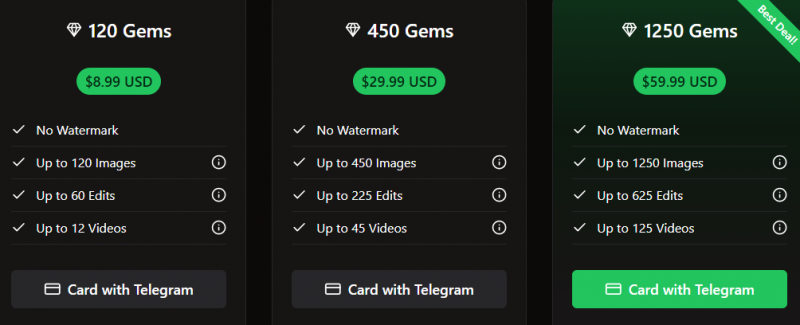
| Gem bundle | Price | Maximum images | Maximum edits | Maximum videos |
| 120 Gems | $8.99 | Up to 120 | Up to 60 | Up to 12 |
| 450 Gems | $29.99 | Up to 450 | Up to 225 | Up to 45 |
| 1,250 Gems | $59.99 | Up to 1,250 | Up to 625 | Up to 125 |
Paid Gem bundles remove the watermark. The maximum figures also show that operations have different costs. A standard image can use approximately one Gem, an edit approximately two Gems and a video approximately ten Gems, although the exact charge should always be checked inside the generation screen.
The 1,250-Gem bundle offers the lowest listed cost per Gem:
- 120 Gems cost approximately $0.075 per Gem.
- 450 Gems cost approximately $0.067 per Gem.
- 1,250 Gems cost approximately $0.048 per Gem.
Based on the listed maximums, a video works out to about $0.75 with the smallest bundle, $0.67 with the middle bundle and $0.48 with the largest bundle. Failed attempts, regenerations and more expensive features can increase the real cost of reaching one usable result.
Unlucid is therefore free to test, but it is not an unlimited free video generator. The free allowance is better suited to occasional experiments than regular content production.
User Experiences and Community Feedback
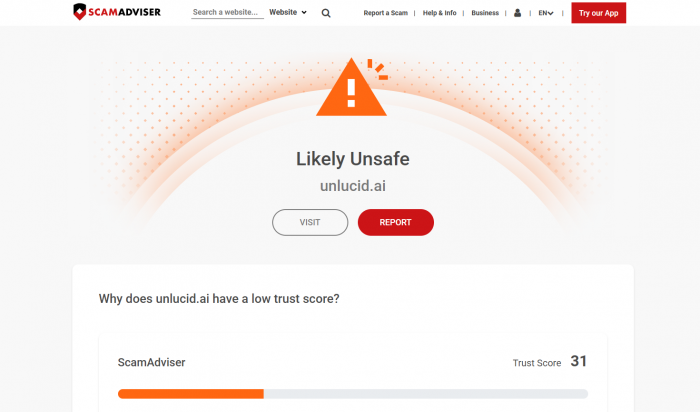
Feedback is mixed. Some Reddit users in the ComfyUI community say Unlucid is refreshing because it allows experiments without coding. Others worry about its lack of clear safety guidelines. ScamAdvisor even lists Unlucid.ai under its “caution” category, highlighting low trust scores.
The small amount of public feedback tends to repeat four observations:
- The interface is easy to understand because each tool is separated into a simple generation page.
- Daily Gems make it possible to test the platform before purchasing a bundle.
- Short effects can produce entertaining social media clips, but faces, hands and body movement may become distorted.
- The Gem system becomes more expensive when several generations are needed to produce one acceptable result.
G2 currently shows only one review for Unlucid AI. That is not enough evidence to calculate a meaningful satisfaction score or present one opinion as a community consensus.
The article should therefore avoid unsupported statements such as “Reddit users in the ComfyUI community say…” unless a specific, accessible discussion is quoted and linked.
Is Unlucid AI Safe and Legit?
This is where Unlucid AI stumbles, and why users should be cautious.
Security & Legitimacy Red Flags
ScamAdviser: Flags it as suspicious (anonymous ownership, new domain).
Gridinsoft: Assigns 1/100 trust score, citing:
- possible blacklisting
- adult-content risk
- unclear legitimacy
- high-traffic but low transparency
These do NOT confirm it is a scam, but they raise important concerns about:
- Payment security
- Data privacy
- Long-term reliability
- Content ownership
If you plan to upload sensitive photos, run commercial projects, or store assets inside the platform, proceed carefully.
Final Takeaway: Should You Try Unlucid AI?
Unlucid AI represents a newer generation of browser-based creative editing tools designed for fast experimentation rather than polished production workflows. It combines AI image generation, lightweight editing features, and short animation effects into a single, easy-to-access platform.
As a new name in creative editing, its appeal lies in flexibility and simplicity. Users can test visual ideas quickly, animate static images, and experiment with styles without complex setup or heavy software installations.
However, its strengths in creative freedom come with trade-offs. Output consistency varies, advanced control is limited, and transparency around platform ownership and long-term reliability remains unclear. It is best suited for casual creators, experimental artists, and social media users rather than enterprise teams or regulated industries.
In short:
Unlucid AI is an emerging creative playground, innovative, flexible, and accessible, but not yet a fully mature professional editing suite.
For curious creators, it’s worth exploring.
For mission-critical projects, more established platforms may provide stronger stability and trust.
FAQs About Unlucid AI
Is Unlucid AI completely free?
No, the free tier is limited. Advanced use requires Gems.
Can I use Unlucid AI on mobile?
Yes, but functionality is smoother on desktop browsers.
Are there risks in using uncensored AI platforms?
Yes, content misuse, data privacy issues, and unclear ownership of generated outputs.
What’s the best alternative to Unlucid AI?
For professional use, Runway is safer. For technical users, Stable Diffusion offers more customization.
Post Comment
Share your thoughts about this article.
Be the first to post a comment!