This is not a walkthrough and not a rewritten press release. I signed up on the free trial, uploaded a real audio file, translated it from English into Japanese, and hit every wall the free plan has. Then I cross-checked my experience against 300+ user reviews on G2, Trustpilot, and Product Hunt.
| PLAN USED | TEST FILE | LANGUAGE PAIR | MY SCORE |
| Free (3-day trial) | 1-minute dialogue MP3 | English to Japanese | 3.9 / 5 |
Quick Summary
Rask AI is genuinely fast, and the translation quality surprised me. My one-minute English dialogue came back as natural-sounding Japanese with a cloned voice in roughly 10 to 15 seconds. The pipeline (detect speaker, translate, clone voice, sync timing, keep background audio) simply works.
But the free trial is a preview, not a product. You cannot export anything without paying: no video, no audio, not even the subtitle file. The preview is watermarked and a countdown timer follows you around the dashboard. And once you look past the app at what long-term users say online, the picture splits sharply: G2 loves it, Trustpilot does not.
How I Tested Rask AI
I kept the test simple and realistic. One account, one file, default settings, zero money spent. Here is the exact setup:
| Test file | A roughly 1-minute English dialogue MP3 (a car-accident conversation from a language-learning site). Real overlapping speech, not a clean studio voiceover. |
| Target language | Japanese. Chosen deliberately because its grammar is nothing like English, which makes it a hard test. Easy language pairs hide weak translation engines. |
| Settings | All defaults. If a tool is good, its defaults should be good. |
| Plan | Free 3-day trial, no credit card. |
| Verification | Compared my results against 300+ reviews on G2, Trustpilot, Product Hunt, and independent blogs. |
Step-by-Step Testing
What I Saw at Every Stage
Six checkpoints, from the landing page to the paywall. Every screenshot below is from my own session. Nothing is staged.
Step 1: The Landing Page and First Impressions
Search "Rask AI" and you land here: a clean, confident homepage claiming 3,400,000 users, a 4.7-star rating, and dubbing in 130+ languages, plus a Product Hunt "#1 Product of the Day" badge. So far, so standard for an AI tool in 2026.
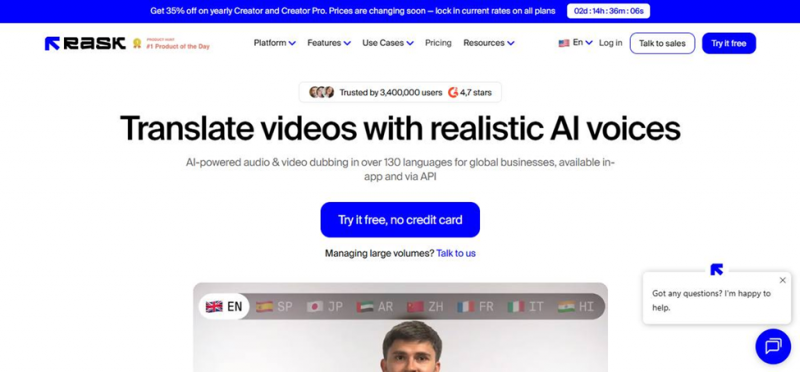
Rask AI homepage: bold claims, big blue CTA, and a ticking discount timer
What I noticed immediately: a ticking countdown banner ("prices changing soon, lock in current rates") before I had even scrolled. That is a classic urgency pattern, and it set the tone for the whole experience. This product really, really wants you to convert.
MY OBSERVATION The countdown timer on the landing page was my first yellow flag. Good products do not usually need a stopwatch. I noted it and moved on. |
Step 2: Sign-Up Took Me Under 30 Seconds
Clicking "Try it free" drops you on a no-nonsense login page: Google, SSO, or plain email. No credit card asked, which matches the promise on the homepage. The sidebar quietly pitches the headline features: VoiceClone in 29 languages, lip-sync, multi-speaker dubbing, and translation into 130+ languages.
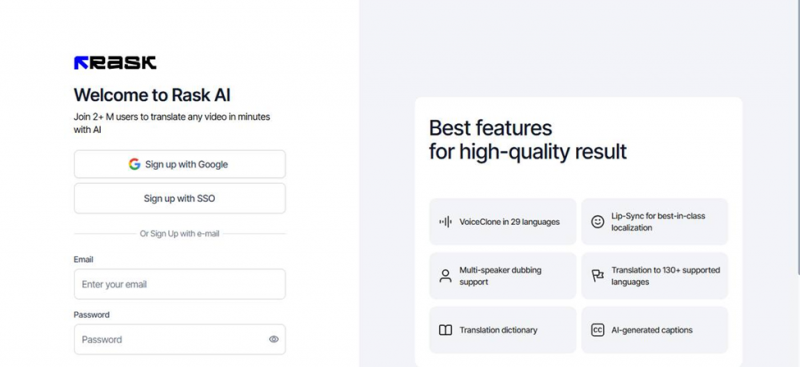
Sign-up page: three options, no credit card required
MY OBSERVATION Small thing, but the homepage says 3.4M users and the sign-up page says "2+ M users." Which one is it? Sloppy copy like this makes me trust the big numbers a little less. |
Step 3: The Dashboard Is Clean but Already Counting Down
The dashboard is refreshingly uncluttered: just three tools in the sidebar (Translation, Voice Clone Library, Dictionary) and one big blue "Translate now" button. But the very first thing you see, before any feature, is another timer: "Your 3-day trial is ending soon" with a live countdown to the second. I had not even done anything yet.
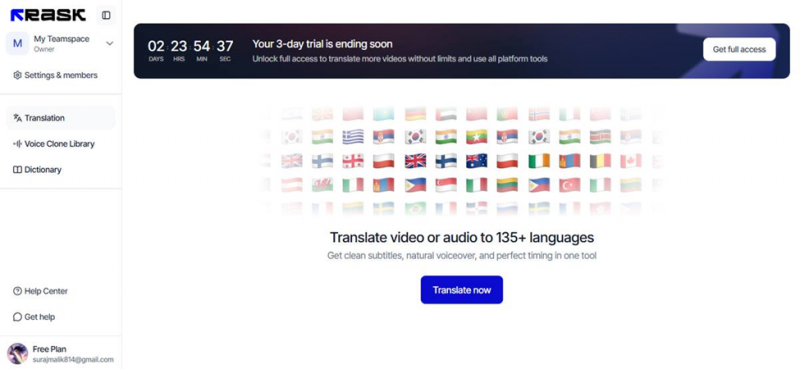
The free-plan dashboard: minimal sidebar, prominent trial countdown
MY OBSERVATION Credit where due: I found the upload button in about two seconds. Zero learning curve. The G2 crowd rates its ease of use 9.4 out of 10 and honestly, I get it. |
Step 4: Uploading My Test File (English to Japanese)
I uploaded the dialogue MP3 and picked Japanese as the target. There is an "Additional Parameters" dropdown for finer control, but I deliberately left everything on defaults.
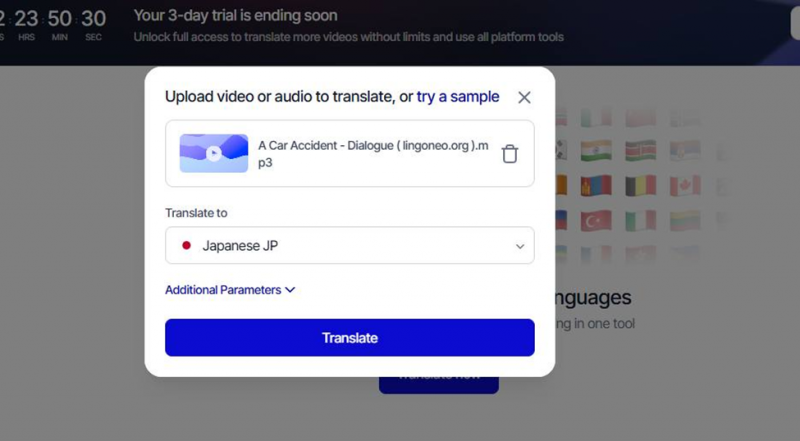
Upload modal: file in, Japanese selected, one button to go
MY OBSERVATION I picked Japanese on purpose. It is grammatically nothing like English, so it is a genuinely hard test for any translation engine. |
Step 5: The Result Arrived in 10 to 15 Seconds, and It Was Good
This is where Rask earned real points from me. The processing took about 10 to 15 seconds. I barely had time to switch tabs. The result screen lets you flip between Original and Translated side by side, which makes comparing effortless. The Japanese output sounded natural, the pacing matched the original conversation, and the cloned voice was recognisably the original speaker's.
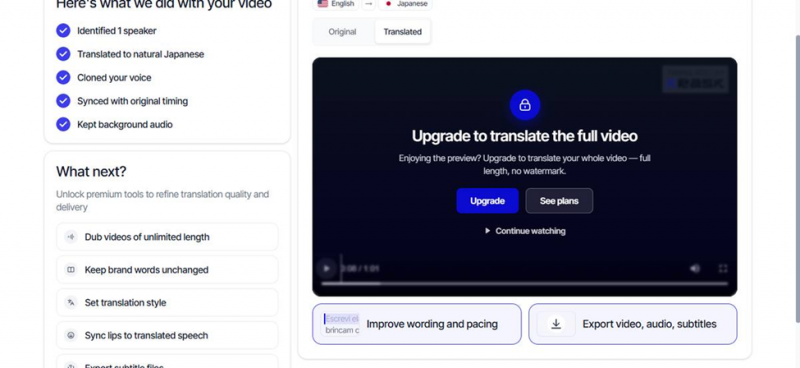
Result page: Original vs Translated tabs, with the full video locked behind an upgrade
The left panel spells out exactly what the pipeline did, and every step checked out in my test:
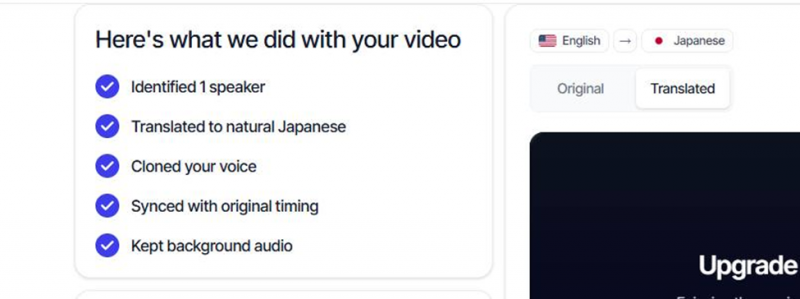
The processing summary: speaker identified, translated, voice cloned, timing synced, background audio kept
MY OBSERVATION Fastest AI dubbing I have personally tested. For context, G2 reviewers report rival tools taking 30+ minutes to export a single minute of video. Rask did the whole translation in the time it takes to sip coffee. |
Step 6: The Export Paywall (Where the Free Ride Ends)
Clicking "Export video, audio, subtitles" opens a polished modal that is, in essence, a paywall. On the free trial you get a watermarked preview only, no full-length translation, and no downloads in any format, not even the SRT subtitle file. Your options are upgrade, or "share for free" (a hosted link, which keeps you inside their ecosystem).
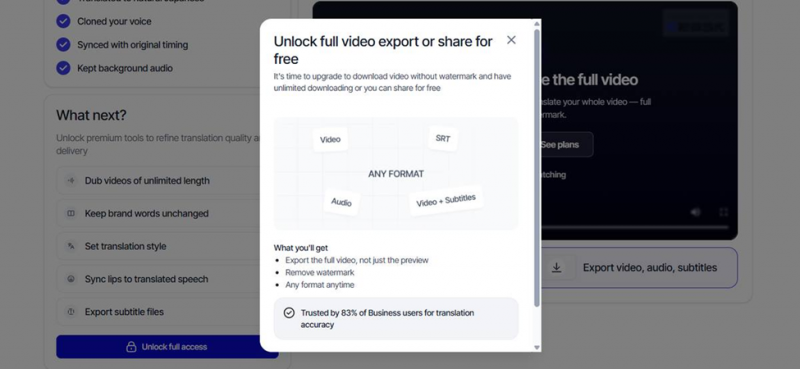
The export modal: full export, watermark removal, and all formats are paid features
MY OBSERVATION I understand gating the video export. But locking the SRT file, a plain text file, stung. The trial lets you taste the food but not leave the restaurant with it. |
Rask AI Pricing
What It Costs When the Trial Ends
These are the yearly-billed prices I was shown in-app (a 35% promo code was active during my test). Monthly billing runs higher.
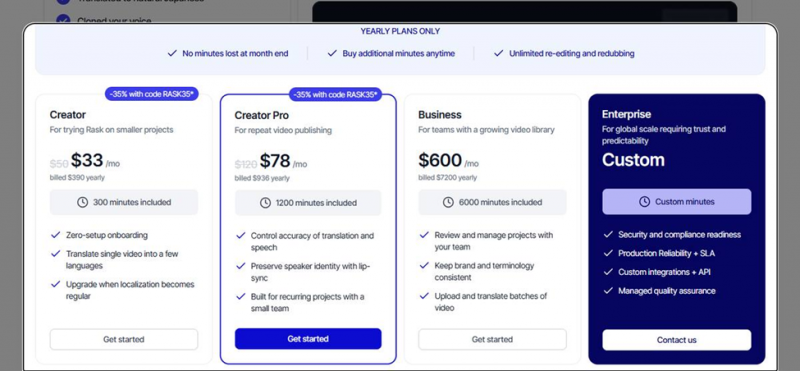
In-app pricing page: Creator, Creator Pro, Business, and Enterprise tiers (yearly billing)
| Plan | Price | Minutes | My read |
|---|---|---|---|
| Creator | $33/mo ($390/yr) | 300 min/mo | For dipping a toe in. Fine for occasional translation, but 300 minutes disappears fast if you are consistent. |
| Creator Pro | $78/mo ($936/yr) | 1,200 min/mo | The only tier where the good stuff lives: accuracy controls and lip-sync. If I paid, it would be this one. |
| Business | $600/mo ($7,200/yr) | 6,000 min/mo | Team review workflows, brand-term consistency, batch uploads. A serious jump; this is agency territory. |
| Enterprise | Custom | Custom | Compliance, custom API integrations, managed QA, SLA. You will be talking to sales, not a checkout page. |
MY OBSERVATION Do the math on Creator: $33 per month divided by 300 minutes is roughly 11 cents per dubbed minute, genuinely cheap versus human dubbing. But reviewers warn that lip-sync burns extra minutes and 6:45 of audio gets billed as 7. The meter runs faster than you think. |
What Real Users Say
G2 vs Trustpilot vs Product Hunt
My test was short, so I read what long-term users say across the big review platforms. The verdict depends entirely on where you look, and that gap itself is the most useful data point.
G2: 4.7 out of 5

• Rating spread: 81% five-star, 16% four-star, 1% three-star, roughly 0% one- and two-star.
• What users praise: the intuitive interface, translation accuracy, and voice cloning. Ease of use scores 9.4 out of 10.
• Speed comparisons: one reviewer switching from HeyGen reported that an export which took the rival over 30 minutes finished in under one minute on Rask.
• Recurring gripes: lip-sync precision, cost, occasionally robotic or too-fast voices, and Brazilian vs European Portuguese getting mixed up.
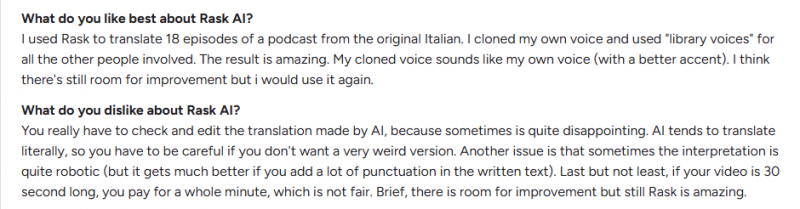
Trustpilot: Mostly 1-Star

• A very different story: users describe trials that worked fine but full-length videos hitting random errors and endless processing.
• Support complaints: slow or absent responses; independent analysis found Rask replied to only about 18% of negative reviews.
• Billing complaints: surprise charges after trials and features that feel paywalled on top of an already-paid subscription.
• One business reviewer claimed roughly 84% of the page's ratings sat at one star.

Product Hunt and Independent Blogs: Mixed
• Product Hunt: reviewers broadly find it a fast, easy way to dub videos, with several calling the workflow better than rivals. Dissenting voices report poor translations, wrong voice gender, and off-target accents, notably a French user served an old Quebec accent instead of standard French on paid usage.
• Independent 2025-26 reviews: scores range from 4.5 down to 2.0 out of 5. The harshest cite slow processing on paid plans and billing complaints, while conceding the product is legitimate and the dashboard is genuinely easy to use.
How I Read This Split
G2 skews toward business buyers reviewing early, feature-driven impressions, which is the exact experience I had, and it was great. Trustpilot collects the people who stayed, paid, and hit billing or support problems months in. Both are real. The lesson is not "which site is lying." The lesson is that Rask's first 15 minutes are its best 15 minutes, and you should stress-test a full-length video and the cancellation flow before committing to a year.
My Scorecard
Ratings for What I Could Verify
Scored only on what I personally tested on the free trial, plus pricing shown in-app. I cannot score long-term reliability or support because I did not need support in 3 days.
| Category | Score | Why |
|---|---|---|
| Processing speed | 4.8 / 5 | 10 to 15 seconds for a 1-minute file. Fastest I have tested. |
| Translation quality | 4.5 / 5 | Natural Japanese from messy conversational English, on default settings. |
| Ease of use | 4.6 / 5 | Zero learning curve. Upload, pick a language, done. |
| Voice cloning | 4.2 / 5 | Kept the speaker's character and the background audio intact. |
| Value for money | 3.2 / 5 | 11 cents per minute sounds cheap, but minutes round up and drain fast. |
| Free trial generosity | 2.4 / 5 | No exports at all, watermarked preview, constant countdown pressure. |
Pros and Cons at a Glance
| WHERE IT WON ME OVER | WHERE IT LOST POINTS |
10 to 15 second turnaround on a 1-minute file Japanese output sounded natural with original timing preserved Voice clone kept the speaker's character; background audio intact Zero learning curve: upload, pick a language, done Transparent pipeline: it tells you exactly what it did, step by step | Free trial exports nothing, not even the subtitle file Countdown timers and urgency banners at every turn Lip-sync and accuracy controls locked to the $78/mo tier Trustpilot pattern: quality and support reportedly drop after payment Minute-based billing rounds up and drains faster than expected |
Top Rask AI Alternatives Worth Comparing
If my review left you unsure, these are the tools G2 reviewers most often weigh against Rask before buying. I have not run my full test on each of these, so the ratings below come from G2 community data, and my notes explain when I would pick each one over Rask.
| Tool | G2 rating | Known for | Pick it over Rask when... |
|---|---|---|---|
| HeyGen | ~4.8 / 5 | Realistic AI avatars and best-in-class lip-sync | Lip-sync realism is your top priority. G2 users prefer HeyGen for avatar quality and lip accuracy, though Rask users report much faster exports. |
| ElevenLabs | ~4.5 / 5 | Voice quality and speed | The voice itself matters more than the video. Its speech generation is widely considered the benchmark, but you assemble the dubbing workflow yourself. |
| VEED | ~4.6 / 5 | Easy all-in-one video editing | You want translation plus a full editor (trimming, captions, layout) in one place instead of a dedicated dubbing tool. |
| Murf.ai | ~4.7 / 5 | Natural studio-style voiceovers | You are producing voiceovers from a script rather than dubbing existing footage. |
| Synthesia | ~4.6 / 5 | Avatar video creation for teams | You are making training or corporate videos from scratch and do not have original footage to dub at all. |
Where Rask still wins, in my view: raw speed and language breadth. G2 comparison data credits Rask with superior voice cloning, wider language support (130+), and faster export times, and my own 10-to-15-second result backs that up. If you dub existing spoken content into many languages and want it done in seconds, Rask remains the specialist. If you need avatars, deep editing, or premium standalone voices, one of the five above is likely the better fit.
MY OBSERVATION My practical shortlist: if I were choosing today, I would trial Rask and HeyGen side by side on the same video. Rask for speed and languages, HeyGen for lip-sync. One afternoon of testing both on your own footage will settle it better than any review, including mine. |
Final Verdict
Is Rask AI Worth Paying For?
Would I pay for it? Yes, but on a month, never on a year. Here is where I landed after three days. The core technology is legit. Watching my English dialogue come back as fluent, well-paced Japanese in the time it took to stretch my arms was genuinely impressive, and I tested an audio file with overlapping conversational speech, not some pristine studio narration. If my job were pushing content to non-English audiences every week, Rask would save me real hours. But I cannot ignore the pattern I saw everywhere I looked: the aggressive countdown timers, the paywalled subtitle file, the 35%-off urgency codes, and a Trustpilot page full of people who say the product got worse the moment they started paying. A confident product does not need this much pressure. So my honest recommendation is the one I would give a friend: take the trial seriously as a demo, then buy one month, not the yearly plan, and throw your longest, ugliest real video at it before you commit further. If it survives that, you have found your dubbing tool. For me personally, as someone who translates occasionally rather than weekly, the $33 to $78 per month ask is more than the habit justifies. I am keeping it bookmarked, not subscribed. FINAL SCORE: 3.9 / 5 Brilliant engine, pushy storefront. |
Post Comment
Share your thoughts about this article.
Be the first to post a comment!