One is an automation engine built by the CapCut team; the other is a full browser-based editor with AI built deep into the timeline. We compared pricing, features, output limits, and thousands of user reviews to find out.
"AI video editing" now means two very different things. It can mean generation (paste a product link or prompt and get a finished clip) or assisted editing, where you work in a timeline while AI handles captions, cuts, dubbing, and cleanup. Pippit AI and Veed.io sit almost perfectly on opposite ends of that spectrum, which is why "which is better?" depends far more on your workflow than on any single feature.
Pippit AI is a browser-based creative platform from the CapCut team (owned by ByteDance, the company behind TikTok). It was originally launched as CapCut Commerce Pro before rebranding to Pippit in 2026, and it is aimed squarely at e-commerce sellers and social marketers: feed it a product URL, images, or a script, and it generates ready-to-post videos with captions, voiceovers, and AI avatars.
Veed.io is a London-based, browser-first video editor used by millions, including teams at companies like Meta, Amazon, and Netflix. It started as a simple subtitle tool and has grown into a full editing suite with AI features layered on top: auto-subtitles in 100+ languages, AI dubbing, avatars, text-to-video with multiple models (including Google Veo 3), magic cut, and eye-contact correction.
In one line: Pippit is the automation engine (best for volume and e-commerce); Veed is the AI-powered editor (best for working with real footage and teams).
Tale of the tape
| Pippit AI | Veed.io | |
|---|---|---|
| Maker | CapCut team / ByteDance (formerly CapCut Commerce Pro) | VEED Ltd., London (founded 2018) |
| Core identity | AI content generation and marketing automation | Browser-based video editor with AI tools |
| Runs on | Web browser (no install) | Web browser (no install) |
| Primary users | E-commerce sellers, TikTok Shop brands, solo marketers | Creators, educators, marketing teams, SMBs |
| Pricing model | Credit-based (weekly/annual credit pools) | Per-seat subscription plus AI credit allowances |
| Entry paid price | About $24/mo billed annually (Starter) | About $12/mo billed annually (Basic/Lite tier) |
| Public API | No | Partial: enterprise-oriented |
| User ratings | Very few public reviews; Trustpilot feedback skews negative (support and credit complaints) | G2 about 4.6/5; Trustpilot about 4.1/5 from 3,500+ reviews |
Sources: vendor sites, G2, Trustpilot, third-party pricing audits (Apr-Jun 2026). Veed revises pricing roughly quarterly; verify before buying.
Two very different ways to make a video
Pippit AI: prompt in, video out
Pippit's flagship workflow is Link to Video: paste a Shopify, Amazon, or TikTok Shop product URL and the AI pulls in product images, writes a script, adds transitions, captions, background music, and optionally an AI avatar presenter. Most videos generate in 30 seconds to 5 minutes. Reviewers consistently describe the process as genuinely beginner-proof, and consistently note the trade-off: limited control over the finer details. If you want to nudge every keyframe, Pippit hands you off to its integrated CapCut-style multitrack editor, which covers effects, audio layering, background removal, and stabilization, but it is a bolt-on rather than the main event.
Around the generator, Pippit bundles a full marketing stack: batch AI product images (background removal, AI shadows, virtual try-on), AI avatars with voiceovers in 28+ languages, post scheduling to up to 3 social accounts, and performance analytics. It also plugs into modern generation models; its site advertises Veo 3.1, Sora 2, and ByteDance's own Seedance/Seedream models for prompt-to-video work.
Veed.io: an editor with AI everywhere
Veed starts from the opposite premise: you bring footage (or record your screen and webcam right in the browser), and the timeline is home base. AI then removes the drudgery: auto-subtitles in over 100 languages with fully customizable styling, AI dubbing and translation into 50+ languages, Magic Cut for trimming dead space, filler-word removal, one-click background and noise removal, and an eye-contact corrector for talking-head videos. Users on G2 overwhelmingly cite ease of use and subtitle speed as the reasons they stay.
In 2025-2026 Veed pushed hard into generation too: its text-to-video tool offers 25+ AI models (including its own Fabric 1 and Google's Veo 3), plus AI avatars and voice cloning. But those features run on annual credit and hour allowances (for example, avatar and dubbing time is capped at a few hours per year on Pro), so heavy generative use gets expensive faster than on generation-native platforms.
Feature-by-feature comparison
| Capability | Pippit AI | Veed.io |
|---|---|---|
| Full timeline editor | Partial: CapCut-style editor as secondary step | Yes: core of the product |
| Link/URL to video | Yes: flagship feature (Shopify, TikTok Shop, Amazon) | No |
| Text-to-video generation | Yes: Veo 3.1, Sora 2, Seedance models | Yes: 25+ models incl. Veo 3, Fabric 1 |
| Auto subtitles | Yes: auto captions in generated videos | Yes: 100+ languages, styling control; its signature feature |
| Translation / AI dubbing | Yes: voiceovers in 28+ languages | Yes: 50+ languages, filler-word removal |
| AI avatars | Yes: large library plus custom avatars, talking photos | Yes: but time-capped (hours/year) and Pro-tier only |
| Voice cloning | Yes | Yes |
| Screen & webcam recording | No | Yes: built in |
| Magic cut / silence removal | Partial: basic trims via editor | Yes: Magic Cut plus filler-word detection |
| Eye-contact correction | No | Yes |
| Batch product images / AI try-on | Yes: backgrounds, shadows, apparel try-on | No |
| Social scheduling + analytics | Yes: up to 3 accounts, built-in analytics | Partial: export presets; analytics on top tiers |
| Team collaboration | No: built for solo use | Yes: up to 5 editors, review workflows |
| Stock library | Partial: templates plus commercial-use assets | Yes: 50,000+ royalty-free assets |
| Max export quality | HD / 4K on paid generation | 1080p (Basic) to 4K (Pro and above) |
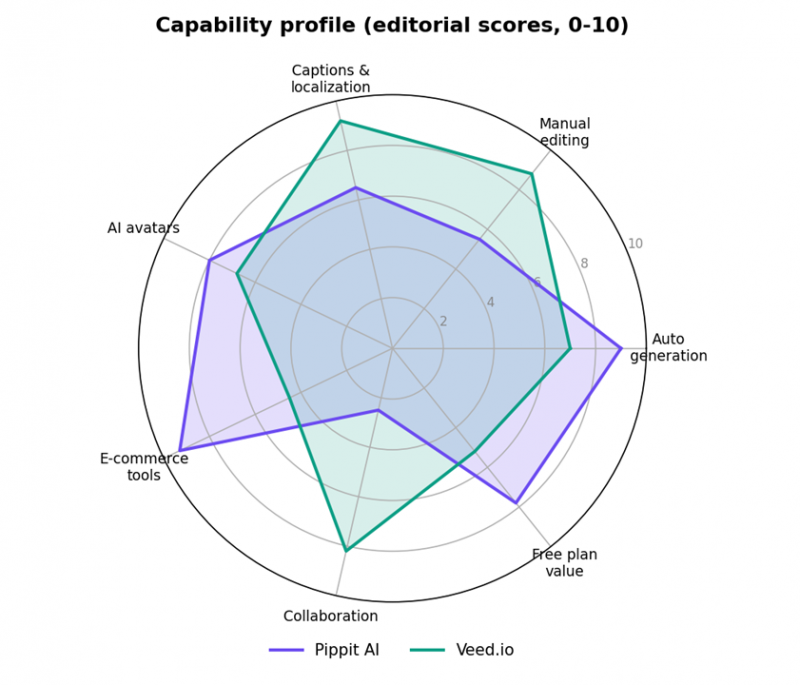
Capability profile at a glance. Editorial scores (0-10) synthesized from feature audits and 2026 reviews.
The pattern is unmistakable. Pippit dominates everything upstream of the edit (generation, product imagery, publishing) while Veed dominates everything inside the edit: captions, localization, cleanup, and collaboration. Neither is a weak product; they simply optimize for different halves of the video pipeline.
Pricing: credits vs. seats
This is where the comparison gets genuinely tricky, because the two companies charge for different things. Pippit sells credits, a pool that video and image generation draws from. Veed sells seats, with AI usage governed by separate credit and hour allowances. Both approaches have hidden edges: Pippit users report burning credits on failed generations, and Veed users report exhausting annual AI allowances months early.
| Pippit plan | Price | What you get |
|---|---|---|
| Free | $0 | 150 credits/week (about 2 min of video plus 75 images), Link-to-Video and avatar access, 3 photo avatars, 500 GB storage, publish to 3 platforms. Video exports watermarked. |
| Starter (Pro) | About $24.17/mo billed annually (about $290/yr); about $45 month-to-month | About 21,600 credits/yr (about 360 min of video or 10,800 images), watermark removal, full toolset: smart crop, voice generation, custom avatars, bulk editing, scheduling plus analytics for 3 accounts, commercial-use assets. |
| Veed plan | Price (annual billing) | What you get |
|---|---|---|
| Free | $0 | Basic editing, auto-subtitles capped about 30 min/month, 720p export, Veed watermark, limited storage. |
| Basic / Lite | About $12/mo per user | No watermark, 1080p export, subtitles up to 144 hrs/yr, 50,000+ stock assets, simple brand kit, auto-resize. No AI avatars. |
| Pro | About $24-25/mo per user | 4K export, all AI tools, translation into 50+ languages, AI avatars (about 4-6 hrs/yr), text-to-speech 144 hrs/yr, about 30,000 AI credits/yr, full brand kit, up to 5 editors. |
| Business / Studio | About $59-70/mo per user | Higher AI allowances, unlimited storage on Studio, access to all AI models, team analytics and governance. |
Per-seat matters: a 3-person team on Veed Pro pays about $63-75/mo, not $25. Veed revises pricing roughly quarterly. Pippit has no team pricing at all. Naming is transitioning to Free/Creator/Pro/Studio.
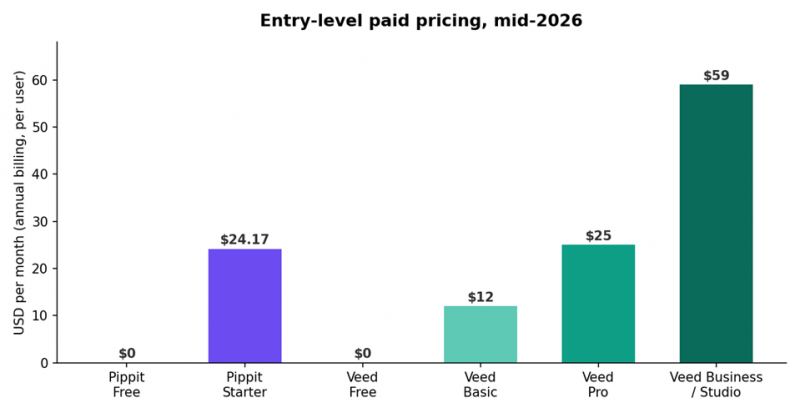
Entry-level paid pricing, annual billing (USD/month). Sources: vendor pricing pages and third-party audits, Apr-Jun 2026.
Bottom line on cost: for one person generating marketing clips, Pippit's roughly $290/year Starter plan is hard to beat; reviewers compare it favorably to hiring an editor at $50-100 per video. For a person or team editing real footage, Veed's Basic tier at about $12/month is the cheaper entry, but the features most people actually want (avatars, 4K, translation) live on Pro, and per-seat billing scales cost quickly.
What real users say
Reputation is the starkest difference in this comparison, and it deserves plain language.
Veed.io has a large, mostly positive track record. It holds roughly 4.6/5 on G2 and 4.1/5 on Trustpilot across more than 3,500 reviews. G2's review analysis shows ease of use and fast subtitle generation as the dominant praise (1,200+ mentions), with the main recurring complaints being slow performance on large files, the size of the free-plan watermark, and cost creep as AI features move up-tier.
Pippit AI's public review footprint is thin and rocky. As a 2026 rebrand it has only a few dozen Trustpilot reviews, and they skew sharply negative. Recurring themes include credits consumed by failed generations, AI models being removed without notice, and unresponsive customer support. Hands-on editorial reviews are considerably kinder (praising speed, avatars, and value), so the fair reading is: the product works well for its target use case, but support and reliability are real risks, and there is not yet a large body of satisfied-customer evidence to offset the complaints.
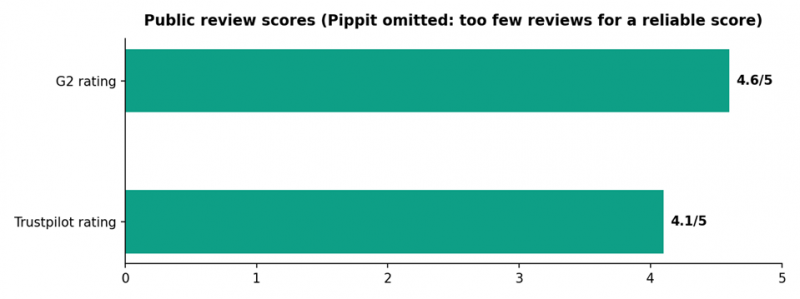
Public review scores, checked May 2026. Pippit's Trustpilot base (about 33 reviews) is too small for a reliable score.
Real reviews
A representative sample from public review platforms, quoted briefly and paraphrased where longer. Ratings shown are the reviewers' own.
★★★★★
"Everything about Veed is easy and simple to use."
The same reviewer noted that narration, AI video, and AI images all live inside one project, and said they would recommend it to anyone.
Verified user review, G2
★★★★☆
A creator who publishes up to three videos per day says Veed's rendering speed and auto-subtitles are what make that pace possible. Their one gripe: they never touch the AI features and wish there were a cheaper plan without them.
Paraphrased from a verified G2 review
★★☆☆☆
"The watermark is too big in the free version."
The watermark's size is the single most repeated complaint among free-tier reviewers on Trustpilot. One paying user also reported the AI generator ignoring prompts and discovering an 8-second clip limit only after purchase.
Trustpilot reviews of veed.io (4.1/5 overall, 3,500+ reviews)
★★★★☆
A hands-on tester who produced 12 videos over 30 days concluded Pippit is a genuinely useful, fairly priced tool for Shopify sellers, TikTok Shop brands, and teams that need volume over perfection. Another independent reviewer highlighted that one-click background removal and quality upscaling exceeded expectations, while cautioning that the credit system demands planning because running out mid-project stalls everything.
Paraphrased from independent 2026 hands-on reviews
★☆☆☆☆
"In just two videos, all my credits were used up."
This reviewer paid €29, found voice sync broken in every attempt, and received no reply or refund from support. Other Trustpilot reviewers describe AI models being removed without notice and credits lost to failed generations.
Trustpilot reviews of pippit.ai (about 33 reviews, skewing negative)
★☆☆☆☆
A reviewer on Slashdot reported that more than ten audio tracks they personally owned were wrongly flagged for copyright, and that support asked for the same information six times over two and a half weeks without resolving the case or issuing a refund. Support responsiveness is the most consistent negative theme across Pippit's early reviews.
Paraphrased from a verified Slashdot review
Quotes are kept short and attributed to their platforms; longer feedback is paraphrased. Review volume for Pippit is small, so treat individual reviews as anecdotes, not statistics.
Which is better?
The short answer
For AI video editing, meaning working with real footage, Veed.io is the better tool, and it is not close. It has the real timeline, the best captions in the category, translation, team features, and a proven reputation. For AI video generation at volume, especially e-commerce and TikTok marketing, Pippit AI is the better tool, with a workflow (link to video to schedule to analytics) that Veed simply does not offer, at a lower solo price. Match the tool to which half of the pipeline you live in.
Choose Pippit AI if
• You sell on Shopify, Amazon, or TikTok Shop and need dozens of product videos and images per week
• You want avatar presenter videos in multiple languages without filming anything
• You work solo and value speed over frame-level control
• You want scheduling and analytics bundled in one dashboard
• Budget: about $290/year covers your whole content stack
Choose Veed.io if
• You edit real footage: podcasts, tutorials, talking-heads, webinars, social clips
• Subtitles, translation, or dubbing are central to your output
• You collaborate: multiple editors, review and approval flows
• You record screen/webcam content and want capture-to-publish in one app
• You need a mature product with a large, verifiable user track record
My Honest Verdict
Both platforms share one gotcha: credit systems punish iteration. Failed or unsatisfying AI generations still consume credits on both tools, and users of both report burning through allowances faster than expected, so budget 30-50% headroom for any AI-heavy campaign. Test both free tiers with your actual content before subscribing: Pippit's 150 weekly credits and Veed's free editor are each enough for a genuine trial. And since Veed reportedly revises pricing quarterly and Pippit is still a young, fast-changing product, verify current plans on the official pricing pages before committing to annual billing.
Data verified June-July 2026 from vendor pages, G2, Trustpilot, and independent pricing audits. Prices and limits change frequently; always confirm on pippit.ai and veed.io before purchase.
Post Comment
Share your thoughts about this article.
Be the first to post a comment!