I signed up for Notta with a fresh account, ran a 22 minute YouTube video through it, poked at every button the free plan let me touch, and hit every paywall it threw at me. This is what actually happened, step by step, with my honest notes at each stage. No affiliate spin, no marketing copy.
| 7.2 /10 | MY SCORE · Strong transcription and summaries, dragged down by aggressive upselling and a locked-up free plan. Full verdict at the bottom. |
BEFORE THE TEST
What Notta claims to be
Notta pitches itself as an AI note taker that turns meetings, interviews, lectures and videos into searchable text and visuals. Transcribe, summarize, collaborate, all in one workflow. That is the promise on the landing page. My job here was to check how much of that survives contact with a free account.
Quick context before the test log: Notta is built by a Japanese company, supports 50 plus languages, and has crossed 10 million users. It can join Zoom, Google Meet, Teams and Webex calls as a bot, transcribe uploaded files, and even pull transcripts straight from a YouTube URL, which is exactly the route I took.
My testing session, from sign up to summary
I recorded my notes at every step while testing. Here is the whole session in order, with what I saw and what I honestly thought about it.
STEP 01 · LANDING PAGE
First impressions of the website
Searching for Notta AI lands you on a clean page with the headline about an AI note taker that visualizes meeting decisions. The layout is tidy, the demo animation makes the product easy to understand in five seconds, and there is a big Start for Free button plus a new AI Voice Recorder tab in the navigation.
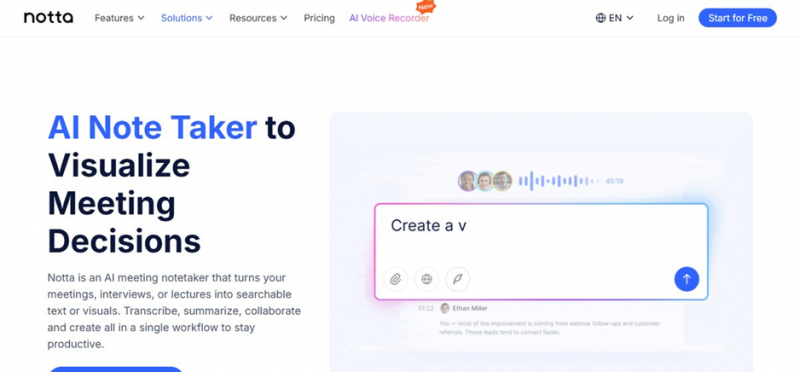
SCREENSHOT · The Notta landing page I saw when I first searched for it
MY OBSERVATION The landing page does its job well. Nothing confusing, nothing hidden. I knew exactly what the tool does before clicking anything. Good start. |
STEP 02 · SIGN UP
Creating the account
Clicking Try It opened a standard login and signup page. Options include Google, Microsoft, Apple, SSO and plain email with a verification code. On the right side there is a preview of the product showing AI Summary, Chapters, Action Items and the transcript view.
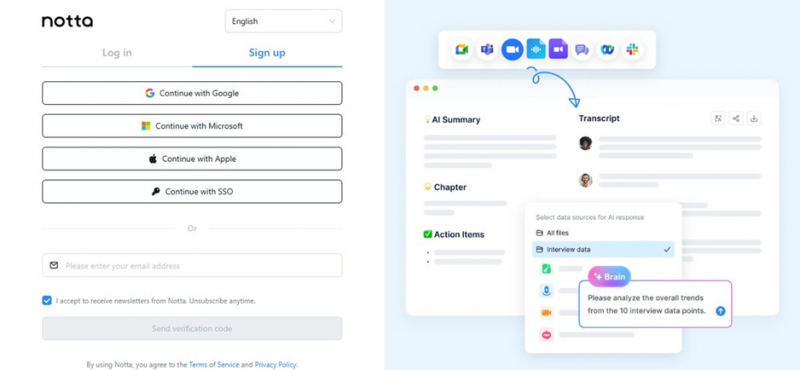
SCREENSHOT · The signup screen with Google, Microsoft, Apple, SSO and email options
MY OBSERVATION Signup was painless and took under a minute with Google. One small thing I noticed: the newsletter checkbox is ticked by default, so untick it if you do not want promotional mail. |
STEP 03 · THE EARLY PAYWALL
A subscription popup before I even saw the product
Right after answering a few onboarding questions about what I plan to use Notta for, the Pro plan checkout appeared. Full pricing, card number field, expiry, CVC, the works. This was before I had transcribed a single second of audio.
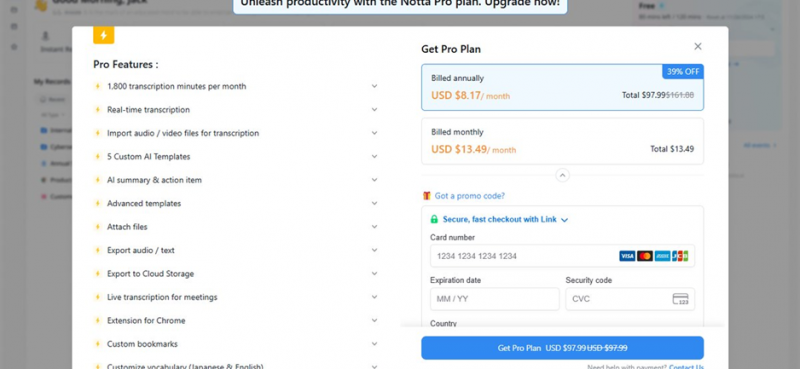
SCREENSHOT · The Pro plan checkout that appeared right after onboarding questions
MY OBSERVATION This felt too pushy for me. Showing a card entry form to someone who has been inside the product for thirty seconds is a strange choice. I closed it and moved on, but a lot of users would bounce right here. |
STEP 04 · DASHBOARD
Home screen and the four main actions
The dashboard greeted me by name and offered four ways in: Instant Record, Upload and Transcribe, Record Online Meeting, and Transcribe from URL. There is a task checklist promising 10% off, a Notta Brain promo card, and a usage meter showing my 120 free minutes. A banner on top keeps nudging me to connect Google Calendar or Outlook.
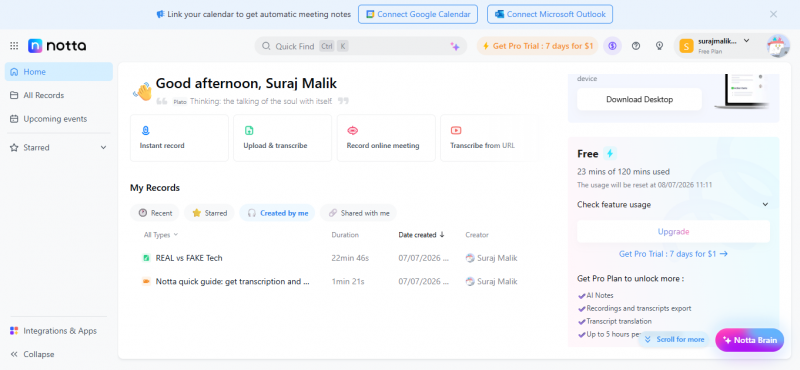
SCREENSHOT · My dashboard on day one, with the four main actions and the 10% off checklist
MY OBSERVATION The dashboard itself is genuinely well organized. I found everything without hunting. But count the promotions on this one screen: a Pro trial button in the header, a discount checklist, a Notta Brain card, and a desktop app popup in the corner. Four upsells before I did anything. |
STEP 05 · TRANSCRIBE FROM URL
Feeding it a YouTube link
I picked Transcribe from URL and pasted a YouTube link for a 22 minute tech video called REAL vs FAKE Tech. Notta verified the link instantly with a green tick, showed supported sources like YouTube, Dropbox and Google Drive, and let me set the transcription language to auto. One click on Start Transcription and it was off.
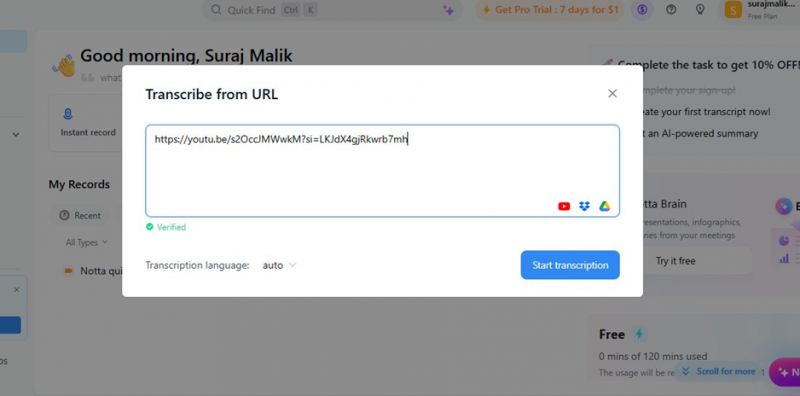
SCREENSHOT · Pasting the YouTube link, verified instantly with a green tick
MY OBSERVATION This flow is excellent. No downloading the video, no converting formats, just paste and go. The instant link verification is a nice touch that tells you it will work before you commit. |
STEP 06 · PROCESSING
The long wait on the free plan
An Uploaded Records panel appeared in the corner showing the file at 6% progress. So I waited. And waited. After 10 to 12 minutes it was still showing as uploading, so I decided to reload the page, and the moment I did, it showed 95% and then complete. My usage meter showed 23 of 120 free minutes consumed for the 22 minute video.
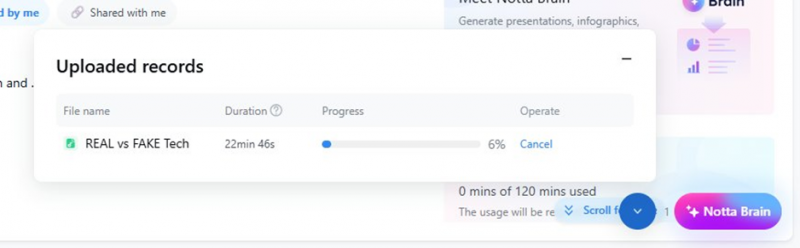
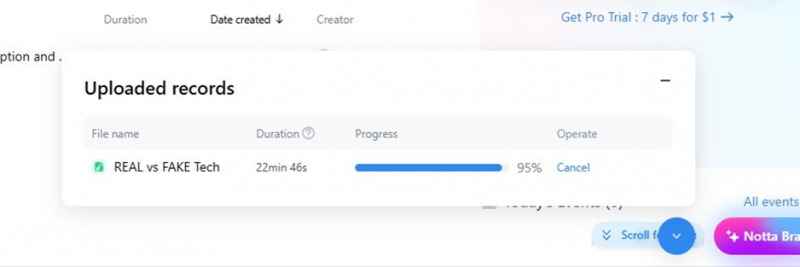
SCREENSHOT · Straight to 95% the moment I reloaded the page
MY OBSERVATION Two issues here. First, 10 plus minutes for a 22 minute video is slow, and Notta openly admits free users sit in a lower priority queue since no wait time for processing is a listed Pro perk. Second, the progress indicator clearly was not refreshing on its own. My job had likely finished earlier and the UI never told me until I reloaded. That is a bug, or at least sloppy state handling. |
STEP 07 · INTEGRATIONS CHECK
Browsing integrations while waiting
While the file processed, I opened Integrations and Apps. There are 29 integrations across Calendar, CRM, Video Meetings, Collaboration, Communication, Automation and Storage. Google Calendar, Outlook and Salesforce connect in one click. Apple Calendar sits at a Request stage, and Salesforce carries a Business plan tag.
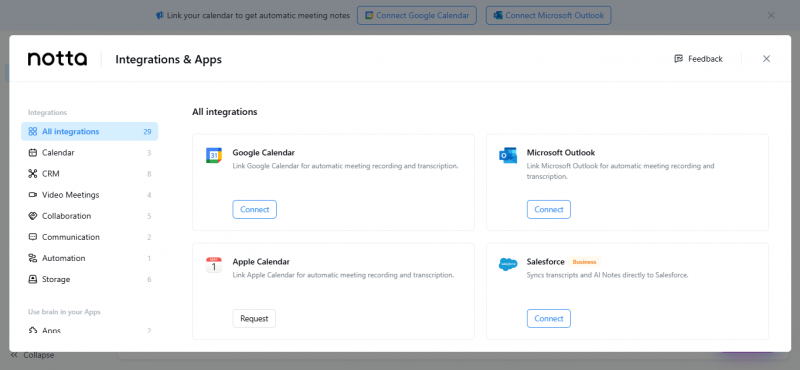
SCREENSHOT · The Integrations and Apps panel with 29 options across seven categories
MY OBSERVATION The integration lineup is honestly impressive for a transcription tool. Salesforce sync alone makes this interesting for sales teams. Just note that the juicier ones like CRM sync are gated behind the Business tier, not even Pro. |
STEP 08 · SUMMARY GENERATION
Picking a summary template
Once the transcript was ready, a Summarize Meetings with AI popup offered templates: Auto, General, Team Meeting, Consulting Meeting, plus a customize option and an outline box where you can steer the summary. I went with Auto and hit Generate Now.
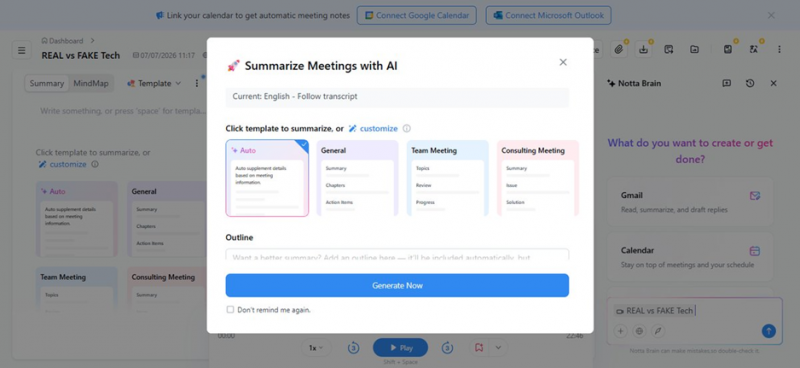
SCREENSHOT · The summary template picker: Auto, General, Team Meeting, Consulting Meeting
MY OBSERVATION The template system is smart. Different meeting types genuinely need different summary structures, and letting me add my own outline is a power feature most competitors hide or skip. This is where Notta started winning me back. |
STEP 09 · THE OUTPUT
Transcript, summary and action items
The record view is a three panel layout: summary and mind map on the left, the video with a synced transcript in the middle, and Notta Brain chat on the right. The Auto summary produced a proper structured document with sections and action items. For a casual tech video it generated tasks like QA designing durability tests for budget gadgets and a security review of third party smart home devices. The transcript itself synced to video playback with clickable timestamps.
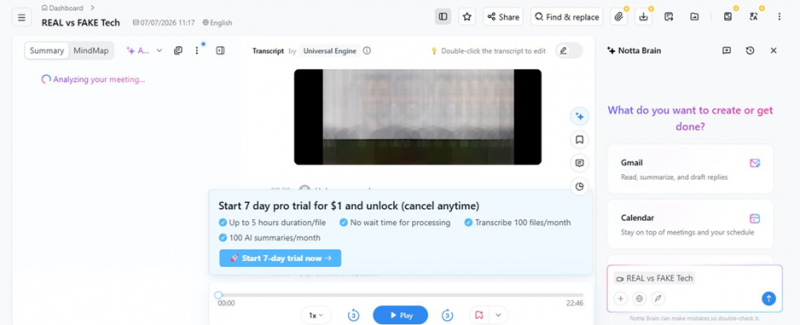
SCREENSHOT · Notta analyzing the meeting right after the transcript finished
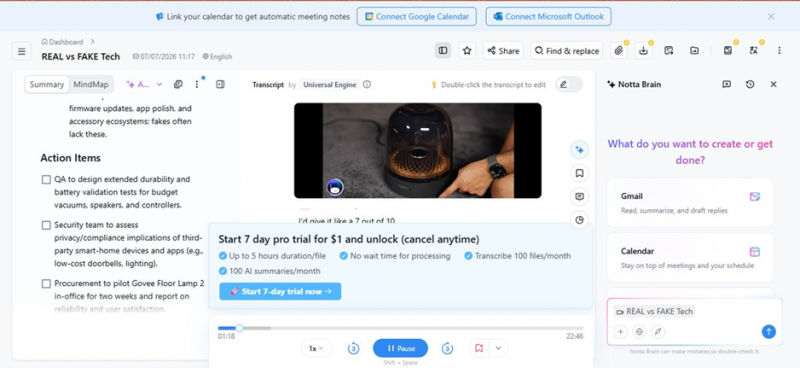
SCREENSHOT · The finished output: summary and action items on the left, synced transcript in the middle
MY OBSERVATION This is the best part of the product. The summary quality surprised me. It did not just compress the video, it reorganized it into decisions and follow ups like a real meeting note. Transcript accuracy on this clear single speaker video was very solid, and I only spotted minor slips. The mind map and Brain chat add real value on top. |
STEP 10 · THE BANNER PROBLEM
An upsell I could not close
While reviewing the transcript, a promo bar for the 7 day $1 Pro trial sat right across the middle of the transcript area. I looked for a close button. There is none. It covers part of the transcript and stays there permanently on the free plan. On top of that, the export, translate and several toolbar options carry little orange badges and are locked to Pro.

SCREENSHOT · The toolbar with orange Pro badges on export, translate and other options
MY OBSERVATION This is where my patience ran out. An undismissable banner sitting on top of the content I came to read is hostile design, plain and simple. Combine it with locked exports, meaning I cannot even take my own transcript out as a file on the free plan, and the free tier starts feeling like a demo built to annoy you into paying. |
STEP 11 · PRICING PAGE
What upgrading actually costs
The Pro checkout shows two options: $8.17 per month billed annually as one payment of $97.99 (a 39% discount), or $13.49 billed monthly. Pro unlocks 1,800 transcription minutes a month, real time transcription, file imports, AI summaries and action items, exports, cloud storage export, custom templates, the Chrome extension and more. Payment goes through a Stripe Link checkout, and the renewal date for annual billing is shown clearly.
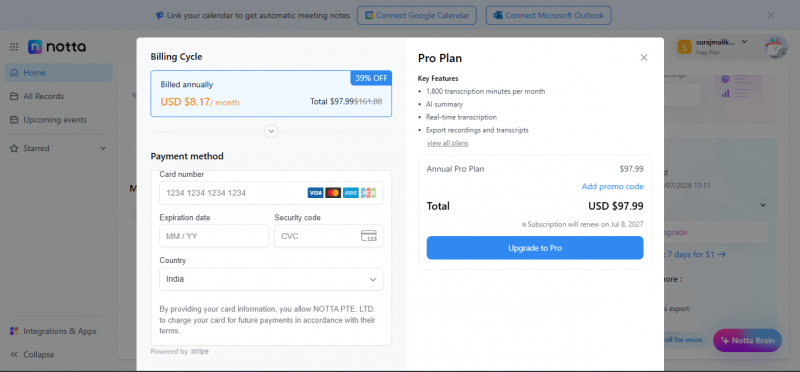
SCREENSHOT · The Pro checkout: $97.99 annual with renewal date and card form
MY OBSERVATION The pricing itself is fair, honestly cheaper than Otter for similar minutes. But the annual plan charges $97.99 upfront and auto renews, and after reading what users report about billing on Trustpilot (more on that below), I would think twice before saving a card here, and I would set a calendar reminder before any trial ends. |
The Free Plan Reality
What stays locked unless you pay
Based on my session, here is everything I bumped into that the free plan would not let me do.
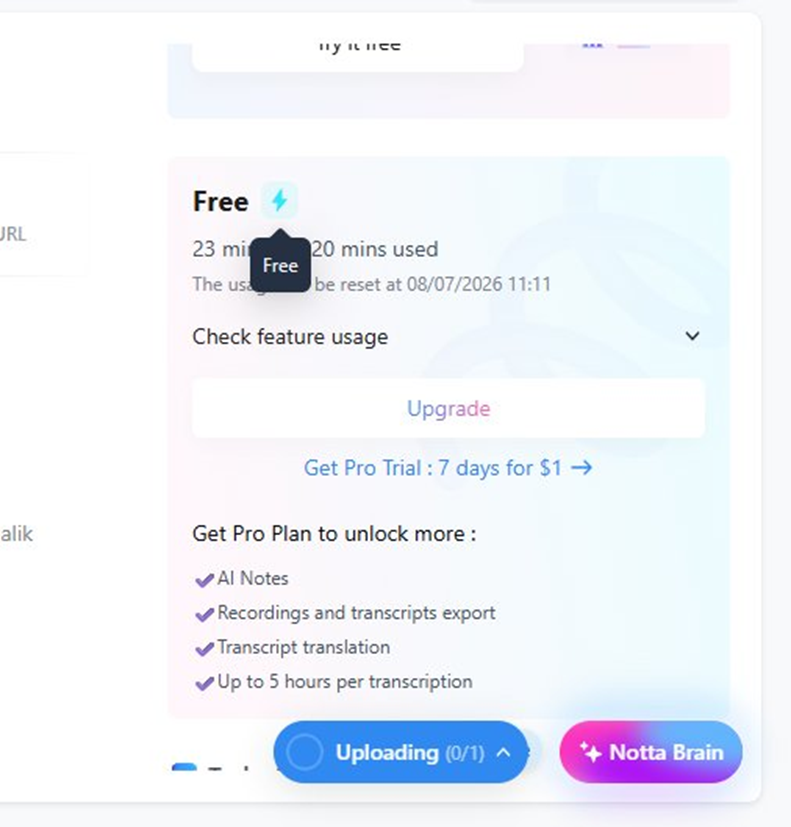
SCREENSHOT · My free usage meter after one video: 23 of 120 minutes gone
| PRO | Exporting transcripts or recordings in any format |
| PRO | Transcript translation |
| PRO | Files longer than the free per file cap (Pro allows up to 5 hours) |
| PRO | Priority processing with no queue wait |
| PRO | Custom AI templates and advanced templates |
| PRO | Chrome extension and custom vocabulary |
| BIZ | CRM integrations like Salesforce sync |
| FREE | You keep: 120 mins/month, AI summary, Notta Brain, mind map, in app viewing |
Plans as I saw them during testing
| FREE | PRO (BEST VALUE) | TRIAL | |
| Price | $0 / forever | $8.17/mo billed yearly ($97.99), or $13.49 monthly. 39% off annual. | $1 for 7 days |
| Minutes | 120 mins per month, short per file cap | 1,800 mins per month, 5 hrs per file | 100 files and 100 AI summaries per month |
| Features | AI summary and Notta Brain access. No exports, permanent upsell banner. | Exports, translation, real time transcription, custom templates, Chrome extension | No processing wait time. Cancel anytime, but it auto converts. |
| My note | A locked showroom more than a plan | The plan Notta actually wants you on | Set a reminder before day 7, seriously |
What real users say on G2, Trustpilot and Capterra
My test is one afternoon with one video. So I cross checked my findings against verified user reviews on the three big platforms. The split between them tells its own story.
G2 4.4/5
230+ verified reviews
G2 reviewers largely echo what I found in the product. They consistently praise the fast, accurate transcription, the clean and easy interface, the wide language support and the flexible export formats. Several mention the mind map and infographic outputs as genuinely useful for sharing meeting takeaways.
The recurring complaints match my notes too: accuracy dips with background noise, accents and overlapping speakers, the speaker identification can mislabel who said what, and multiple reviewers flag the pricing as expensive given the limited free tier.
One reviewer summed it up by saying the summaries were broadly fine with room for improvement, after a smooth onboarding.
Paraphrased from a verified G2 review
Trustpilot ~1.8/5
Consumer reviews
Trustpilot is a very different picture, and most of the anger is about billing rather than the product. Reviewer after reviewer describes being charged the full $97.99 annual fee after a short trial with no warning email, struggling to get refunds, and slow or dismissive support responses. Trustpilot itself notes it has removed fake reviews for this company.
Product complaints exist too. Non English speakers report weak accuracy in languages like Greek and Portuguese, and one user described a transcription that stalled partway and then prompted for payment.
A common theme: users felt the 3 day trial converting into a full yearly charge was designed to catch people who forget.
Summarized from multiple Trustpilot reviews
Capterra Limited data
Small review base
Capterra has surprisingly few Notta reviews compared to G2, so treat it as a smaller sample. The feedback that does exist is positive on the core product: accurate transcription, a strong AI summary tool and good value for money, with a recommendation for anyone wanting an ad hoc note taker.
The main criticism there mirrors an integration weakness: the Outlook connection did not always work reliably, so the bot sometimes failed to auto join meetings, and getting video captured along with audio was fiddly.
The verified reviewer there recommended it for ad hoc note taking while flagging the flaky Outlook auto join.
Paraphrased from a Capterra review
The Scorecard
Pros and cons from my testing
What I liked Transcribe from URL is genuinely brilliant, paste a YouTube link and done AI summary quality is excellent, with real structure and action items Template system for summaries plus a custom outline option Transcript syncs to video playback with clickable timestamps 29 integrations including Salesforce, calendars and storage apps Pro pricing at $8.17/month annually undercuts most competitors Clean, well organized dashboard that needs zero tutorial | What annoyed me Card entry paywall shown seconds after signup, before any usage Undismissable $1 trial banner covering my own transcript Free plan blocks all exports, your transcript is stuck inside Notta Slow free tier processing, 10+ minutes for a 22 minute video Progress indicator did not update until I manually reloaded Trustpilot is full of billing and refund horror stories Four or more upsell prompts visible on a single dashboard screen |
My VerdictGood engine, exhausting salesperson 7.2 /10 CORE PRODUCT: 8.5/10 · FREE PLAN EXPERIENCE: 5/10 · TRUST AND BILLING: 6/10 Here is where I landed after my testing session. The core technology is legitimately good. The URL transcription flow is the smoothest I have used, the summary it produced from my 22 minute video was better organized than notes I would have taken myself, and the template plus outline system shows real product thinking. If I judged Notta purely on what it does with audio, it would score much higher. But I did not test the technology in isolation, I tested the product, and the product kept getting in its own way. A card form before I had used anything. A promo banner glued over my transcript with no close button. My own transcript held hostage because exports are a Pro feature. A progress bar that lied to me until I refreshed. Individually these are small irritations. Together they made a 90 minute session feel like walking through a market where every stall owner grabs your sleeve. The Trustpilot pattern seals my caution. When feature reviews on G2 sit at 4.4 and consumer reviews sit near 1.8, the product is fine and the business practices are the problem. Most of those one star reviews are about trials silently converting into $97.99 annual charges and refunds being refused. My recommendation: If you transcribe regularly and multilingual support matters, Notta Pro on the monthly plan is genuinely good value at $13.49, and the annual plan is fine if you are certain you will use it all year. Pay with a card you monitor, skip the auto renewing trial unless you set a reminder for day 6, and do not judge the tool by its free plan, because the free plan is not really a plan, it is a locked showroom. If you mostly need occasional transcripts with free exports, look at Otter, Fathom or tl;dv first and come back if they fall short. |
Post Comment
Share your thoughts about this article.
Be the first to post a comment!





