There are dozens of “all the AI tools in one place” directories out there, and most of them are glorified link farms. So when I landed on OpenFuture AI, which claims to be the largest AI tools directory with the fastest updates and the most accurate database, I didn’t want to just browse it. I wanted to test it.
My method was simple: start at the homepage, use only the site’s own filters to find a tool, and follow the trail all the way to the tool itself. No Google shortcuts, no prior bookmarks. If the directory works, it should carry me from 40,000+ listings down to one useful tool without friction. Here’s exactly how that test went, step by step, with my honest observations at every stop, plus what real users on Trustpilot, G2, and independent review sites say about what I found.
First contact: big claims, one search bar

Fig. 1: The OpenFuture AI homepage. 75 categories, 40,502 tools, and a single search bar.
The homepage makes its pitch in the first three seconds. The numbers are right there in the search placeholder: 75 categories, 40,502 tools. It’s a smart move because it turns a vague boast (“largest”) into something countable. The navigation is minimal: Categories, AI Tools, a language switcher, and Login. Below the fold, the listings start immediately with tabs for All, Recommended, and Newly Added.
MY OBSERVATION I appreciated that there’s no marketing fluff between me and the tools. A lot of directories bury the actual catalog under newsletter popups and sponsored banners; here, I was one scroll away from real listings. The dark neural-network background is a bit of a cliché in AI branding, but it doesn’t get in the way. One thing that made me raise an eyebrow: 40,502 tools is a huge claim, and huge catalogs usually mean thin quality control. I made a mental note to check whether the entries deeper in feel curated or scraped. |
STEP VERDICT Clean, fast, and confident first impression. The tool count is impressive on paper. Now it has to prove that quantity hasn’t killed quality. |
The Exact OpenFuture Tool Count Is More Fluid Than It Looks
One thing I would add after revisiting OpenFuture in August 2026 is that the headline catalog number should not be treated like a fixed audited inventory.
Different currently indexed OpenFuture pages show totals in roughly the 40,200 to 40,500-tool range, while still presenting 75 categories. One recent page displayed 40,244 tools, another 40,252, and another indexed version displayed 40,502.
That does not necessarily mean something is wrong.
Directories constantly:
- Add tools
- Remove dead products
- Merge duplicates
- Reclassify listings
- Update cached pages
- Reprocess submissions
But it does change how I would interpret the homepage.
Instead of saying:
“OpenFuture has exactly 40,502 verified AI products.”
I would say:
“OpenFuture currently indexes roughly 40,000 AI-tool listings.”
That is a more defensible description of what the number actually represents.
The real product is not the exact count anyway.
It is whether OpenFuture can turn that huge inventory into a useful shortlist.
The pricing filter is where directories usually lie. This one mostly doesn’t.
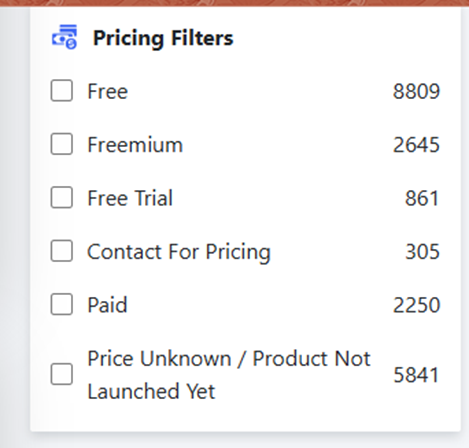
Fig. 2: Pricing filters with live counts: Free (8,809), Freemium (2,645), Free Trial (861), and more.
Scrolling down reveals the filter sidebar, and this is where OpenFuture AI started earning some respect from me. Pricing is broken into six honest buckets, and crucially, “Free,” “Freemium,” and “Free Trial” are separated. Anyone who has hunted for AI tools knows the pain of clicking a “free” tool that turns out to be a 7-day trial with a credit card wall.
MY OBSERVATION The category I found most telling was “Price Unknown / Product Not Launched Yet” with 5,841 entries. Most directories would quietly dump these into “Free” or hide them entirely. Labeling nearly 6,000 tools as essentially unverified is a transparency move, but it also confirms my earlier suspicion: a meaningful chunk of that 40,502 headline number is padding from tools nobody has fully vetted or that don’t even exist yet. Still, 8,809 genuinely-tagged free tools is a serious pool to filter from, and the live counts next to each checkbox told me the filters were querying real data, not decoration. |
STEP VERDICT Honest pricing taxonomy, which is rare in this space. The “unknown” bucket dents the headline tool count, but I’d rather see it labeled than hidden. |
A Pricing Tag Is a Starting Point, Not a Guarantee
The pricing filters remain one of OpenFuture's better features, but there is an important distinction between:
directory metadata
and
the vendor's live pricing.
OpenFuture currently provides filters for categories such as:
- Free
- Freemium
- Free trial
- Contact for pricing
- Paid
- Price unknown / product not launched yet
That is useful for discovery.
But AI-product pricing changes quickly.
A service categorized as “free” may mean:
- Unlimited free use
- Limited free scans
- Daily free credits
- A free account with premium features
- A small no-login demo
GPTZero is a good example.
Calling it “free” is not incorrect because users can run free AI-detection scans. But GPTZero also offers paid plans, higher usage allowances, Advanced Scan features, team plans, and API access.
So my updated rule for using OpenFuture would be:
Use the directory to discover the pricing model.
Then:
Use the tool's own website to verify the actual limits before deciding whether it fits your budget.
75 categories, alphabetized, searchable, with some overlap
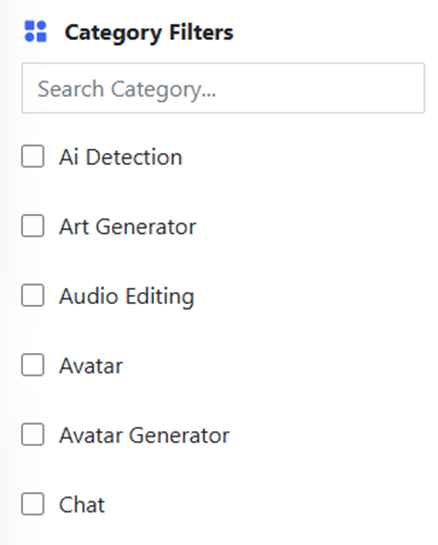
Fig. 3: Category filters with a built-in search box. “AI Detection” is a first-class category.
Right below pricing sits the category panel. The built-in “Search Category” box is a thoughtful touch; with 75 categories, scrolling would get old fast. The list is alphabetical and checkbox-based, so you can stack multiple categories with your pricing filters.
MY OBSERVATION My nitpick showed up almost immediately: “Avatar” and “Avatar Generator” exist as two separate categories, sitting right next to each other. That’s a taxonomy smell. If those two overlap, I’d bet others do too, which means some tools are probably split across categories where a single, tighter label would serve users better. That said, “AI Detection” being its own first-class category is exactly what I wanted for this test. In many directories, detection tools get lumped under “Writing” or “Education,” making them nearly impossible to isolate. |
STEP VERDICT Functional and searchable, though the taxonomy could use a cleanup pass. For my test case, it did precisely what I needed. |
Category Overlap Is More Than a Cosmetic Problem
The existing Avatar / Avatar Generator example looks minor, but taxonomy quality becomes increasingly important as a catalog moves past 40,000 listings.
OpenFuture's current category system contains dozens of overlapping concepts, including examples such as:
- Copywriting
- Copywriting Assistant
- Research
- Research Assistant
- Social Media
- Social Media Assistant
- Avatar
- Avatar Generator
- Image Generator
- Generative Art
This creates two possible problems.
False Exclusion
A useful tool may be tagged under a neighboring category and disappear from a narrowly filtered search.
False Inclusion
A tool may technically relate to the category without actually performing the function the user expects.
The Notbyai example in my original test demonstrated exactly that second problem.
It relates to AI-authorship verification, but it is not an AI-text detector in the same sense as GPTZero.
This means OpenFuture works best when categories are used to narrow the search, not to certify that every returned product has an identical function.
The filters actually filter, and GPTZero surfaces near the bottom
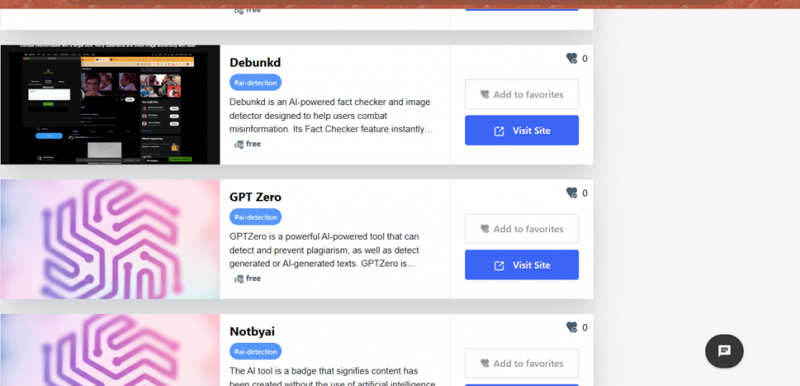
Fig. 4: Results after stacking “Free” + “AI Detection”: Debunkd, GPT Zero, and Notbyai.
This was the real test. I checked “Free” under pricing and “AI Detection” under categories, and the listing refreshed into a focused set of tools. Each card carries the essentials: name, a short description, the category tag, the pricing tag, a favorites counter, and two actions (“Add to favorites” and “Visit Site”). Among the results, three caught my attention for how different they were from each other:
→ Debunkd: an AI-powered fact checker and image detector aimed at fighting misinformation.
→ GPT Zero: the well-known detector for AI-generated text and plagiarism.
→ Notbyai: not a detector at all, but a badge signaling content was made without AI.
MY OBSERVATION The filtering felt genuinely accurate. Every card in view was legitimately a detection-adjacent tool tagged free, so the combination of the two filters held up. The descriptions are short but informative enough to differentiate tools at a glance. Two soft spots: the favorites counters all read 0, which suggests the community engagement layer isn’t very active yet, and some thumbnails were just the OpenFuture logo blur rather than a real product screenshot. Also, Notbyai in an “AI Detection” category is a slightly loose fit; it certifies rather than detects. I picked GPT Zero. Partly because it’s the most consequential tool in the list (it’s used by teachers and editors making real decisions about real people’s work), and partly because it’s the perfect candidate to test whether the directory’s data (free, AI detection) matches reality. |
After repeating this process, I would add a verification step between:
Find a tool
and
Trust the listing.
Before visiting an unfamiliar AI product, quickly check:
- Does the listing describe what the tool actually does?
- Is the pricing label plausible?
- Is the product still operating?
- Does the outbound link use the expected official domain?
- Is the listing recent enough to reflect major product changes?
For GPTZero, this worked well.
OpenFuture's current GPTZero listing still identifies it as an AI detector and points users toward its detection functionality.
But one accurate result does not prove that 40,000 other records are equally current.
The larger the directory becomes, the more important random spot checks become.
STEP VERDICT The core promise, filtering 40,000 tools down to a relevant shortlist in two clicks, delivered. Weak social signals and generic thumbnails are cosmetic issues, not functional ones. |
The handoff: one click, straight onto GPTZero’s front door
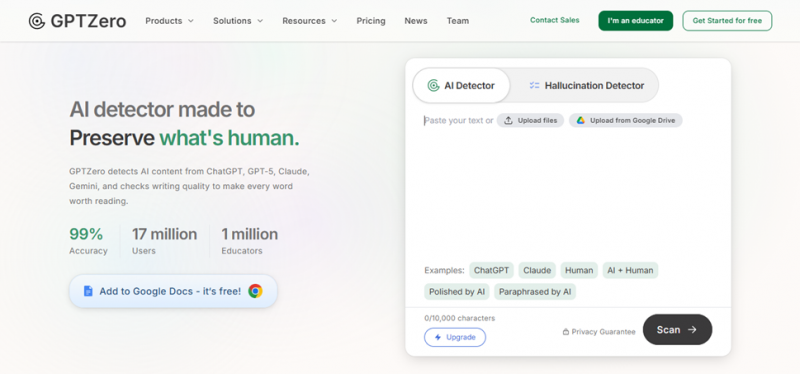
Fig. 5: GPTZero’s homepage after clicking “Visit Site”: free scan box, 10,000-character limit, example texts.
Clicking “Visit Site” took me directly to gptzero.me. No interstitial ad page, no redirect chain, no affiliate splash screen. That alone puts OpenFuture ahead of a surprising number of directories that monetize every outbound click.
And because the whole point of my test was to follow the trail to the end, landing here meant I was now indirectly testing GPTZero itself. The scan box is front and center: paste up to 10,000 characters for free, or upload a file. The example chips are a clever onboarding trick. One click loads a sample of ChatGPT text, Claude text, human text, or trickier hybrid cases like “Polished by AI” and “Paraphrased by AI,” so you can watch the detector work before committing your own text.
MY OBSERVATION First, the directory’s data checked out. OpenFuture tagged GPT Zero as free with an accurate description, and the live site confirmed both: there’s a genuinely free scanning tier, with an Upgrade path for heavier use. That’s the homepage’s accuracy claim actually holding up under a spot check. Second, GPTZero itself makes a strong first impression. The interface is inviting, and the inclusion of a Hallucination Detector tab and hybrid-text examples shows they understand the real world isn’t a clean split between “AI wrote this” and “a human wrote this.” My skeptical side, though, flags the “99% accuracy” banner. No AI detector operating in the wild is reliably 99% accurate across paraphrased, edited, and mixed text, and false positives on human writing have real consequences for students. I’d treat that number as marketing, and the tool’s output as a signal, never a verdict on its own. |
STEP VERDICT A clean, honest handoff from directory to tool, and the listing’s metadata matched reality. GPTZero itself is polished and generous with its free tier. Just read its accuracy claims with adult supervision. |
WHAT REAL USERS SAY
Reality check
My test was a single run on a single afternoon, so before closing, I checked how my impressions line up with what real users and independent reviewers report about both platforms.
On OpenFuture AI
INDEPENDENT REVIEWERS (ZERLO, MOBILEBD, AIRESULT) · Mostly positive Third-party write-ups describe OpenFuture as one of the better-known AI directories, with SEO trackers estimating roughly 120,000 to 131,000 monthly visitors. Reviewers consistently praise the well-structured, beginner-friendly browsing and the value of comparing tools in one place instead of ten browser tabs. They also note an honest caveat: a directory’s worth ultimately depends on the quality of the third-party tools it lists, and no directory is truly exhaustive. |
BLOGGER REVIEWS (SUSHILPROMPT AND OTHERS) · Positive Several reviewers highlight the daily update cycle as OpenFuture’s real differentiator and note that it feels discovery-first rather than aggressively affiliate-driven, which matches my experience with the clean, direct “Visit Site” handoff. One reviewer described using it exactly the way I did: filtering to find a free alternative when a paid tool cut its free credits. |
INDUSTRY ROUNDUPS (RADIUSTHEME, GITHUB AI-DIRECTORIES LIST) · Positive OpenFuture appears regularly in “best AI directory” roundups, credited with detailed tool profiles, fast updates, and an accurate database. A GitHub community list of AI directories also includes it among the larger, more current databases, which supports its visibility claims even if the exact tool count is hard to verify independently. |
Verdict on the reviews: they broadly match my test. Nobody serious disputes the breadth or usability. The recurring caveat, that listing quality varies, is the same one I flagged with the 5,841 “price unknown” entries.
On GPTZero
G2 · 4.3 / 5 from 101 verified reviews G2 reviewers generally rate GPTZero well, praising its ease of use, sentence-by-sentence highlighting, and value for educators and content teams. But even positive reviews repeatedly mention the same weakness: occasional false positives, where genuinely human writing gets flagged as AI, making it hard to rely on the results alone. One verified reviewer also complained that detection results were inconsistent between scans and that the free version’s word limits felt restrictive. |
TRUSTPILOT (POSITIVE VOICES) · Individual 5-star reviews The happy reviewers are genuinely happy. Students and casual users describe it as fast and efficient, say the free plan already gives a useful summary of whether text looks AI-generated, and call the interface welcoming for first-time users. A few educators specifically praise the grading and feedback features for correcting assignments. |
TRUSTPILOT (CRITICAL VOICES) · Around 2.4 / 5 overall (“Poor”) The overall Trustpilot score tells a much harsher story, and inaccuracy dominates the complaints. One user reported that text written entirely by them came back as 97% AI, while another detector recognized it as human. A parent described the tool marking her daughter’s teacher-required quotations as AI. A writer said years of trained academic style kept getting flagged, forcing them to distort their own writing to pass. Several users also noted the same text scanned twice returned different results, and that customer service was hard to reach. |
INDEPENDENT TESTING (CYBERNEWS, STANFORD RESEARCH) · Mixed Independent testers found GPTZero excellent at catching raw, unedited AI text but far less reliable on edited or paraphrased content. The Cybernews reviewer noted it even flagged articles they had written years before AI tools existed. The most sobering data point comes from a Stanford study (Liang et al., 2023): AI detectors flagged 61.3% of TOEFL essays written by non-native English speakers as AI-generated, and all of them were human-written. Simpler vocabulary and formulaic structure, hallmarks of second-language writing, look like “AI patterns” to detectors. |
Verdict on the reviews: the split between G2 (professionals using it as one signal among many) and Trustpilot (students and writers on the receiving end of false flags) perfectly captures my own caution about the 99% accuracy banner. GPTZero is a useful signal and a genuinely generous free tool, but the real-world reviews confirm it should never be the sole judge of anyone’s work.
FINAL VERDICT
Does OpenFuture AI pass the test?
Yes, with caveats. As a discovery engine, it did exactly what a directory should do: it took me from 40,000+ tools to one relevant, accurately-described, genuinely-free tool in under two minutes and five clicks, with no dark patterns along the way. The pricing taxonomy is unusually honest, the filters query real data, and the outbound links go straight to the source. Independent reviews back this up.
The caveats are the ones I flagged along the route: the headline tool count is inflated by nearly 6,000 unverified “price unknown” entries, the category taxonomy has overlaps that need pruning, and the community layer (favorites, engagement) feels dormant. None of these broke my test, but they’re the difference between a good directory and a great one.
My advice if you use it: ignore the raw tool count, go straight to the pricing and category filters, stack them, and let the shortlist do the work. That workflow is where OpenFuture AI genuinely shines. And if the trail leads you to an AI detector like GPTZero, remember what the reviews say: treat its output as a signal, not a sentence.
| FILTERING & SEARCH | DATA ACCURACY | TAXONOMY & CURATION | OVERALL EXPERIENCE |
| 8.5 / 10 | 8 / 10 | 6 / 10 | 7.5 / 10 |
Post Comment
Share your thoughts about this article.
Recent Comments
Larry
Jul 16, 2026I use it when I'm looking for something specific and don't want to dig through Reddit threads. Its not perfect though but it is solid enough that I bookmarked it.
Login to reply




