Higgsfield AI has been appearing everywhere on my feed, so I decided to test it the way a completely new user would.
I opened the website, selected one tool, created an account, and attempted a single generation without paying. This review documents that session step by step, including the login wall, promotional offers, pricing screen, credit system, and the paywall that appeared when I clicked Generate.
I also compared my experience with recent feedback from users on Trustpilot and G2.
TRUSTPILOT 4.0 / 5 · 3,100+ reviews | G2 4.5 / 5 · 70+ reviews | MY SCORE AFTER TESTING 6.5 / 10 |
IF YOU SCROLL AND RUN Higgsfield is a genuinely impressive all-in-one platform for AI image and video creation. Its model catalogue is extensive, the individual tools are thoughtfully designed, and the interfaces I tested were clean and intuitive. However, my first session repeatedly pushed me toward payment. I encountered a login requirement before I could upload an image, an immediate “personal” 58% discount with a countdown timer, an annual pricing page I had not requested, and a paywall when I tried to run a generation costing only 0.2 credits. The technology deserves attention. The onboarding and sales experience deserve scrutiny. My advice is simple: explore carefully, read the billing and refund conditions, and do not enter your card details until you understand exactly what you are purchasing. What is Higgsfield AI? |
What is Higgsfield AI, in one honest paragraph
Higgsfield is a browser-based creative suite that bundles a large number of image and video models under one roof. Instead of paying separately for Kling, Seedance, Nano Banana, Veo and friends, you buy Higgsfield credits and spend them across everything: text-to-video, image generation, lip sync, camera-angle tools, a Cinema Studio, plugins for Premiere Pro and DaVinci Resolve, and even an MCP integration for Claude. The company was founded in 2023 by ex-Google Brain people and is reportedly valued around 1.3 billion dollars, so this is not some weekend project. The pitch is simple and honestly attractive: one subscription, every hot model, no prompt-engineering PhD required.
That is the pitch. What follows is what it felt like to actually walk through the front door as a brand new user, which is a very different story.
MY TESTING SESSION
I did not follow a tutorial or a sponsored walkthrough. I searched for Higgsfield, landed on the site, picked one tool that looked interesting, and tried to generate one output. Every screenshot below is from my own session, and every observation is what went through my head at that exact moment.
The landing page: impressive and loud at the same time
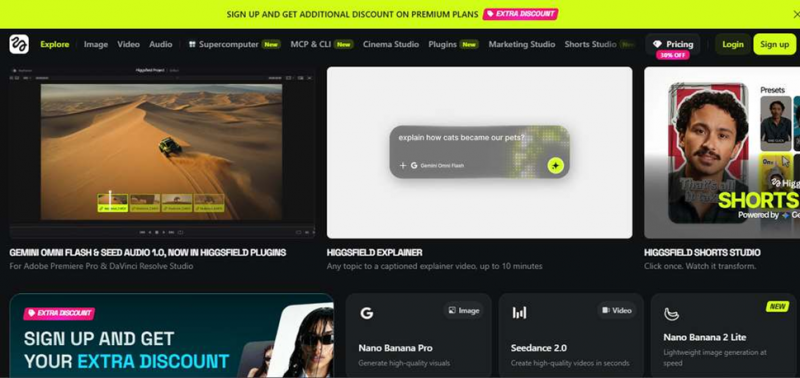
Fig. 1 · The first thing you see when you search Higgsfield AI and open the site.
The homepage does a good job of showing off. Gemini Omni Flash plugins for Premiere Pro and DaVinci Resolve, an Explainer tool that turns any topic into a captioned video up to 10 minutes, a Shorts Studio, Nano Banana Pro for images, Seedance 2.0 for video. The catalogue is genuinely deep and the demos look slick.
MY OBSERVATION Before I saw a single feature, I saw a bright yellow banner screaming about sign-up discounts, an "EXTRA DISCOUNT" pill, and a "30% OFF" tag glued under the Pricing button. I had been on the page for three seconds and the site had already asked me for money three times. Also, almost every nav item carries a "New" badge, which stops meaning anything when everything is new. First impression: real technology underneath, flash-sale energy on top. |
Picking my test tool: Angles 2.0
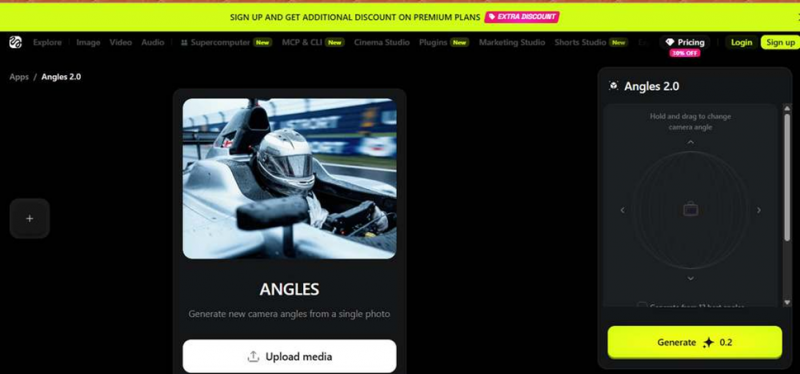
Fig. 2 · Angles 2.0, the tool I chose to test. Note the Generate button showing 0.2 credits.
I chose Angles 2.0, a tool that takes one photo and generates the same shot from new camera angles. As a concept it is genuinely useful for storyboarding, thumbnails, and product shots. The interface is clean: an upload button in the middle, a draggable 3D sphere on the right to set the camera position, and a Generate button that clearly shows the cost, 0.2 credits.
MY OBSERVATION Credit for where it is due: the tool page itself is one of the cleaner AI tool UIs I have used. No clutter, the cost is shown upfront on the button, and the drag-to-rotate sphere is intuitive without a tutorial. If the whole product matched this page, this review would read very differently. 0.2 credits also sounds refreshingly cheap, which mattered later. |
I clicked Upload and hit the first wall
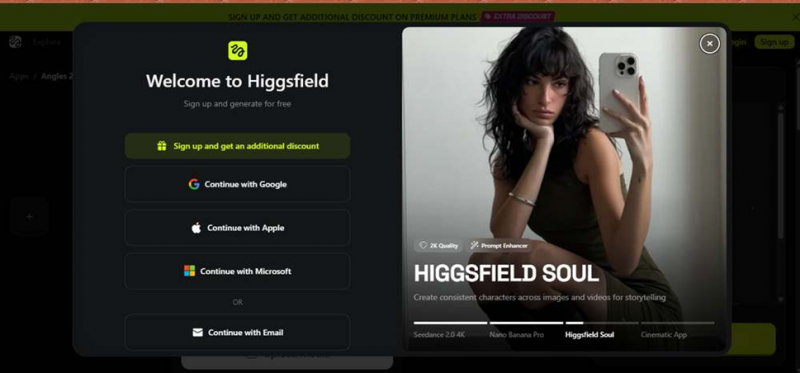
Fig. 3 · The login wall that appeared the moment I tried to upload an image.
The instant I clicked Upload media, a login modal took over the screen. Google, Apple, Microsoft, or email. No uploading, no previewing, nothing without an account. The modal says "Sign up and generate for free," and the top button is not a plain sign-up, it is "Sign up and get an additional discount."
MY OBSERVATION A login wall before upload is common in this industry, so I will not pretend to be shocked. But notice the framing: even the sign-up button is a discount pitch. The promise "generate for free" also sits right there in the modal, and I want you to remember that phrase, because it becomes important at Step 8. |
The moment I signed up, a "personal" 58% offer with a countdown
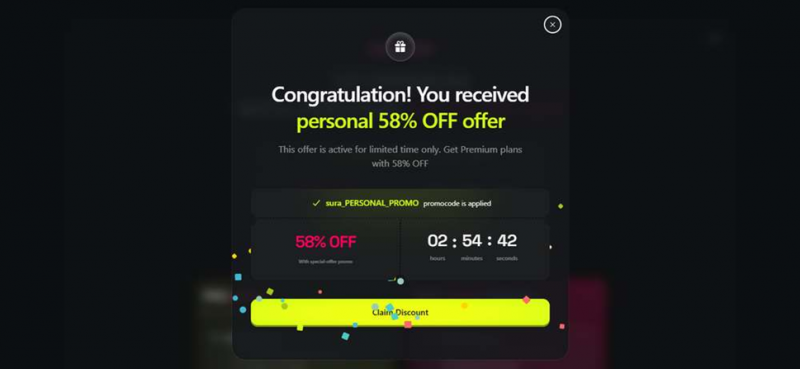
Fig. 4 · Confetti, a "personal" promo code already applied, and a 2 hour 54 minute countdown.
I signed up, answered a few onboarding questions, and before I could see the tool again the screen filled with confetti. "Congratulation! You received personal 58% OFF offer." A promo code with my name baked into it was already applied, and a timer told me I had 2 hours 54 minutes before this once-in-a-lifetime moment expired.
MY OBSERVATION This is textbook urgency marketing and I did not do anything to earn it. I had not generated anything, browsed pricing, or shown any intent. Every new account almost certainly gets this exact "personal" offer, which means it is not personal and probably not really expiring. The typo in "Congratulation" did not help the premium feel either. This was the moment my trust meter started dropping, because a product this well-funded does not need casino tactics unless the tactics are the strategy. |
Behind the popup: the pricing page was waiting for me
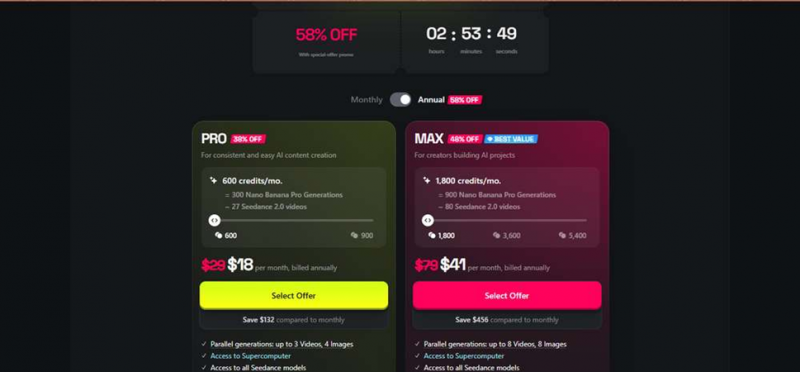
Fig. 5 · Close the popup and you are not back at the tool. You are on the pricing page.
I closed the discount popup expecting to return to Angles 2.0. Instead, the page behind it was the full pricing screen. Pro at 18 dollars a month and Max at 41 dollars a month, both billed annually, with the billing toggle already flipped to Annual and the same countdown ticking at the top.
MY OBSERVATION Two things stood out. First, I never asked to see pricing, the funnel just deposited me there. Second, the annual toggle being preselected is a classic move: those "18 dollars a month" numbers mean roughly 216 dollars charged upfront for a year. Trustpilot has multiple reviews from people who bought annual plans by accident, and standing on this page, I completely understand how that happens. |
Finally uploading my test image
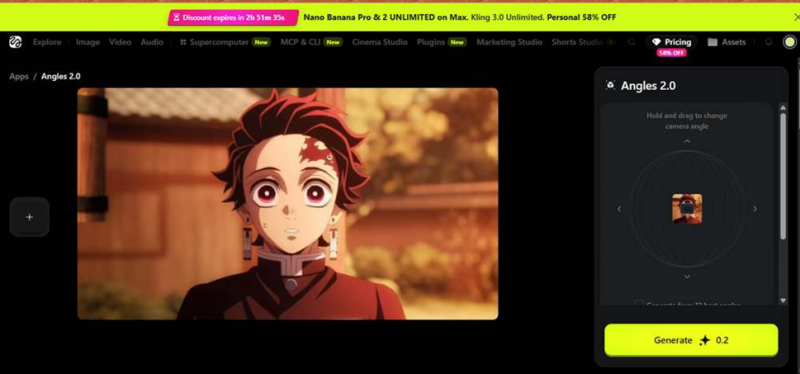
Fig. 6 · My test image loaded into Angles 2.0. The top banner now counts down my "personal" discount.
Back at the tool at last, I uploaded a test frame, an anime still, to see how Angles handles stylised art rather than photography. The upload was fast and the image appeared instantly in both the canvas and the little sphere widget. But look at the top of the page: the site banner had morphed into "Discount expires in 2h 51m," and the Pricing button badge had jumped from 30% OFF to 58% OFF.
MY OBSERVATION The countdown now followed me everywhere. Even while doing actual creative work, a timer sat at the top of my screen telling me money was slipping away. This is the "infinite popups" experience users complain about in reviews, and I was living it within ten minutes of creating an account. |
Setting the camera: rotation 45°, tilt 30°
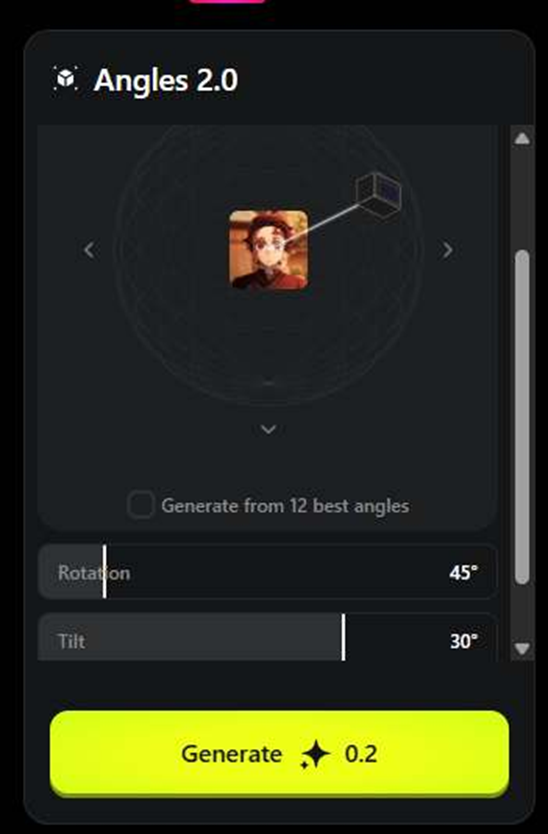
Fig. 7 · The exact settings I used: 45° rotation, 30° tilt, cost still showing 0.2 credits.
I dragged the sphere to set a 45 degree rotation and 30 degree tilt, wanting a three-quarter high angle of the character. The controls responded smoothly and there are also numeric sliders if you want precision instead of dragging. There is even a checkbox to generate from 12 best angles in one go, which is a smart feature for anyone doing shot exploration.
MY OBSERVATION Again, the tool design is genuinely good. Clear cost, precise controls, a sensible batch option. Whoever builds the tools at Higgsfield is doing excellent work. My frustration in this review is aimed at whoever builds the funnel around those tools. |
I pressed Generate. The paywall pressed back.
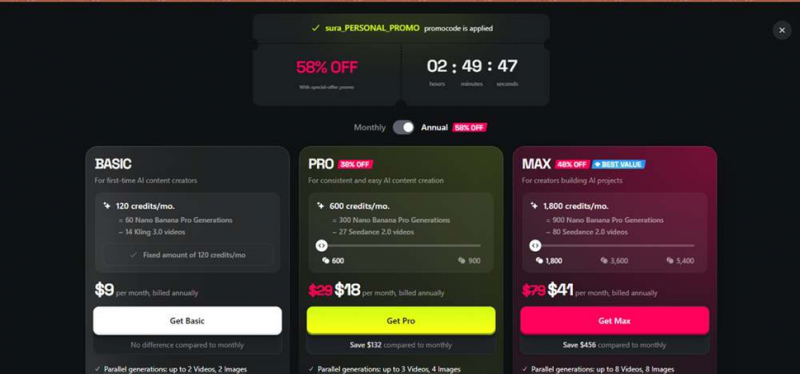
Fig. 8 · A few seconds of loading, then this. Even the Basic tier is a paid annual plan.
I hit Generate on my 0.2 credit task. A loading state ran for a few seconds, long enough for me to believe it was working, and then the full pricing wall slid over the screen. Basic at 9 dollars a month, Pro at 18, Max at 41, all billed annually, promo code applied, countdown still running. My generation never happened.
MY OBSERVATION This was the deal-breaker of the session. The sign-up modal said "Sign up and generate for free." I signed up. I tried to generate. I was shown a price list, and even the entry tier, the one labelled for first-time AI content creators, is a paid annual commitment. In my session there was no functional free credit for this tool, no sample generation, nothing. The few seconds of loading before the paywall appeared felt especially cheeky, as if the product wanted me to taste anticipation before charging for the meal. Whatever the fine print says about free tiers on other models, this was my lived experience as a new user: the free generation promise did not survive contact with the Generate button. |
THE PRICING PART
What Higgsfield actually costs, as shown to me
Higgsfield’s displayed prices appear to vary depending on the promotional state associated with an account. Several reviewers also describe the changing discounts as confusing.
The following prices are exactly what appeared during my session under the “personal” 58% promotion. Every plan was billed annually.
| Plan | Price shown to me | Monthly credits | Approximate usage |
| Basic | $9/month, billed annually | 120 credits | About 60 Nano Banana Pro images or approximately 14 Kling 3.0 videos |
| Pro | $18/month, reduced from $29 and billed annually | 600 credits | About 300 image generations or approximately 27 Seedance 2.0 videos |
| Max | $41/month, reduced from $79 and billed annually | 1,800 credits | About 900 image generations or approximately 80 Seedance 2.0 videos |
Remember that “billed annually” means the entire year is charged upfront.
For example, the Basic plan displayed as $9 per month would result in an upfront annual charge of approximately $108.
Three things to check before paying
Based on my research, there are three areas prospective customers should examine carefully.
1. Credit and discount conditions
Independent pricing trackers report that credits may expire and that promotional prices change regularly.
The price shown to one user or even the price shown to the same user at a different time may therefore vary.
2. Refund eligibility after using credits
Multiple Trustpilot reviewers report that using even one credit can remove refund eligibility under the terms of use.
That makes it difficult to evaluate the platform after paying without potentially affecting your ability to request a refund.
3. Renewals and cancellation
Several reviewers report being charged for renewals after believing they had cancelled their subscriptions.
These reports do not mean that every customer will experience a billing problem. They do mean that users should treat the checkout page and subscription terms as a contract rather than a casual trial.
WHAT REAL USER SAYS
One testing session is one data point. So I went through recent reviews on the major software review platforms to see whether my experience was a fluke or a pattern. Short version: the pattern is real, in both directions.
| Trustpilot ★ 4.0 / 5 · 3,100+ reviews |
Trustpilot is where the tug-of-war is most visible. A large share of reviewers genuinely love the product: they praise having every major model in one place, the quality of Seedance and Kling outputs, the Lipsync Studio, and a support team that gets named personally and warmly in dozens of reviews. One creator summed up the positive camp well: "All of the constantly updated A.I. Models in one place. Love it." Trustpilot reviewer, 5 stars The critical reviews cluster around exactly what I hit in testing. Users describe constant upsell popups and offers, pricing that keeps changing until it stops feeling trustworthy, credits burning far faster than expected, refund requests denied because a single credit was used, and surprise renewal or annual charges. Some angry reviewers go as far as calling the site a scam, which I think overshoots, but the frustration behind those words matches the funnel I walked through. Higgsfield support replies to nearly every negative review asking people to email in, which is more effort than most companies make, though reviewers are split on whether those emails actually resolve things. + model variety + output quality + responsive support - credit burn - pricing confusion - refund policy - renewal charges |
| G2 ★ ~4.5 / 5 · 70+ reviews |
G2 skews noticeably more positive than Trustpilot, partly because it attracts working professionals rather than one-time buyers. Reviewers there consistently highlight ease of use, the quality of generations, and how the platform has become a single hub for AI filmmaking workflows, with features like Supercomputer and Cinema Studio getting specific praise. One independent filmmaker described completing a five-minute sci-fi short film on the platform while juggling a full-time job, something that would have been financially impossible with a traditional crew. Even the fans converge on one complaint though: credit consumption. G2's own summary of user feedback notes that credits can drain quickly on larger projects, and reviewers ask for better character consistency and longer generation lengths, which to be fair are limitations across the whole AI video industry right now, not just Higgsfield. + ease of use + all-in-one workflow + Cinema Studio - high credit consumption |
| Capterra No established review base |
| I checked Capterra as well and I will be straight with you instead of padding this section: at the time of writing, Higgsfield does not have an established Capterra listing with a meaningful number of user reviews. Worth knowing too, Capterra was acquired by G2's parent in early 2026, so the two ecosystems are converging anyway. If you are researching Higgsfield, Trustpilot gives you the raw consumer sentiment and G2 gives you the professional-user view, and between them the picture is consistent enough. |
THE SCOREBOARD
Pros and cons, from my testing plus the review data
WHAT GENUINELY WORKS
+ Massive model catalogue in one subscription: Seedance, Kling, Nano Banana, Veo-class models, plus in-house tools
+ Individual tool pages are clean, fast, and show credit costs upfront
+ Angles 2.0 concept and controls are excellent, with precise rotation and tilt and a 12-angle batch option
+ Serious ecosystem: Premiere and Resolve plugins, MCP and CLI, Shorts Studio, Cinema Studio
+ Support team is unusually responsive and named positively in many reviews
+ Well-funded company shipping new features at high speed
WHAT HURT MY TRUST
– Login wall before you can even upload a file
– Fake-feeling "personal" 58% discount with a countdown, served instantly to a brand new account
– Closed the popup and landed on the pricing page instead of the tool
– "Sign up and generate for free" ended in a paywall on my very first 0.2 credit generation
– Annual billing preselected, so small monthly numbers hide big upfront charges
– Widely reported issues: fast credit burn, refunds voided by any usage, surprise renewals
MY VERDICT
Good product, exhausting salesperson
My score: 6.5/10
| Category | Assessment |
| Tools and technology | Strong |
| Pricing transparency | Weak |
| Onboarding honesty | Weaker |
| Would I pay today? | Not yet |
Higgsfield the creative product and Higgsfield the sales funnel felt like two different companies during my test.
The product itself is legitimately impressive.
Its model catalogue is one of the strongest aggregations I have seen in a single platform. The tool interfaces are thoughtfully designed, and the ecosystem of plugins, creative studios, MCP support, and CLI integrations demonstrates serious engineering ambition.
If I were scoring only the Angles 2.0 interface and camera controls, Higgsfield would receive an 8 or higher.
But the rest of the onboarding experience cannot be ignored.
I was told I could sign up and generate for free, yet my first 0.2-credit generation ended at a pricing screen. Before reaching that point, I encountered a supposedly personal discount, a countdown that followed me around the platform, and an annual billing option selected by default.
Thousands of user reviews also repeat concerns about rapid credit consumption, refund eligibility, renewals, and unexpected annual charges.
Trust is part of the product experience. At the moment, it is the weakest part of Higgsfield.
Get it if
→ You are a working creator who will actually use hundreds of credits monthly, and one hub beats five subscriptions
→ You have tested your exact use case, read the refund terms, and are fine committing to an annual plan knowingly
→ You want cinematic camera tools like Angles and Cinema Studio and can absorb some wasted credits on retries
Skip it, or wait, if
→ You expected to try before you buy, because in my session that option did not really exist
→ You are a casual user, since credits reportedly burn fast and annual billing punishes experimentation
→ Dark-pattern checkout flows are a dealbreaker for you on principle, as they nearly were for me
My final word: keep Higgsfield on your watchlist, not your bank statement. The day they add an honest free tier and calm the discount circus down, I will happily retest and update this score upward. The technology has earned that second look. The sales funnel has not earned my card details.
Post Comment
Share your thoughts about this article.
Be the first to post a comment!





