“Free” is the most stretched word in AI photo editing, and these two platforms stretch it in opposite directions. PixNova AI opens most of its image tools without an account and earns its money on video credits. Pica AI hands out a small daily credit allowance, stamps a watermark on every free export, and reserves clean files for subscribers.
Both platforms chase the same audience: thumbnail designers, meme page admins, short-form editors, and anyone who needs a convincing face swap before lunch. The resemblance ends there. PixNova has grown into a sprawling toolbox covering image generation, video models, lip sync, and even room design. Pica has stayed deliberately narrow, polishing face swap, headshots, and avatars while quietly routing its photo enhancer through a sister product called Artguru.
This comparison runs both platforms through seven scored rounds on identical source files, breaks down what the listed prices hide, examines watermark and privacy rules, and closes with a recommendation for each type of creator. Every dollar figure and limit was recorded from live pages during the first week of June 2026.
Quick Verdict for Creators in a Hurry
| Overall winner | PixNova AI, scoring 8.2 against 7.3 across seven equally weighted rounds. The free tier behaves like a finished product, image exports ship clean, and one-time credit packs suit irregular creator income. |
| Where Pica AI wins | Headshots and portraits. Headshot+ remains the most polished single feature either platform ships, and the subscription removes watermarks for daily users. |
| PixNova suits | Meme and trend pages, thumbnail designers, short-form video editors, and anyone allergic to sign-up walls. |
| Pica suits | Job seekers and personal brands wanting LinkedIn-ready portraits under a predictable monthly plan. |
| Worth skipping both | Agencies that need audit trails and unambiguous commercial licensing, and retouchers who rely on layers, masks, and manual control. |
The reasoning behind every line above sits in the scored rounds below, and the pricing section explains why the cheapest option depends entirely on publishing cadence.
Why These Two Names Keep Colliding
Search results push these platforms together because both rank for free face swap queries, both promise one-click results, and both trace to Hong Kong linked operators. The resemblance makes the matchup look closer than it actually plays out in practice.
A note on identity belongs before anything else, because the naming situation around both products routinely misleads buyers:
• pixnova.ai is the platform reviewed here. The site footer credits global operations support to YiMeta (HK) and SAVETO LTD (UK).
• pixnova.net, pixnova.app, and pixnova.cc are separate properties. The .cc domain belongs to a different Hong Kong entity, GROW ENGINE LIMITED, with its own pricing and apps. Reviews and feature claims for one do not transfer to the others.
• pica-ai.com is the platform in this comparison. It is unrelated to Pika, the text-to-video startup at pika.art that often appears in the same search results.
Thin, auto-generated comparison pages mix these properties together constantly. The scores, prices, and policies below apply to pixnova.ai and pica-ai.com only.
How the Scoring Worked
The Same-Shot Standard
The Same-Shot Standard is the rubric built for this matchup: both platforms received identical source material across seven creator briefs. The asset set included a mixed-lighting portrait series across multiple skin tones, one five-person group photo, a nine-second vertical clip, a low-resolution scan from a 2009 camera phone, and a product flat lay.
Each round earned a score from 1 to 10 weighing four factors in equal measure: output realism, available control, friction from upload to download, and export cleanliness. All seven rounds carry equal weight in the overall score. Pricing, limits, and policy language come from live pricing pages, plan selectors, and policy documents captured on June 8, 2026.
Scores represent editorial judgment rather than laboratory measurement. Both platforms ship updates frequently, and credit math in this category shifts without notice, so the figures deserve a recheck against live pages before any purchase.
Seven Rounds on Identical Source Files
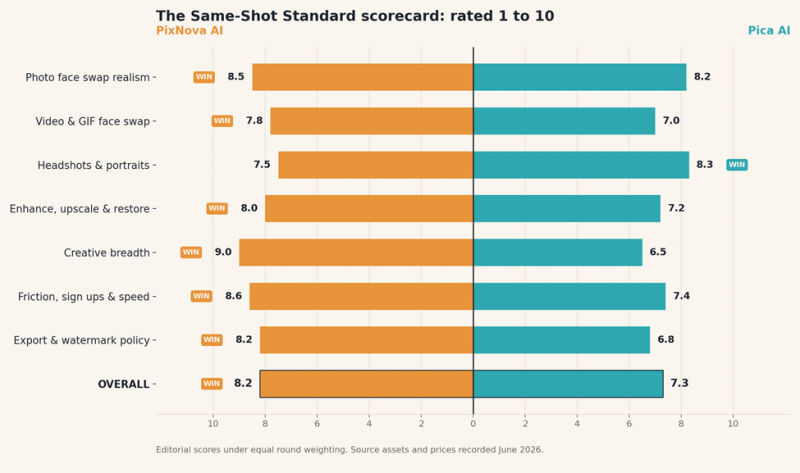
Figure 1. Round-by-round scores under the Same-Shot Standard, with the overall result at the base.
Round 1: Photo Face Swap Realism
Both platforms clear the bar that matters most: a frontal, well-lit swap that survives a casual scroll. PixNova takes the round on blend quality at hairlines and under uneven lighting, where its output held skin texture with fewer plastic highlights. Pica counters with smart detection. Uploading a group shot automatically opens a multi-face playground, though detection caps at three faces per image, which proved limiting on the five-person group test.
Round score: PixNova 8.5 | Pica 8.2
Round 2: Video and GIF Face Swaps
Video is where the pricing models start steering the experience. PixNova processes short clips quickly but caps free video swaps at roughly ten seconds; anything longer draws from the credit balance. Pica supports video and GIF swaps on the same flow as photos, yet renders noticeably slower on clips, and every free render carries a watermark, which makes free video output effectively unusable for publishing.
Round score: PixNova 7.8 | Pica 7.0
Round 3: Headshots and Professional Portraits
Headshot+ is the strongest single feature in this entire comparison. Pica's portrait pipeline produced consistent corporate framing, believable fabric texture, and backgrounds that read as offices rather than gradients. PixNova's headshot generator works, but results lean template-driven, with repeated poses across runs. Creators building LinkedIn profiles, speaker pages, or press kits get more usable frames per attempt from Pica.
Round score: PixNova 7.5 | Pica 8.3
Round 4: Enhancement, Upscaling, and Restoration
PixNova keeps the unglamorous utilities in house: an upscaler rated to four times resolution, a face enhancer, color correction, and a magic eraser all run on the same site under the same free policy. Pica made a structural choice here. The Photo Enhancer and Restore Old Photo links in its own navigation now route to Artguru, the operator's sister product, with a separate brand and login context. Output quality through Artguru held up on the low-resolution scan, but the extra hop breaks the single-tool promise.
Round score: PixNova 8.0 | Pica 7.2
Round 5: Creative Breadth
No contest in volume. PixNova's catalog spans text-to-image generation with access to branded frontier models, a video generation suite built around Seedance 2.0, talking photo and lip sync tools, anime conversion, clothes and hairstyle changers, and even interior design generators. Pica offers face swap, headshots, and avatars. Breadth cuts both ways: quality across PixNova's sixty-plus tools is uneven, and several entries exist for novelty rather than production. Still, a creator hits far fewer dead ends on PixNova.
Round score: PixNova 9.0 | Pica 6.5
Round 6: Friction, Sign-Ups, and Speed
PixNova's most underrated feature is the absence of a front door. Most image tools run without an account, which turns a thirty-second idea into a thirty-second task. Pica requires sign-in to collect its daily credit drip, reported at roughly four to five credits per day in recent hands-on walkthroughs, and a single photo swap consumes one credit. That allowance evaporates before any serious evaluation finishes.
Round score: PixNova 8.6 | Pica 7.4
Round 7: Export Quality and Watermark Policy
The round that decides real-world usability. PixNova ships free image exports clean, holding back 1080p face swap video and priority queues for paying users. Pica watermarks every free export, photo and video alike, and independent testing places free output around 720p. A watermark converts free results into previews, which is a legitimate business model but a different product than the marketing suggests.
Round score: PixNova 8.2 | Pica 6.8
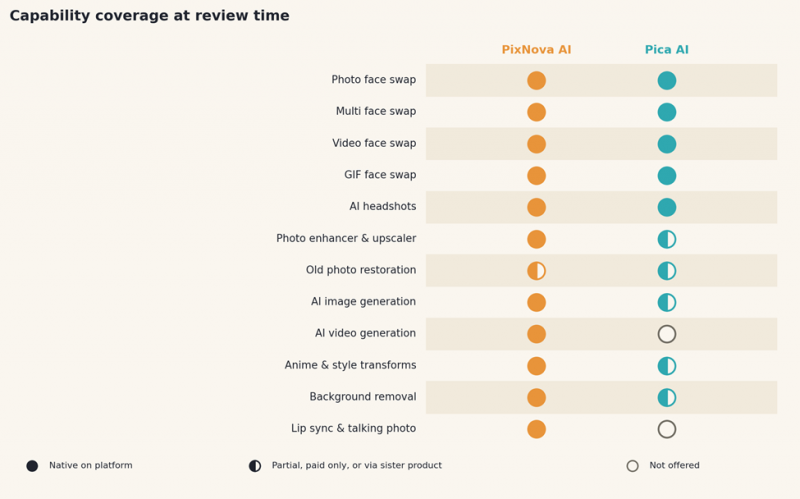
Figure 2. Capability coverage at review time. Half-filled markers indicate partial, paid-only, or sister-product routing.
Pricing Reality: What the Listed Numbers Hide
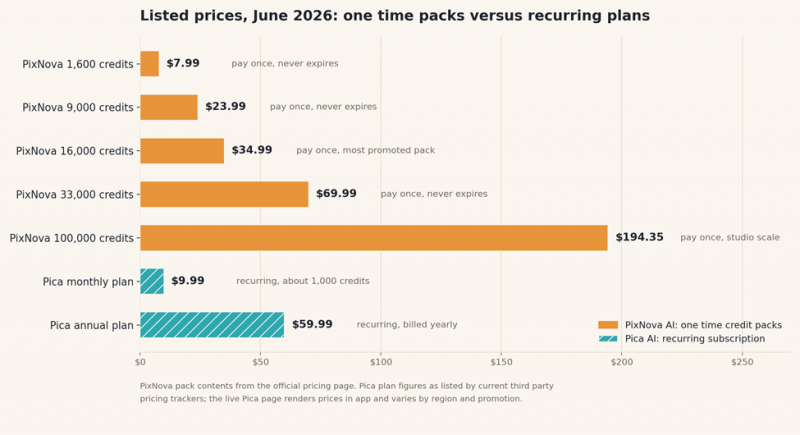
Figure 3. Listed price points in June 2026. Hatched bars recur; solid bars are one-time purchases.
PixNova sells credits the way arcades sell tokens. Five one-time packs run from $7.99 for 1,600 credits to $194.35 for 100,000, paid credits never expire, and the official pricing page states the entry pack covers up to 13 video generations or 160 image editor tasks. A Plus subscription also appears in the plan selector, listing roughly 10,000 monthly credits with priority processing and watermark-free 1080p video. Two clauses deserve attention: free daily credits expire the same day they are claimed, and the platform states plainly that it does not offer refunds.
Pica prices time rather than tokens. Third-party trackers list a monthly plan at $9.99 carrying about 1,000 credits and an annual plan at $59.99, with small one-time packs and weekly offers appearing by region. The live pricing page renders its numbers inside the app shell, which keeps figures out of search results and makes regional variation hard to audit. At listed rates the monthly plan works out to roughly one cent per credit, against about half a cent on PixNova's entry pack and under a quarter of a cent at pack scale.
The structural differences matter more than the sticker prices:
| The question | PixNova AI | Pica AI |
|---|---|---|
| Free output watermark | None on most image tools | Applied to every free export |
| Free credit behavior | Daily credits expire the same day | Small daily drip after sign-in |
| Paid credit expiry | Never expires | Tied to the billing cycle |
| Cheapest paid entry | $7.99 one time | $9.99 per month as listed |
| Refund policy | None, stated on the pricing page | Not prominently documented |
| Price transparency | Public pricing page | Rendered in app, varies by region |
Where Each Platform Falls Short
PixNova AI's Weak Points
• Catalog sprawl dilutes quality. Sixty-plus tools cannot all be excellent, and several novelty generators produce results well below the face swap and upscaler standard.
• Manual control barely exists. No layers, no masks, no curve adjustments; every tool is a one-slider pipeline, which frustrates anyone trained on a conventional editor.
• Batch processing is absent, so a fifty-image cleanup job means fifty separate uploads.
• Video credits drain quickly. The entry pack covers about 13 video generations, and the no-refund policy removes the safety net for misjudged purchases.
• Image generation trails dedicated platforms, sitting below what Midjourney-class generators produce despite the branded model names on the menu.
• Lookalike domains create real confusion, and support reflects a lean operation rather than an enterprise help desk.
Pica AI's Weak Points
• Watermarks gate everything free. The free tier functions as a preview, not a product.
• The daily credit drip is too small for an honest evaluation. A handful of swaps per day cannot stress-test video features before payment.
• Core utilities now live elsewhere. Routing enhancement and restoration through Artguru fragments the experience the homepage sells.
• Video swaps run slow, with multi-minute waits on short clips reported across independent hands-on tests.
• Multi-face detection stops at three faces, which fails on common group content.
• Corporate disclosure is thin. The site names no operating entity on its main pages, leaving third-party listings to fill the gap.
Which Creator Should Pick Which Platform
| Creator profile | Better fit | Why it fits |
|---|---|---|
| Meme and trend page admins | PixNova AI | No login, fast photo swaps, and anime or style transforms for format chasing |
| YouTube thumbnail designers | PixNova AI | Swap, upscale, background removal, and color fixes in one tab without watermarks |
| Job seekers and personal brands | Pica AI | Headshot+ produces the most consistently professional portraits in the matchup |
| Short-form video editors | PixNova AI | Longer swaps via one-time credits, plus lip sync and a video generation suite |
| E-commerce sellers | PixNova AI, with caveats | Free background removal and upscaling cover small catalogs; no batch tools at volume |
| Agencies on client work | Pica AI paid, or neither | Predictable billing and clean exports, though licensing language deserves legal review first |
One pattern runs through the table: the more a workflow depends on volume and speed, the more PixNova's frictionless free tier compounds. The more a workflow depends on polish for a single high-stakes image, the more Pica's narrow focus pays off.
Privacy, Consent, and Platform Rules
Both platforms process the most sensitive material a creator uploads: faces. PixNova states that most tools run without an account, that uploads travel encrypted, that files delete automatically after processing, and that user content does not train its models. Those statements come from the platform itself and carry no independent audit, which is the standard caveat across this entire category. Pica publishes terms of service and a privacy policy but discloses less about its operator on the site, and free outputs persist long enough to download with the watermark applied.
Consent is the harder boundary. Swapping the face of a real person without permission risks account strikes, removal under the synthetic media rules now enforced on YouTube and TikTok, and legal exposure under an expanding set of deepfake statutes. Both platforms publish content policies prohibiting abusive use. The durable rule for creators: swap faces that are owned, licensed, or attached to a written yes.
Final Verdict
PixNova AI wins this comparison six rounds to one, finishing at 8.2 against 7.3. The margin comes less from any single spectacular feature than from product philosophy: a free tier that behaves like a finished product, exports that ship clean, and a one-time credit model that matches the irregular cash flow of working creators.
Pica AI earns its keep in exactly one scenario, and it happens to be a valuable one. Creators who need polished professional portraits on a schedule, and who will pay monthly for watermark-free output, get the better headshot engine and a simpler bill. For everything else in a creator's week, the sprawling, slightly chaotic, mostly free toolbox takes the win.
Prices, limits, and feature routing in this category change without warning. The figures here reflect live pages from June 2026, and a sixty-second check of both pricing pages remains the cheapest insurance before committing money.
Post Comment
Share your thoughts about this article.
Be the first to post a comment!





