Why People Look for PixNova AI Alternatives
PixNova AI has become one of the most-searched free AI photo tools of 2026, bundling face swap, AI image generation, upscaling, AI clothes changer, AI body generator, and background/watermark removal into a single browser app with no login required. For anyone reading a PixNova AI review, the first thing that stands out is how much the platform offers without forcing users through signup. Its face swapper works on photos, GIFs, and videos, typically returning results in 3 to 5 seconds, and free outputs are watermark-free for most use cases.
The platform has real traction. According to third-party analytics, pixnova.ai recorded roughly 1.5 million monthly visits in late 2025, with a global rank near 34,700 and an authority score around 41. One product-page tracker even reported a 47% month-over-month jump in visits to 1.8 million for its face-swap tool during a growth spike. User ratings sit around 4.2 out of 5 on independent listing sites.
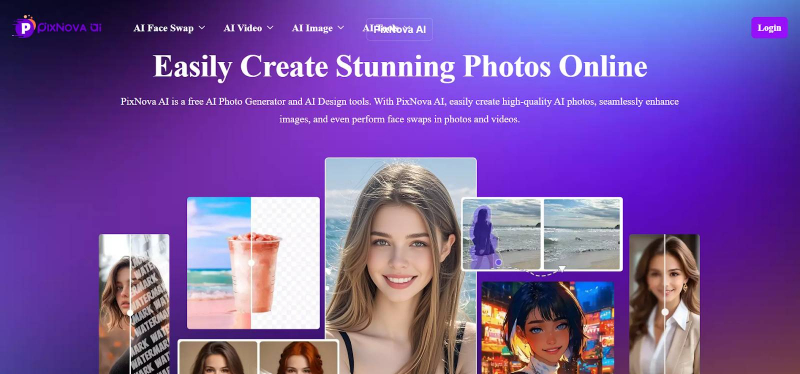
So why look elsewhere? Independent reviews and user reports point to a few recurring reasons. Output quality can be inconsistent on complex or low-light footage; the platform applies AI screening and, in some regions, consent prompts and watermarks on certain outputs; and power users often want longer video support, higher resolution, batch processing, commercial-use rights, or a more predictable credit system than a free generalist tool provides.
This guide cuts through the noise. After reviewing official pricing pages and independent 2026 tests, we picked four alternatives that each beat PixNova on a specific axis: casual ease, professional video, long multi-face clips, and all-in-one editing. We also include a wider 8-tool reference table so you can see where popular names like Akool, Reface, and FaceApp fit.
The 30-Second Verdict • Best for fast, casual photo swaps with a generous free tier: Remaker AI • Best for professional, temporally-stable AI video: Magic Hour • Best for long, multi-face, 4K video swaps: DeepSwap • Best all-in-one image editor plus swapper: Remaker AI (or a PixNova hybrid workflow) • Best for enterprise ad campaigns at scale: Akool (bonus pick) |
Quick Context
The Face Swap Landscape in 2026
Modern face-swap tools use deep-learning models that first detect a face and lock onto landmarks (eye corners, nose tip, mouth edges, jawline), then map a target face onto the source while matching skin tone, lighting, and expression. The 2026 leap forward is temporal consistency: keeping the swapped face stable across frames so it no longer flickers or drifts during head movement. This is now the main differentiator between casual tools and production-grade platforms.
Three trends define the category this year, and the table below summarizes how each one reshapes buying decisions.
| 2026 Trend | What It Means | Who It Favors |
|---|---|---|
| Temporal consistency | Faces stay stable frame to frame, no flicker on motion | Magic Hour, DeepSwap |
| API-first architecture | Volume teams use APIs, not web UIs | Magic Hour, DeepSwap, Akool |
| Full creative suites | Swap, edit, video, lip sync bundled together | Magic Hour, Remaker, PixNova |
| Consent and labeling | Laws now require consent and AI labels | Tools with consent prompts and watermarks |
Table 1: How the three defining 2026 trends (plus regulation) shape tool selection.
Master Comparison
8 Tools at a Glance
The table below summarizes the core differences across the eight most relevant tools. Pricing reflects representative entry tiers verified from official and independent sources in early-to-mid 2026. Always confirm current pricing on each vendor's site before buying, since plans, credits, and regional offers change frequently.
| Tool | Best For | Video Swap | Entry Price | Free Tier |
|---|---|---|---|---|
| PixNova AI | Free all-round photo/GIF/video | Yes (short) | Free | Unlimited, no login |
| Remaker AI | Casual swaps plus editing suite | Yes (credits) | From ~$2.99 pack | 30 credits plus daily |
| Magic Hour | Pro AI video and workflow | Yes (4K, stable) | ~$10/mo annual | 400 credits, no card |
| DeepSwap | Long multi-face 4K video | Yes (up to 30 min) | $9.99/mo | Limited trial |
| Akool | Enterprise ad and avatar video | Yes (4K, live) | ~$21 to $30/mo | Watermarked, 720p |
| Reface | Mobile viral social swaps | Yes (templates) | ~$6.99/mo | Limited, watermark |
| FaceApp | Mobile face editing | No | ~$8.99/mo | Limited, watermark |
| FaceFusion | Local, private, open source | Yes (local GPU) | Free (open source) | Full, self-hosted |
Table 2: High-level comparison of PixNova AI and seven leading alternatives (2026).
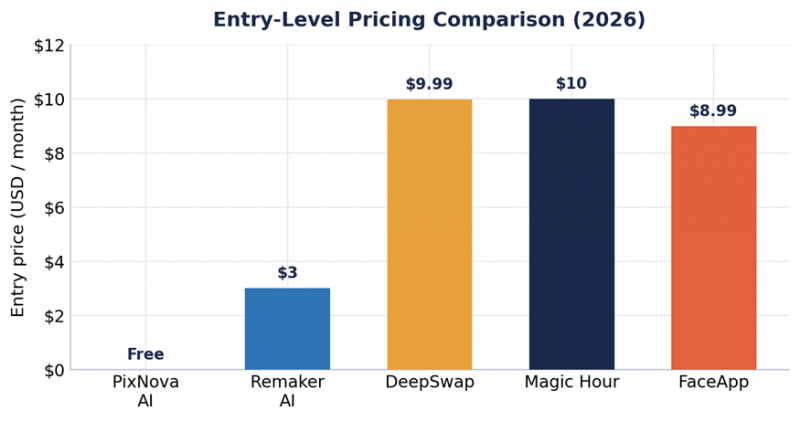
Figure 1: Representative entry-level monthly price by tool. PixNova is free; Remaker uses one-time credit packs (effective entry shown).
Detailed Feature Matrix
Headline prices only tell part of the story. The matrix below compares the four core alternatives plus PixNova across the features that most often decide a purchase. A check means the feature is supported on at least one tier; notes clarify limits.
| Feature | PixNova | Remaker | Magic Hour | DeepSwap |
|---|---|---|---|---|
| Photo face swap | Yes | Yes | Yes | Yes |
| Video face swap | Yes (short) | Paid credits | Yes (4K) | Yes (30 min) |
| Multi-face in one clip | Yes | Yes | Yes | Up to 6 faces |
| Batch processing | Limited | Yes (folder) | Limited | Limited |
| Max resolution | HD | HD | 4K | 4K |
| Temporal stability | Basic | Basic | Strong | Strong |
| Watermark-free free tier | Yes | Yes | No (paid) | No (paid) |
| Commercial rights | Check terms | Paid | Paid plans | Paid plans |
| API access | No | Limited | Yes | Yes |
| No login required | Yes | Trial only | No | No |
| Auto-delete uploads | Yes (shortly) | Check policy | Cloud | 7 days |
Table 3: Feature-by-feature matrix across PixNova and the four core alternatives.
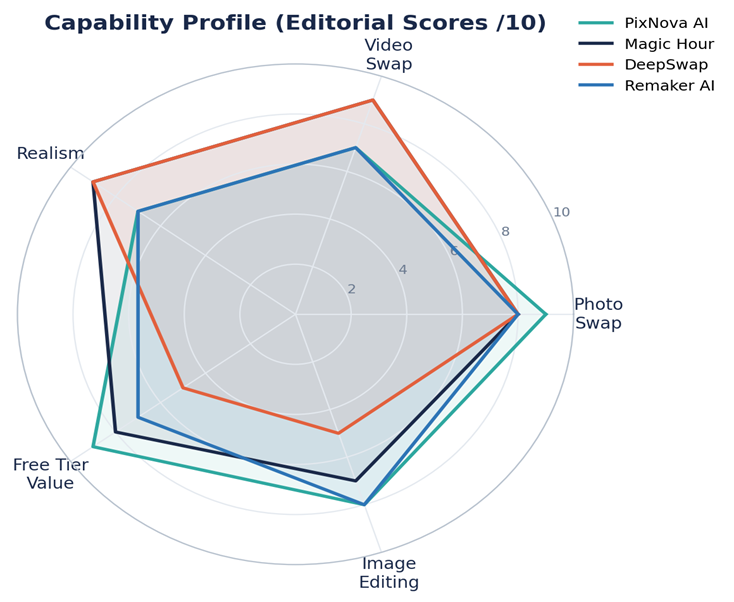
Figure 2: Editorial capability scores (out of 10) across five dimensions. Scores are this guide's qualitative assessment based on 2026 testing reports, not vendor benchmarks.
Remaker AI
Best for Casual Swaps Plus a Built-In Editing Suite
_1771314491.webp)
Remaker AI is a browser-based, all-in-one creative platform that became popular through viral face-swap reels and has since expanded into image generation, upscaling, background removal, AI headshots, stickers, and image-to-video. In any Remaker AI review, its signature tool remains AI Face Swap, which supports single-face, multi-face, batch, and video swaps.
Key Features
• Single and multi-face swap: replace one face or every face in a group photo at once.
• Batch processing: upload a folder and apply one source face across many images, a real time-saver for marketers and e-commerce sellers.
• Watermark-free downloads: clean exports even on the free starter credits.
• Wider toolkit: upscaler, background remover, AI art, prompt generator, and sticker maker in one dashboard.
Pricing Breakdown
Remaker uses a credit-based, no-subscription model. You get 30 credits on signup plus a few free credits daily (reviewers report around 5 per day), and most actions cost 1 to 2 credits. Top-up packs are one-time purchases with no recurring charges. The table below shows commonly reported pack pricing.
| Credit Pack | Reported Price | Approx. Cost per Credit | Typical Use |
|---|---|---|---|
| Free signup | $0 (30 credits) | Free | Testing the platform |
| 150 credits | $2.99 | ~$0.020 | Light personal use |
| 1,000 credits | $19.99 | ~$0.020 | Regular creator use |
| 2,500 credits | $49.99 | ~$0.020 | High-volume batch work |
Table 4: Representative Remaker AI credit pack pricing (one-time purchases, no refunds, prices vary by region).
Pros and Cons: Remaker AI + Generous free credits and no recurring subscription + Batch swaps and watermark-free output + Genuinely useful image upscaler - Video swap is gated behind paid VIP credits - Object replace and uncrop tools are hit-or-miss |
Bottom line: If you want PixNova's ease but with a more polished editing suite and clean exports, Remaker is the closest like-for-like upgrade, especially for volume photo work.
Magic Hour
Best for Professional, Stable AI Video
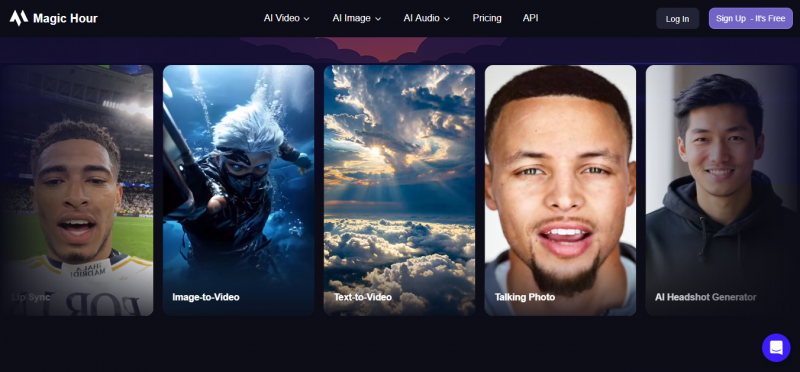
Magic Hour is a Y Combinator-backed (W24) AI video platform where face swap is one tool among lip sync, image-to-video, text-to-video, talking photos, and animation. Its face swap runs on photos and video, handles multiple faces in a clip, and uses temporal-consistency algorithms to keep the swapped face stable across frames. It outputs up to 4K and processes in the cloud, so no local GPU is needed. Reviewers note marketing teams at large brands use it for campaign localization and branded content at scale.
Key Features
• Temporally-stable video swap: minimal drift during head movement.
• Full production workflow: swap, lip sync, image-to-video, and editing in one place.
• Commercial-use rights on paid plans, plus API access for teams.
• Credits that never expire: unused credits roll forward indefinitely, unlike many rivals whose credits reset monthly.
Pricing Breakdown
Magic Hour offers a genuinely usable free tier: 400 credits (about 17 seconds of video), 576px, watermarked, no credit card required. Paid plans start around $10/month billed annually. The Creator plan provides roughly 120,000 credits per year (about 1.4 hours of video at 1024px). Note that video swaps consume multiple credits depending on length and complexity, so real-world cost scales with volume.
| Plan | Price (approx.) | Credits | Notes |
|---|---|---|---|
| Free | $0 | 400 (never expire) | 576px, watermarked, no card |
| Starter/Creator | From ~$10/mo annual | 120,000/yr (Creator) | 4K, commercial rights |
| Higher tiers | Scales up | More credits | Priority and team features |
Table 5: Representative Magic Hour pricing tiers (verify current numbers on the vendor pricing page).
Pros and Cons: Magic Hour + Best blending accuracy and frame stability for a web tool + Watermark-free, no-card free tier; credits never expire + Full creative suite plus API plus commercial rights - Free plan restricts commercial use and is 576px - Credit burn is high for long or motion-heavy clips |
Bottom line: For creators and marketing teams shipping real video, Magic Hour is the most complete, production-ready pick on this list.
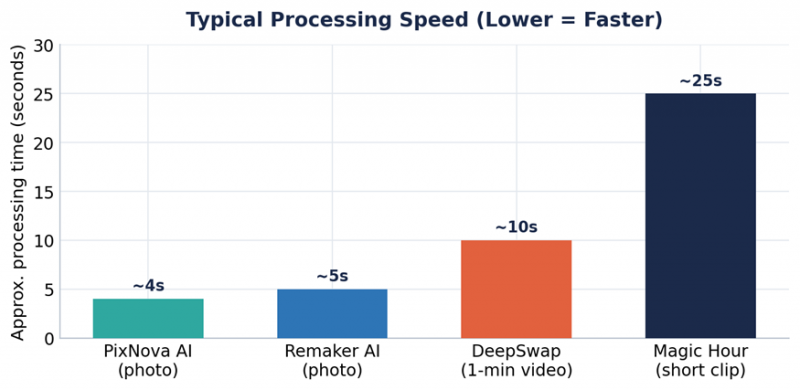
Figure 3: Typical processing time by task. Photo swaps finish in seconds; video rendering takes longer but Magic Hour and DeepSwap trade time for higher quality and length.
DeepSwap
Best for Long, Multi-Face, 4K Video Swaps
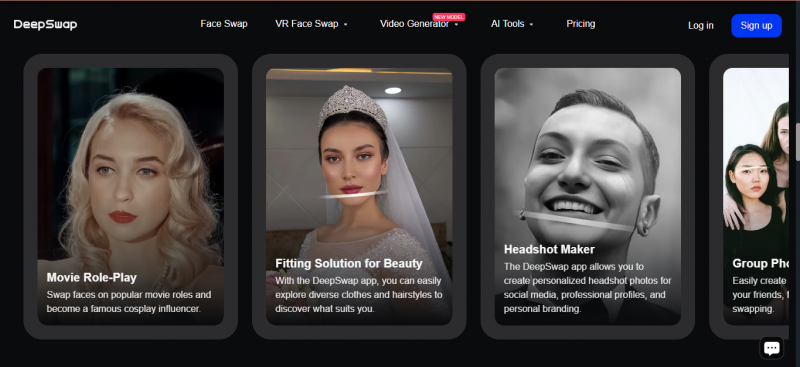
DeepSwap is a privacy-forward, video-first face-swap platform built around a proprietary model that vendors and reviewers cite at 90%+ face-swap similarity, roughly 20% above common open-source models. It targets longer, more demanding projects than most browser tools and claims it can handle 16+ challenging scene types (occlusion, varied angles, mixed lighting).
Key Features
• Up to 30-minute video swaps and files up to 1GB on paid plans.
• Multi-face swapping: replace up to 6 faces simultaneously in one clip.
• 4K HD output with fast GPU processing (a one-minute clip can render in roughly 10 seconds).
• Privacy posture: uploads are automatically deleted after 7 days; the platform states it does not collect upload data and requires users to be 18 or older.
Pricing Breakdown
DeepSwap uses a subscription-plus-credits model. Independent 2026 reviews report the figures below. Note that credit consumption varies by feature: video face swap is often billed per 15 seconds of footage, while photos cost a fraction of a credit.
| Plan | Reported Price | Credits | Key Limits |
|---|---|---|---|
| Free trial | $0 | Limited | Watermarked output |
| Monthly | $9.99/mo | ~20 to 100 | HD, watermark-free |
| Annual | ~$49.99/yr (~$4.17/mo) | 20/mo (240/yr) | Best value, renews higher |
| Pro (some sources) | $19.99/mo | ~300 | Priority, longer video |
Table 6: Representative DeepSwap pricing. Reported numbers vary by source and region; annual renews at a higher rate after year one.
Pros and Cons: DeepSwap + Longest video support here (up to 30 min) plus up to 6 faces + High similarity accuracy and 4K output + 7-day auto-deletion privacy policy - Credit system can be confusing; renewal rates rise after year one - Thinner editing toolkit than Magic Hour or Remaker |
Bottom line: When the job is a long clip with several faces and you need 4K, DeepSwap is purpose-built for exactly that.
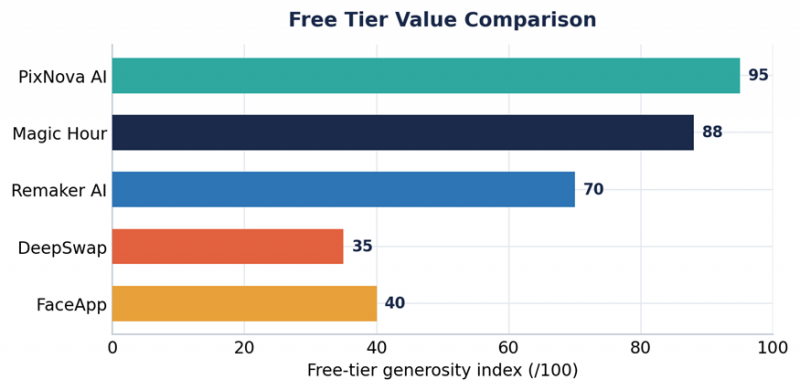
Figure 4: Representative maximum single-clip video face-swap length by tool (minutes).
The All-In-One Editing Pick
Remaker or PixNova Hybrid Workflow
If your real need is image editing and not just swapping faces, the smartest 2026 move is a hybrid: use a free generalist for instant swaps and a credit-based suite for the heavy editing. PixNova handles instant, login-free swaps and quick HD upscales; Remaker (or Magic Hour for video) covers batch processing, background removal, AI headshots, and clean commercial exports.
Why a hybrid beats a single tool: free generalists are unbeatable for speed and zero cost, while credit-based suites win on output control, batch volume, and commercial rights. Pairing them gives you PixNova's frictionless start with a professional finishing pipeline, without paying for features you will not use.
| Editing Task | Use This Tool | Why |
|---|---|---|
| Instant single photo swap | PixNova AI | Free, no login, 3 to 5 sec output |
| Batch swaps across many images | Remaker AI | Folder batch processing |
| Background or object removal | Remaker AI | Built-in remover plus upscaler |
| Upscaling old or grainy photos | PixNova or Remaker | Strong one-click HD upscale |
| Stable 4K video swap | Magic Hour | Temporal consistency, 4K |
| Long multi-face video | DeepSwap | Up to 30 min, 6 faces |
| Enterprise ad campaigns | Akool | Studio-grade, API, compliance |
Table 7: A practical task-to-tool routing map for an all-in-one editing workflow.
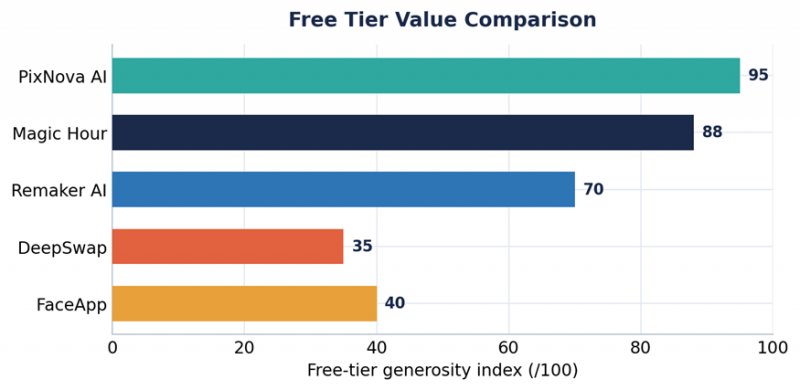
Figure 5: Editorial free-tier generosity index. PixNova and Magic Hour lead on what you can do without paying.
Bonus Picks
Three More Tools Worth Knowing
Akool: Enterprise Ad and Avatar Video
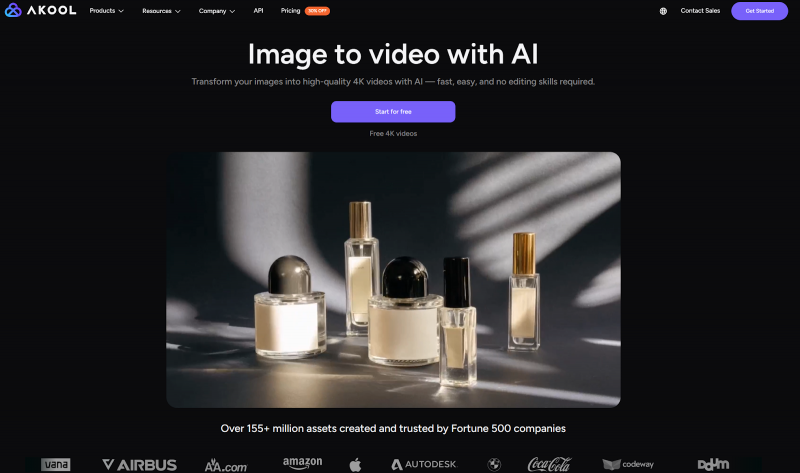
Akool is a Palo Alto-based generative AI suite founded in 2022 and built around avatar video, face swap, and real-time streaming avatars. It moves beyond static image edits into studio-style AI video production, making it more advanced than a simple face-swap or meme-generation tool. It is trusted by 10,000+ companies, reportedly hit number one on the 2025 Inc. 5000 with around $40M ARR, and runs campaigns for major brands. Pricing runs roughly $21 to $30/month and up to $500/month on higher tiers, with a free basic plan capped at 720p and watermarked, 10-minute videos. Best for media buyers and agencies, not casual meme makers.
Reface: Mobile Viral Social Swaps
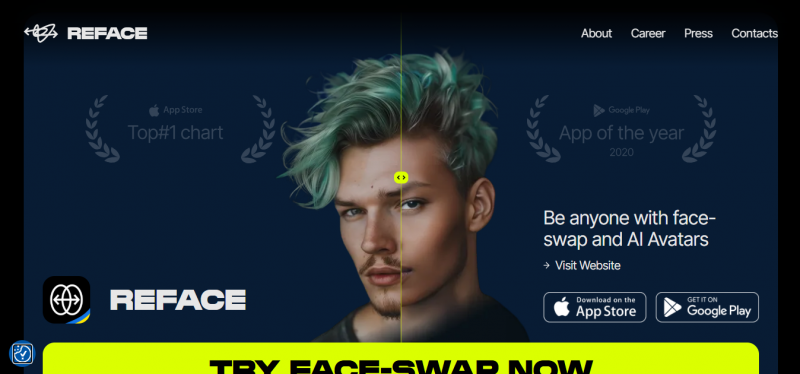
Reface remains the go-to mobile app for fast, fun, template-driven swaps and is ideal for individual creators producing TikTok and Instagram content. Entry pricing is around $6.99/month. It is strongest for casual social content rather than precise professional control.
FaceFusion: Free, Private, Open Source
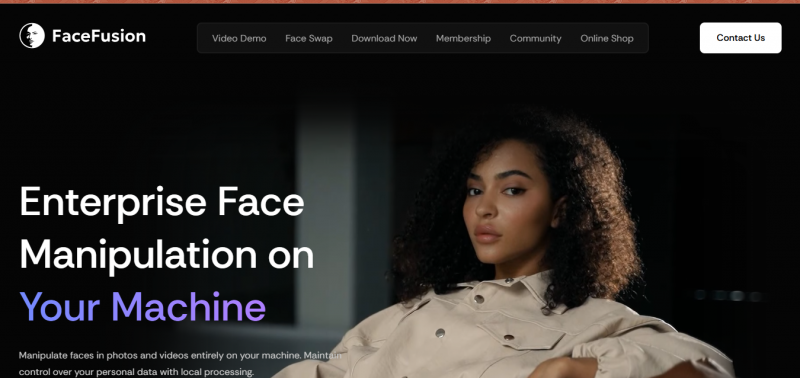
FaceFusion is open source and free, running entirely on your own machine for maximum privacy and control. The trade-off is technical setup and the need for capable GPU hardware. For users who refuse to upload anything to the cloud, this and DeepFaceLab are the benchmark privacy options.
How to Choose the Right Tool
Work through these questions in order. The first yes usually points to your tool.
1. Do you just need a quick, free photo or GIF swap? Stay on PixNova AI or use Remaker's free credits.
2. Do you produce video that ships (ads, social, branded)? Choose Magic Hour for stability and commercial rights.
3. Is your clip long or full of multiple faces, and you need 4K? Choose DeepSwap.
4. Do you edit images at volume (batch, backgrounds, headshots)? Choose Remaker AI as your editing hub.
5. Are you an agency running paid ad campaigns at scale? Evaluate Akool for studio-grade output and compliance.
6. Do you need full privacy with no uploads? Use FaceFusion or DeepFaceLab locally.
Responsible Use: Consent, Privacy, and the Law
Consent is the single most important factor in 2026. Face-swap output has reached near-photorealistic quality, which means the old it-is-obviously-fake defense no longer applies. Intent and consent are now what matter legally and ethically.
The table below summarizes key U.S. and EU rules creators should know.
| Law / Rule | Region | What It Does | Status |
|---|---|---|---|
| TAKE IT DOWN Act | United States | Platforms must remove non-consensual intimate deepfakes on notice | Enforceable May 19, 2026 |
| DEFIANCE Act | United States | Civil cause of action, damages up to $250,000 | Signed May 2025 |
| NO FAKES Act | United States | Targets unauthorized voice and likeness use | Active legislation |
| State synthetic-media laws | 46 U.S. states | 30 specifically regulate political deepfakes | In effect |
| EU AI Act labeling | European Union | AI-generated face swaps must be labeled | Obligations rolling out 2025 to 2026 |
Table 8: Key 2026 deepfake and synthetic-media regulations. This is informational, not legal advice.
Practical guidance: always get explicit permission from anyone whose face you use, never create non-consensual intimate content, prefer tools with consent reminders and watermarking, and label AI-generated media where required. Open-source local tools keep data on your machine; cloud tools like DeepSwap publish deletion windows (7 days) worth factoring in for client or brand assets. Industry benchmarks recorded 179 deepfake incidents in Q1 2025 alone, and watermarking standards like C2PA are increasingly used to support compliance.
Editor's Note on Sources and Accuracy Pricing, credit allotments, and feature limits change frequently and can vary by region and promotion. All figures here were compiled from official vendor pages and independent 2026 reviews and should be treated as representative, not guaranteed. Always confirm current pricing, free-tier terms, and commercial-use rights on the vendor's own site before purchasing. |
Final Takeaway
PixNova AI earns its popularity as a free, no-friction all-rounder, but best depends entirely on the job. For casual photo work with a cleaner suite, Remaker AI is the natural step up. For professional, stable video, Magic Hour leads. For long, multi-face 4K clips, DeepSwap is purpose-built. For serious image editing, a hybrid free-plus-credit workflow gives you the best of both worlds. And for agencies at scale, Akool is worth a serious look.
Whichever you choose, the 2026 rule is the same: get consent, label AI media where required, and confirm current pricing before you buy. Match the tool to your workflow and you will get better results than chasing a single number-one app.
Post Comment
Share your thoughts about this article.
Be the first to post a comment!





