Have you ever looked at a photo and thought, “This would be hilarious if I could just swap the face quickly,” only to remember that opening Photoshop feels like committing to a two-hour project? That was the exact mindset before trying Remaker AI. The goal was not professional-level editing or cinematic effects. It was something quick, playful, and usable without tutorials or technical stress.
The biggest surprise was how effortless the entire process felt. Upload an image, choose the feature, wait a few seconds, and the result appears. There are no overwhelming dashboards, no complex adjustment panels, and no need for editing experience. Compared to many AI tools that try to offer everything at once, Remaker AI keeps things simple.
However, simplicity comes with limits. This is not a high-end editing suite, and it does not attempt to compete with professional design software. What it offers instead is speed, accessibility, and experimentation without frustration. For users who want quick visual transformations without diving into complicated tools, Remaker AI stays comfortably within that space.
What Is Remaker AI?
Remaker AI is an AI-based image transformation platform that focuses primarily on face swapping and visual remakes. Its purpose is straightforward: allow users to modify images quickly without needing design skills.
The core idea is not perfection. It is speed and impact.
Instead of giving users detailed manual controls, the platform handles most of the decision-making automatically. When you provide a clear, high-quality image, the output can look surprisingly convincing. When the input quality is low or the prompt is vague, the result reflects that as well.
For example, the prompt used during testing was:
“side face Indian brown girl with cute shy smile in saree”
_1771314491.webp)
The output showed how the tool interprets descriptive input. Sometimes the result looks impressive. Other times, it feels slightly off. That unpredictability is part of the experience.
Remaker AI is not positioned as a replacement for professional editing tools. It is designed for experimentation, social content, and creative ideas. For casual creators and curious users, it delivers quick results that are often entertaining and occasionally impressive.
Real-World Testing: How Remaker AI Performs
After spending time testing multiple images and variations, here is a practical breakdown based on actual use rather than marketing claims.
Free Credits
New accounts typically receive around 30 free credits. This is enough to experiment with several face swaps and image remakes before deciding whether to pay.
One catch worth knowing: the small daily bonus credits typically expire the same day they are claimed, so they do not pile up into a usable balance. Only purchased credits stick around.
Ease of Use
The interface is straightforward. From uploading an image to seeing the first result took less than two minutes. There was no learning curve involved.
Processing Speed
Most transformations completed within 15 to 30 seconds. Waiting time was rarely an issue.
Output Quality
With well-lit, high-resolution photos, results appeared clean and realistic. Lower-quality inputs produced noticeably weaker outputs.
Control Options
Manual adjustments are minimal. Users rely largely on the AI’s automatic decisions, which keeps things fast but limits fine-tuning.
Fun Factor
The speed of results encourages experimentation. It becomes easy to test multiple variations simply because each attempt returns quickly.
Professional Suitability
For serious client projects or production-level editing, it does not offer enough depth. It works best for creative play rather than formal delivery.
Overall, it feels less like a detailed editing platform and more like a quick creative sandbox.
Video Face Swap and Multiple Face Swap
Two features deserve more attention than a passing mention, because they are the reason many people land on Remaker in the first place.
Video face swap works on MP4 clips and GIFs, not just stills. In practice it behaves differently from the image tools in two ways. First, it is far hungrier on credits: a single short clip can cost several times what an image swap does, so the free balance disappears quickly. Second, while it is listed among the free tools, meaningful use effectively requires buying a credit pack. Results on steady, front-facing footage hold up well; fast movement and side profiles are where the seams start to show.
Multiple face swap lets you replace several faces in one group photo, mapping each source face to a target individually, and a bulk mode can process batches of images in one run. It is genuinely fun for group memes, but this is also where the review's earlier caveat bites hardest: quality drops noticeably in complex compositions. Two or more faces at odd angles or in uneven lighting produce the weakest results the tool generates.
Pricing: Is It Worth Paying For?
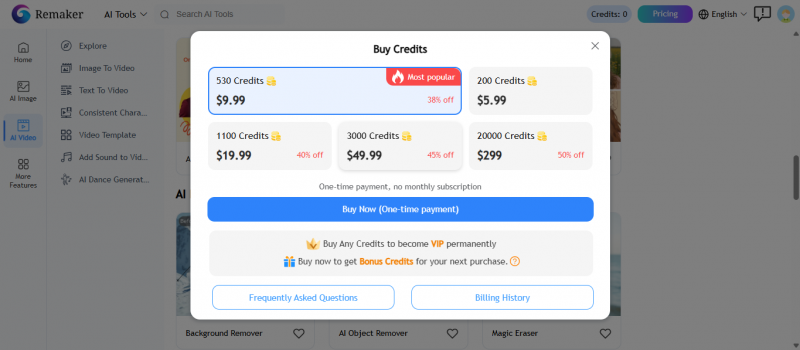
Remaker AI generally offers limited free access with credit restrictions and paid plans for extended usage. Compared to full editing software, the cost feels moderate, but expectations should remain realistic.
Here is the structure in one view. Pricing checked: July 3, 2026, against the official remaker.ai pricing page and current third-party listings. Remaker sells one-time credit packs rather than subscriptions, and pack sizes change periodically, so re-verify before buying. Note that in-app mobile purchases cost noticeably more than the same credits bought on the website.
| Plan | Cost | What You Get | Limitations |
| Free | $0 | About 30 credits on sign-up plus small daily bonus credits; access to core tools | Daily bonus credits expire same day; watermarks and lower resolution on some outputs; video face swap effectively unusable without paid credits |
| Credit packs | From about $5.99 for 200 credits, with larger packs at steep per-credit discounts | Purchased credits never expire and work across every tool; HD export; no subscription or billing cycle | One-time purchases are non-refundable; costs are hard to predict because video tasks burn credits many times faster than image tasks |
If compared to professional editing tools, it will not match their depth. However, compared to other lightweight AI image platforms, it sits comfortably in the mid-range.
It makes sense to upgrade if you regularly create social content or enjoy experimenting with image transformations. It may not be worth paying for if you expect high-end, studio-grade precision.
Safety, Privacy, and Responsible Use
A face swap tool deserves a privacy paragraph, so here it is. Remaker states in its privacy policy that uploaded images are deleted within 48 hours of processing and are not shared with third parties. The platform is operated by ZINGDECK INTL PTE. LTD., a Singapore-registered company. As with any cloud tool, treat that as a policy promise rather than an audited guarantee: do not upload photos you would not be comfortable having on a third-party server, even briefly.
The bigger issue is not the platform but the use. A few rules keep the fun on the right side of the line:
• Only swap faces of people who have given you permission, and of yourself. A funny result for you can be humiliating or harmful for the person in the photo.
• Never create sexual, misleading, or defamatory content with someone's face. Non-consensual deepfake imagery is illegal in a growing number of jurisdictions, including under India's IT rules and recent laws in the US, UK, and EU.
• Label obviously synthetic content as edited when posting it somewhere it could be mistaken for real.
Used within those lines, Remaker is harmless fun. Used outside them, the tool is not the one who gets in trouble; you are.
Strengths and Weaknesses
What Works Well
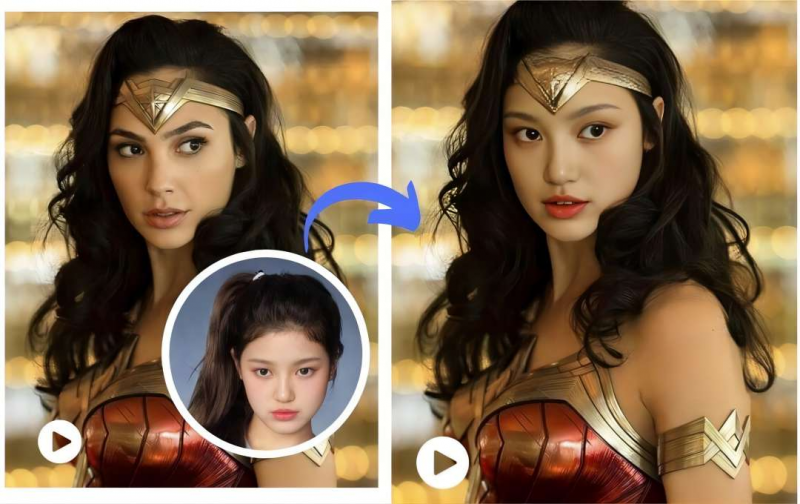
- Face swap results can look surprisingly realistic when the input image is strong
- Ideal for social media, memes, and casual creative experiments
- No technical knowledge required
Where It Falls Short
- Quality decreases significantly with low-resolution images
- Limited ability to refine or adjust fine details
- Not suitable for professional design workflows
- Results may vary in complex compositions
Final Verdict: 3.8 out of 5
After experimenting across different images and scenarios, the pattern becomes clear. Remaker AI prioritizes speed and simplicity over advanced control.
It is easy to use, beginner-friendly, and capable of producing entertaining results with minimal effort. When given strong input images, it can deliver surprisingly realistic transformations.
At the same time, it lacks the depth, customization, and consistency required for professional or commercial editing projects.
Remaker AI works best as a creative shortcut rather than a full editing solution. For quick social content, playful experiments, and casual creativity, it performs well. For users who need detailed adjustments, collaborative tools, or production-level reliability, more advanced platforms would be better suited.
If the goal is fast visual fun without a steep learning curve, Remaker AI is worth trying. If the goal is polished, consistent professional output, it may feel limited.
Post Comment
Share your thoughts about this article.
Be the first to post a comment!





