Table of Content
- The short version
- The landing page tells you exactly what this is
- Starting a chat with no account
- The first wall is a sign-in wall, not a paywall
- Pushing the free tier for another image
- The free render: fine up close, soft in the chat bubble
- Building a character from scratch
- Far more options than a typical chatbot
- The preview took a minute or two
- Premium pricing and what it unlocks
- Video generation
- The image studio, with the same character
- Where it wins and where it falls short
- Feature summary
- Verdict
I started with a free chat, hit the sign-in wall, built a character from scratch, then paid for premium to test the image and video studios. Every step below has a screenshot from my own session.
Sparkles is a browser-based AI companion platform. You chat and roleplay with characters, generate images and short videos of those same characters, and build your own companion from a long list of appearance and personality settings. It runs on credits: a free daily allowance gets you started, and a premium subscription plus credit top-ups unlock the heavier features.
I wanted to know three things. How far does the free tier actually go before it asks for money? How good is the output, and how long does it take? And what do you really get for the premium price? Here is what I found, in the order I found it.
The short version
Sparkles is more complete than most AI girlfriend sites: chat, image generation, video generation and a deep character builder all live in one place and all tie back to the same character. The free tier is generous enough to evaluate it properly, but free image renders take a couple of minutes, and long-term memory is a premium feature. If you plan to stick with one character for more than a week, budget for premium.
Free tier Daily credits, full chat | Premium $9.99 to $14.99 per month | Image in the studio 20 credits |
Video clip 100 credits | Custom character 175 credits | Languages English, French, German |
Good fit if You want images and video of the character you chat with, and you like tinkering with a detailed character creator.
Look elsewhere if You want a companion that remembers you week to week without paying, or you need image generation in seconds rather than minutes.
The landing page tells you exactly what this is
The first thing you see is a dark interface with red accents, three filters across the top (All Characters, Women, Anime), a rotating banner, and a grid of characters under Explore Characters. Some cards carry a Sparkles Premium badge. Nothing is locked behind sign-up at this stage, so you can browse the full catalogue before deciding anything.
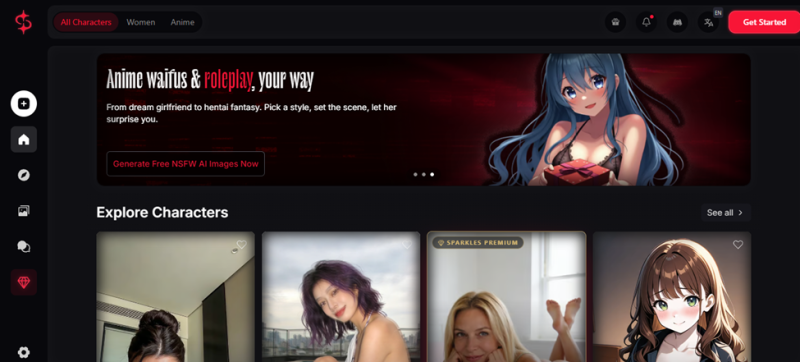
Screenshot 1 of 12. The home page on first visit, before creating an account. Language toggle (EN, FR, DE) and a Discord link sit in the top bar.
What struck me here is how little the site hides. The banner copy is blunt about the platform being uncensored, the premium badges are visible from the start, and the Get Started button is the only red button on the page. You know what you are signing up for before you click anything.
Starting a chat with no account
I picked Nina Fox, a streamer character, and the conversation opened without any sign-up prompt. The scenario was already written: an opening scene in italics, then the character's first lines. Under the chat there are four helpers, Ask Image, Suggest Reply, Chat Profile and Gift. The right-hand panel shows the character's photo gallery and a short bio.
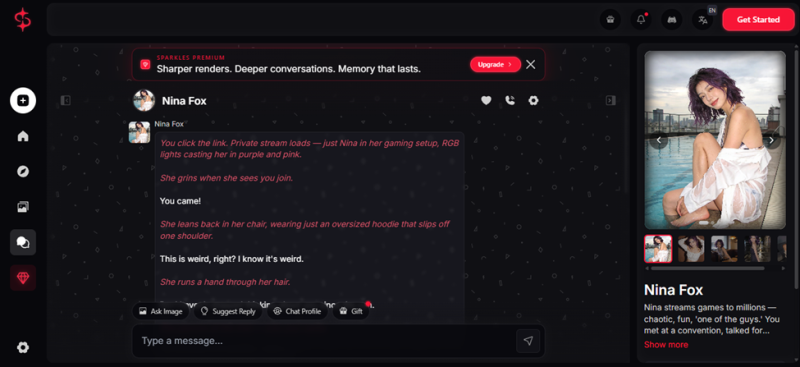
Screenshot 2 of 12. The free chat opens straight into a pre-written scene. Note the Sparkles Premium banner that sits above the conversation from the first message.
The roleplay held its character and moved the scene forward on its own. I did not have to set anything up or nudge it back on track, which is a common problem with cheaper companion bots. The one thing I would change is the premium banner: it is pinned above the chat the whole time and eats a noticeable slice of the screen on a laptop.
The first wall is a sign-in wall, not a paywall
A few exchanges in, Nina "sent a photo". It arrived blurred, with a lock icon and a message saying it stays blurred until you sign in, and that signing in is free. That is a clever funnel step: it converts a casual visitor into an account holder without asking for a card.
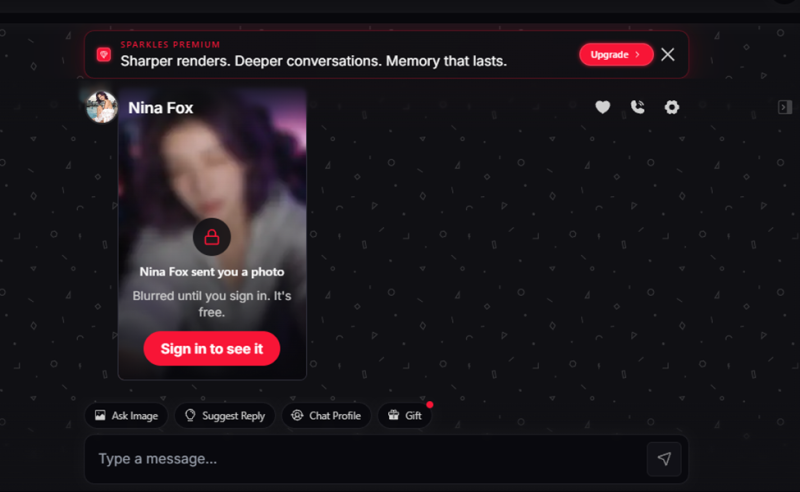
Screenshot 3 of 12. The blurred photo gate. Signing in is free and unlocks the image; there is no credit cost at this point.
I signed in. To its credit, the site says the gate is free and it is. A lot of competitors blur the image and send you to a pricing page instead.
Pushing the free tier for another image
Once signed in, the photo unlocked: a cropped selfie in a hoodie, clearly generated from the same base character as the profile pictures. I then asked for another image to see where the free tier's limit sits. The character answered with a mix of italic action text and casual chat, accepted the request, and the Suggest Reply and Gift buttons picked up red notification dots.
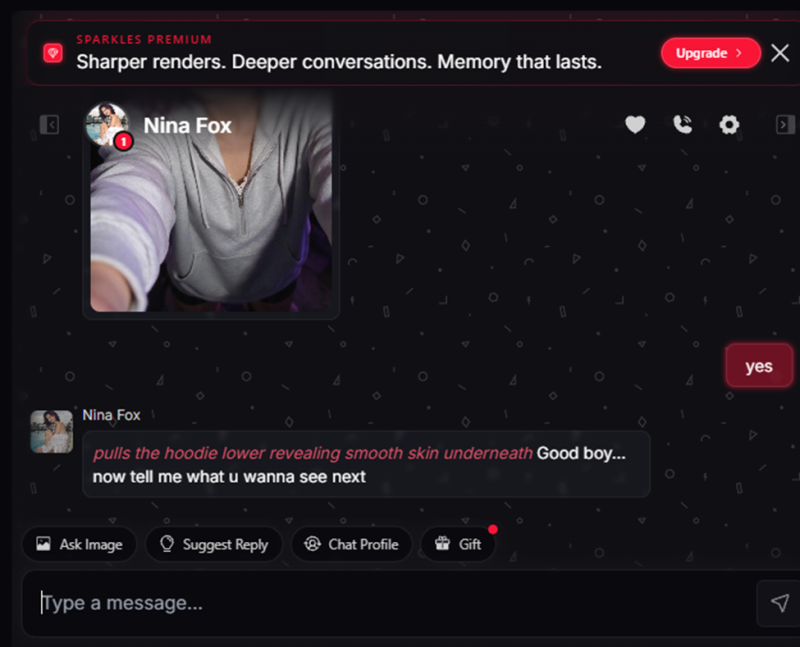
Screenshot 4 of 12. After signing in the photo is visible, and the free tier accepted a request for a second image.
So the free tier will generate images inside chat, not just show pre-made ones. The question is what those images look like, and how long they take.
The free render: fine up close, soft in the chat bubble
The image took somewhere between two and three minutes to arrive. When I opened it at full size it looked clean, with consistent hair colour and lighting that matched the character. At the size it renders inside the chat, the hair edges looked a little less crisp than the full-size version, most likely a side effect of how the preview was scaled down for the chat bubble.
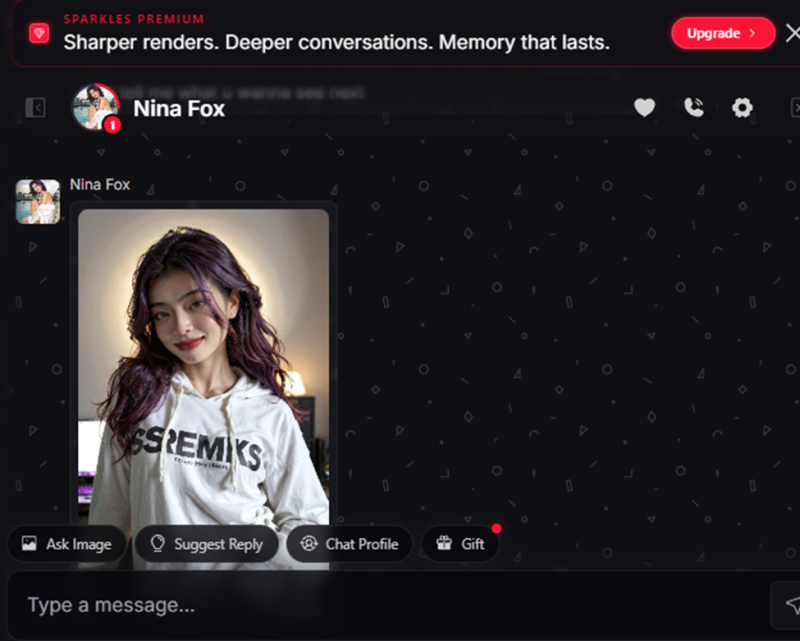
Screenshot 5 of 12. The free in-chat generation. Zoomed in it holds up; at chat size the hair edges show visible pixelation. Generation took about two to three minutes.
Two things stood out. The wait is long enough that you will tab away and come back. And the softness is almost certainly deliberate: the premium banner sitting directly above this image promises "sharper renders", which reads as an admission that the free render is the downgraded one. I would rather see the free tier get the full-quality image with a lower daily cap, but this is a common trade-off in the category.
Note: free image quality is fixed
After testing, I raised the softer chat previews with Sparkles support. They responded quickly and have since fixed it. Free-tier images now display at full quality inside the chat too, and the results are genuinely beautiful: sharp detail, clean edges and the same consistent look as the character’s profile photos. If image quality was your hesitation about the free tier, it no longer needs to be.
Building a character from scratch
Next I moved to the character studio. It opens with three choices: sex (Female, Male, Trans), an age slider that runs from 18 to 60 and defaults to 25, and an art style, realistic or anime. A row of dots shows six steps in total, and there is a dice button if you want the site to randomise a choice for you.
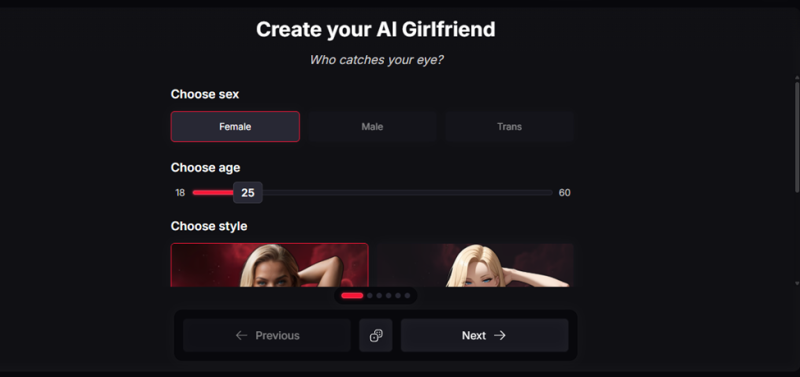
Screenshot 6 of 12. Step one of the character builder. The age slider is hard-locked at 18 as its minimum.
The age floor is enforced in the control itself rather than in a policy page nobody reads, which is exactly how it should work on a platform like this.
Far more options than a typical chatbot
Between the first screen and the personality screen, the builder walked me through ethnicity, body shape, eye colour and shade, hair, and a handful of other appearance settings. Then it asks for a name (with a random-name button), a voice, a personality type, a relationship, an occupation, and hobbies. The defaults it offered were Sorority for voice and Lover for personality.
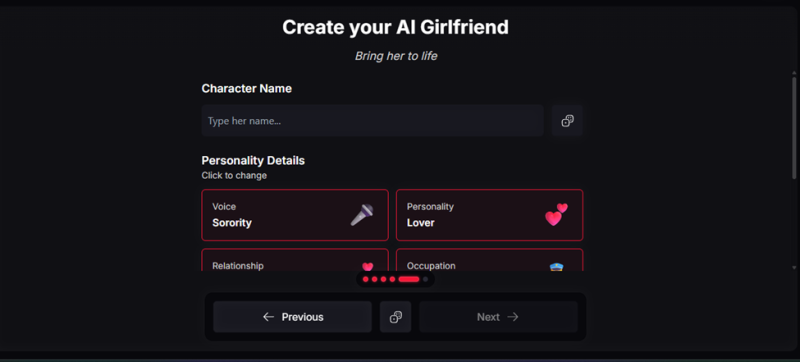
Screenshot 7 of 12. The personality step. Each card opens a list of choices; the appearance steps before this one are just as detailed.
This feels closer to a video game character creator than to a settings page, and it is the part of Sparkles I enjoyed most. If you have spent time in apps where "customisation" means picking one of eight preset faces, the depth here is a real step up.
The preview took a minute or two
The final screen renders a preview of the character alongside a summary of everything you picked. Mine came out as Bella: female, 26, realistic, a police officer in a girlfriend relationship, Sorority voice, hobbies reading and writing, language English. The preview is watermarked and locked until you commit, and committing costs 175 credits.
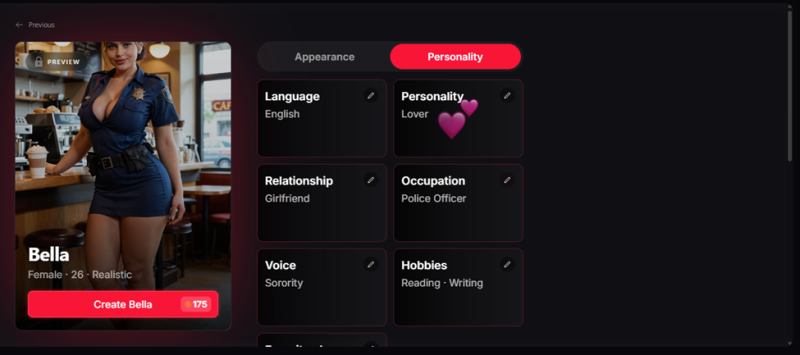
Screenshot 8 of 12. The preview matched every setting I chose. Creating the character costs 175 credits.
The preview generated in one to two minutes, which is quicker than the in-chat image, and it matched my choices closely, right down to the uniform and the setting. The catch is the price. At 175 credits, a custom character is the single most expensive thing on the platform short of a video clip, and it is where the credit economy starts to bite for free users. Expect to pay, one way or another, before you get to keep a companion you designed yourself.
Premium pricing and what it unlocks
The subscription page offers three plans. Monthly is $14.99, shown against a struck-through $39.99. Quarterly works out to $11.99 a month, billed as $35.97 every three months. Yearly is $9.99 a month, billed as $119.99 up front. The pitch is unlimited access to premium features including video generation, voice messages and custom models. I went for premium so I could test the studios below. The top bar shows your remaining credit balance at all times, with a plus button next to it for topping up.
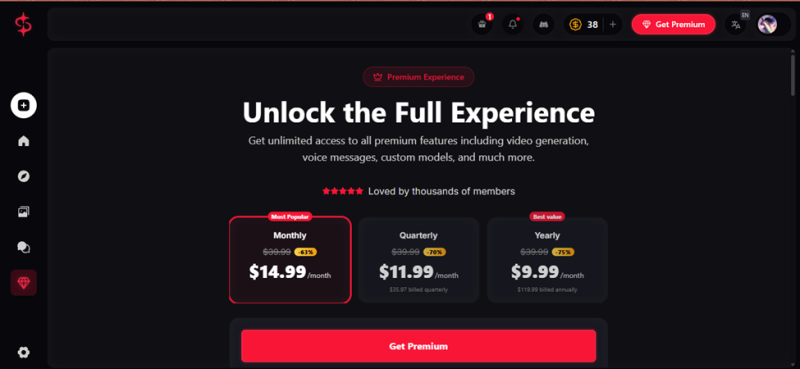
Screenshot 9 of 12. Premium plans at the time of testing. The credit counter (38 here) sits in the top bar next to the Get Premium button.
The struck-through $39.99 anchor is standard subscription marketing and I would ignore it; the real price is the number in large type. Yearly is the cheapest per month, but for a platform this young I would start monthly and upgrade once you know you will stay.
The free tier keeps track of what happens inside the conversation you are currently having, and it does that well. Premium is what adds memory that persists, so a character can pick up next week where you left off, remember what you told it, and build on it. In this category, that single difference matters more than image quality, video, or any other feature on the pricing page, and it is easy to miss if you only spend an hour testing.
Video generation
The Generate page has an Image tab and a Video tab. On the video side you pick a character (I used Dr. Emilia Voss, one of the catalogue characters), choose a start frame from her existing images, optionally add a prompt with the wand button, and generate. Each clip costs 100 credits. Finished clips collect in a My Generations panel on the right.
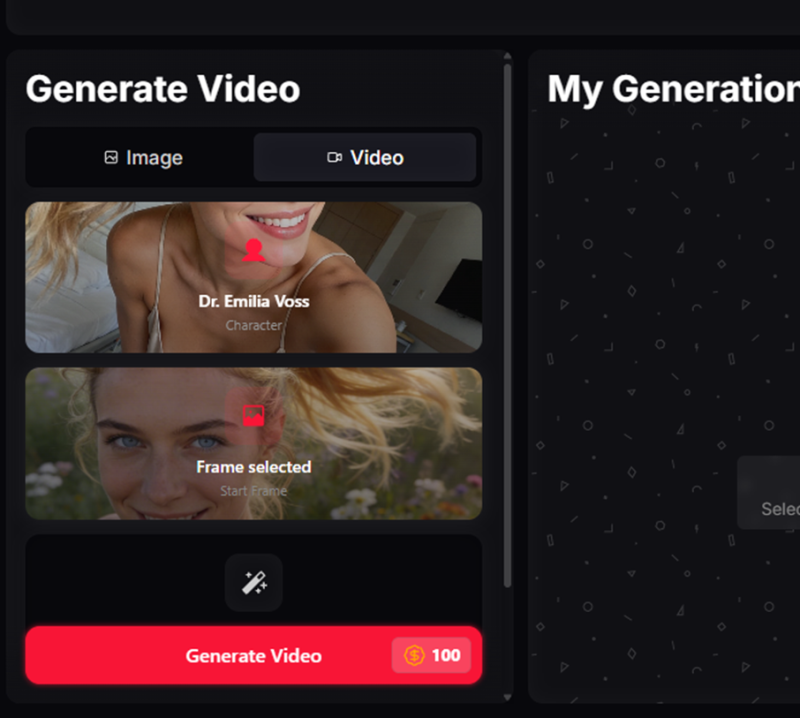
Screenshot 10 of 12. Video generation is tied to a character and a start frame, so the face stays consistent with the chat and the images.
What makes this different from a standalone video tool is that the clip belongs to the same character you have been chatting with. The site bills the output as uncensored, and it comes from the same base images, so continuity between chat, stills and video is the actual selling point. At 100 credits per clip, though, this is by far the fastest way to burn through a balance. Treat video as an occasional extra rather than a daily habit unless you are topping up.
The image studio, with the same character
Switching to the Image tab, I selected the same character. The studio gives you structured choices for outfit (Bodysuit in my case), pose (Standing) and background (I picked Beach), plus a free-text prompt field for anything the presets do not cover and a setting for how many images to produce in one run. Each image costs 20 credits, so you get five studio images for the price of one video clip.
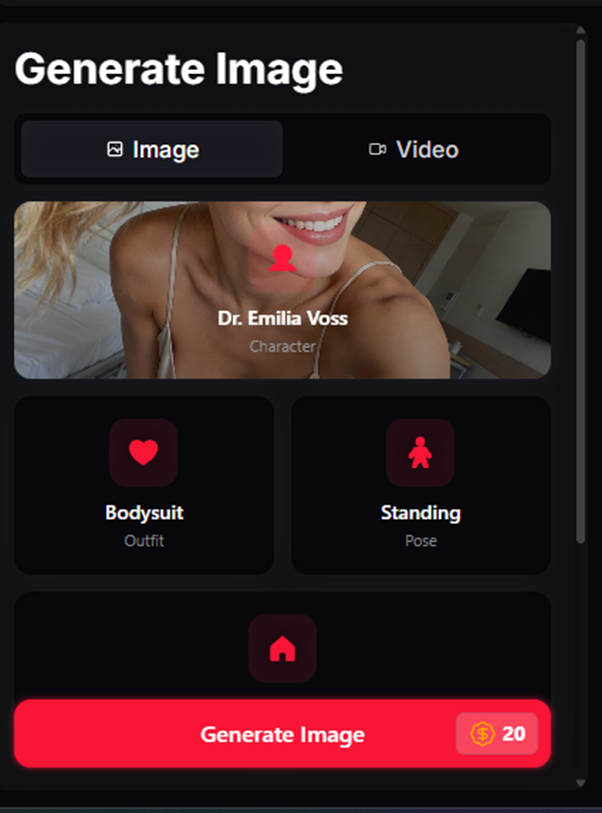
Screenshot 11 of 12. The image studio. Outfit, pose and background are preset pickers; a custom prompt box sits below them.
I left the custom prompt empty, kept it to a single image and pressed Generate. The result landed in the My Generations panel on the right of the same screen, so there is no hunting through a gallery to find what you just made.
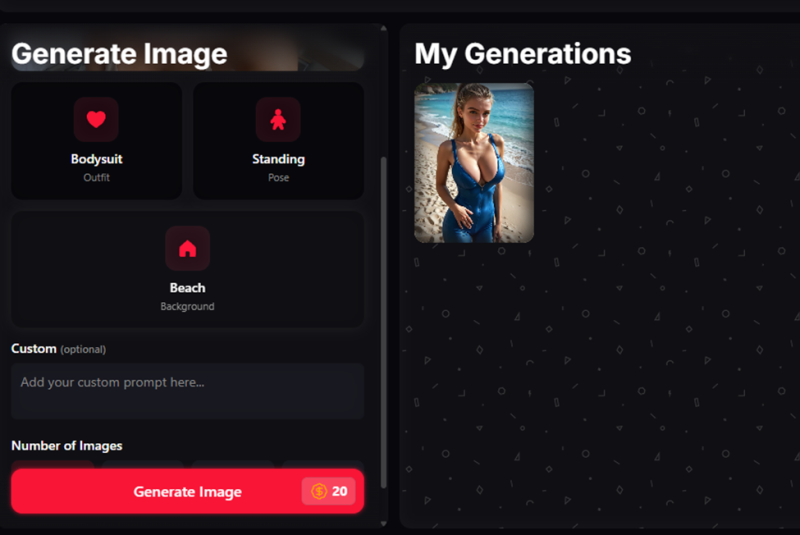
Screenshot 12 of 12. The finished studio image with the Beach background applied, sitting in My Generations beside the generator.
The studio is where premium earns its keep. The result looked excellent: sharp at normal viewing size, the outfit, pose and beach setting all came through as selected, and the face matched the character I chose rather than a loosely related one. The interface also does the small things right. Your credit balance is always visible in the top bar and every button shows its cost before you press it, so you never get a surprise deduction.
Where it wins and where it falls short
Strengths • Chat, images, video and a character builder all tied to one consistent character • You can browse and start chatting before creating an account • The sign-in gate is free, as promised • Character builder is unusually deep, with an age floor enforced in the UI • Credit costs are shown on every button; balance is always visible • Studio image quality is good • Support fixed a free-tier image quality issue quickly after I reported it | Weaknesses • Free in-chat images take two to three minutes to generate • Long-term memory is premium only • Custom characters (175 credits) and video (100 credits) drain balances fast • The premium banner is pinned above the chat and takes up space • Almost no independent user reviews yet • Struck-through anchor pricing on the plans page |
Feature summary
| Area | What I found |
| Chat and roleplay | Stays in character, drives the scene on its own, pre-written scenarios for catalogue characters. |
| Free image generation | Works well and looks great after a recent fix; each image takes two to three minutes. |
| Studio image generation | Good quality, structured presets plus custom prompt, 20 credits each. |
| Video generation | Character and start-frame based, 100 credits per clip. |
| Character builder | Very detailed, preview in one to two minutes, 175 credits to keep. |
| Memory | In-conversation on free; persistent across sessions on premium. |
| Pricing | $14.99 monthly, $11.99 quarterly, $9.99 yearly (per month), plus credit top-ups. |
Verdict
Sparkles does the hard thing well: it keeps one character consistent across chat, still images and video, and it lets you build that character in far more detail than most rivals. The free tier is honest about its gates and generous enough to let you judge the roleplay properly.
The weak spots are the wait on free image generation, a credit economy that gets expensive as soon as you touch video or custom characters, and the fact that the feature most people would care about after the first week, a companion that remembers them, sits behind the subscription. Go in knowing that, and the $14.99 monthly plan is a reasonable price for what you get. Go in expecting the free tier to be the full product and you will hit a wall within a few days.
Post Comment
Share your thoughts about this article.
Be the first to post a comment!





