If you’ve ever stared at a blank video editor timeline and thought, “There has to be an easier way,” then you’re exactly the kind of person Pictory AI was built for.
Video content dominates the internet. Blogs are important, yes. But video? Video gets attention, engagement, and conversions. The problem is that traditional video editing is slow, technical, and occasionally rage-inducing. Export failures at 97% are a personality test no one asked for.
Enter Pictory AI (https://pictory.ai/), a cloud-based AI video generator designed to turn scripts, blog posts, URLs, and even long recorded videos into polished, shareable clips. It promises automation, captions, visuals, voiceovers, branding — and most importantly — speed.
The question is: does it actually deliver?
Let’s break it down properly.
What Pictory AI Actually Is
Pictory AI is a browser-based platform built for content creators, marketers, YouTubers, educators, and businesses that need video output quickly but don’t want to become professional editors.
There’s no software to download. No heavy hardware requirements. If your laptop can handle multiple open tabs (barely), it can handle Pictory. Everything runs in the cloud, which means it works on almost any modern computer.
It’s currently trusted by over 20,000 companies, and its popularity is largely driven by how fast it converts text into video.
The platform isn’t trying to compete with Hollywood editing suites. Instead, it focuses on automation, efficiency, and scalability.
How Pictory AI Turns Words into Video
The magic begins with text.
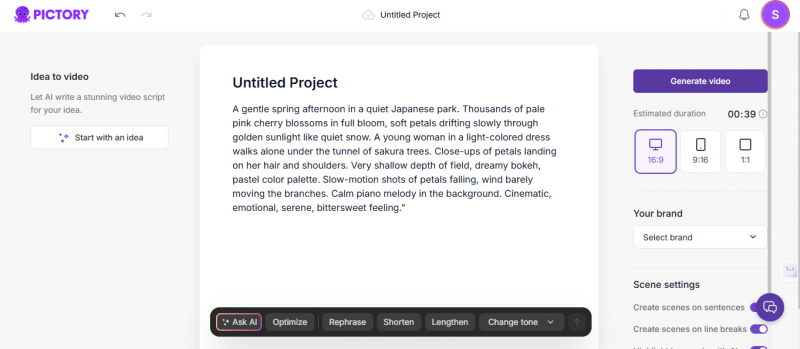
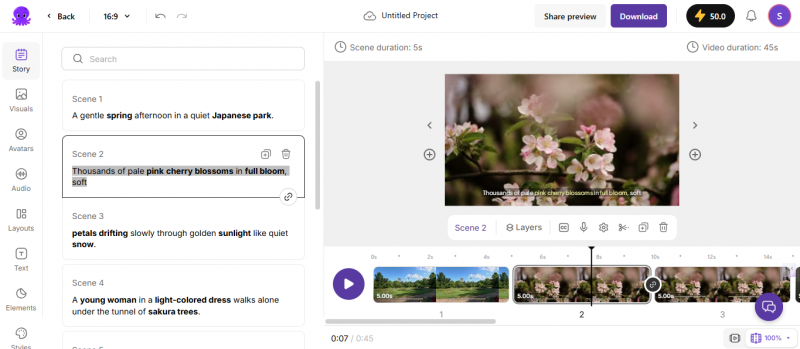
You can paste a script directly into the editor, and Pictory AI automatically divides it into scenes, selects stock visuals, applies transitions, adds background music, and generates captions. Within minutes, you have a structured video draft ready for export or refinement.
Even more interesting is the Blog-to-Video feature. You paste a URL, and the system extracts key points, summarizes the content, and builds a storyboard around it. For content marketers sitting on dozens or hundreds of blog posts, this feature feels like unlocking a hidden growth lever. Suddenly, written content can become video content without rewriting everything from scratch.
Then there’s the “Edit Video with Text” tool. Upload a webinar, podcast, or recorded presentation, and Pictory transcribes it. Instead of trimming footage manually, you simply edit the transcript. Delete a sentence, and the corresponding video segment disappears. For non-editors, this feels almost unfairly convenient.
The platform also includes AI voiceovers. On higher plans, it integrates with ElevenLabs for more realistic narration. While English voice quality is impressively natural, some non-English pronunciations can still feel slightly robotic. It’s improving, but not flawless.
AI presenter avatars are also available for explainer-style content, which is helpful for businesses that want a talking-head format without filming anyone.
Why Pictory AI Is Growing So Fast
The primary reason Pictory AI is gaining traction is speed. Traditional editing can take hours per video. Pictory often generates a usable first draft in minutes.
The second reason is accessibility. You don’t need to understand timelines, keyframes, audio layering, or color grading. The interface is intuitive and intentionally simple. For small businesses and solo creators, that matters more than advanced editing power.
Finally, scalability plays a huge role. With hundreds of video minutes available on mid-to-high tier plans, teams can repurpose blog posts, scripts, newsletters, and webinars into consistent video content without hiring additional staff.
It’s not about cinematic perfection. It’s about output efficiency.
Speed in Numbers: Generation vs. Export
"Fast" deserves numbers, so here is what the record actually shows. Draft generation is genuinely quick: a structured first draft typically appears within minutes of pasting a script. The slower parts of the pipeline show up after that. Verified user reviews repeatedly report scene previews taking 30 seconds or more to reload after a simple edit, final exports of short videos taking roughly 3 to 4 minutes to download, and noticeable rendering slowdowns during peak hours. None of this is disqualifying, but it means the honest math is minutes to a draft and a coffee break to a finished file, not instant end to end.
Pricing in 2026: Is It Affordable?
Pricing checked: March 2, 2026, against Pictory's live pricing page. Two notes before the table: the prices shown are annual-billing rates, and monthly billing costs more, so confirm which toggle you are looking at. Plans, minute allowances, and the ElevenLabs quota change periodically; re-verify before subscribing.
| Plan | Price/month | Video minutes | AI voices | Stock library | Brand kits | Key extras |
|---|---|---|---|---|---|---|
| Free trial | $0 | 3 projects, 480p | Basic | Limited | No | Pictory watermark |
| Starter | $25 | 200 min | Standard, 7 languages | 2M Storyblocks | 1 | No watermark, basic AI tools pictory+1 |
| Professional | $35 | 600 min | 120 min ElevenLabs, 29 languages | 12M Getty + Storyblocks | 5 | Advanced AI tools, video summarization pictory+1 |
| Team | $119 | 1,800 min | 240 min ElevenLabs, 29 languages | 12M Getty + Storyblocks | 10 | 3+ users, API access, team workspace pictory+1 |
| Enterprise | Custom | Custom | Custom | Full library | Custom | Pictory Central hosting, dedicated support |
Pictory AI offers multiple annual billing tiers. The Starter plan begins at $25 per month and includes 200 video minutes along with access to the Storyblocks media library. The Professional plan at $35 per month expands usage to 600 minutes and includes ElevenLabs voice integration in up to 29 languages.
The Team plan, priced at $119 per month, unlocks API access, higher usage limits, and collaborative tools for multiple users. Enterprise pricing is custom and includes additional hosting and support options.
The free trial exists but is very limited, allowing only three projects in 480p with a watermark. It’s useful for testing the interface, but not for serious publishing.
What Real Users Are Saying
Across platforms like G2 and Trustpilot, Pictory AI generally receives strong ratings. As of July 2026, Pictory holds 4.4 out of 5 on G2 across hundreds of verified reviews, with ease of use its highest-rated dimension, and has more than 500 reviews on Trustpilot with a generally positive but polarized spread: five-star praise for speed and support sitting alongside one-star complaints about glitches and billing. Many users highlight how much time they save, especially when converting blog content into social-ready videos. The interface is often described as beginner-friendly, and customer support earns consistent praise for responsiveness.
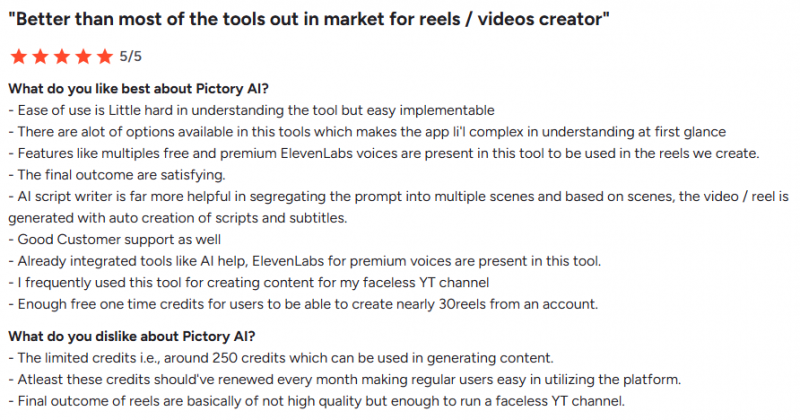
However, recurring complaints also appear. Some users feel that AI-selected visuals can be generic or repetitive, requiring manual adjustments for higher-quality results. Others mention occasional rendering glitches on complex projects. A few users also report frustration with the cancellation process.
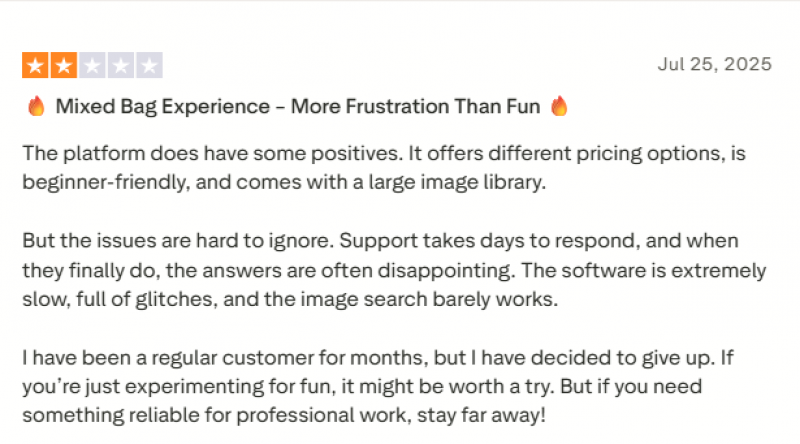
In other words, it’s efficient — but not perfect.
Strengths and Limitations (Quick Overview)
Strengths:
- Extremely fast blog-to-video workflow
- Beginner-friendly interface
- Large stock media library
- ElevenLabs voice integration
- Multi-language support
Limitations:
- AI visuals sometimes miss context
- Non-English voice quality varies
- API locked behind higher-tier plans
- Limited free trial
Privacy and Licensing: What You Can Actually Do With the Output
Two questions matter before building a content pipeline on Pictory, and neither is answered by the feature list.
Licensing. The stock media that Pictory assembles into your videos comes from Storyblocks on the Starter plan and Getty Images plus Storyblocks on Professional and above, licensed for use inside videos rendered on the platform. In practice that means finished Pictory videos can be published and used commercially under your plan, but the stock clips and images are not yours to extract and reuse as standalone assets outside those videos. Your own uploaded footage, scripts, and branding remain yours. As always, the live Terms of Service on pictory.ai is the binding document; re-check it before client work, and note that AI-generated elements of a video may not qualify for copyright protection on their own in many jurisdictions.
Privacy. Everything you feed Pictory, including scripts, blog drafts, and full webinar or meeting recordings, is uploaded to and processed on its cloud servers. For marketing content that is a non-issue. For internal recordings that contain confidential product details, customer data, or unreleased material, treat it like any third-party processor: check your company's data policy first, and keep genuinely sensitive footage out of any cloud editing tool, this one included.
Ideal Use Cases for Pictory AI
Pictory AI is particularly effective for content marketers repurposing written articles into video. It’s also valuable for YouTubers creating explainer content, online educators building course material, and small businesses producing product demos or promotional clips.
Teams that require brand consistency will appreciate the brand kit feature, which allows saved logos, fonts, colors, and intros across projects.
It is not designed for cinematic storytelling or advanced animation. It is designed for marketing output at scale.
Is Pictory AI Worth It?
If your priority is speed, efficiency, and scalable content production, Pictory AI makes a strong case. It significantly reduces production time and lowers the barrier to entry for video marketing.
If you’re a professional editor seeking total creative control, you may find it limiting. But if you’re a marketer trying to turn blog posts into engaging video content without hiring a production team, it’s hard to ignore.
Ultimately, Pictory AI does what it promises: it turns words into videos quickly.
And in a world where attention spans are shrinking and video dominates search results, that capability is powerful.
Post Comment
Share your thoughts about this article.
Be the first to post a comment!





