Most AI photo swap tools claim to be free, then lock the download behind a paywall, a credit cap, or a watermark. Genuine usefulness means finding a platform with a free tier that skips those traps.
Whether you’re retouching a headshot, making a meme, or putting together a quick social clip, the right tool depends on your goal. This guide evaluates seven platforms on their real free-tier access, output quality, and how much friction stands between you and a finished image.
Head Swap vs Face Swap: Know the Difference First
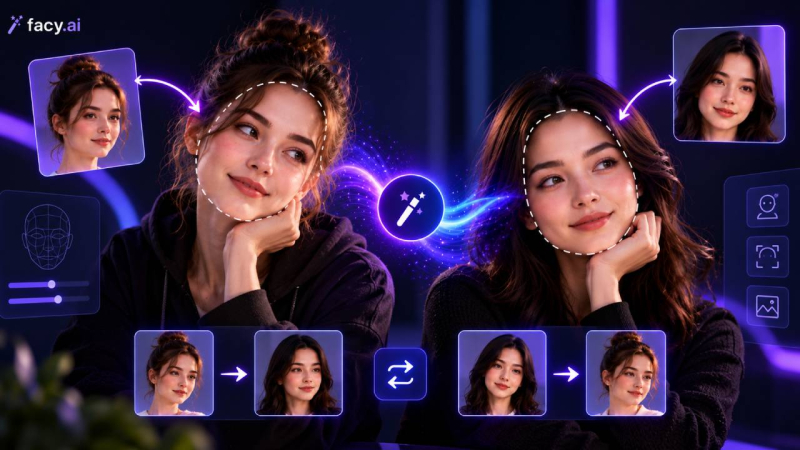
Face swapping and full head replacement rely on different mechanics, and picking the wrong one for your photo wastes an attempt.
● Face Swap: Replaces facial features eyes, nose, mouth, eyebrows onto a target photo. Hair, ears, and skull shape stay exactly as they were. Best for memes, portraits, or expression fixes where the existing hairstyle already works.
● Head Swap: Replaces the entire head, including hair, ears, and the neckline where it meets the body. It takes more processing power to blend correctly, but it’s the only option when the hairstyle or head shape actually needs to change.
The 7 Best Free Swap Platforms
1. Facy.ai
Facy handles both techniques from a single web tool, with no account required to start. Its face swap ai free , runs directly on the page and is designed to clear uploaded images from its servers once your export finishes.
When the hairstyle needs to change too, the same platform’s free AI head swap tool maps a full head onto a target body and it can target a single person in a group shot instead of altering everyone in the frame.
2. Magic Hour
Magic Hour pairs face swapping with lip-syncing and image-to-video generation in one dashboard. The free tier includes several hundred credits for watermark-free photo exports. Video output on the free plan is capped at 720p with longer render queues, but it’s a solid pick for reaction clips and short-form memes.
3. Vidnoz
Built specifically for head swaps rather than basic facial mapping, Vidnoz focuses on anatomical blending smoothing the seams at the neck, temples, and collar to avoid the discoloration that trips up more generalist editors. Free exports require an account and carry a watermark.
4. Fotor
Fotor offers a fast, automated editor for casual projects. It detects the subject, isolates the head, and fits it onto a template quickly, though fine detail like stray hair can show soft edges up close. Free exports need an account and include a watermark.
5. Remaker AI
Remaker AI leans into photographic realism, analyzing directional light and skin tone to blend a face naturally into its new setting. The free tier requires an email sign-in but includes enough unwatermarked credits to properly test single-photo output.
6. FaceSwapper AI
FaceSwapper.ai is built for speed: no account, no payment screen, clean unwatermarked downloads. Upload a source and target image and the swap generates immediately. It has no video support and struggles with sharp side angles, but for a fast single-image edit it’s hard to beat.
7. Reface
Reface is a mobile-first app built around entertainment a library of trending video templates, movie scenes, and animated GIFs you drop your face into. The free plan enforces daily credit caps and adds a watermark.
Free Plan Feature Comparison Matrix
| Platform | Swap Type | Sign-Up Required | Watermark on Free Output | Best Use Case |
| Facy.ai | Head & Face | No for face swap | No | Head and face swaps without an account |
| Magic Hour | Face & Video | Yes | No for photos | Short video clips, lip-syncing |
| Vidnoz | Head & Face | Yes | Yes | Hairstyle changes, head replacement |
| Fotor | Head & Face | Yes | Yes | Quick social media edits |
| Remaker AI | Face | Yes | No | Realistic skin-tone blending |
| FaceSwapper.ai | Face | No | No | Fast, simple photo swaps |
| Reface | Face & Video | Yes | Yes | Viral video templates |
AI image manipulation carries real ethical and legal responsibility. These tools are legal for personal and commercial use, but only when you hold the rights to every image you upload.
Never manipulate someone’s likeness without consent, and never use a swap tool for impersonation or deception. Uploading images of anyone under 18 is strictly off-limits. Favor platforms with a clear stated policy on deleting uploads after processing. Whoever generates the image stays legally responsible for how it’s used afterward.
Frequently Asked Questions (FAQ)
Do free plans cap how many swaps I can generate?
Yes, usually. Sign-up-based tools like Vidnoz, Fotor, and Reface allot a set number of free credits or daily generations, while no-account tools like Facy.ai limit by session instead.
Do these tools work on mobile, or only in a desktop browser?
Most here, including Facy.ai, run in any mobile or desktop browser without a separate app. Reface is the exception it’s a dedicated mobile app.
What file types and sizes do free tiers accept?
JPG and PNG work everywhere on this list; several, including Facy.ai, also accept WEBP and BMP, generally capped in the 10–20MB range.
Conclusion
Your choice comes down to project format and how much sign-up friction you’ll tolerate. For instant, watermark-free single-photo swaps with no account, FaceSwapper.ai is the fastest route. For reaction clips or short video animation, Magic Hour’s credit-backed video tools are the more versatile pick.
For projects that need both facial changes and full head replacement with clean hair blending, Facy.ai covers both in one browser-based workflow. Test two or three unwatermarked tools on the same photo to see which one handles your lighting and angle best.
Post Comment
Share your thoughts about this article.
Be the first to post a comment!