Table of Content
- A Quick Take on Meshy AI’s Idea
- Core Capabilities That Define Meshy AI
- Trustpilot, Reddit and Reality: Feedback Breakdown
- Highlights and Shortcomings
- Meshy AI Subscription Plans
- Commercial Rights, Ownership, Privacy, and Enterprise Notes
- Worth It or Not? And How It Compares
- Would I Use It for a Real Project? My Take
A Quick Take on Meshy AI’s Idea
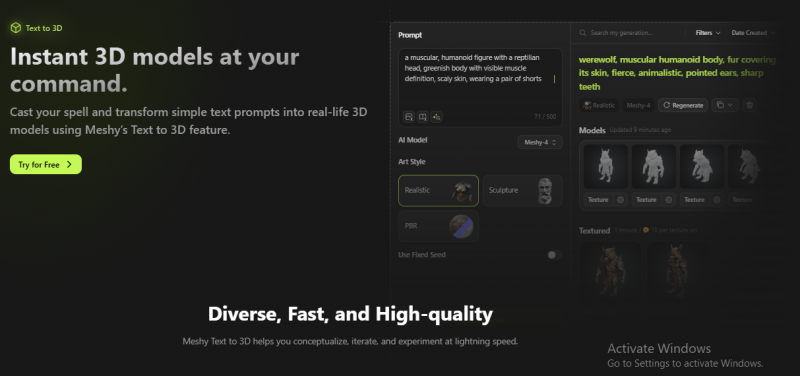
Meshy AI transforms text prompts or input images into fully textured 3D assets, supporting Text‑to‑3D, Image‑to‑3D, Text‑to‑Texture, and animation. It caters to game developers, hobbyists, designers, and educators looking for rapid, automated asset creation.
Core Capabilities That Define Meshy AI
- Text to 3D: Prompt‑based generation of geometry in minutes; supports multiple art styles (realistic, cartoon, low‑poly, voxel), with adaptive or fixed polycount and topology options.
- Image to 3D: Converts 2D input into 3D, though some users report geometry inaccuracies, especially in complex assets.
- Text to Texture: AI‑generated PBR textures (color, metallic, roughness, normal maps) customized via prompts.
- Animation support: Built‑in rigging/animation tools suitable for simple character motion, integrated with standard export formats.
- Export & integration: Outputs in .fbx, .obj, .glb, .usdz, .stl, and supports Blender, Unity, Unreal, Maya, and Godot plugins.
- Prompt‑engineering flexibility: Rich controls over prompts, symmetry, style, topology, resolution, textures—though effective use requires experience.
Trustpilot, Reddit and Reality: Feedback Breakdown
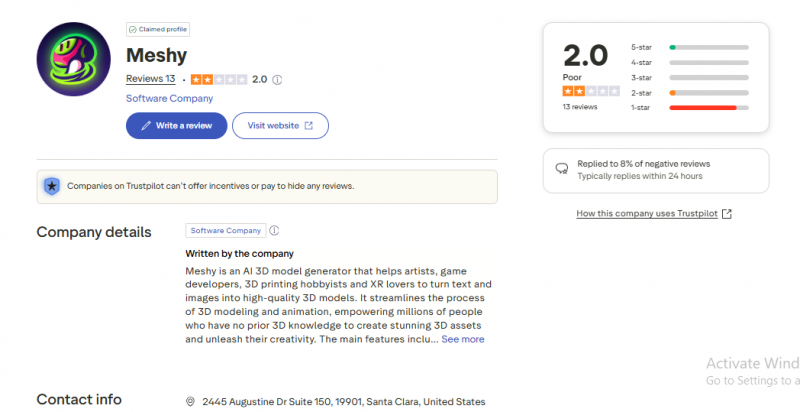
Trustpilot (13 reviews, average 2.0/5) shows overwhelmingly negative sentiment:
“NO REFUNDS for a crappy program”—one user paid for the full version and saw quality drop, refund not processed via homepage error.
Many 1‑star reviews reflect a perceived bait‑and‑switch trial policy and poor customer response rates.
Reddit r/unity / r/gamedev impressions:
“It was atrocious… for character models it’s unlikely to be anywhere near good enough unless it’s changed a lot. … I spent a while trying … it couldn’t do a cylinder properly.”
Another user:
“just tried it … failed miserably because ai doesn't know what a hard surface is … textures … horrendous experience.” Reddit
These voices highlight serious limitations around precision models, hard‑surface objects, and texture fidelity.
In contrast, Product Hunt and Unite.ai reviews praise the tool’s speed, support, and improvements:
“Meshy empowers content creators … in under a minute.”
Unite.ai notes that the tool generates high‑quality models with PBR textures, versatile export formats, and a user‑friendly UI, though professional models may need extra tweaking.
Highlights and Shortcomings
| Positives | Pitfalls |
|---|---|
| Rapid generation of textured 3D models from prompts | Character and hard‑surface model quality often subpar—especially for detailed design, e.g. halberds, cylinders |
| Intuitive interface with multiple generation modes | Texture mapping sometimes blurry, stretched, limited to single materials |
| Broad export formats (.fbx, .obj, .glb, .stl) and plugin support | Slow on low‑end hardware; sometimes stalls during processing |
| Customizable prompts and polycount/settings give control | Refund issues noted—some users reported being charged without produce or no refunds via site |
| Active improvement and regular updates reported on Product Hunt and review communities | Free trial automatically converts to charge—users warned to cancel promptly |
Meshy AI Subscription Plans
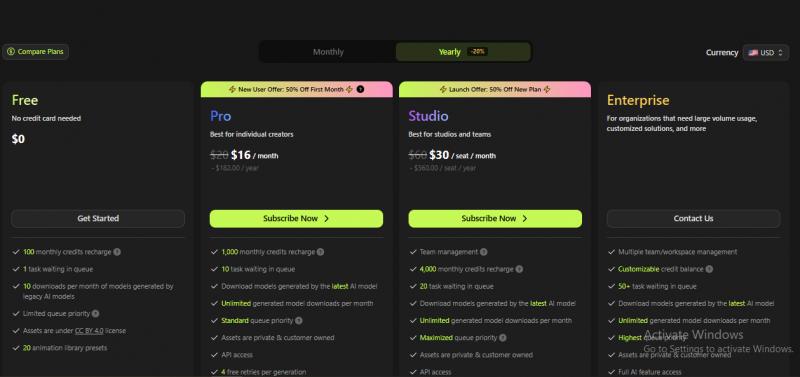
| Plan | Monthly Cost | Credits per Month | Key Features |
|---|---|---|---|
| Free | $0 | 100 | Basic access, limited credits |
| Pro | $16 | 1,000 | Full features, priority generation, enhanced support |
| Studio | $30 | 4,000 | Advanced tools, higher priority, extended support |
| Enterprise | Custom Pricing | Custom Allocation | Custom solutions, dedicated management, API access |
What Credits Actually Buy You
Credits are the real price of Meshy, so here is the math that the plan table hides:
• A full Meshy 6 generation (Text to 3D or Image to 3D) costs 20 credits: the model stage plus the texture stage. Credit costs are identical on every plan.
• Rigging and animating a model currently costs 0 credits, which is unusually generous for the category.
• Translated into models per month: Free's 100 credits equal about 5 full generations; Pro's 1,000 credits equal about 50; Premium's 3,000 about 150; Ultra's 10,000 about 500. Budget roughly double that credit spend in practice, because retries on failed or unsatisfying generations also consume credits.
• Plan credits reset monthly and do not roll over. Separately purchased credit packs are permanent, so buy packs (available on paid plans) rather than upgrading a tier if your usage is spiky rather than steady.
• The legacy Meshy 5 workspace uses a different scheme (4 draft variants per run with its own costs), but new work should assume the Meshy 6 numbers above.
Commercial Rights, Ownership, Privacy, and Enterprise Notes
• Paid plans: you own your assets outright. Models created on Pro, Premium, Ultra, Studio, or Enterprise are exclusively yours with full rights to distribute and sell, and they stay private to your account.
• Free plan: CC BY 4.0 license instead of ownership. Free-tier assets are public, and commercial use is allowed but requires crediting Meshy (for example in your store listing). If you are shipping a commercial game or selling assets, a paid plan is effectively mandatory.
• Copyright caveat: ownership applies only if your inputs did not violate someone else's copyright. Generating from a copyrighted character image does not launder the rights; what you feed in matters legally.
• Privacy: on Free, anything you generate is publicly visible to other users. Do not prototype confidential client designs or unannounced product shapes on the free tier; asset privacy begins at Pro.
• Enterprise: custom contracts add SSO, dedicated infrastructure and support, and volume API pricing. The public API is pay-before-you-go with per-task credit pricing documented at docs.meshy.ai, and Blender/Unity plugins are official.
• Billing hygiene: given the no-refund policy, subscribe monthly first, calendar your renewal date, and cancel from Settings > Subscription (the cancel button is in the Current Plan section) rather than assuming an email will do it.
Worth It or Not? And How It Compares
Meshy AI excels at fast prototyping, rough visual ideation, and simple organic shapes with automatic texture generation. It supports multiple assets and workflows, including animation, and is accessible to beginners with basic prompt knowledge.
However, for commercial-quality characters, precise hard-surface assets, or complex texturing—especially in professional game or film pipelines—it often underdelivers. Users report inconsistent output and tooling limitations. The refund policy and billing practices have raised complaints.
Alternatives like Appy Pie, Spline, and Masterpiece Studio may be more suitable depending on workflow:
- Appy Pie: easier for simple 2D→3D transformations, ecommerce prototyping.
- Spline: strong for interactive web‑based 3D and browser collaboration.
- Masterpiece Studio: VR-driven asset refinement and remixing tools.
| Feature | Meshy AI | Masterpiece Studio | Spline | Appy Pie 3D |
|---|---|---|---|---|
| Text-to-3D | Yes | Yes | No | Yes |
| Image-to-3D | Yes | Yes | No | No |
| Export Formats | .fbx, .obj, .glb, .stl | .fbx, .obj, .glb | Web-based (no downloads) | .obj, .stl |
| Animation Tools | Basic rigging/animation | Advanced rigging/animation | No | No |
| Pricing | Starts at $0 (free tier) | Paid tiers starting at $39 | Starts free, paid from $16 | Starts free, paid from $18 |
| Best For | Prototyping, game dev | High-quality animation | Interactive web-based 3D | Simple 3D models, prototyping |
| Ease of Use | User-friendly, basic controls | Professional, but complex | Intuitive, minimal learning curve | Very beginner-friendly |
| Target Audience | Game devs, indie creators | Animators, 3D artists | Web designers, UX/UI designers | Entrepreneurs, small business owners |
| Limitations | Texture issues, limited models | Expensive, complex for beginners | Limited to web-based projects | Basic features, less flexibility |
| Customer Support | Email, limited hours | Email, phone support | Email support | Email and community forums |
Would I Use It for a Real Project? My Take
Meshy AI stands out as an innovative tool for generating textured 3D models fast and easily, but it comes with serious caveats: output quality varies heavily depending on asset type, prompt precision, and hardware; user dissatisfaction is concentrated on character/hard‑surface failures and refund issues. Use it for ideation and low‑risk prototyping; lean on human artists or more specialized tools for commercial‑grade deliverables.
Post Comment
Share your thoughts about this article.
Be the first to post a comment!





