How I Stopped Drowning in Study Notes
I used to spend more time organising my notes than actually learning them. That changed when I found Gizmo AI, an app that takes my PDFs, YouTube videos, and scribbled lecture notes and magically turns them into flashcards and quizzes. It’s like having a study assistant who doesn’t sleep.
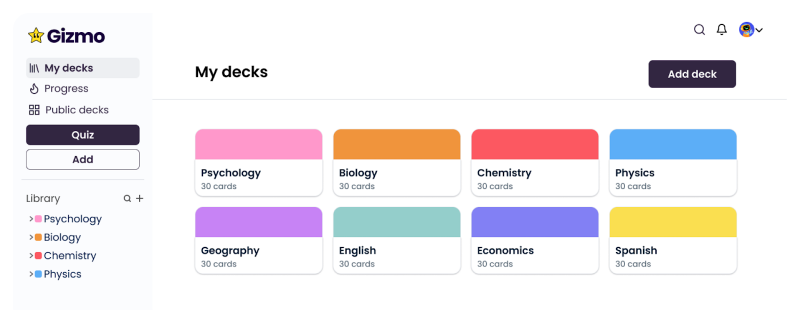
But finding a tool is one thing, understanding why it’s worth sticking with is another. That’s where Gizmo surprised me.
Why This App Keeps Popping Up in Student Chats
Every time I scroll through r/GetStudying, someone’s talking about Gizmo. The common theme? “It actually keeps me studying.” Between condensing huge resources and scheduling review sessions right before I forget, it makes revision feel doable.
Of course, it’s easy to say something “works”,but the real question is how it works behind the scenes.
What Happens the Moment You Upload Your FIrst File
The first time I tested Gizmo, I uploaded a dense 45-page history PDF. In under a minute, it gave me a neat deck of flashcards and multiple-choice quizzes. It even highlighted tricky dates I tend to miss. According to Techpoint Africa, that’s because Gizmo’s AI recognises patterns and learning gaps, not just words on a page.
And that’s when I started thinking, how does this compare to the way I’ve been studying all these years?
Normally, when I open a long PDF, I start scrolling. I highlight aggressively. I tell myself I’ll “revise properly later.” Then later never really comes. Or if it does, I end up rereading everything from scratch because I don’t trust my memory.
With Gizmo, the experience felt different.
Instead of passively scanning the document, I was immediately forced into recall mode. The flashcards weren’t just definitions copied from the text. They were structured prompts, “What caused?”, “Why did?”, “In which year?”, the kind of questions that actually show up in exams.
That shift from reading to answering changed my focus instantly.
I also noticed something subtle but important: it broke the psychological barrier of starting. A 45-page PDF feels overwhelming. A deck of 30 flashcards feels manageable. The content didn’t shrink, but the anxiety around it did.
Another thing I didn’t expect was how it prioritised information. Some topics I thought were “important” barely showed up, while others I had skimmed too quickly were turned into multiple cards. It made me realise how biased my own note-taking can be. I often focus on what feels easy, not what’s exam-relevant.
In the past, creating flashcards meant:
- Reading the page
- Deciding what matters
- Writing it down
- Formatting it
- Revising it later
That entire pipeline used to take hours.
Here, it took seconds.
Of course, I still edited a few cards. Sometimes I rephrased a question to make it clearer. But instead of building from zero, I was refining. That difference alone saved me mental energy.
And honestly, the biggest difference wasn’t speed.
It was momentum.
Within five minutes of uploading the file, I was already testing myself. Not planning to study. Not organizing folders. Not highlighting.
Actually studying.
That’s when I realized something: the tool didn’t just process my PDF. It changed the way I approached the material.
For years, my study method was input-heavy, read more, highlight more, watch more lectures.
This felt output-heavy, answer more, recall more, test more.
And that small shift made a bigger difference than I expected.
Why I Think It Beats My Old Study Habits
Manual studying for me meant highlighting, rewriting, and… forgetting. With Gizmo, I’m actively tested from the start, which forces my brain to work harder and remember more. One Cambridge alum even wrote on Gizmo’s site that they cut their study time in half by switching.
_1754976398.png)
Still, it wouldn’t be fair to call it perfect without looking at how it stacks up against other tools I’ve used.
Features That Changed How I Study
What surprised me most wasn’t that Gizmo had features. Every study app has features.
What surprised me was how those features quietly rewired my routine.
Take voice-to-flashcard conversion. I didn’t expect to use it much. But after long study sessions, when typing structured notes feels exhausting, speaking feels natural. I started summarising chapters out loud the way I would explain them to a friend. Gizmo converted that into flashcards almost instantly. The interesting part wasn’t just convenience, it was cognitive. When you verbalise a concept, you’re already engaging recall pathways. Turning that spoken explanation into a testable card meant I was reinforcing the material twice without consciously trying to. It reduced friction between thinking and revising.
Then there’s collaborative decks. Study groups usually sound productive in theory and messy in reality. Shared drives become cluttered. Notes overlap. People prepare differently. With Gizmo, we weren’t sharing documents, we were sharing recall systems. Everyone interacted with the same structured deck. If someone added a clearer explanation or corrected a weak card, the improvement reflected for everyone. It removed the usual coordination overhead and replaced it with something far more useful: collective refinement. Instead of debating what to study, we were actually studying.
The gamified layer also affected me more than I expected. I used to dismiss streaks and progress visuals as superficial. But what I noticed over time was behavioral consistency. On days when motivation dipped, I didn’t aim for a two-hour deep session. I aimed to maintain the streak. That simple psychological hook kept me engaged daily. The hearts, the review counters, the subtle sense of completion, they made studying feel active rather than passive. Not intense. Not dramatic. Just steady.
And the multi-source integration solved a problem I didn’t fully realise I had. My study material has never existed in one format. Some professors send PDFs. Others share slides. Half my understanding comes from YouTube breakdowns. Sometimes I jot handwritten summaries that don’t fit neatly anywhere. Before Gizmo, I would spend unnecessary time reorganising content before even beginning revision. Now I upload everything as it is. The AI handles extraction and structuring. That shift alone preserved mental energy. I wasn’t preparing to study anymore, I was studying.
What these features collectively changed was not my intelligence or my discipline. They changed my starting point. Instead of facing scattered content and deciding how to convert it into something usable, I faced structured prompts asking me what I remembered.
That subtle difference transformed my sessions from input-heavy to output-focused. From rereading to responding. From highlighting to answering.
And when you’re preparing for major exams, volume becomes the real threat. Not difficulty. Not complexity. Volume.
Gizmo doesn’t reduce the content.
It reduces the overwhelm around the content.
And for me, that made all the difference.
Why I Actually Enjoy Using It
The gamification works. Streaks, hearts, and that satisfying progress bar keep me coming back. One Google Play user nailed it: “Seeing my streak hit 50 days makes me want to study even when I’m wiped.”
Still, no app is without flaws, and Gizmo has a few.
My Experience With Big Exams
When I used Gizmo for timed GCSE practice, my focus and retention improved more than I expected. Before that, revision always felt heavy. I would sit down with the intention of doing two solid hours, but half the time was spent figuring out what to revise instead of actually revising it.
With Gizmo, that decision fatigue disappeared.
The quizzes felt closer to exam conditions. Instead of rereading notes, I was answering questions under light pressure. That small shift made my brain switch modes. It wasn’t “reviewing” anymore, it was performing. And performance builds sharper recall.
The spaced repetition also helped more than I realised at first. Topics I thought I understood kept reappearing just when I was about to forget them. That timing made revision feel controlled instead of random. I wasn’t guessing what to revisit, the system nudged me.
What changed most during big exam prep was my consistency. I didn’t cram as aggressively because I didn’t need to. Short, focused review sessions stacked up over days. By the time mock exams came around, I noticed something subtle: I hesitated less. Dates came quicker. Definitions felt automatic.
I’ve read similar stories on r/GCSE — students talking about moving from average to top scores after switching to AI-assisted flashcards and structured review cycles. I can’t say it magically guarantees results, but I can say it changed the rhythm of my preparation.
Instead of hoping I’d remember things in the exam hall, I felt like I had trained for it.
And that feeling — walking into an exam knowing you’ve actively tested yourself dozens of times, is very different from simply having read the material.
That confidence alone made a difference.
The Premium Features and What I Think
The AI Tutor and unlimited quizzes are behind a paywall, but if you’re serious about daily study, it’s worth it. The free plan is generous enough to keep casual learners engaged. I mostly stick with the free version for everyday review but switch to Pro for exam prep.
One thing I’d love to see added: offline mode. Being able to study on the train without Wi-Fi would make Gizmo even more indispensable.
Gizmo AI vs Other Study Tools
I’ve tried Quizlet, Anki, and Brainscape:
- Quizlet is fast for simple flashcards, but lacks multimedia integration.
- Anki is great offline but requires setup.
- Brainscape has strong analytics but fewer import options.
For AI-driven enhancements, I started experimenting with AnswerAI, which automates content summarization and quiz creation, making review sessions even more efficient.
The Parts That Frustrate Me
Premium features like unlimited quizzes and the AI Tutor are locked behind a paywall, which can feel frustrating if you’re on a tight student budget. The free version is usable, but once you see how powerful the deeper features are, you do feel the limitation. The AI Tutor in particular adds contextual explanations and follow-up prompts that make revision feel more guided rather than self-directed. So yes, the upgrade feels tempting.
Large files can also lag occasionally. When I uploaded extremely dense PDFs with heavy formatting, there were moments where processing took longer than expected. It’s not a dealbreaker, but it reminds you that AI tools aren’t instant magic machines, they’re still processing large volumes of structured text.
And the lack of offline mode is noticeable. On train commutes or in low-signal areas, you can’t just open the app and revise like you could with something fully offline like Anki. For students who rely on travel time to squeeze in revision, that limitation matters.
But here’s the thing.
None of these flaws affected the core benefit I was getting: structured recall and consistent revision. Once I was in a stable internet environment, the system worked exactly how I needed it to. The processing delays were occasional, not constant. The paywall features felt like enhancements rather than necessities.
Most importantly, during major exam prep, the question becomes simple:
Is this helping me retain more in less time?
For me, the answer was yes.
When the pressure of exams builds, what you value most isn’t perfection. It’s reliability. A system that keeps pushing the right material at the right time. A tool that reduces chaos instead of adding to it.
So while it’s not flawless, the practical wins, time saved, better recall, reduced overwhelm, outweigh the inconveniences.
Especially when the stakes are high.
_1754976533.png)
Who I Think Gizmo Works Best For
- Visual Learners: Import images and videos to create rich flashcards.
- Auditory Learners: Convert recorded lectures into flashcards.
- Collaborative Learners: Share decks and study with friends.
Personally, I find it helps me stay consistent, building a study habit rather than just cramming.
Final Thoughts
For me, Gizmo isn’t just an app, it’s become part of my study routine. It turns scattered notes into structured revision sessions, keeps me consistent on low-motivation days, and makes retention feel intentional rather than accidental. Adding AI-powered tools like AnswerAI alongside it has made handling massive amounts of content feel less intimidating and far more systematic.
What I value most isn’t the automation itself, it’s the clarity. I know what I’ve revised. I know what I’m weak at. I know what’s coming up next. That sense of direction removes a huge layer of stress during exam prep.
If you’re tired of drowning in notes, switching between PDFs, and rereading the same chapters without real progress, Gizmo AI can help you move from passive reviewing to active recall. It won’t study for you, but it will give you a framework that makes serious exam preparation feel achievable instead of overwhelming.
And sometimes, that structure is exactly what turns confusion into confidence.
Quick Questions I Get About Gizmo AI
Q1. Gizmo AI vs Traditional Study Methods – Which is More Effective?
Gizmo’s active recall beats passive reading every time.
Q2. Can Gizmo AI Replace a Real Tutor?
No, it’s a great helper, but not a full tutor replacement.
Q3. Does Gizmo AI Work Well for GCSE, SAT, and AP Exam Prep?
Yes, it’s built for structured, exam-focused learning.
Q4. What Are the Limitations of Gizmo AI?
Premium paywall, no offline mode, and big file lag.
Q5. How Secure Is My Data with Gizmo AI?
Secure servers, but I still avoid uploading sensitive data.
Q6. How Well Does Gizmo AI Handle Complex Subjects Like Math or Science?
Great for facts, mixed results for complex problem-solving.
Q7. What’s the Difference Between the Mobile App and Web Version of Gizmo AI?
App is faster for quick reviews, web is better for deck management.
Q8. What Are the Best Alternatives to Gizmo AI?
Gradius, Anki, and Brainscape.
Q9. What Future Updates or Features Are Planned for Gizmo AI?
Likely offline mode, better analytics, faster imports.
Q10. How Much Time Can Gizmo AI Actually Save Me?
Hours a week, flashcard creation takes minutes, not hours.
Post Comment
Share your thoughts about this article.
Be the first to post a comment!





