Table of Content
- What Notion AI Brings to Student Workspaces
- Inside Unstuck AI's Study Companion Approach
- Pricing Breakdown for 2026
- Side-by-Side Feature Comparison
- Limitations of Notion AI for Coursework
- Gaps in Unstuck AI's Study Coverage
- Matching Each Tool to a Student Profile
- Closing Verdict for Student Workflows
Students juggle lectures, readings, assignments, and exam prep across multiple courses every semester. The right AI assistant can compress hours of manual review into focused study sessions, while the wrong choice creates extra digital clutter. Two tools sit at opposite ends of the student AI spectrum: Notion AI, a workspace-wide assistant baked into a productivity platform, and Unstuck AI, a purpose-built study companion designed around lectures, PDFs, and flashcards.
This comparison examines current 2026 pricing, core feature sets, performance on student-specific tasks, and where each tool falls short in real academic workflows. Notion AI operates as part of a larger note and database environment, while Unstuck AI focuses narrowly on turning course materials into study assets. Decisions between the two depend on whether a student wants a single workspace for everything or a dedicated study layer over uploaded course content.
What Notion AI Brings to Student Workspaces
Notion AI is the artificial intelligence layer inside Notion, a workspace platform used for notes, databases, project management, and wikis. The 2026 version centers on two flagship capabilities: Ask Notion and Notion Agent. Ask Notion answers questions using any page or database connected to the workspace, surfacing relevant content with linked sources. Notion Agent goes a step further by executing multi-step actions like generating study guides, creating linked pages, or populating database properties from a single prompt.
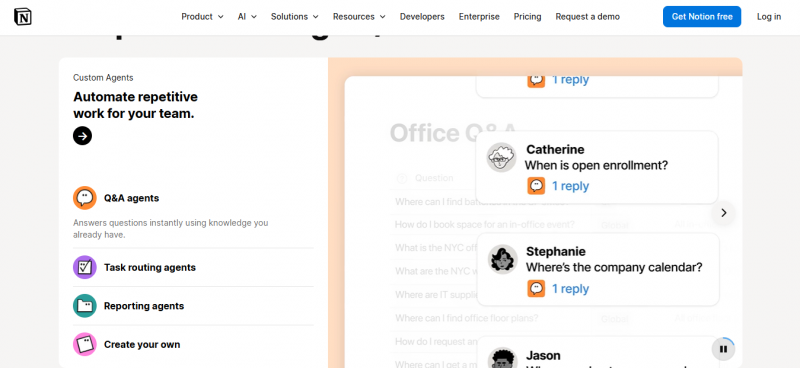
Beyond those two flagship features, Notion AI provides writing assistance for drafting, rewriting, and tone changes, AI database autofill including auto-summary columns and custom autofill properties, AI search across the workspace, and translation across multiple languages. The system reads PDFs uploaded directly into Notion pages and can pull summaries from public URLs pasted into the workspace.
Notion is a horizontal productivity tool rather than an education-first product. Students benefit because an entire semester can be structured inside one workspace: lecture notes, reading lists, assignment trackers, project plans, and AI-generated study guides all live in the same environment. The 2026 pricing changes shifted Notion AI away from a standalone add-on and into a tiered model where full AI access lives inside the Business plan.
The platform also supports collaboration through shared pages and guest access, making it useful for group projects and study circles where multiple students need to read, edit, and query the same set of notes simultaneously.
Inside Unstuck AI's Study Companion Approach
Unstuck AI launched in January 2023 as an AI study companion built specifically for college and high school learners. Used by more than 2 million students across institutions including MIT, UCLA, and the University of Michigan, the tool turns course materials into interactive study assets through a chat-first interface.
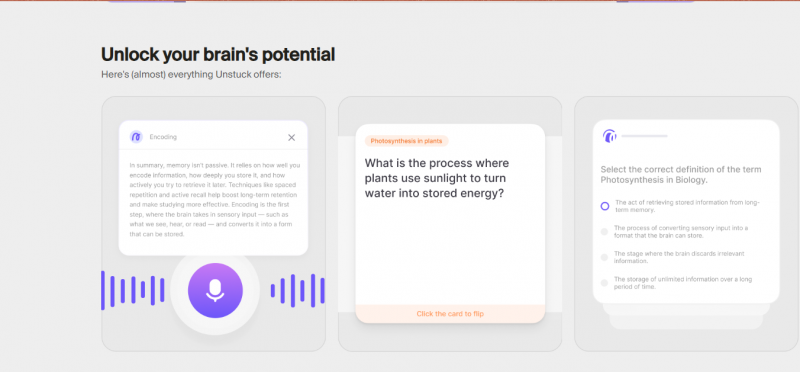
The workflow centers on uploading source material: PDFs, PowerPoint slides, textbook chapters, lecture recordings, YouTube links, and handwritten notes after digitization. Once content is processed, learners can chat with the materials and receive cited answers that point back to the exact source page or transcript timestamp. Readers coming from articles such as My Semester With Unstuck AI will recognize this upload-and-chat workflow as the platform’s main differentiator compared with traditional flashcard-first study apps. Three core outputs emerge from uploaded content: AI-generated flashcards, custom quizzes (multiple choice, fill in the blank, true or false), and structured summaries.
Live lecture recording is the standout feature. Students can record classes on the mobile app and receive automatic transcripts plus structured notes once the session ends. Quiz mode supports timed sessions with hints, and content is grouped by Class for organized review across a semester.
Unstuck AI runs on advanced language models comparable to GPT-4 and operates as a mobile-first product, with apps optimized for studying between classes. Materials remain private to the account that uploads them, addressing a common concern about coursework confidentiality. The focus stays narrowly on converting source content into study aids rather than doubling as a workspace or writing assistant.
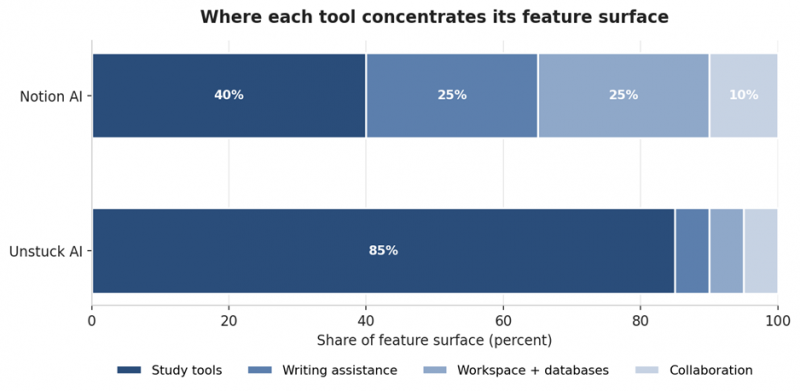
Figure 1. Share of feature surface focused on each capability area.
Pricing Breakdown for 2026
Pricing shifted meaningfully for both products over the past 12 months. Notion retired its standalone $10 AI add-on in May 2025 and moved full AI capability into the Business plan. Unstuck AI kept a freemium model with a premium upgrade option.
| Plan tier | Notion AI (2026) | Unstuck AI (2026) |
|---|---|---|
| Free tier | Available, includes limited AI | Available with usage caps |
| Student offer | Plus free with verified .edu email | 7-day free trial of Premium |
| Entry paid plan | Plus at $10/month (annual) | Premium at $9.92/month (annual) |
| Mid paid plan | Business at $15/month annual ($180/year) | Unlimited at $19.99/month or $119/year |
| Enterprise | Custom quote required | Not offered |
| Metered AI cost | $10 per 1,000 Notion credits (since May 2026) | Not applicable |
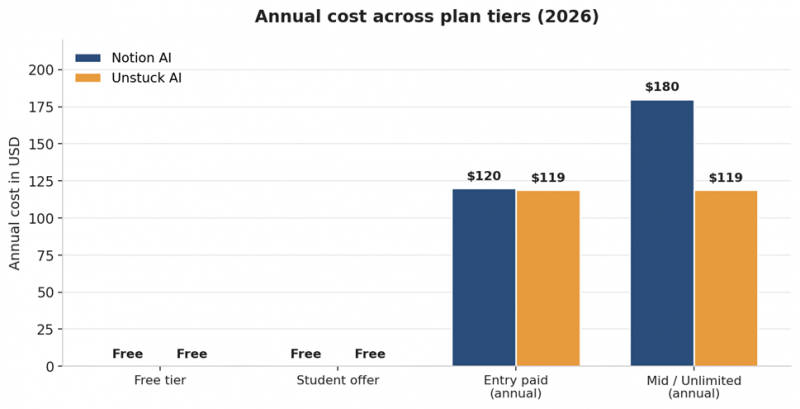
Figure 2. Annual cost comparison across plan tiers.
For students who already maintain a Notion workspace, the .edu email Plus offer covers most non-AI features at zero cost. Unlocking Ask Notion and Agent across an academic workspace requires the Business plan, which adds $180 per year. Unstuck AI sits below that price point at $119 per year for unlimited usage. Notion's Custom Agents began billing at $10 per 1,000 credits on May 4, 2026, which introduces metered costs on top of the base subscription for heavy automation usage.
Side-by-Side Feature Comparison
Functional overlap between the two tools is partial, not complete. Some study tasks are native to one product and require workarounds in the other.
| Capability | Notion AI | Unstuck AI |
|---|---|---|
| Chat with documents | Yes, via Ask Notion | Yes, with source citations |
| Lecture recording | No native feature | Yes, mobile recording with auto-transcript |
| YouTube link import | Limited (paste public URL) | Yes, structured notes from video |
| AI flashcard generation | Possible via Agent prompts | Native with one-tap generation |
| Custom quizzes | Possible via Agent prompts | Native: MCQ, fill blank, true or false |
| Writing assistant | Strong (drafting, rewriting, tone) | Limited |
| Workspace integration | Native Notion ecosystem | Standalone study dashboard |
| Database autofill | Yes (AI summary, custom fields) | No |
| Mobile-first design | Desktop and mobile parity | Mobile-first |
| Collaboration tools | Strong (shared pages, guests) | Limited (individual focused) |
| Citation in answers | Workspace pages | Direct page or timestamp reference |
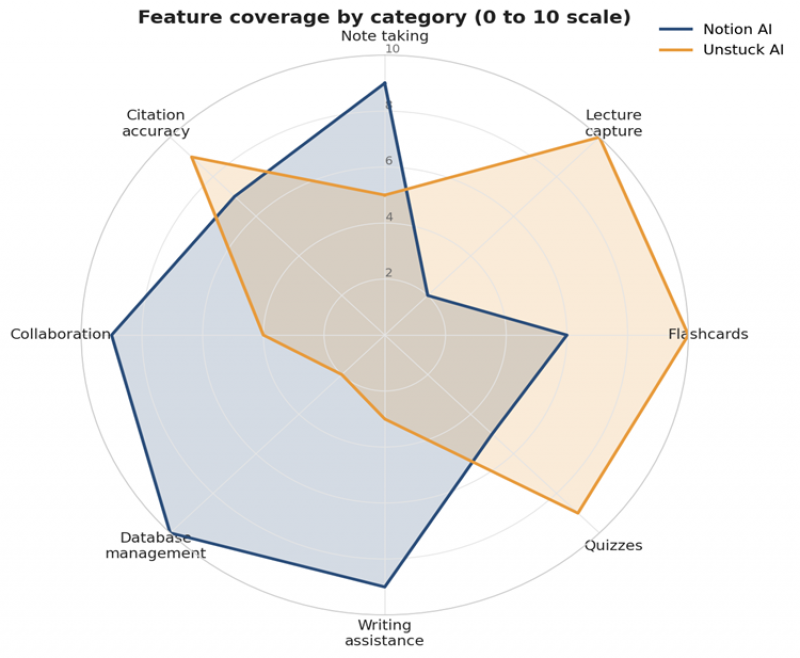
Figure 3. Feature coverage radar across eight study and productivity dimensions.
Lecture Capture and Transcription Differences
The biggest practical difference shows up in how each tool handles spoken lectures. Unstuck AI records and transcribes directly inside the app, then produces summaries and flashcards from the transcript without manual intervention. Voice capture, transcription, and structured note generation happen in one continuous workflow on the mobile app.
Notion AI does not record lectures. Students must capture audio with a separate tool such as Otter.ai, voice memos, or another third-party transcription app, then paste the transcript into a Notion page before Notion AI can process it. Once the transcript lives in the workspace, Ask Notion or Notion Agent can summarize and pull action items, but the front end of the workflow requires an external app.
For students attending three to six lectures per day, that gap matters. Unstuck AI removes a step entirely. Notion AI compensates by offering more flexibility once the transcript exists, including the ability to tag, sort, and link lecture content to assignments or readings on related pages within a structured database setup.
Active Recall: Flashcards and Quizzes
Both tools produce flashcards, but with different defaults and ceilings. Unstuck AI generates flashcards from uploaded material with a single command and presents them in a study interface optimized for spaced repetition. Quizzes follow the same one-tap pattern, with format selection (multiple choice, fill in the blank, true or false) and timed test modes that include optional hints.
Notion AI does not ship with a dedicated flashcard mode. Notion Agent can build flashcard databases on request, which gives more layout control but requires manual prompting and template setup. Once the database is built, additional flashcards can be auto-populated through Agent commands. For students who already maintain templated study databases, the flexibility pays off. For students who want flashcards on demand without configuration, Unstuck AI delivers faster.
Quiz scoring logic also differs. Unstuck AI scores answers strictly against the source material, which means paraphrased or near-correct responses can be marked incorrect. Notion AI does not include native quiz scoring, so any quiz built through Agent prompts requires manual review or external grading. For high-stakes exam preparation where active recall accuracy is critical, the Unstuck AI workflow is tighter, even if its scoring strictness occasionally penalizes valid answers.
Source-Cited Q&A and Answer Accuracy
Citation quality matters for academic work where source attribution is non-negotiable. Unstuck AI answers questions with direct references to the page number, slide, or transcript timestamp where the information originated. The chat interface keeps answers grounded in the uploaded corpus rather than pulling from general training data, which reduces the risk of hallucinated facts.
Notion AI cites sources from inside the workspace when answering through Ask Notion. Answer quality correlates strongly with workspace organization. Well-structured pages with clear headings produce reliable answers. Cluttered workspaces with half-finished pages and dump-zone databases produce fuzzier responses. The system also has documented edge cases where it fails to surface relevant content from connected databases, particularly across nested database relationships.
For a student who maintains tidy lecture notes inside Notion, Ask Notion can outperform Unstuck AI on cross-subject questions because it sees the entire workspace at once. For a student who uploads raw PDFs and lectures without organizing them, Unstuck AI tends to deliver tighter answers because the corpus is smaller and study-focused.
Daily Workflow Integration
Notion AI fits into a much wider workflow envelope. The same workspace that holds lecture notes can also host an assignment tracker, a thesis outline, a roommate chore list, a job application database, and a personal reading list. AI commands work consistently across all of those contexts, so writing a cover letter, summarizing a research paper, and drafting a group project plan happen inside a single tool with shared permissions.
Unstuck AI does not extend beyond study tasks. Course management, assignment tracking, and personal organization happen elsewhere. The tradeoff is depth: every feature in Unstuck AI maps to a study scenario, which keeps the interface uncluttered and the learning curve gentle. New users typically reach productive use within an hour of signing up.
Limitations of Notion AI for Coursework
Several limitations affect student use of Notion AI specifically. Full AI capabilities require the Business plan at $180 per year, a steep jump from the free Plus tier that many students qualify for through the .edu email program. Basic AI writing features carry over to Plus, but Ask Notion and Notion Agent stay locked behind Business. The pricing change in May 2025 removed the cheaper $10 add-on path that many students relied on previously, and grandfathered users keep the old rate only while their subscription remains uninterrupted.
Native lecture recording does not exist, so pairing Notion AI with a separate transcription tool is mandatory for audio-based study workflows. Q&A accuracy depends heavily on workspace tidiness, which adds maintenance overhead for students juggling multiple courses. The system does not connect to Slack, Zendesk, or most external apps, so context outside Notion remains invisible to the AI.
Custom Agents now bill at $10 per 1,000 Notion credits with no rollover, which introduces a metered cost layer on top of the base subscription for heavy automation use. Power users running daily Agent workflows can see their effective monthly cost climb well above the $20 sticker price.
Gaps in Unstuck AI's Study Coverage
Limitations exist on the Unstuck AI side as well. The free plan caps several core features including chat volume, file uploads, and flashcard generation, pushing serious users toward the paid tier. Pricing reports vary across sources, with figures ranging from $9.92/month annually to $19.99/month for unlimited usage, which suggests promotional pricing or tier restructuring during 2025 and 2026.
Quiz scoring lacks accommodation for paraphrased answers. Responses must closely match the source phrasing to count as correct, which can penalize students who understand concepts but express them differently. There is no workspace, no project tracker, no writing assistant for essays, and no integration with other apps a student might already use for assignments or research notes.
Reliance on uploaded content quality means scanned handwritten notes with poor image resolution or low-quality PDFs produce weaker outputs. An internet connection is required at all times, which limits offline study scenarios. Cross-subject queries are also narrower because Unstuck AI sees materials within each Class but does not link findings across Classes the way Notion connects across workspace pages.
Speed Benchmarks Across Common Study Tasks
Time-to-output is where Unstuck AI generally wins for narrow study workflows. Recording a 2-hour lecture and producing a structured summary takes approximately 5 minutes once the session ends. Generating 50 flashcards from a chapter completes in roughly 2 minutes. Building a full study guide from uploaded source material lands around 7 minutes.
Notion AI matches that speed once content lives inside the workspace, but the upfront cost is higher because content must be moved or pasted into Notion pages first. For workflows where notes already live in Notion, the speed advantage flips. Ask Notion can pull from 12 weeks of lecture notes across 5 courses in under 30 seconds, which Unstuck AI cannot match because it processes one Class at a time.
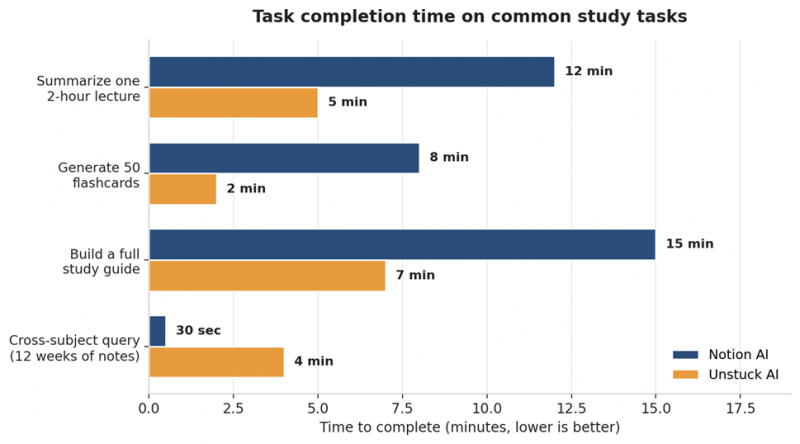
Figure 4. Average task completion time across four common study workflows.
Matching Each Tool to a Student Profile
The right product depends on academic level, course load, existing tool habits, and budget. The table below maps common student profiles to the better-fit option based on the typical workflow shape.
| Student profile | Better fit | Reason |
|---|---|---|
| Heavy Notion user with organized workspace | Notion AI | Workspace-wide queries and full ecosystem integration |
| Undergrad working with PDFs and lecture audio | Unstuck AI | Native lecture recording, instant flashcards, gentle learning curve |
| Graduate student writing a thesis | Notion AI | Writing assistance, database organization, agent automation |
| High schooler preparing for standardized tests | Unstuck AI | Quiz modes, flashcards, mobile-first study sessions |
| Group project coordinator | Notion AI | Shared pages, guest access, collaborative editing |
| Self-learner using YouTube courses | Unstuck AI | Direct YouTube link import and video to notes conversion |
| Budget-conscious student | Either free tier | Notion Plus free for students or Unstuck AI free tier |
| Researcher managing multiple papers | Notion AI | Database autofill, AI summary columns, cross-source synthesis |
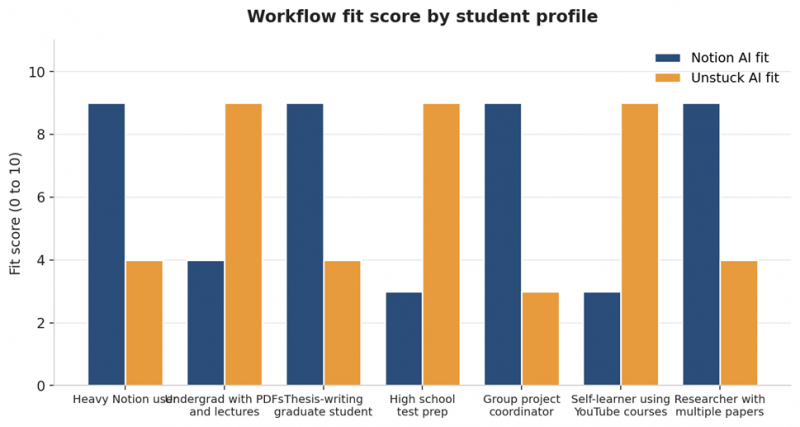
Figure 5. Workflow fit score by student profile on a 0 to 10 scale.
Data Privacy and Security Posture
Both products keep uploaded content private to the account that uploads it. Unstuck AI states that files are stored securely and only accessible by the account holder, with no third-party data sharing. Notion publishes SOC 2 Type 2 compliance and encrypts data at rest and in transit. Neither product publishes detailed information about whether uploaded student materials are used to train underlying foundation models, which is worth verifying for learners handling unpublished research, proprietary lab data, or sensitive institutional content.
For students bound by university honor codes around AI assistance, the deciding factor often shifts from privacy to institutional policy. Some universities permit AI summarization but prohibit AI-generated study quizzes if the quiz answers are submitted as practice work that affects grades. Reading the relevant academic integrity policy before adopting either product is wise.
Closing Verdict for Student Workflows
The choice between Notion AI and Unstuck AI rarely comes down to one tool being objectively better. Each is built around a different starting assumption. Notion AI assumes the user already operates inside a structured digital workspace and wants intelligence layered across that workspace. Unstuck AI assumes the user has course materials sitting in folders and wants those materials converted into study tools as quickly as possible.
For students who manage entire semesters across many tools and subjects, the Notion Business plan at $180 per year unlocks a workspace AI that touches every part of academic life. For students focused tightly on lectures, PDFs, and exam preparation, Unstuck AI delivers more study-specific value at a lower annual price.
Many students end up using both products in parallel, with Notion AI handling general organization and writing tasks and Unstuck AI handling lecture transcription and active-recall study sessions. The combined cost of free Notion Plus (with a verified .edu email) and Unstuck AI Premium runs under $120 per year, less than the Notion Business plan alone and covering a broader set of academic needs. Tool selection should match the actual shape of a student workflow rather than marketing claims, and testing both on a single course before committing to an annual subscription remains the most reliable way to confirm fit.
Post Comment
Share your thoughts about this article.
Be the first to post a comment!





