Adobe Firefly and Hotpot AI sit at opposite ends of the AI graphics market. One is a flagship enterprise platform with legal indemnification and Photoshop integration. The other is a browser toolkit popular with bloggers, side-project creators, and budget-conscious teams. Anyone shopping for an AI image generator in 2026 will eventually run into both.
This breakdown skips marketing copy and scores each tool across six rounds: image quality, pricing, toolkit depth, workflow fit, commercial safety, and raw performance. A final scoreboard tallies the wins at the end.
Both products have legitimate audiences in 2026. Firefly dominates agency and enterprise buying lists thanks to indemnification and Creative Cloud lock-in. Hotpot AI maintains a loyal base among bloggers, e-commerce sellers, and students who value the generous free tier and one-time credit purchases. The rest of this article shows where each one earns its place.
The Quick Scorecard
Two very different products, two very different scores.
ADOBE FIREFLY 9.0 / 10 ★★★★★ Best for brand campaigns, video, vector graphics, and any work needing legal cover. | HOTPOT AI 6.5 / 10 ★★★½ Best for solo creators, quick edits, photo restoration, and tight budgets. |
At-a-glance specs
| Snapshot | Adobe Firefly | Hotpot AI |
|---|---|---|
| Starting price | Free, then $9.99 / mo | Free, then $12 one-time |
| Native max resolution | 4 MP (2240 × 1792) | 1 MP, 10× upscale |
| Underlying model | Firefly Image Model 5 | Stable Diffusion variants |
| Free-tier limit | 25 credits / month | 75 images / day |
| Video generation | Yes, up to 5 sec at 1080p | Not available |
| Vector output | Yes (Text to Vector) | Not available |
| Commercial indemnification | Included on paid tiers | Not offered |
| Best for | Brands, agencies, video teams | Bloggers, social, photo cleanup |
Meet the Contenders
Adobe Firefly
Enterprise-grade generative AI built for commercially safe creative production.
Adobe Firefly launched in beta in March 2023 and now powers the generative features inside Photoshop, Illustrator, Premiere Pro, and Express. Firefly Image Model 5 went generally available in March 2026 after a public beta at Adobe MAX 2025. It generates native 4-megapixel images at 2240 by 1792 pixels without upscaling, a clear jump from the 2K ceiling of Image Model 4.
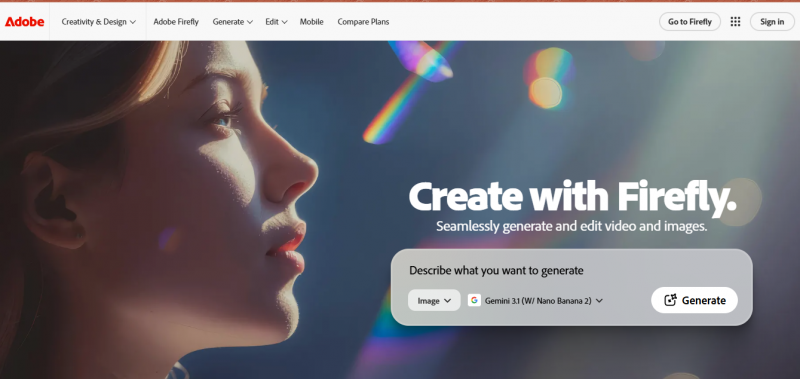
The 2026 Firefly app also routes prompts through 30 plus partner models including Google Nano Banana 2 and Veo 3.1, Runway Gen-4.5, Kling 2.5 Turbo, ElevenLabs voice, Luma AI, OpenAI image, and Topaz Labs upscaling. Every paid output is commercially indemnified. Content Credentials embed tamper-resistant provenance metadata in each image.
Hotpot AI
A budget-friendly all-in-one AI image toolkit for solo creators.
Hotpot AI launched in 2021 with backing from Google Ventures and Andreessen Horowitz. It bundles a wide menu of utilities under one shared credit balance: AI art generation, headshot creation, photo restoration, colorization, background removal, object removal, upscaling up to 10x, AI logo and character design, plus a short-form writing assistant.
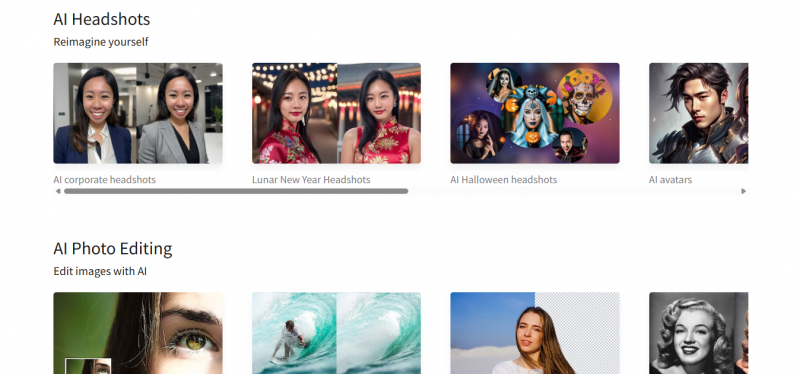
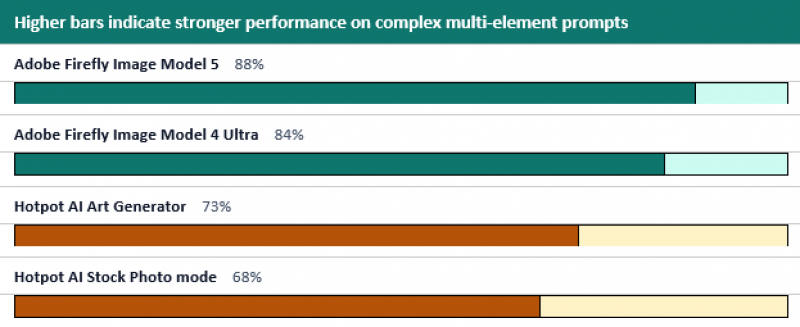
The art engine runs on Stable Diffusion variants with custom tuning. Independent reviewers cite an approximate 73 percent success rate on detailed prompts. Similarweb data for March 2026 places traffic at 305,000 monthly visits, down 9 percent month over month, suggesting pressure from larger consolidating platforms.
Pros and cons at a glance
ADOBE FIREFLY Strengths • Native 4 MP commercially safe output • Enterprise indemnification on paid tiers • Photoshop, Illustrator, Premiere Pro built-in • Vector, video, and audio generation • 30+ partner models inside one app Weaknesses • Credit system can confuse new buyers • API tier starts at $1,000 monthly minimum • Strict content filters block some prompts • Internet connection required at all times | HOTPOT AI Strengths • Generous free tier with 75 daily images • No subscription required for credits • One-click photo restoration and colorization • Karma Tier for students and nonprofits • Low total cost for occasional creators Weaknesses • Output quality trails Firefly noticeably • No video, vector, or audio generation • Trustpilot rating of 2.1 of 5 • No Creative Cloud or Figma plugins • Declining traffic suggests uncertain roadmap |
Round 1: Image Quality
Output fidelity is the most obvious dividing line. Firefly Image Model 5 produces native 4-megapixel output with accurate human anatomy, clean lighting, and acceptable text rendering inside images. Hotpot AI generates at 1024 by 1024 pixels and relies on 10x upscaling for larger output, which introduces artificial smoothing at higher ratios.
Firefly Image Model 5 also handles complex multi-subject scenes far better than Stable Diffusion derivatives. Adobe's skeletal-awareness algorithm reduces limb artifacts by roughly 85 percent compared to 2025 beta models. Hotpot AI still produces occasional duplicate faces or misaligned limbs on group portraits or scenes with more than three subjects.
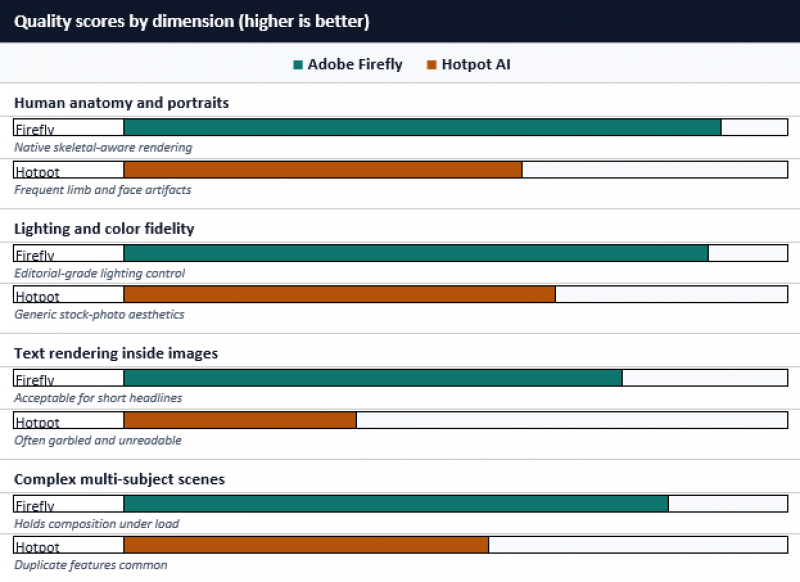
Side-by-side prompt tests in April 2026 show Firefly defaulting toward editorial polish and Hotpot defaulting toward generic stock-photo aesthetics. For brand campaigns, the difference shows up in lighting fidelity and human anatomy. For a blog header or quick LinkedIn post, the gap narrows.
| ▌ ROUND WINNER Adobe Firefly takes the round on native resolution, anatomy, and text rendering. |
Round 2: Pricing and Value
Pricing tells two very different stories. Firefly uses a tiered subscription model layered on top of a generative credit system. Hotpot AI sells flexible credit packages with optional monthly or yearly billing.
| Tier | Adobe Firefly | Hotpot AI |
|---|---|---|
| Free tier | 25 credits / month, watermarked | 75 images / day, watermarked |
| Standard / Entry | $9.99 / mo, 2,000 credits | $12 one-time for 1,000 credits |
| Pro / Mid | $19.99 / mo, 4,000 credits | $50 / mo or $60 one-time for 5,000 credits |
| Premium | $199.99 / mo, 50,000 credits | 20,000 credits, custom pricing |
| Bundled suite | Creative Cloud All Apps $59.99 / mo | Browser only, no bundle |
| API access | ~$1,000 / mo minimum (Firefly Services) | Pay-per-credit REST API |
| Annual saving | 18 percent off yearly billing | 43 percent off yearly billing |
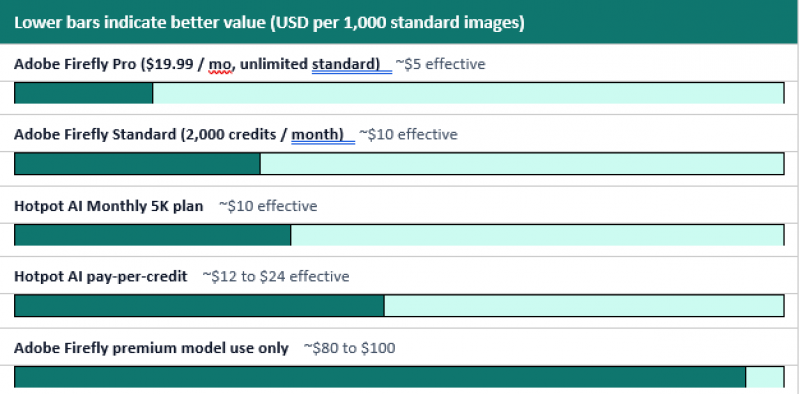
Firefly's standard generations are unlimited on every paid plan. Premium models burn credits faster: Image Model 5 costs 10 credits per image, Image Model 4 Ultra costs 20 credits, and unused credits do not roll over. Hotpot sells credits in flat bundles, with a Karma Tier offering free or discounted credits to students and nonprofits.
Effective cost per 1,000 standard generations
| ▌ ROUND WINNER Split decision. Hotpot AI wins for occasional users. Firefly wins for daily volume. |
Round 3: Toolkit Depth
Both products bundle multiple utilities, but they bundle different ones. Hotpot AI offers more standalone tools for niche photo work. Firefly offers fewer but heavier capabilities like video, vector, and audio generation.
| Capability | Firefly | Hotpot |
|---|---|---|
| Native 4 MP image generation | ✓ | ✗ |
| Vector graphics (editable SVG) | ✓ | ✗ |
| Video generation up to 5 sec | ✓ | ✗ |
| Audio and voiceover generation | ✓ | ✗ |
| Custom brand model training | ✓ | ✗ |
| 30+ partner models (Nano Banana 2, Runway) | ✓ | ✗ |
| Photoshop and Premiere Pro integration | ✓ | ✗ |
| Mobile app (iOS, Android beta) | ✓ | ✗ |
| AI art generator | ✓ | ✓ |
| Background remover | ✓ | ✓ |
| AI headshot generator | ✓ | ✓ |
| Photo upscaling (up to 10×) | ✓ | ✓ |
| Photo restoration (one-click) | ✗ | ✓ |
| Photo colorization (one-click) | ✗ | ✓ |
| DnD or game character generator | ✗ | ✓ |
| Karma Tier free credits | ✗ | ✓ |
Hotpot AI wins on raw number of dedicated tools, especially for photo restoration, colorization, and headshot generation. The role-specific headshot variants for corporate, real estate, medical, and cosplay use cases have no Firefly equivalent. Firefly wins on capability range and creative output formats including editable vector SVGs, short-form video up to five seconds at 1080p, and AI-generated soundtracks.
| ▌ ROUND WINNER Split decision. Different definitions of toolkit depth. |
Round 4: Workflow Fit
Firefly is built into Photoshop, Illustrator, Premiere Pro, and Express. Generative Fill and Generative Expand sit inside the Photoshop toolbar. Photoshop Actions can batch-process thousands of product photos. Slack, Zapier, and Make.com handle automation from outside the suite.
Hotpot AI runs only in the browser. There are no Creative Cloud plugins, no Figma plugins, no desktop application. The REST API exposes core features for developers, but engineering teams should expect substantial work to wire it into established creative pipelines.
For freelancers already paying for Creative Cloud, Firefly's 4,000 bundled credits inside the $59.99 All Apps plan effectively replaces a separate Hotpot subscription for image generation.
| ▌ ROUND WINNER Adobe Firefly takes the round on integration depth and batch automation. |
Round 5: Commercial Safety
Adobe Firefly carries enterprise indemnification on paid commercial use. Adobe assumes legal risk if a Firefly-generated image faces a copyright claim. Training data comes from Adobe Stock licensed images, public domain content, and openly licensed material. Content Credentials embed tamper-resistant provenance metadata in every output.
Hotpot AI grants commercial rights only on paid output but does not offer indemnification. The Stable Diffusion training base has a broader legal exposure profile. Free-tier outputs carry visible watermarks and cannot be used commercially.
For agencies, regulated industries, and enterprise marketing teams, that distinction frequently decides the buying conversation before any quality test runs.
| ▌ ROUND WINNER Adobe Firefly wins decisively on legal cover and provenance. |
Round 6: Performance and Reliability
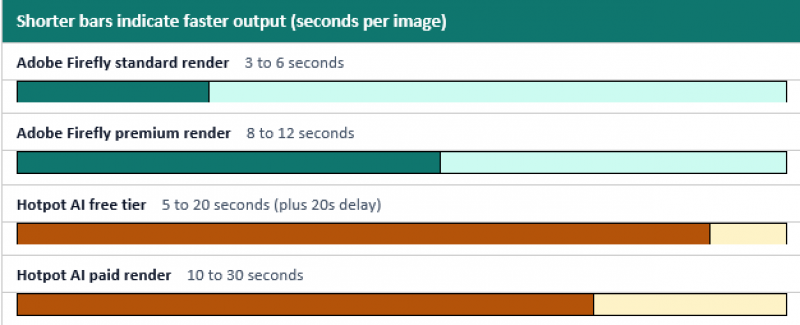
Render speed, success rate, and support reliability all favor Firefly. The numbers below come from vendor documentation and independent benchmark runs in the first quarter of 2026.
Success rate on detailed prompts
Render speed comparison
Hotpot AI's Trustpilot rating of 2.1 of 5 (from 11 reviews) reflects support response times that can stretch into days. Firefly does not have a publicly aggregated Trustpilot score, but enterprise customers consistently report faster issue resolution through Adobe's standard support channels.
| ▌ ROUND WINNER Adobe Firefly takes the round on speed and reliability. |
Final Scoreboard
Six rounds, one tally. Firefly wins four outright. Two rounds end in split decisions where the right answer depends on user type.
| Round | Winner | Why |
|---|---|---|
| Round 1: Image Quality | Adobe Firefly | Native 4 MP, better anatomy and lighting |
| Round 2: Pricing | Split decision | Hotpot for casual, Firefly for daily use |
| Round 3: Toolkit Depth | Split decision | Different definitions of depth |
| Round 4: Workflow Fit | Adobe Firefly | Creative Cloud native and batch automation |
| Round 5: Commercial Safety | Adobe Firefly | Enterprise indemnification on paid tiers |
| Round 6: Performance | Adobe Firefly | Faster renders and higher success rate |
| FINAL TALLY | Firefly 4 • Hotpot 0 • Split 2 | |
That scoreboard reads more lopsided than reality. Hotpot AI wins for a specific buyer profile Firefly does not serve well: solo creators on tight budgets who need quick visual wins, photo restoration, or headshot generation. The scoreboard counts rounds, not user types.
Decision Flowchart
Five questions answer most picking decisions. Work through them in order and stop at the first yes.
| 1 | Is this for paid commercial or client work? | YES → Firefly | NO → Continue ↓ |
| 2 | Need video, vector, or audio output? | YES → Firefly | NO → Continue ↓ |
| 3 | Already paying for Creative Cloud? | YES → Firefly | NO → Continue ↓ |
| 4 | Need restoration, colorization, or headshots? | YES → Hotpot AI | NO → Continue ↓ |
| 5 | Generate fewer than 50 images per month? | YES → Hotpot AI | NO → Firefly Pro |
Real-World Use Cases
Most buyers fit one of the patterns below. The recommended tool reflects the trade-offs documented across all six rounds.
| User Type | Best Fit | Why |
|---|---|---|
| Enterprise marketing team | Adobe Firefly | Indemnification and brand workflows |
| Freelance designer on Creative Cloud | Adobe Firefly | Bundled credits inside CC All Apps |
| Social media manager on budget | Hotpot AI | Free tier covers daily posting |
| E-commerce seller | Hotpot AI | Fast background removal and cleanup |
| Video producer | Adobe Firefly | Native video and Premiere Pro link |
| Photo restoration specialist | Hotpot AI | Dedicated one-click tools |
| Brand agency | Adobe Firefly | Vector output and legal cover |
| Indie game developer | Hotpot AI | DnD and game asset generators |
| Student or nonprofit | Hotpot AI (Karma Tier) | Free or discounted credits |
| Developer building AI features | Adobe Firefly Services | Robust enterprise API |
Verdict
Adobe Firefly takes the round-by-round count and is the safer pick for any team that needs commercial cover, vector or video output, or deep Photoshop hooks. Image Model 5 closed most of the remaining quality gap with competing flagship generators.
Hotpot AI wins on price flexibility, free-tier generosity, and niche tools like photo restoration and headshot generation. It loses badly on output quality benchmarks, commercial safety, and integration depth.
The hybrid setup most creative professionals adopt in 2026: Firefly for client-facing brand work where legal cover matters, and Hotpot AI for personal projects, photo cleanup, and experimental social content.
Post Comment
Share your thoughts about this article.
Be the first to post a comment!





