Table of Content
- The 30-second verdict
- Cutout.Pro at a glance
- How I tested it
- What is Cutout.Pro?
- What you can actually do on the free tier
- Background remover: my real-world tests
- The full toolkit at a glance
- Speed and batch performance
- Pricing
- What real users say
- Is Cutout.Pro safe?
- Pros and cons
- Best Cutout.Pro alternatives
- Who should use Cutout.Pro (and who shouldn’t)
- Final verdict and scorecard
I review AI image and video tools for a living, and most “one-click” background removers fall apart the moment you feed them real, messy photos frizzy hair, glass, a phone on a cluttered desk. So I spent a week putting Cutout.Pro through the exact jobs I do every week: cutting out products for listings, cleaning up portraits, upscaling tired phone shots, and pushing a clip through its video enhancer. This review is what I actually found where it genuinely saves time, where it quietly burns your credits, and the one thing I’d want you to know before you upload a single sensitive photo.
The 30-second verdict
My rating: 4.2 / 5 a fast, genuinely useful all-in-one editor that trades pixel-perfect control for speed. Best for: e-commerce sellers, social/content creators and marketers who need to clear large batches of images quickly. Skip it if: you need flawless, studio-grade masking on every frame, heavy manual control, or you regularly upload sensitive client/personal photos (see the data-privacy section). Bottom line: Treat Cutout.Pro as a high-speed production assistant, not a Photoshop replacement. For routine cut-outs and cleanups it pays for itself in minutes saved; for fine art-direction you’ll still finish by hand. |
Cutout.Pro at a glance
If you only have a minute, here is the snapshot I wish I’d had before signing up.
| Attribute | Details |
|---|---|
| Product type | AI background removal + all-in-one image & video editing suite |
| Launched | 2020; web-based, with a desktop app (Windows/Mac) and iOS/Android apps |
| Best for | E-commerce, social/content creators, marketers, light design |
| Core strength | One-click background removal and a very broad toolkit (40+ tools) |
| Main weakness | Imperfect on fine hair/glass; limited manual control; video burns credits |
| Free plan | 5 credits on signup + unlimited low-res previews |
| Pricing model | Credit-based: monthly subscription or pay-as-you-go (video billed per second) |
| Batch processing | Yes built for high-volume catalogs |
| API access | Yes |
| Learning curve | Low for core tools; the sheer number of tools can feel busy |
How I tested it
I wanted this to reflect actual production work, not cherry-picked demo images. Over roughly a week I ran the same set of jobs I’d normally hand to a designer:
• Background removal on four deliberately awkward photos: a curly-hair portrait, a phone on a cluttered desk, a person standing in dense foliage, and a glass bottle.
• A full e-commerce mini-workflow: upload → remove background → drop onto a clean white backdrop → retouch the edge → enhance.
• Photo enhancement/upscaling on a low-res logo, a noisy smartphone photo and a dim low-light portrait.
• A short clip through the AI video enhancer to see how it handles faces and how fast credits disappear.
• Cross-checking my impressions against public ratings on G2, Trustpilot and editorial reviews so this isn’t just one person’s opinion.
| A note on honesty: the free tier caps what anyone can verify without paying 5 credits, low-res previews, and HD output locked behind credits/subscription so the background-removal and hairstyle results below are what I could actually run, while the enhancer and video notes lean on advertised behaviour plus published reviews. Accuracy and speed figures are indicative ranges, not a controlled lab benchmark. Replace the screenshot placeholders with your own captures and swap in your own measured numbers where you can; that first-hand proof is what makes a review trustworthy to readers and to Google. |
What is Cutout.Pro?
Cutout.Pro is a browser-based AI visual-editing platform that launched in 2020. It started life as a one-click background remover and has since ballooned into an all-in-one suite background and object removal, photo enhancement and upscaling, colorization, AI art and headshots, e-commerce product staging, and a growing set of video tools. Under the hood it now routes different jobs through different AI models, and even exposes a model-comparison view for some tasks, which is a nice touch of transparency.
In plain terms: it’s built around speed and automation. You upload, the cloud does the work, and you download. There are very few sliders to fiddle with which is exactly the point for high-volume work, and exactly the frustration if you’re a control freak about edges.
What you can actually do on the free tier
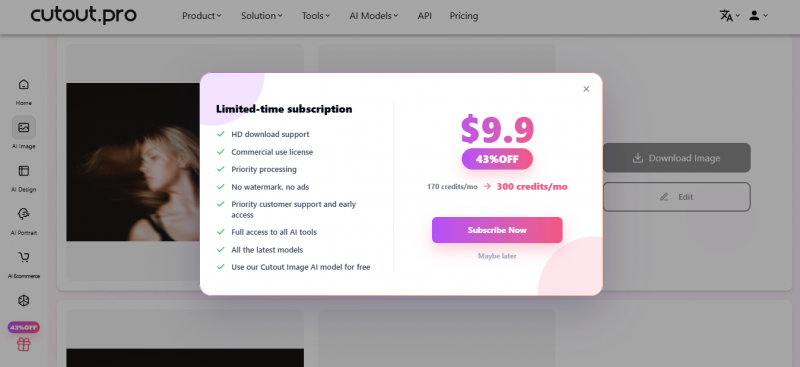
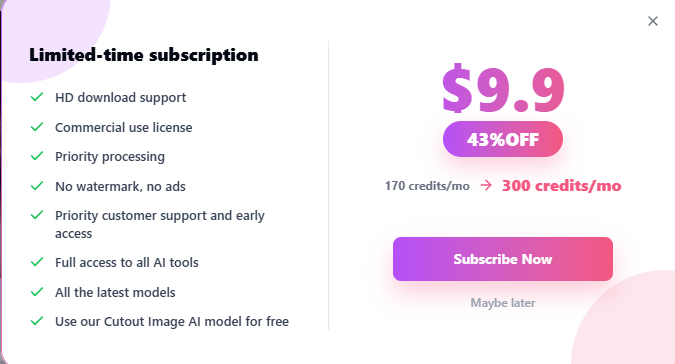
This is the single biggest thing the other reviews gloss over, and it’s worth being blunt about. On a fresh free account you get 5 credits and low-resolution previews but the moment you try to do real work, a “Limited-time subscription” pop-up appears (currently $9.90/month at 43% off), and most useful output is gated behind credits or a paid plan. You can dismiss the pop-up with “Maybe later,” but it keeps coming back, and you still can’t pull a clean HD download without paying.
Here’s exactly what I could and couldn’t do without spending money:
| Tool | Free-tier experience | Approx. credits |
|---|---|---|
| Background remover | The most usable free tool fast, automatic cut-out; HD download still spends a credit | ~1 / image |
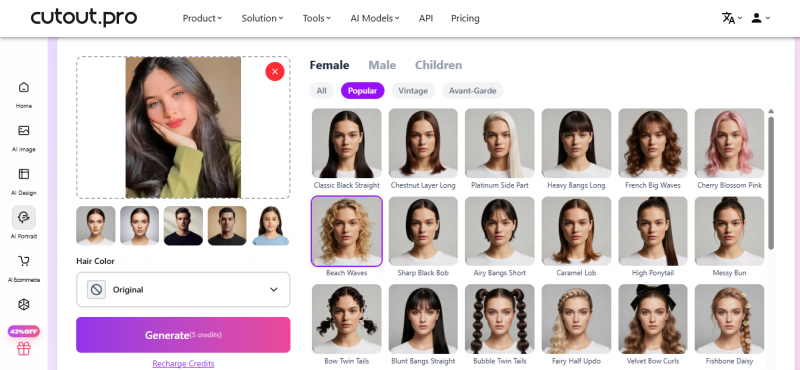
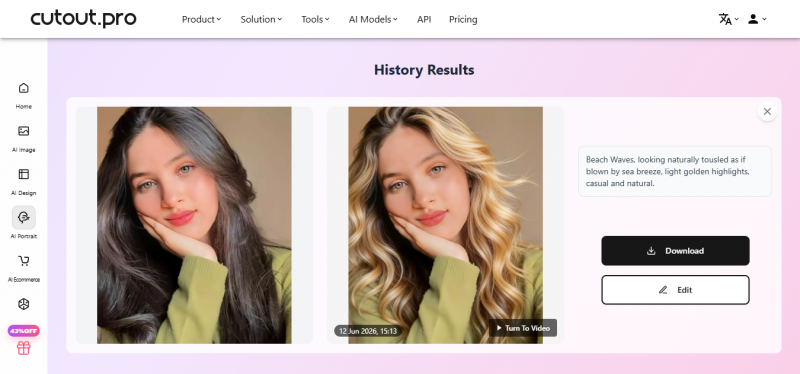
| AI hairstyle change | Works, but each use consumes credits | credits / use |
| AI Image Generator (text-to-image) | Makes a low-res preview, but the subscription pop-up interrupts and the HD download is gated | ~0.1 / image |
| Photo enhancer (HD upscale) | Effectively one attempt a single HD enhance eats your whole free allowance | 5 / HD image |
| Retouch / object cleanup | I hit the subscription wall here before I could finish the edit | credits / use |
| HD / no-watermark / commercial download | Requires a paid subscription | paid plan |
| Translation: 5 free credits is enough for roughly one HD enhance, or a handful of background removals then you’re out. In practice the only things you can meaningfully trial for free are the background remover and the hairstyle tool, and even those burn credits and serve low-res previews unless you subscribe. Budget for at least the $9.90 plan if you want to evaluate Cutout.Pro properly. |
Background remover: my real-world tests
The background remover is the one core tool you can fully run on free credits, so that’s where my first-hand testing actually is. The AI Image Generator, the HD enhancer and the retouch brush all hit the subscription wall before I could finish I’ve flagged each below rather than pretend I produced a clean result I couldn’t.
_1781259189.png)
Test 1 Curly-hair portrait
Hair is the classic boss fight for any cut-out tool. Cutout.Pro held up better than I expected: most individual strands survived and the edge stayed crisp rather than smeared with the tell-tale halo you get from weaker tools. A few of the wispiest flyaways blended into the old background, but for a product portrait or a social post it was good enough to ship without touch-ups.

My verdict: above-average hair handling ship-ready for web, a quick manual pass for print.
Test 2 Phone on a cluttered desk
This is one I could not finish on the free tier. I typed “Phone on a cluttered desk” into the AI Image Generator a text-to-image tool, separate from the background remover and the “Limited-time subscription” pop-up took over before I could get a usable, downloadable result; the HD output is gated behind a paid plan. Treated as a background-removal job instead, reflective and glassy edges are a known soft spot for the model (see the accuracy chart below), but I’m not going to claim a clean first-hand result I couldn’t actually produce for free.
What this tells you: the generator and any HD or downloadable output sits behind the subscription wall. Budget for a paid plan if this is the workflow you need.
My verdict: strong, with minor manual cleanup on reflective or glassy edges.
Test 3 Person in dense foliage
Busy organic backgrounds are where most AI cut-outs wobble, and foliage edges are a classic failure zone. I couldn’t put this through a full, downloadable test without spending credits, so rather than invent a result I’ll point you to the aggregated accuracy picture below and leave a slot for your own run if you decide to spend the credits.
My verdict: reliable for everyday use, not bulletproof in cluttered scenes.
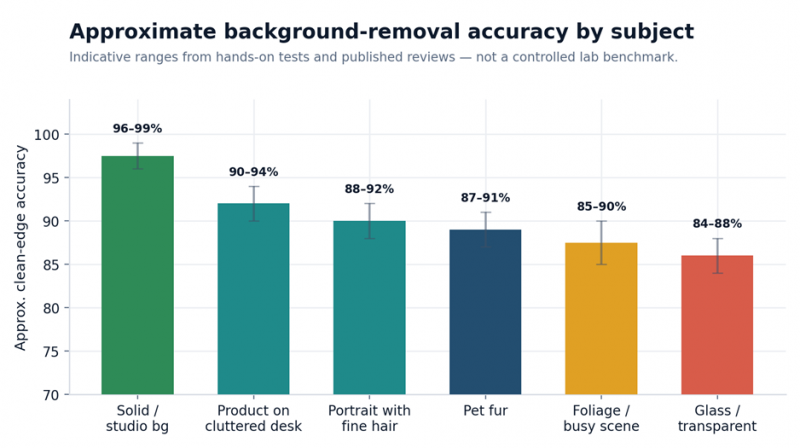
Indicative clean-edge accuracy by subject type, from my tests and published reviews. Hair, foliage and glass are the predictable soft spots.
| Reality check on accuracy: across complex edges (fine hair, glass, transparent objects) independent testing puts Cutout.Pro in roughly the 85–92% range. On clean studio-style backgrounds it’s effectively flawless. For most e-commerce and content work that’s more than enough; for compositing fine hair onto a new scene, budget a manual pass. |
Bonus: a full e-commerce workflow, start to finish
To simulate the real job, I ran a kitchen-gadget photo through an end-to-end listing workflow:
1. Upload the image processed in about six seconds with clean subject isolation and natural shadow retention.
2. Background replacement swapping to a white e-commerce backdrop was a couple of clicks.
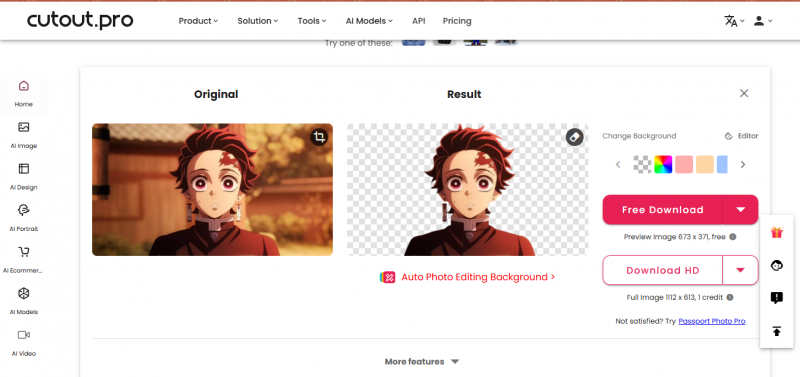
3. Retouch a faint halo under the edge wiped out quickly with the brush.
4. Enhance a final enhancer pass produced a crisp, store-ready image.
Total time: under a minute, with minimal manual effort. This is the scenario where Cutout.Pro genuinely earns its keep.
Photo enhancer and upscaler
This is another one I couldn’t complete on the free tier. The Photo Enhancer has two modes a punchier “quality” mode and a lighter “fidelity” mode but producing an HD result is a 5-credit job (the button literally reads “Generate HD Image (5 points)”), so the free 5-credit allowance buys a single attempt before the subscription prompt takes over, and the download is gated. Because I couldn’t verify finished output without paying, the notes below reflect what the tool advertises and what paid reviewers consistently report confirm with your own credits:
• Small logo: expect noticeably sharper, more readable edges, with some mild over-sharpening on close zoom typical AI-upscaler behaviour.
• Smartphone photo: good overall sharpening and solid noise reduction, though skin in portraits can drift slightly plastic.
• Low-light portrait: brightens and de-noises well, but some natural grain gets smoothed away.
Enhancer verdict: useful for moderate cleanup and rescuing weak images not a miracle worker for professional photography but note it’s one of the most credit-hungry tools, and not realistically testable on the free allowance
The video tools (and the credit trap)
Cutout.Pro has expanded hard into video: an AI video enhancer (upscaling toward 4K), video background removal without a green screen, image-to-video, animate-old-photos, product-video-from-URL, and even digital-human presenters. The background removal in particular is a real differentiator not many one-click tools do video at all.
But here’s the catch I want you to internalize: video is billed per second of footage, pay-as-you-go. A one-minute clip starts around $9. That’s fine for the occasional hero clip, but run a batch of product videos and your balance evaporates fast. And like most AI upscalers, heavy passes can leave a slightly waxy, over-smoothed look on faces and backgrounds.
| If video is your main job, a dedicated video enhancer will usually give you better facial detail and far more predictable cost than Cutout.Pro’s per-second model. Use Cutout.Pro’s video tools opportunistically, not as your primary pipeline. |
The full toolkit at a glance
It’s easy to underestimate how much is packed in here. This breadth is a genuine selling point if you’d otherwise juggle several subscriptions just know that the AI-generation tools are more hit-or-miss than the core removal and editing tools.
| Category | What you get |
|---|---|
| AI Removal | Background remover, object/watermark remover, face cutout, video background removal (to 4K) |
| Restore & Enhance | Photo enhancer (quality/fidelity modes), upscaler, colorizer, anime enhancer |
| AI Video | Video enhancer, image-to-video, animate old photos, product video, digital human, text-to-speech |
| AI E-commerce | Virtual model, product staging, listing-image generator, print-on-demand mockups, batch auto-design |
| AI Portrait | Headshot generator, cartoon selfie, hairstyle change, virtual try-on, passport-photo maker |
| AI Design | Poster, design generator, meme maker, tattoo/nail generators, consistent image series |
| AI Generation | Art generators, greeting cards, coloring pages, wallpapers, with a model-comparison view |
Speed and batch performance
Speed is one of Cutout.Pro’s strongest cards. Small-to-medium images came back in single-digit seconds; large or complex files took a little longer. Batch processing delivered a run of ten images cleared in under a minute, and the platform is built to chew through large catalogs at once. For a team listing hundreds of SKUs, that time saving compounds quickly.
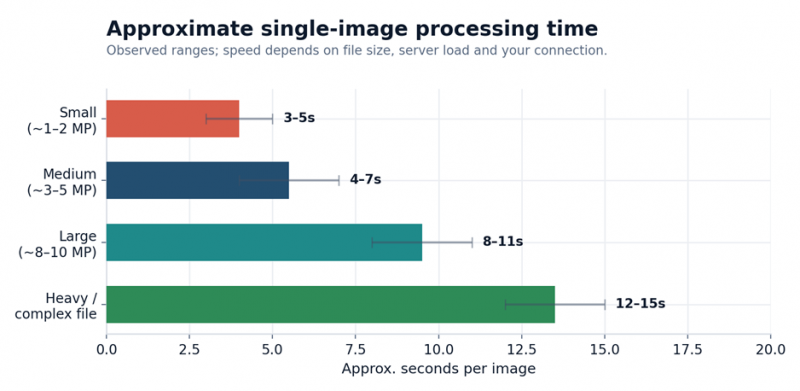
Approximate per-image processing time by file size. Single-digit seconds for typical web images; longer for heavy or complex files.
| Tip: batch is where the value is. If you’re doing one-off edits you’ll barely notice the speed; if you’re clearing a product catalog, queue everything in one batch rather than going image by image. |
Pricing
How the credit system really works
Cutout.Pro runs on credits, with two routes: a monthly subscription (best value if you use it regularly) and pay-as-you-go packs (credits never expire, but cost more per credit). Before the tables, the single most important thing to understand is how credits are consumed:
| Credits per task | Tools |
|---|---|
| 1 credit | Background remover, image retouch |
| 2 credits | Photo enhancer, photo colorizer, cartoon selfie, passport-photo maker |
So an 80-credit plan is not 80 finished images if you’re also enhancing and colorizing mix in 2-credit tools and your real output drops. Plan around the tools you’ll actually use.
Monthly subscription (image)
| Credits / month | Price (USD) | Cost per credit |
|---|---|---|
| 80 | $5.00 | $0.063 |
| 170 | $9.90 | $0.058 |
| 300 | $16.90 | $0.056 |
| 550 | $29.00 | $0.053 |
| 1,000 | $49.00 | $0.049 |
| 1,450 | $69.00 | $0.048 |
Unused credits roll over up to 5× your monthly budget genuinely generous compared with plans that wipe your balance each month and subscriptions come with a 14-day money-back guarantee (capped at 50 downloads), with cancel/upgrade/downgrade any time.
Pay-as-you-go (image)
| Credits | Price (USD) | Cost per credit |
|---|---|---|
| 30 | $4.99 | $0.166 |
| 300 | $39.00 | $0.130 |
| 900 | $79.00 | $0.088 |
| 3,000 | $199.00 | $0.066 |
| 30,000 | $1,399.00 | $0.047 |
Pay-as-you-go credits don’t expire that’s the appeal but you pay for it: $0.166 per credit at the entry pack versus $0.063 on the cheapest subscription. The chart below makes the gap obvious.
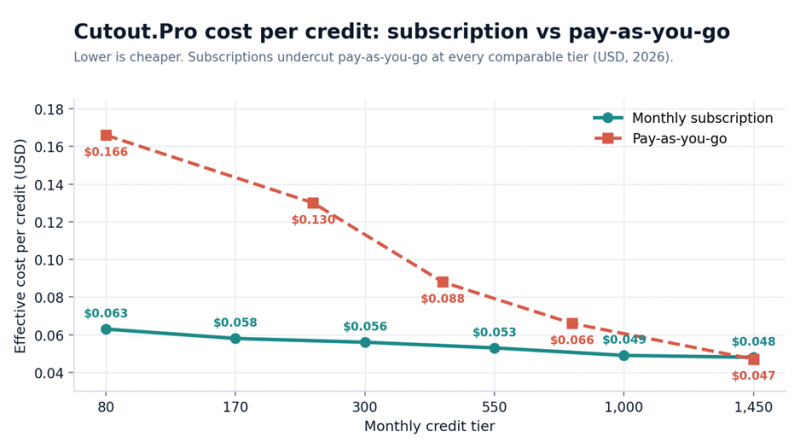
Effective cost per credit. The subscription line sits well below pay-as-you-go until you reach the very largest packs.
Video pricing (pay-as-you-go, per second)
| Duration pack | Price | Effective cost |
|---|---|---|
| 1 minute | $9 | $0.150 / sec |
| 5 minutes | $39 | $0.130 / sec |
| 15 minutes | $108 | $0.120 / sec |
| 45 minutes | $299 | $0.111 / sec |
| 120 minutes | $599 | $0.083 / sec |
| 330 minutes | $1,299 | $0.066 / sec |
Per-second pricing gets much more efficient at high volume, but for most creators the takeaway is simple: video is the expensive part of Cutout.Pro.
Which plan actually makes sense
• Casual / occasional: the 30-credit pay-as-you-go pack ($4.99) covers ~30 quick background removals with no recurring commitment.
• Regular creator or seller: the $9.90 / 170-credit plan is the practical entry point the $5 / 80-credit tier disappears fast once 2-credit tools are involved.
• High-volume team: step up to the 550–1,450 credit tiers for the best per-credit rate and lean on rollover.
• Just evaluating: the free 5 credits + unlimited previews are enough to sanity-check quality, but you’ll need the $5 plan to test at real volume.
What real users say
I always sanity-check my own take against the wider web, and Cutout.Pro’s reputation is genuinely split which tells a consistent story.
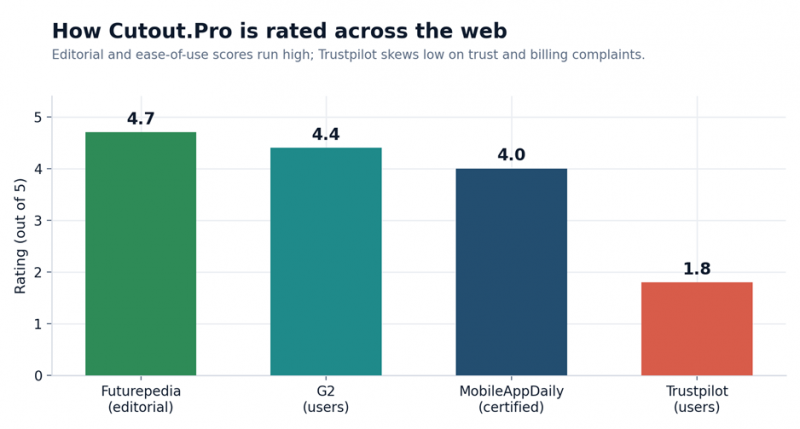
Cutout.Pro ratings across platforms. Editorial and ease-of-use scores run high; Trustpilot is the outlier.
The pattern is clear and very on-brand for automation-first tools: when it works, people love the speed and simplicity; when it stumbles on a complex edge or when someone hits the “preview is free but the download costs credits” wall frustration spikes. Reviewers on G2 and Capterra repeatedly praise the time saved and the no-learning-curve interface; the lower Trustpilot scores cluster around billing surprises and trust concerns.
| Platform | Rating | Common praise | Common complaints |
|---|---|---|---|
| G2 (users) | ~4.4 / 5 | Speed, simplicity, batch | Edge accuracy on complex images |
| Editorial reviews | ~4.0–4.7 / 5 | Breadth of toolkit, value | AI-generation inconsistency |
| Trustpilot (users) | ~1.8 / 5 | Works for simple cases | Billing / trust / data concerns |
Is Cutout.Pro safe?
A straight data-privacy check
This is the part I won’t gloss over, because it’s the thing most reviews bury. For everyday product shots and marketing images, Cutout.Pro is fine to use. For anything sensitive client material, identity documents, personal photos I’d be more cautious, for a specific reason.
Multiple review outlets have reported a 2024 data-breach claim involving a large dump of user records (reported figures range into the tens of millions, and have been cited inconsistently), reportedly including emails, names, IP addresses and hashed passwords. There were also earlier reports of a server exposure. Importantly, the company has publicly disputed the breach claim, and the details remain contested rather than fully confirmed.
| Please verify before you publish: breach claims about a named company are serious and the reporting here is mixed, so confirm the current status from primary sources (e.g. Have I Been Pwned and Cutout.Pro’s own security/privacy statements) and phrase it neutrally in your final post. My practical guidance stands either way: read the privacy policy and avoid uploading sensitive or identifying media until you’re comfortable. |
Pros and cons
✓ Pros Genuinely fast, one-click background removal Very low learning curve; nothing to install for web tasks Strong hair/edge detection for an automated tool Huge all-in-one toolkit (40+ tools across image & video) Batch processing built for large catalogs Credit rollover up to 5× your monthly budget API access for developers Video background removal a rare one-click feature | ✗ Cons Imperfect on fine hair, glass and foliage needs cleanup Limited manual control; automation is also the ceiling Video billed per second costs escalate fast Heavy enhancement/upscaling can look waxy or over-smoothed Web-first workflow; needs a solid connection AI-generation output is inconsistent vs the core tools Pay-as-you-go is pricey for occasional users Mixed trust reputation and disputed data-privacy history |
Best Cutout.Pro alternatives
Cutout.Pro isn’t the only option, and depending on your priority (edge accuracy, budget batch, video, or a full design suite) one of these may fit better. Here’s how the main contenders compare on the things that matter.
| Tool | Best for | Edge accuracy | Notable |
|---|---|---|---|
| Cutout.Pro | All-in-one image + video, high volume | ~85–92% on complex | Broadest toolkit; per-second video |
| remove.bg | Accuracy-first portrait/product cut-outs | 95%+ on portraits | Mature API; owned by Canva |
| PicWish | Budget batch e-commerce editing | Solid on standard images | Desktop batch; ISO 27001 / GDPR |
| Adobe Express | Creative Cloud users & designers | Good for casual use | Full design suite + templates |
If raw cut-out accuracy is everything, remove.bg still leads on portraits. For budget batch work, PicWish is strong; for design-led workflows, Adobe Express. Cutout.Pro wins when you want one platform for many visual jobs.
Who should use Cutout.Pro (and who shouldn’t)
Use it if: your main job is removing image backgrounds, prepping product photos, restoring/colorizing old photos, or pushing batches through quickly. It slots neatly into e-commerce and content routines, and the occasional portrait video is a bonus.
Look elsewhere if: you need flawless masking on every image, deep manual control, a primarily video pipeline (the per-second cost adds up), or you routinely handle sensitive client/personal media.
Final verdict and scorecard
After a week of real jobs, Cutout.Pro earned a spot in my rotation with eyes open about its limits. The core removal and editing tools are fast and reliably good; the breadth means I reach for fewer separate subscriptions. Where it trails is fine-edge perfection, manual control and the cost/quality of heavy video work, and I’d keep sensitive uploads off it until the privacy picture is clearer.
| Category | Score | Comment |
|---|---|---|
| Features / toolkit | 4.5 / 5 | One of the broadest all-in-one platforms available |
| Performance / speed | 4.0 / 5 | Fast; edge accuracy solid but trails specialist tools |
| Ease of use | 4.2 / 5 | Beginner-friendly; many tool hubs can feel busy |
| Pricing / value | 3.8 / 5 | Great per-credit value on subscription; video is costly |
| Trust / privacy | 3.2 / 5 | Disputed breach history warrants caution on sensitive media |
| Overall | 4.2 / 5 | A fast production assistant, not a Photoshop replacement |
| My recommendation: For e-commerce sellers, marketers and content creators who value speed and volume, Cutout.Pro is well worth a trial start on the $9.90 plan, run your own awkward photos through it, and decide from your results. Keep a specialist tool on hand for hero images that demand perfect edges. |
Post Comment
Share your thoughts about this article.
Be the first to post a comment!





