Table of Content
The transcription takes under a minute. The captions take about forty. This guide walks the whole job as a timed track, cue by cue, with a quality gate at every step.
| WORKING TIME | REAL ACCURACY | READING LIMIT |
|---|---|---|
| 00:00:42 | 92 to 97% | 17 |
| for a 10 minute video | on clean audio, against 99 percent claimed | characters per second before viewers fall behind |
The Shape of the Job
Most tools now transcribe a ten minute video in under a minute of processing. That number is true, and it is also the reason so many captioned videos are bad, because it describes one step out of seven.
Accurate text is not the same thing as a usable subtitle. A cue can contain perfectly transcribed words and still be unreadable, because the line is too long, it flashes past too fast, or the file is in a format the platform rejects. Those are timing and formatting problems, and no mainstream tool solves them for you.
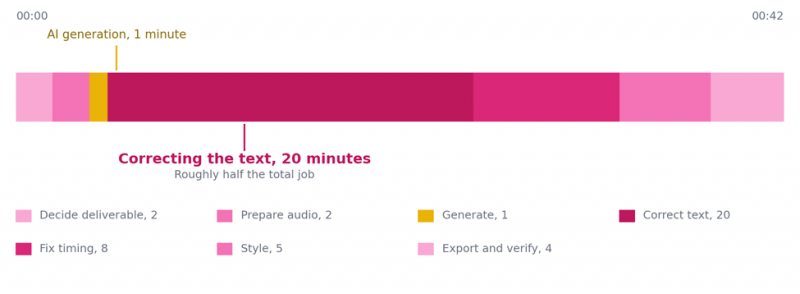
Figure 1. Where the time goes on a ten minute video. Correction time is derived from published 2026 testing, which puts manual correction at 15 to 25 minutes for a video transcribed at around 90 percent accuracy. Other stage times are this guide's estimate.
Cue 01: Choosing the Deliverable
00:00:00 to 00:00:02
Decide what you are delivering
This decision shapes everything after it, and it is the one people skip. You are choosing between a separate caption file that travels alongside the video, and text baked permanently into the picture.
| DELIVERABLE | CHOOSE IT WHEN | COST OF CHOOSING WRONG |
|---|---|---|
| Sidecar file, SRT or VTT | YouTube, Vimeo, a website player, anything that needs to stay editable or searchable | None really, other than viewers who must switch it on |
| Burned in | Instagram, TikTok, LinkedIn, autoplay feeds where captions must appear by default | Permanent. A typo means re-exporting the whole video. |
| Both | The same video is going to a feed and to a website | Extra export time, and two files to keep in sync |
If you are unsure, generate the sidecar file first. You can always burn it in later. You cannot extract it back out.
QUALITY GATE, PASS BEFORE CONTINUING
□ You know which platform this is going to and whether it plays muted by default
□ You know whether anyone downstream will need to translate or edit this text later
Cue 02: Audio Preparation
00:00:02 to 00:00:04
Fix the audio, not the transcript
Audio quality is the single biggest factor in how accurate your first pass is. Two minutes spent here saves far more than two minutes of correcting later, because every error you prevent is an error you do not have to find.
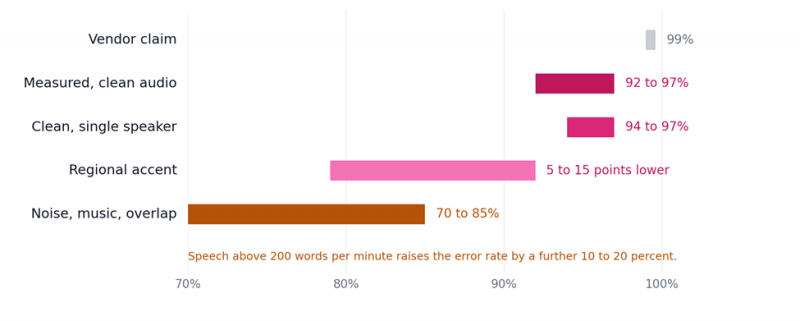
Figure 2. Transcription accuracy by condition. Sources: Open ASR Leaderboard and Whisper Large-v3 benchmarks as reported by VexaScribe, 2026; accuracy-by-condition testing published by FluxNote, March 2026.
• Strip the music bed before transcribing. Run the dialogue-only stem through the tool if you have one, and re-add music at the styling stage. This is the single highest-value trick in the whole workflow.
• Feed it a glossary. Most tools accept a custom vocabulary list. Load your product names, people's names and technical terms before the first pass rather than fixing each one seven times afterwards.
• Test on ninety seconds first. Run one representative minute or two of your own audio through a free tier and read the output. That tells you more than any published benchmark, because it uses the audio you actually work with.
QUALITY GATE, PASS BEFORE CONTINUING
□ Dialogue is audible without music or effects competing with it
□ A custom vocabulary list exists for every proper noun in the video
□ You have run a short sample and know roughly what accuracy to expect
Cue 03: Generating the First Pass
00:00:04 to 00:00:05
Generate the first pass
This is the fast part, and the part every guide is about. Almost every tool in the category runs on OpenAI's Whisper or an architecture very like it, which is why accuracy has converged so tightly. Choose on workflow fit rather than on advertised accuracy. Full descriptions of all five recommended tools are in section 9.
ON THE 99 PERCENT CLAIM
Every tool in this category advertises some version of 99 percent accuracy. Peer-reviewed word error rate for state of the art speech recognition on clean English audio is 3 to 8 percent, which is 92 to 97 percent accuracy. When a vendor claims 99 without publishing test conditions, they are either quoting a best case or measuring characters rather than words. Budget your correction time against the real number.
QUALITY GATE, PASS BEFORE CONTINUING
□ The tool exports the format you decided on in Cue 01
□ You can edit individual cues, not just the whole transcript as a block
Cue 04: Correcting the Text
00:00:05 to 00:00:25
Correct the text, which is half the job
Twenty minutes of a forty two minute job. At 95 percent accuracy you have an error roughly every twenty words, and at 90 percent a ten minute video carries around 150 of them.
Read it rather than skimming it. Speech recognition errors are usually real words in plausible positions, which is exactly what proofreading misses. Work in this order, because it front-loads the errors that change meaning.
• Proper nouns first. Names of people, products and places. These are the errors that damage credibility fastest and the ones a reader notices immediately.
• Numbers and units second. A misheard figure is worse than a misheard adjective, and speech recognition handles digits poorly under noise.
• Homophones third. Their and there, its and it is, principle and principal. Every one of these passes a spellcheck.
• Sentence boundaries last. Punctuation drives where cues break, so fixing it now saves work in the next cue.
QUALITY GATE, PASS BEFORE CONTINUING
□ Every proper noun in the video has been checked against a written source
□ Every number has been checked against the video, not against the transcript
□ You have read the transcript end to end at least once, not skimmed it
Cue 05: Reading Speed and Line Length
00:00:25 to 00:00:33
Fix reading speed and line length
This is the step that separates captions from subtitles, and almost nobody does it. Your text can be perfect and the file can still be rejected, because readability is measured, not judged.
Two numbers govern it. Characters per second is the visible character count divided by how long the cue is on screen. Characters per line caps how much text sits on one row. Get either wrong and the viewer stops reading.
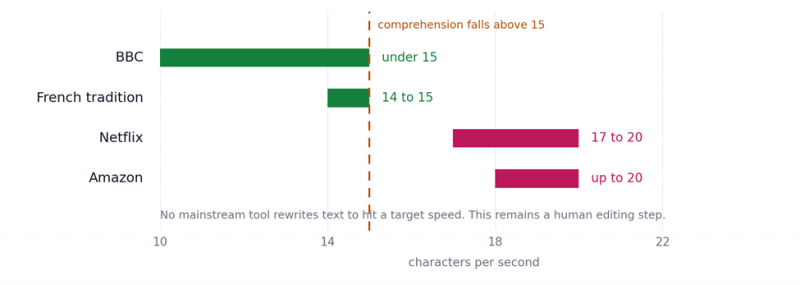
Figure 3. Reading speed limits by platform. Sources: Netflix Timed Text Style Guide and BBC subtitle guidelines as reported by Subhero, Hello8 and Hanna Eng, 2026. Published figures for the Netflix adult limit vary between 17 and 20 depending on source.
| RULE | TARGET | WHY IT EXISTS |
|---|---|---|
| Characters per line | 42 maximum | Longer lines cannot be read in one glance. The most common cause of file rejection. |
| Lines per cue | 2 maximum | Three lines start covering the picture the subtitle is describing |
| Minimum duration | About 1 second | Below this the eye does not register the cue changed |
| Maximum duration | 6 to 7 seconds | Beyond this viewers re-read the line and lose the picture |
| Gap between cues | 2 frames | Without a gap the brain does not notice the text has changed |
| Line breaks | At clause boundaries | Breaking mid-phrase forces the reader to hold the fragment |
Note the tension in that chart. Broadcast practice and comprehension research both sit at or below 15 characters per second, while streaming platforms allow up to 20. If your content is complex, aim at the lower number even when the platform permits the higher one.
QUALITY GATE, PASS BEFORE CONTINUING
□ No line exceeds 42 characters and no cue exceeds two lines
□ No cue is on screen for less than about a second
□ Line breaks fall at clause boundaries rather than mid-phrase
□ You have watched a two minute stretch at normal speed and kept up comfortably
Cue 06: Styling
00:00:33 to 00:00:38
Style it so it stays legible
Styling only applies to burned-in captions and to players that accept styling. The goal is not personality, it is legibility against footage you do not control.
• Always put a background behind the text. A solid or semi-opaque box, or a strong outline. Text alone disappears the moment the shot cuts to something bright.
• Keep it inside the safe area. Feed interfaces overlay usernames, captions and buttons across the lower third. Position above that zone or your text sits underneath a like button.
• Sentence case, not all capitals. Capitals remove word-shape cues and slow reading measurably.
• One style for the whole video. Word-by-word highlight styles work for short-form and become exhausting past about a minute.
• Label speakers when there are several. A dash or a name prefix. Without it, dialogue reads as one person contradicting themselves.
QUALITY GATE, PASS BEFORE CONTINUING
□ Text is legible over the brightest frame in the video
□ Nothing sits where the platform overlays its own interface
□ Speakers are distinguishable when more than one person talks
Cue 07: Export and Verification
00:00:38 to 00:00:42
Export the right format and verify
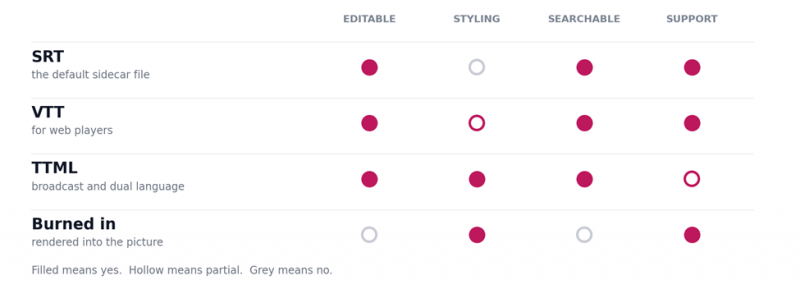
Figure 4. Format decision. Compiled from platform documentation and 2026 tool comparisons. Netflix accepts SRT and TTML for most submission pipelines.
Then verify, which takes four minutes and catches the errors that embarrass you. Play the video at normal speed with the sound off and read only the captions. If you cannot follow the video that way, a deaf viewer cannot either, and that is the actual test.
FINAL GATE, PASS BEFORE PUBLISHING
□ The file plays in the destination player, not just in your editor
□ You have watched the whole video muted and followed it using captions alone
□ Non-speech information that matters is captioned, such as a phone ringing or a door slamming
□ The first and last cue are correctly timed, since those are where drift shows first
Tool Directory
Accuracy has converged, so the real decision is the pricing model and which cues each tool actually covers. These five span the whole range, from free social captions to human-verified compliance work.
One number reframes the category. Published per-minute rates run from about 5 cents to 1 dollar 50, a spread of roughly thirty times, and the expensive end is expensive because a person is involved rather than because the software is better.
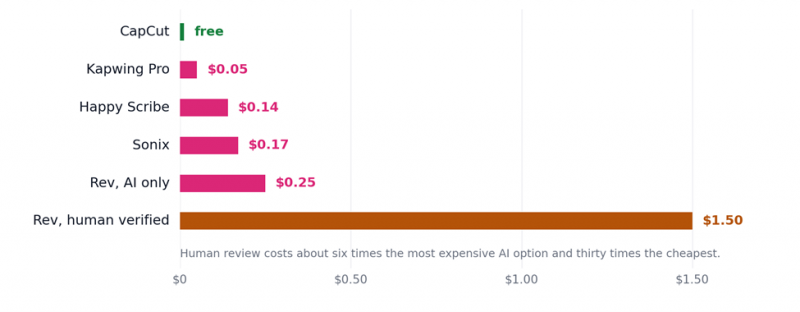
Figure 5. Cost per minute of audio. Per-minute figures published in 2026 comparisons by CreatorStackClub and VexaScribe. Subscription tools are converted from their monthly allowance, so the effective rate rises if you do not use the full quota.
CapCut - Free, Pro at $19.99 per month
Video editor with unlimited automatic captions, built for short-form vertical video.
| SPECIFICATION | DETAIL | NOTE |
|---|---|---|
| Cost per minute | Free | No usage cap on auto-captions |
| Free tier catch | None on captions | No watermark on the free subtitle tool, unusually |
| Output | Burned into the picture | Word-by-word animated styles |
| Sidecar files | Weak | Built for hardcoded captions, not clean SRT export |
| Cues covered | 03, 06, 07 | No reading-speed control |
Strengths. The only tool here with genuinely unlimited free captioning and no watermark, which is rare enough to be the deciding factor for most creators. The animated word-by-word styles are the format that performs on TikTok, Reels and Shorts, and burned-in output is exactly what those feeds require.
Limits. Optimised for hardcoded captions rather than editable files, so the text is not searchable, translatable or fixable after export. No control over characters per second, which matters little at thirty seconds and a lot at ten minutes.
Pick it when you publish short vertical video, want animated captions, and never need the text back.
Kapwing - $16 to $24 per month, Pro
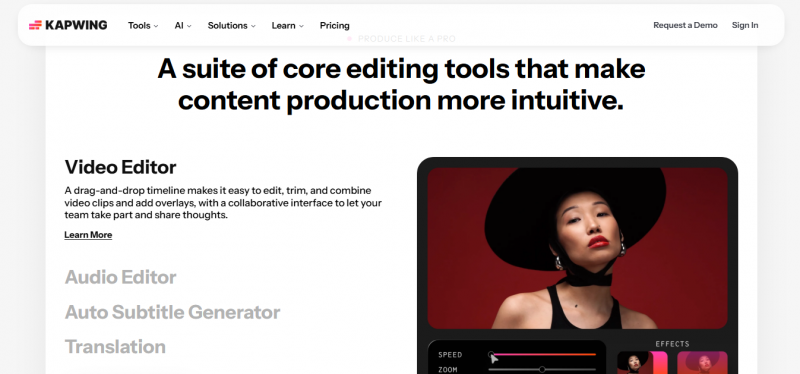
Browser-based editor combining a timeline, auto-subtitles, translation and team collaboration.
| SPECIFICATION | DETAIL | NOTE |
|---|---|---|
| Cost per minute | About $0.05 | Cheapest per minute of any paid tool here |
| Pro allowance | 300 minutes per month | Roughly 5 hours, enough for most solo creators |
| Next tier | $50 per month, 4,000 minutes | A steep jump if you only need 400 to 500 |
| Languages | More than 70 | Among the most multilingual browser editors |
| Caption styles | More than 100 | Covers Cue 06 without leaving the tool |
| Free tier catch | Watermark, 1 min, 720p | Usable for testing accuracy, not for publishing |
| Claimed accuracy | 99 percent | Realistic 90 to 95 clean, 80 to 85 noisy |
| Cues covered | 03 to 07 | The widest coverage of any tool here |
Strengths. The best value per minute among paid tools and the only one that covers the whole workflow in a browser. More than 70 languages, real-time collaboration, and enough caption styling to finish Cue 06 without exporting. If it replaces both your editor and your subtitle tool, the economics are hard to beat.
Limits. Pricing is per member, so a five-person team runs $80 to $250 a month. The free tier watermarks everything and caps exports at one minute, so it is a trial rather than a tier. Users report slow exports on complex projects. Published Pro pricing varies between $16 and $24 depending on source and billing period.
Pick it when you publish regularly, work in a browser, and want one tool for editing and captions.
Happy Scribe - From about $8.50 per month
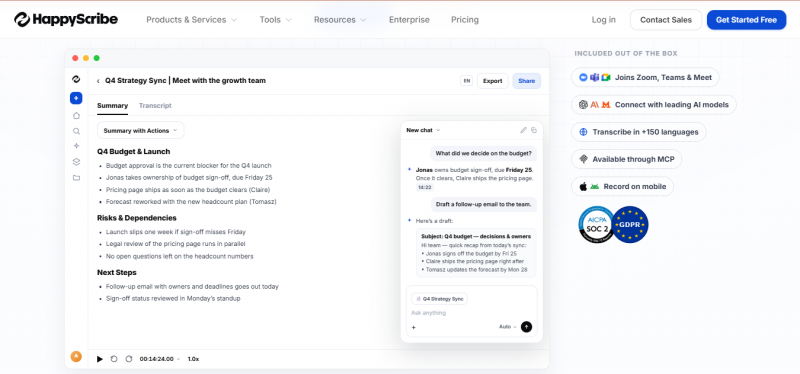
Dedicated subtitle generator with the broadest export format support and optional human review.
| SPECIFICATION | DETAIL | NOTE |
|---|---|---|
| Cost per minute, AI | About $0.14 | Mid-range for a dedicated generator |
| Cost per minute, human | About $2.00 | Escalate individual videos rather than all of them |
| Export formats | 15 or more | Includes STL and FCPXML alongside SRT and VTT |
| Human tier accuracy | Rated up to 99 percent | Applies to human output, not the AI pass |
| Custom vocabulary | Yes | Directly improves Cue 02 |
| Cues covered | 03 to 05 | No video editor, so no burned-in output |
Strengths. The widest export format support in the category, which matters if your file has to enter a broadcast or post-production pipeline rather than a web player. The per-video human escalation is the most useful feature here: most videos ship on AI output and the few that cannot get a person, without paying human rates across the board.
Limits. Generator rather than editor, so burned-in captions are out of scope. The headline 99 percent figure describes the human-made tier and does not apply to the AI output you get by default.
Pick it when you need unusual file formats, or most work can ship on AI but some cannot.
Sonix - $22.50 per month, or $10 per hour
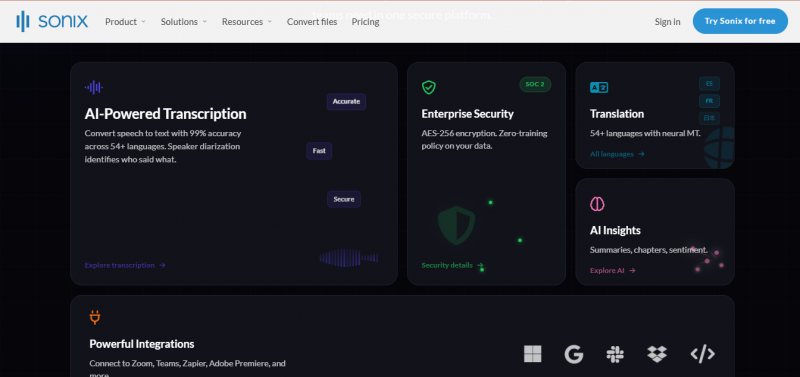
Browser-based transcription and subtitling platform aimed at media teams and regulated sectors.
| SPECIFICATION | DETAIL | NOTE |
|---|---|---|
| Cost per minute | About $0.17 | Pay as you go option at $10 per hour |
| Languages | 53 or more | One of the widest ranges available |
| Timestamp precision | Millisecond | Matters when captions sit against a locked edit |
| Speaker labelling | Automated | Part of the accessibility requirement in Cue 07 |
| Security | SOC 2 Type II | HIPAA-ready workflows, plus an API |
| Claimed accuracy | Up to 99 percent | Vendor claim, no published test conditions |
| Cues covered | 03 to 05 | Plus API access for automation |
Strengths. The only tool in this five with security certification, which turns it from a preference into a requirement for healthcare, legal and public sector work. Automated speaker labelling covers something the accessibility standard demands and most tools leave manual. Millisecond timestamps and an API make it the sensible choice for volume.
Limits. Costs roughly three times Kapwing per minute for transcription quality that benchmarks put in the same band. You are paying for certification, languages and automation rather than for better text.
Pick it when procurement asks about certification, or you are captioning at a volume that needs an API.
Rev - $0.25 per minute AI, about $1.50 human
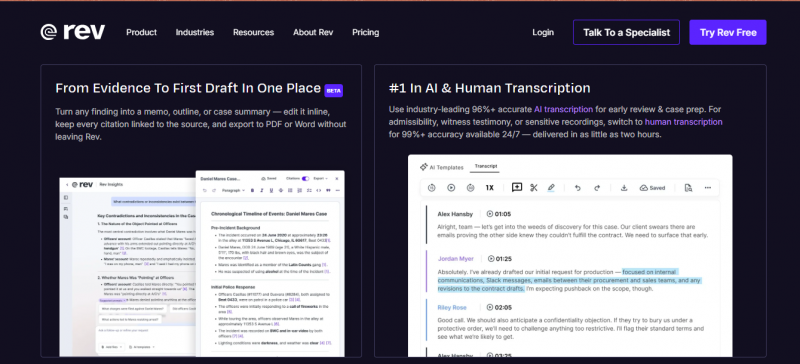
Transcription service selling both an AI product and a human-verified one at very different prices.
| SPECIFICATION | DETAIL | NOTE |
|---|---|---|
| Cost per minute, AI | About $0.25 | The most expensive pure AI option here |
| Cost per minute, human | About $1.50 | Roughly thirty times Kapwing |
| Subscription option | About $25.49 per month | For steady volume rather than one-off jobs |
| Accuracy standing | Category benchmark | Described as the reference for compliance content |
| Turnaround | Slower | A person is in the loop |
| Cues covered | 03 and 04, done for you | Cue 05 is still yours |
Strengths. Human review closes the gap that re-running a model cannot. If your obligation is regulatory rather than aesthetic, this is the only category of option that reaches the standard, and Rev is the name most often cited as the benchmark for it.
Limits. Per-minute pricing scales linearly with no volume relief, so 100 minutes a month costs around $150 against $16 for a subscription tool. Turnaround is slower. And note that Rev's AI-only product at $0.25 a minute is the priciest machine option in this list without being the most accurate one.
Pick it when an error carries legal or reputational cost and the standard is not negotiable.
TWO THINGS TO CHECK BEFORE YOU COMMIT
Published pricing for these tools disagrees between sources, sometimes substantially. Kapwing Pro appears as both 16 and 24 dollars depending on the reviewer and billing period, and several figures here are converted from monthly allowances rather than quoted directly. Separately, one of the 2026 comparisons used as a source discloses that it reviews its own product alongside competitors. That disclosure is to its credit, but treat any ranking that favours the publisher's own tool with the same caution you would apply to a vendor accuracy claim.
| TOOL | COST PER MINUTE | CUES COVERED |
|---|---|---|
| CapCut | Free | 03, 06, 07. Burned-in output only. |
| Kapwing | About $0.05 | 03 to 07. The widest coverage here. |
| Happy Scribe | $0.14, or $2 with human review | 03 to 05, with per-video escalation. |
| Sonix | About $0.17 | 03 to 05, plus API and speaker labels. |
| Rev | $0.25 AI, about $1.50 human | 03 and 04, done for you. |
Notice what no tool covers. Cue 05, reading speed and line length, is absent from every row. If you want that enforced, a free desktop subtitle editor such as Subtitle Edit is the tool for the job, and it works on a file any of these five produced.
Accessibility and Compliance
Two reasons to care beyond reach. The first is regulatory. The United States Department of Justice adopted WCAG 2.1 Level AA as the technical standard under its 2024 Title II rule, and in April 2026 issued an interim final rule extending the compliance date for state and local governments serving 50,000 or more people to April 2027. The second is litigation volume, with more than 4,000 digital accessibility lawsuits filed in a single year.
The commercial case runs alongside it. Around 85 percent of video on social platforms is watched without sound, and captioned video shows materially higher completion rates. Accessibility and reach point at the same work.
CAPTIONS AND SUBTITLES ARE NOT THE SAME THING
Subtitles assume the viewer can hear and render dialogue only. Closed captions assume the viewer cannot hear, and include speaker identification and meaningful non-speech sound. If accessibility compliance is your reason for doing this, you need captions, and an AI transcript alone does not produce them.
Verdict
| TASK | DOES AI HANDLE IT | DETAIL |
|---|---|---|
| Transcribing speech to text | Yes | 92 to 97 percent on clean audio, in under a minute |
| Timing text to the audio | Yes | Millisecond alignment is standard now |
| Translating to other languages | Yes | Available across most tools, quality varies by language |
| Getting proper nouns right | Partly | Only if you supply a glossary first |
| Meeting reading speed limits | No | No mainstream tool rewrites text to hit a target speed |
| Breaking lines at sensible points | No | Machine output routinely breaks the 42 character rule |
| Captioning non-speech sound | No | Required for accessibility, and it is a manual step |
| Deciding what matters | No | Verbatim is not the same as readable |
AI has solved transcription and timing, and has not touched editorial judgement. Budget one minute for the machine and forty for yourself, and the result will be better than most published video.
Post Comment
Share your thoughts about this article.
Be the first to post a comment!





