CHALLENGER 3.5 / 10 Frozen on read-only and openly shutting down. I could not send a single message. | WINNER 8.5 / 10 Open the page, filter, pick a character, start talking. No account needed. It just worked. |
SHORT VERSION
SpicyChat AI won, and it was not close. I could open it and be chatting in seconds, without even making an account. Wsup AI sat in read-only the entire time I tested it, with cards on its own home page announcing the site is shutting down. So this turned into less of a fight and more of a walkover.
How I Tested
One simple question, on real screens
I kept it honest. Two free platforms, one browser, one afternoon. I judged each one on a single thing first: can a normal person walk in and actually have a conversation? After that I looked at how the chat felt, how the characters and scenes were set up, and how easy it was to find what I wanted.
Everything below is what genuinely happened, in order. I wrote my gut reaction at each step instead of tidying it up afterwards, so the notes you will see are the ones I made live, with the screenshots that go with them.
AT A GLANCE
The shape of each app
Here are the six things I cared about, each scored out of 10. The bigger the shape, the better.
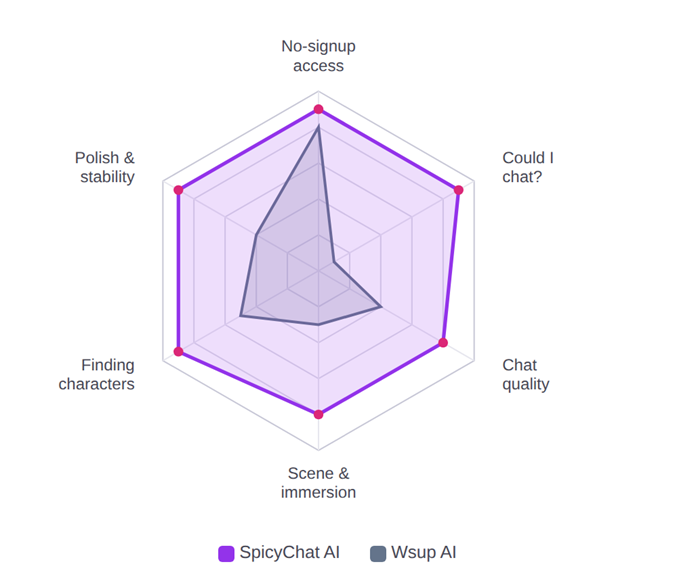
• SpicyChat fills almost the whole chart. It was strong on every single axis I tested, with no obvious weak spot.
• Wsup collapses on the one axis that matters most. Could I chat is the centre of the whole thing, and it scored a 1.
• The only place Wsup gets close is no-signup access, its genuine strength, since you do not need an account. SpicyChat just happens to be good there too.
ROUND 01
Wsup AI
Wsup AI's whole pitch is no sign-up. It runs in your browser on now.gg, and you can start chatting instantly. Lovely idea. Here is how my three steps actually went, one after another.
Step 01: A friendly home page that was already saying goodbye
The layout looked fine at first. Character cards arranged like a social feed, a SPICY toggle up top, a little gem counter. Then I actually read the cards. A couple were titled things like RIP wsup.ai and Goodbye wsup.ai, with text warning the site is shutting down soon. And the gem counter? Sitting on zero. Not what you want to see before you have started.
MY NOTE · STEP 01
Before I typed a single thing, the app was already waving goodbye. Cards literally reading RIP wsup.ai, gems on zero. Bad omen.
Step 02: It said read only and refused to send my message
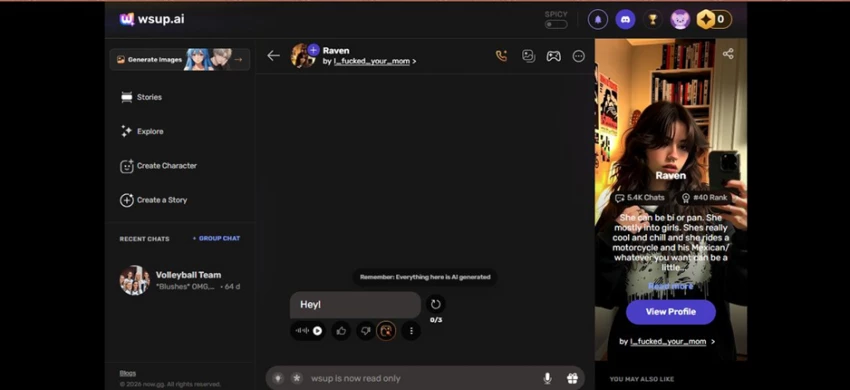
I clicked into a character and typed a plain Hey. The box would not let it go. Where a send button should be, it just said wsup is now read only. I could still see the old scripted intro line and the usual reminder that everything there is AI generated, but nothing I typed could move.
MY NOTE · STEP 02
Typed one word. The app told me it was read-only and ate it. For a chat app, that is the entire product, gone.
Step 03: I tried to buy credits. The store never loaded.

My next thought was that the read-only wall plus the zero gems just meant I needed to buy some currency. So I opened the purchase panel. It showed the logo, said Loading, and then sat there. Forever. No store, no credits, no way back into a conversation.
MY NOTE · STEP 03
Tried to pay my way past the wall. The store just spun on Loading forever. Cannot chat, cannot buy. Hard dead end.
So my honest Wsup AI run in June 2026 was three screens and zero conversations. The app is clearly being wound down, and what is left is basically a museum. You can look at the characters, but you cannot touch them.
ROUND 02
SpicyChat AI
SpicyChat AI makes the same no limits promise, but it actually delivered. The kicker: I never signed in. Every step below happened on a free, logged-out browser session.
Step 01: A huge library and a page that loaded instantly
The landing page felt like a real product, not a toy. A big Chat Without Limits banner, a search bar, an NSFW toggle, and a Trending sort. But the number that stopped me was at the top of the results: 362,134 characters, and it said it found them in 190 milliseconds. Every card showed a name, the creator's handle, and a little For You label. No please sign in wall in sight.
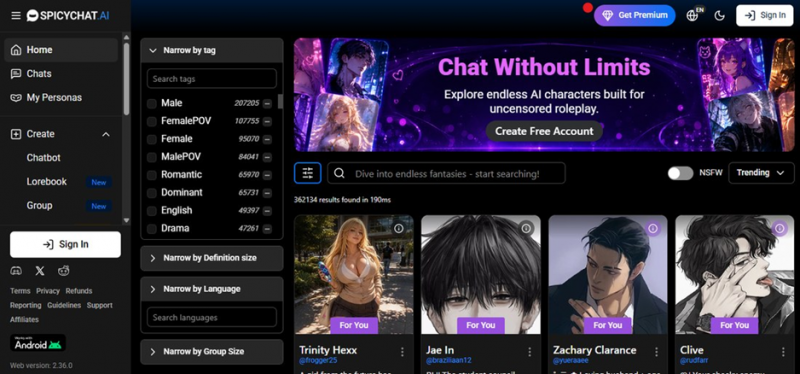
SpicyChat AI home page. 362,134 characters, found in 190ms, and no login required to browse.
MY NOTE · STEP 01
Three hundred thousand plus characters, page loaded in a blink, and nobody asked me to sign up. The exact opposite of a goodbye screen.
Step 02: I narrowed it down to exactly what I wanted
Down the left side there is a Narrow by tag panel with a search box and a long list of tags: Male, FemalePOV, Female, Romantic, Dominant, Horror, Tsundere, and dozens more. Crucially, each tag shows a live count of how many characters match. I picked Real and Female to find a grounded, realistic character. There are also filters for definition size, language, and group size if you want to dig deeper.
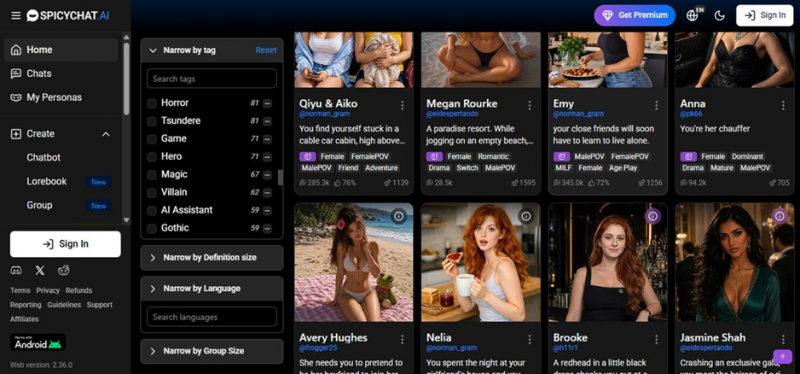
SpicyChat AI filtering by tag. Every tag carries a number, so you are never guessing how much is behind it.
MY NOTE · STEP 02
This felt like a proper search engine, not a toy. The live counts on every tag are a small thing that makes a big difference. You always know what is actually there.
Step 03: Each character has a real info page before you commit
I landed on Zoe Clover, tagged Female, Real, Drama, Wholesome, Romantic. Before chatting I could see the stats laid out: 246.3k chats, a 72% like rating, and 1,268 tokens of definition, which is basically a measure of how detailed the character is. There is a one-line hook (she needs your help to cross the street), Chat Now, Favorite and Share buttons, and an info button to read the full setup.
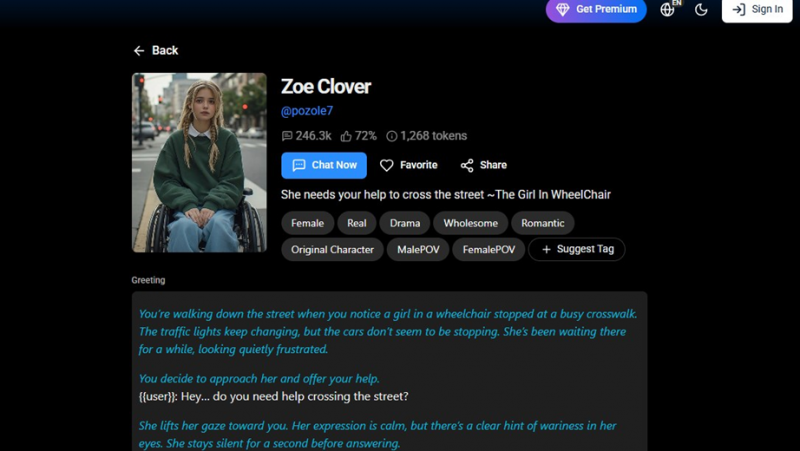
SpicyChat AI, the Zoe Clover profile. Chats, likes and token count are all shown up front.
MY NOTE · STEP 03
I liked seeing the numbers before diving in. Chats, like-rate, token count. It tells you how popular and how fleshed-out a character is before you spend any time on them.
Step 04: I typed one line and it answered, in character, with no account
This is the exact thing Wsup never let me reach. I opened the chat, read a nicely written opening scene, and replied no worries, ill help you. Zoe responded straight away: a line of italic narration describing her reaction, then her actual dialogue, staying in character and matching the tone. The message bar at the bottom even had options for images and more. No errors, no read-only wall, just a conversation that moved. And again, I was never logged in.
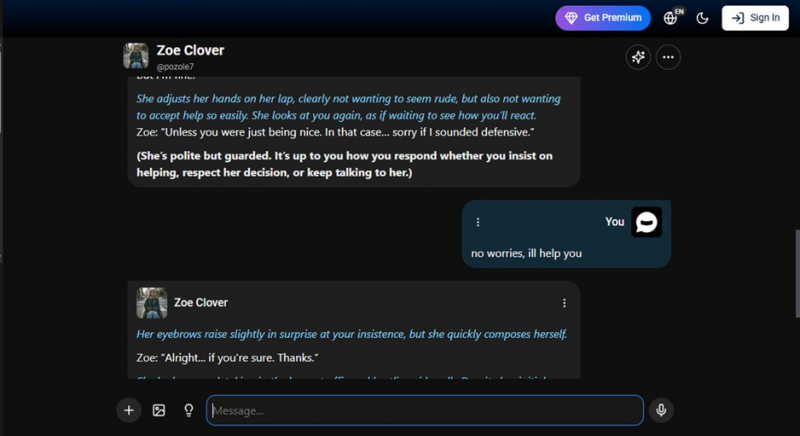
SpicyChat AI, the chat responding in character to my message, on a logged-out session.
MY NOTE · STEP 04
One message in and the scene reacted with real writing, narration plus dialogue, in character. This is everything I was trying to do on Wsup and could not.
Four steps, four working screens, one genuinely enjoyable roleplay, and I never had to make an account. That is the bar for a chat app, and SpicyChat cleared it without drama.
Head to Head Scored on what I tested
Out of 10, from my session. Where Wsup's read-only wall blocked a live test, I leaned on its known behaviour and other reviews.
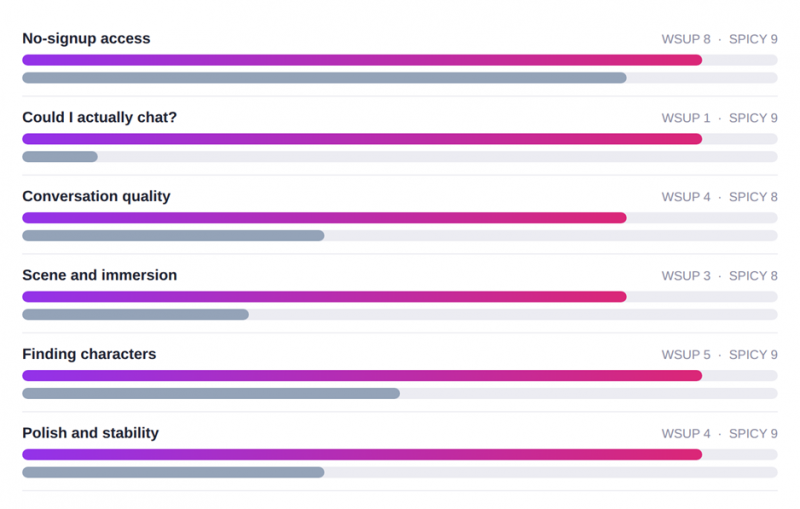
| Category | Wsup AI | SpicyChat AI |
|---|---|---|
| No-signup access | 8 | 9 |
| Could I actually chat? | 1 | 9 |
| Conversation quality | 4 | 8 |
| Scene and immersion | 3 | 8 |
| Finding characters | 5 | 9 |
| Polish and stability | 4 | 9 |
| My overall score | 3.5 | 8.5 |
Side By Side feature breakdown
| Feature | Wsup AI | SpicyChat AI |
|---|---|---|
| Sign-up to start | None on web | None to browse or chat |
| Worked when I tested it (Jun 2026) | No, read only | Yes |
| Status | Winding down, shutdown notices | Active, large character library |
| Library size I saw | Browse-only feed | 362,134 characters |
| Filtering and search | Basic browsing | Tag search with live counts |
| Character info page | Limited | Stats, tags, token count, greeting |
| Content filter | Looser, SPICY toggle | Uncensored, NSFW toggle (18+) |
| Free tier | Free chat plus credits (store frozen) | Free chat, Premium optional |
| Paid plan | Credit packs, store would not load | Get Premium upgrade |
| Best for right now | Honestly, nothing | Roleplay, custom characters, casual chat |
My Verdict
SpicyChat AI, and it is not close
I want to be fair to Wsup AI, because the core idea is genuinely good: no account, instant chat, a looser content policy, and a wall of characters to pick from. On the one thing I could still test, walking in without signing up, it holds its own.
But a chat app has exactly one job, and during my test Wsup AI could not do it. Read-only chat, a gem counter stuck on zero, and a store that never loaded. You cannot recommend a conversation app that will not hold a conversation, especially one that is openly winding down while you use it.
SpicyChat AI is not flawless. It is an uncensored, 18+ platform, and the genuinely nice extras live behind Premium. But it works. The library was massive, the filters were sharp, the character pages were informative, and the roleplay actually flowed, all on a logged-out session. If you want to talk to an AI character today, that is the whole point, and SpicyChat delivered it.
WINNER SpicyChat AI Because I could actually use it. Wsup AI lost the moment the send button stopped working, and it is saying goodbye on its own home page. |
Post Comment
Share your thoughts about this article.
Be the first to post a comment!