Table of Content
- Why Everyone’s Talking About Viggle
- What Exactly Is Viggle AI?
- From a Discord Experiment to a Mobile Meme Studio
- The Fun Modes (Where Things Get Interesting)
- The Credit Game: Tokens for Your Meme Addiction
- Watermarks, Storage & Why You Should Save Everything
- Where Can You Get Viggle?
- What People Actually Say About It
- Privacy, Safety & the “Should I Upload This?” Question
- Viggle vs The Competition
- The Annoying Bits (Troubleshooting in Real Life)
- FAQs People Actually Care About
- Final Thoughts: Why Viggle’s Hard to Ignore
Imagine uploading a single photo of yourself and, minutes later, watching your digital double moonwalk like Michael Jackson, perform a wrestling move in a WWE ring, or dance through a scene you never filmed.
That is the appeal of Viggle AI.
The platform turns static images into animated, full-body videos by transferring movement from an existing clip onto a person or character. It is free to try, easy to experiment with, and built for the kind of content people immediately want to send to a group chat.
The experience is not always perfect. Credits can disappear quickly, free users may face long queues, and some generated videos contain strange visual glitches. Privacy questions also remain important whenever personal photos are uploaded to an AI platform.
Even with those limitations, Viggle is difficult to ignore. It is playful, unpredictable, occasionally chaotic, and almost impossible to use only once.
Why Everyone’s Talking About Viggle
The buzz isn’t just hype — Viggle makes “what if” moments real. Imagine dropping a video of your colleague doing the Barbie dance into the office WhatsApp group — without them ever leaving their desk. That’s the appeal: instant shareable chaos. But Viggle isn’t only about laughs. Its LIVE mode, now available on iPhone and Android, lets you stream as an AI puppet in real time. Think less Zoom fatigue, more prank-filled role-play.
What Exactly Is Viggle AI?
At its core, Viggle is an AI-powered motion-transfer platform built around the JST-1 model.
A basic face-swapping tool typically places one person’s face onto another person’s body. Viggle attempts something more complex: it interprets body movement, positioning, and camera motion before applying that movement to an uploaded character or image.
That is why the final subject does not simply float awkwardly over the original footage. The generated character can bend, turn, dance, gesture, and move through the scene in ways that appear more natural.
The technology may be advanced, but the user experience remains focused on simplicity.
Users generally do not need animation experience, video-editing knowledge, or technical AI skills. They upload an image, choose or provide a motion clip, and allow the platform to generate the result.
This combination of sophisticated motion generation and meme-friendly accessibility is central to Viggle’s popularity.
From a Discord Experiment to a Mobile Meme Studio
Like many rapidly developing AI platforms, Viggle has changed quickly.
Its earlier popularity was closely connected to its Discord-based experience. Since then, it has expanded into a more polished, cross-platform product with browser access and dedicated mobile applications.
The introduction of the V3 model improved several weaknesses found in earlier generations. Animations became cleaner, facial details appeared more polished, and limbs were less likely to look unnaturally flexible or distorted.
The mobile applications marked another significant step.
Users no longer need to remain at a desktop to create animated clips. They can experiment while commuting, waiting for a taxi, sitting with friends, or reacting to a trend as it happens.
The mobile prompt library also makes it easier to discover characters, movements, and ideas without creating every concept from the beginning.
Viggle’s development from a quirky Discord tool into a mobile creative platform shows how quickly AI-generated entertainment is evolving
The Fun Modes (Where Things Get Interesting)
Viggle is not limited to one type of animation. It offers several creative modes, each designed for a different kind of result.
Mix
Mix allows users to place themselves or another character inside an existing scene.
That could mean entering the lobby sequence from The Matrix, appearing in a Marvel-style battle, or replacing the performer in a viral dance video.
The mode is particularly useful when the movement and background already exist and the user simply wants to replace the original subject.
Move
Move animates a single image.
A static selfie can be transformed into a character that waves, nods, dances, or performs a TikTok-style movement. This mode is useful when users want to bring a photograph or illustrated character to life without recreating an entire scene.
Multi
Multi extends the idea beyond one person.
Users can replace several characters within a sitcom scene, music video, or group performance. A friend group can effectively become the cast of an existing clip.
The results can range from surprisingly convincing to hilariously strange, which is part of the experience.
LIVE
LIVE enables real-time AI puppeteering through Viggle’s mobile applications.
Instead of waiting for a finished render, users can control an animated character through their own live movements. The mode is designed for streaming, performance, role-play, and interactive comedy.
Lighting and device performance can influence the quality, but the ability to control an AI character in real time makes LIVE one of Viggle’s most distinctive features.
The Credit Game: Tokens for Your Meme Addiction
Here’s where things get real. Viggle runs on a credit system, explained clearly on their pricing page.
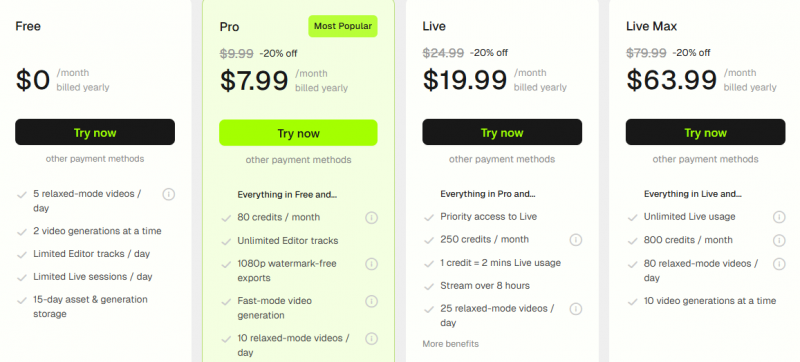
Free plans give you a taste, but one 15-second clip eats up a credit, and longer videos burn through packs fast. There’s also a “relaxed mode” where you wait in a queue but save tokens. It feels a lot like arcade tokens — fun until you realize how many you’ve spent in an hour.
Watermarks, Storage & Why You Should Save Everything
Videos created through Viggle’s free plan include a Viggle watermark.
Paid plans remove the watermark, which may matter to creators who want cleaner videos for social media, campaigns, or professional projects.
Storage is another important limitation.
Videos created through the free plan remain available for approximately two weeks before they disappear. Paid plans provide longer retention, but users should not rely on the platform as permanent storage.
The safest habit is simple: download every result you want to keep.
A clip may seem easy to recreate, but motion settings, generation quality, and random visual details can make each result slightly different. Saving the file immediately prevents a successful generation from disappearing before it is shared or reused.
Where Can You Get Viggle?
Viggle is available across several platforms.
Web application
Users can access Viggle through a browser, making it possible to create videos without installing a separate program.
iOS application
The iPhone application includes Viggle’s mobile creation tools and LIVE streaming functionality.
Android application
The Android version provides similar features, although performance may vary depending on the device.
Some Android users report issues such as overheating, particularly during more demanding tasks. Results may also differ based on processing power, lighting, connection quality, and the complexity of the selected animation.
Despite these device-specific limitations, cross-platform availability makes Viggle relatively easy to test
What People Actually Say About It
The internet is split, and that’s half the fun:
- The Enthusiasts rave on Product Hunt: “Best thing since TikTok. My grandma’s K-pop dance video is legendary.”
- The Critics vent on MouthShut: “Bought credits, burned through them in minutes, half my videos never rendered.”
- The Weirdos (and heroes) on Reddit: “Uploaded my cat into Avengers and now she’s saving New York.”
It’s exactly the mix you’d expect from a tool designed for memes — joy, chaos, and occasional frustration.
Privacy, Safety & the “Should I Upload This?” Question
Uploading a face or personal photograph to an AI platform should never be treated as a meaningless step.
Some users have raised concerns about whether Viggle stores uploaded content or uses it to improve its systems. The debate around AI training data, facial imagery, and generated media continues across the wider technology industry.
Deepfake concerns make this issue even more serious.
Tools capable of placing recognizable people into artificial scenes can be used for jokes and harmless creativity, but similar technology can also be used for impersonation, harassment, misinformation, or political manipulation—particularly during elections.
Before uploading an image, users should review Viggle’s latest privacy terms and think carefully about consent.
A practical rule is to avoid uploading anything you would be uncomfortable seeing outside its intended audience.
That includes private photographs, sensitive workplace material, images of children, confidential content, and photographs of people who have not agreed to participate.
The fact that a video is intended for a private group chat does not guarantee that it will remain there.
Viggle vs The Competition
Viggle operates in a crowded market of AI video-generation and animation platforms.
However, many competing tools are designed for different audiences.
PixVerse
PixVerse focuses more heavily on polished visual output. Its results may look more cinematic, but the creation process can be slower.
Runway, Pika, and Luma
Runway, Pika, and Luma are often positioned toward filmmakers, visual storytellers, and creators producing more sophisticated AI video projects.
They may offer greater control or production-oriented capabilities, but they are not as closely associated with fast, meme-based motion transfer.
D-ID
D-ID performs particularly well with talking-head videos and animated presenters.
However, its focus is different from Viggle’s full-body movement and deliberately chaotic action scenes.
Viggle’s competitive advantage is straightforward: it is fast, playful, accessible, and designed around meme culture.
It does not necessarily attempt to become a complete filmmaking suite. It aims to help users create something funny enough to share immediately.
The Annoying Bits (Troubleshooting in Real Life)
No sugarcoating: Viggle has quirks. Free users wait in long queues. Credit systems confuse newbies. Sometimes faces melt into Picasso paintings. And LIVE mode, while hilarious, stutters if your lighting is bad. Still, for most, these are bumps on a road paved with viral clips.
FAQs People Actually Care About
Is it free? → Yes, but with watermarks and limited credits.
Can I stream? → Absolutely — LIVE is built for it.
How long do videos stay saved? → ~2 weeks on free, longer on paid.
Does it train on my uploads? → Check policies; debate is ongoing.
Does it work on both iOS and Android? → Yes, with some device quirks.
Final Thoughts: Why Viggle’s Hard to Ignore
Viggle AI is a mix of messy brilliance. It won’t win film festivals, but it will win your group chat. If you want to laugh at yourself moonwalking, prank friends with dance videos, or just explore the edges of AI creativity, it’s worth a try. Just remember: credits run out fast, privacy is worth thinking about, and the best creations are the ones you share right away — before they vanish from storage.
Post Comment
Share your thoughts about this article.
Be the first to post a comment!





