Cancelling ChatGPT almost never fails because the button is hidden. It fails because people cancel in a billing system that was never charging them. This guide identifies which of the three systems holds your payment, then gives the exact steps for that one.
QUICK ANSWER Cancel wherever you paid. If you subscribed on chatgpt.com, go to Settings, then Billing, then Cancel plan. If you subscribed in the iPhone app, go to iOS Settings, tap your name, then Subscriptions, then ChatGPT. If you subscribed in the Android app, open the Play Store, then Menu, then Subscriptions, then ChatGPT. Cancel at least 24 hours before your renewal date. You keep access until the paid period ends, and fees are not refunded. |
Why cancellations fail: three separate billing systems
OpenAI sells the same subscription through its own checkout, through Apple, and through Google. Each one has its own cancel control, and none of them can switch off the other two. Cancelling on the wrong system does nothing to the charge.
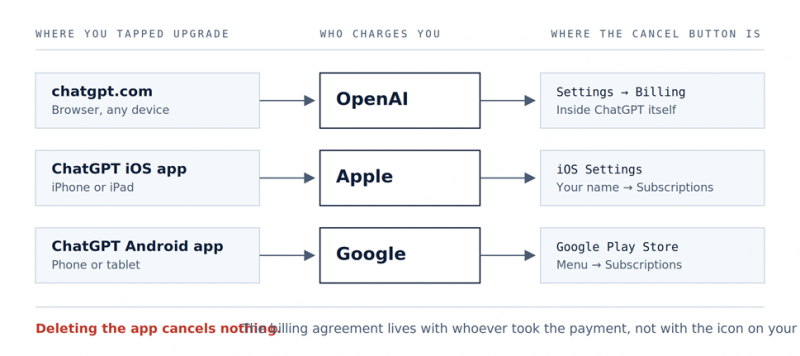
Figure 1. The three billing systems and where each cancel control lives.
How to identify your billing system
• Read the descriptor on your card statement. This is the only reliable diagnostic. Match it against the table below.
• Open ChatGPT on the web and go to Settings. If the billing area gives you a live cancel control, OpenAI is billing you. If it tells you to manage the plan through your app store, it is not.
| STATEMENT DESCRIPTOR | WHO CHARGED YOU | WHERE YOU CANCEL |
|---|---|---|
| OPENAI *CHATGPT | OpenAI | ChatGPT Settings, then Billing |
| APPLE.COM/BILL | Apple | iOS Settings, then Subscriptions |
| GOOGLE *ChatGPT | Google Play | Play Store, then Subscriptions |
MOST COMMON FAILURE Someone subscribes on their phone, forgets, then subscribes again on a laptop months later. Both charges land on the same card under different descriptors. Cancelling one leaves the other running. If your statement shows two ChatGPT lines, you have two subscriptions and must cancel each one separately. |
ALSO WORTH KNOWING Deleting the app cancels nothing. The billing agreement sits with whoever took the payment, not with the icon on your phone. This is stated plainly in OpenAI support documentation and is still the single most common cause of surprise charges. |
Cancelling on the web
(Billed by OpenAI)
For anyone billed directly by OpenAI. This covers most desktop subscribers. Expect it to take about 90 seconds.
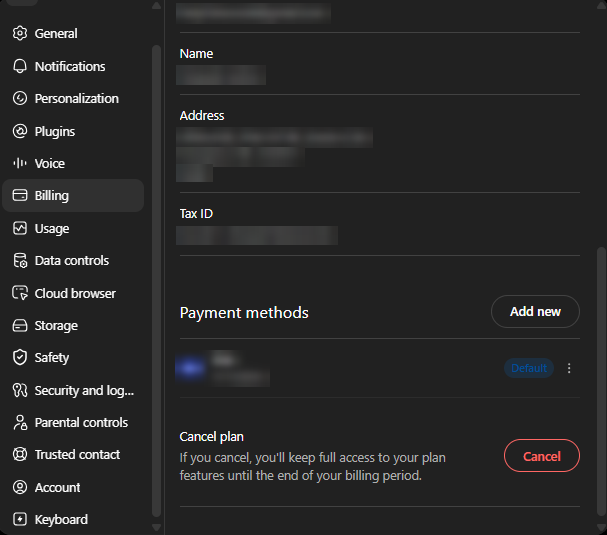
1. Go to chatgpt.com and log in with the exact account that holds the subscription.
2. Click your profile icon, then Settings.
3. Open Billing. Depending on your version of the interface this may be labelled My plan or Manage my subscription, and may hand you off to a Stripe hosted page.
4. Under Cancel plan, select Cancel.
5. Choose a reason if you are asked for one, then confirm.
6. Verify. Reload the billing page. It should now show an expiry date rather than a renewal date. That swap is your proof.
IF YOU SEE THE FREE PLAN AFTER LOGGING IN You are signed in to a different account than the one paying. If you used Sign in with Apple with Hide My Email, your OpenAI account is tied to a private relay address. Find that address in your Apple ID settings and sign in with it. Subscriptions cannot be moved between accounts. |
NO DESKTOP NEARBY A mobile browser works exactly the same way. You do not need a computer, only a browser rather than the app. |
Cancelling on iPhone or iPad
(Billed by Apple)
If you tapped Upgrade inside the iOS app, Apple holds the billing agreement and OpenAI cannot cancel it on your behalf. Expect it to take about 45 seconds.
1. Open the Settings app on your iPhone. This is the system app, not ChatGPT.
2. Tap your name at the very top.
3. Tap Subscriptions.
4. Find and tap ChatGPT in the active list.
5. Tap Cancel Subscription, then confirm.
BILLING DETAIL Apple charges your account roughly 24 hours before the current period ends, and the paid features stay in your account until that period finishes. Refund requests for this subscription go to Apple, not OpenAI, because Apple is who received the money. |
Cancelling on Android
(Billed by Google Play)
Google Play holds the agreement. Same logic as Apple, different place. Expect it to take about 45 seconds.
1. Open the Google Play Store app.
2. Confirm you are signed in to the Google account you subscribed with. Multiple accounts on one device is a frequent cause of not being able to find the subscription.
3. Tap Menu, then Subscriptions.
4. Select the ChatGPT subscription.
5. Tap Cancel subscription and follow the prompts.
You can do the same thing from a desktop browser on the Google Play subscriptions page.
Business, Enterprise, and Edu plans
These are not personal subscriptions and the self service cancel flow does not cover them.
| PLAN | WHO CAN CANCEL | WHERE | WATCH FOR |
|---|---|---|---|
| Business | Workspace owner or billing admin only | Workspace admin settings | Two seat minimum. Removing one seat may not reduce the bill below the floor. |
| Enterprise | Your named account contact | Via your OpenAI account representative | Annual commitment and notice periods. Read the agreement before assuming you can exit mid term. |
| Edu | Institutional admin | Via the institution agreement | Individual students and staff usually cannot cancel anything, because nothing is charged to their card. |
IF YOU ARE A SEAT RATHER THAN THE PAYER On someone else workspace you are not being charged at all. What you want is to leave the workspace, not cancel a subscription. Ask the admin to remove your seat, because that is what actually reduces the bill. |
Billing cycle and cancellation timing
There is no proration. Understanding this one mechanic changes when you should press the button.
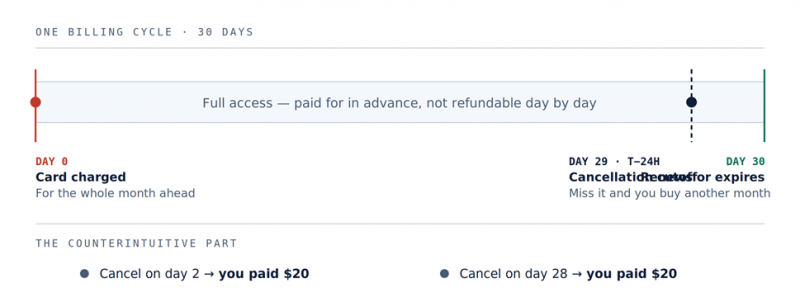
Figure 2. Money leaves on day 0. Everything after that is access you have already bought.
PRACTICAL TAKEAWAY Cancel immediately after a charge lands, not right before you want access to stop. You keep the full month you already paid for, and the renewal simply never happens. Cancelling the day before renewal produces the same bill and 28 fewer days of use. |
What cancelling does and does not do
| QUESTION | ANSWER |
|---|---|
| Does access stop immediately? | No. It continues to the end of the period you have paid for. |
| Are my chats deleted? | No. Cancelling a plan is not deleting an account. History, custom GPTs, and settings remain. |
| Can I undo it? | Yes, until the period actually ends. Resubscribe from the same billing page and the cycle continues. |
| Will I get a partial refund? | No. Fees are non refundable as a matter of stated policy. |
| What if I delete my account instead? | Deleting the account cancels the subscription automatically, so you are not billed again. |
| How late can I leave it? | At least 24 hours before the renewal date. Give yourself two or three days of buffer. |
Plan prices and downgrade options
The plan ladder grew considerably during 2026. If cost is the reason you are cancelling, there may now be a cheaper tier that did not exist when you subscribed.
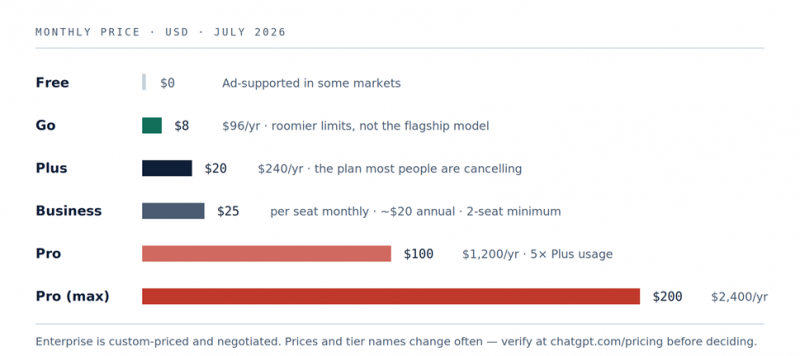
Figure 3. Monthly prices as of July 2026.
| PLAN | MONTHLY | ANNUAL EQUIVALENT | NOTES |
|---|---|---|---|
| Free | $0 | $0 | Ad supported in some markets |
| Go | $8 | $96 | Roomier limits, but not the flagship model |
| Plus | $20 | $240 | The plan most people are cancelling |
| Business | $25 per seat | About $20 per seat annually | Two seat minimum, so roughly $600 per year at entry |
| Pro | $100 | $1,200 | Five times Plus usage |
| Pro (max) | $200 | $2,400 | Twenty times Plus usage |
| Enterprise | Custom | Custom | Negotiated, with an annual commitment |
BEFORE YOU DOWNGRADE INSTEAD OF CANCELLING The cheaper tiers do not route to the flagship model, and Free and Go carry ads in some markets. If the reason you are paying is answer quality, dropping to Go may not solve it and you will likely resubscribe within a month. If the reason is message volume, it usually works well. |
Refund policy and eligibility
OpenAI states that subscription fees are non refundable, and there is a refund request process in the Help Center for cases falling outside that. In practice, requests succeed most often when something is objectively wrong rather than when there has been a change of heart.
• Duplicate charges. You were billed twice in the same period.
• Charges after a confirmed cancellation. You have the confirmation email and were billed anyway.
• An unauthorised charge. Someone else used your card or account.
• An unused renewal reported immediately. You noticed within a day or two and have not used the service.
Consumer protection law in some regions, notably the EU and the UK, gives stronger rights on digital purchases than any company default policy does, including cooling off provisions. If you are in one of those jurisdictions and were charged unexpectedly, state that explicitly in the request rather than simply asking politely.
SEND IT TO THE RIGHT DESK If Apple or Google took the payment, they handle the refund. OpenAI never received your money and cannot return it. Filing with the wrong company only costs you a week. |
Data export checklist
Your account survives cancellation, but some of this is much harder to retrieve from a downgraded account. Two minutes now saves the regret.
• Export your conversations. Settings, then Data Controls, then Export data. You receive a download link by email containing your full history.
• Save the contents of any custom GPTs you built. The instructions, knowledge files, and prompt scaffolding. Rebuilding those from memory is genuinely painful.
• Download your invoices if you expense them. Do it while the billing page still shows an active plan.
• Note your renewal date so you know exactly when access ends and can verify that no further charge appears.
Troubleshooting
I cancelled, but I am still being charged
You almost certainly have two subscriptions on two different billing systems, the classic outcome of subscribing on the web and again inside the mobile app. Check all three places and cancel each one separately. Compare the descriptor on the charge against the table in section 1.
I cannot log in to the account being charged
Usually a work email you have lost access to, or an SSO provider you have forgotten using. Support can cancel a subscription tied to an inaccessible account. Contact them through the Help Center chat widget and include the last four digits of the charged card or a copy of the receipt so they can locate it.
The cancel button is greyed out
Typically means a payment is still pending, or a cancellation is already in progress. Wait for the pending transaction to settle, then reload. If it persists for more than a day, contact support rather than clicking repeatedly.
My plan still says active after I cancelled
Expected behaviour. The plan stays active until the paid period expires. The tell is whether the page shows a renewal date or an expiry date. If it still says renewal, the cancellation did not register.
There is no cancel option in the mobile app
If OpenAI bills you rather than an app store, the control lives on the web. Open chatgpt.com in a mobile browser. You do not need a desktop, only a browser rather than the app.
I cancelled the wrong account
Subscriptions cannot be transferred between accounts. You will need to resubscribe on the account you actually wanted and cancel the other one. Check which email each account uses before doing anything else.
OpenAI API billing
If cancelling OpenAI means your developer platform account, there is nothing to cancel. API access is billed against usage rather than on a recurring plan, so no cancel control exists. To stop spending:
• Set your hard usage limit to zero in the platform billing settings.
• Revoke every active API key, including ones sitting in old projects and CI environments.
• Remove the payment method once any outstanding balance has settled.
ChatGPT subscriptions include no API credits, and the two are billed entirely separately. Cancelling Plus does nothing to your API spend, and zeroing your API limits does nothing to your Plus subscription.
Quick reference
| YOUR SITUATION | STATEMENT SHOWS | DO THIS |
|---|---|---|
| Subscribed on chatgpt.com | OPENAI *CHATGPT | Settings, Billing, Cancel plan |
| Subscribed in the iOS app | APPLE.COM/BILL | iOS Settings, your name, Subscriptions, ChatGPT |
| Subscribed in the Android app | GOOGLE *ChatGPT | Play Store, Menu, Subscriptions, ChatGPT |
| Business plan | Varies | Workspace admin settings, owner or billing admin only |
| Enterprise or Edu | Varies | Contact your OpenAI account representative |
| API spend | OPENAI *API | Zero the usage limit, revoke keys, remove the card |
| You want everything gone | Varies | Deleting the account cancels the subscription automatically |
THE FINAL CHECK Whichever path you took, return to the billing page one more time. If it shows an expiry date rather than a renewal date, you are done. That single check is what separates a clean exit from another surprise charge next month. |
Notes on accuracy
Interfaces, tier names, and prices change frequently. The plan ladder alone changed several times during 2026. Treat every figure here as a July 2026 snapshot and confirm current steps against the OpenAI Help Center and chatgpt.com/pricing before acting on anything time sensitive.
Post Comment
Share your thoughts about this article.
Be the first to post a comment!





