Two AI image tools keep coming up in the same searches, and they could not be more different. Unlucid AI is built around fast, beginner-friendly editing and animation, while Midjourney is built to generate the most striking images possible from a text prompt. So the real question is not “which is better?” It is “which job are you actually trying to do: polish images quickly, or generate world-class art from scratch?”
This guide answers that with a side-by-side breakdown across eight decision factors, original comparison charts, a full feature table, and a clear recommendation for each type of user. No fluff, no hype, just what helps you choose.
The 10-second verdict Choose Unlucid AI if you want a free, simple, all-in-one tool for editing photos, removing objects, and turning stills into short videos, especially for social content. Choose Midjourney if image quality is your top priority and you want cinematic, highly controllable, professional-grade generations, and you are happy to pay a monthly subscription to get them. |
Two tools, two philosophies
Most “X vs Y” comparisons pretend two products are competing for the exact same job. These two mostly are not. Understanding the gap between them is the fastest way to pick the right one.
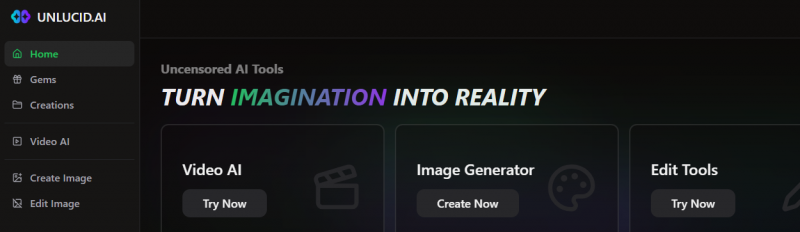
Unlucid AI: the editing-first “creative hub”
Unlucid AI positions itself as an approachable, imagination-first toolkit that combines text-to-image generation, AI photo editing, and simple animation in one place. Its appeal is that you do not need design skills: you upload or generate an image, then clean it up, restyle it, or add motion in a few clicks. Think of it as a lightweight, browser-based studio aimed at speed and simplicity rather than maximum fidelity.
Midjourney: the generation-first quality leader
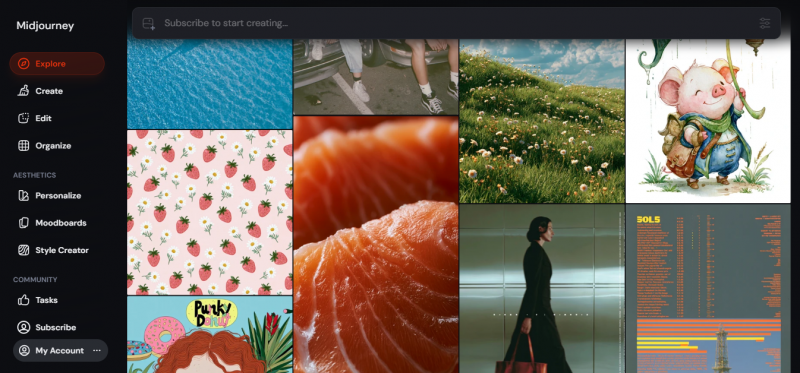
Midjourney is a specialist. It is widely regarded as the benchmark for raw image quality and artistic, cinematic output, with deep controls for prompt adherence, style, and character consistency. It is a subscription product used heavily by designers, illustrators, and studios who care more about how good the final image looks than about how simple the tool is or how little it costs.
The core trade-off Unlucid AI optimises for ease, breadth, and price. Midjourney optimises for quality, control, and consistency. Almost every difference below flows from that single split. |
Meet the contenders
Before the head-to-head, here is a closer look at what each tool actually is, who builds it, and how it behaves in everyday use.
Unlucid AI
Unlucid AI is a browser-based, all-in-one creative suite that pulls text-to-image generation, AI photo editing, and short-form animation into a single workspace. Rather than specialising in one task, it tries to cover the whole quick-creation loop: make an image, refine it, then set it in motion, all without juggling separate apps or installing anything.
In day-to-day use, the toolkit centres on a handful of core tools. The text-to-image generator turns a written prompt into a visual in seconds and supports a range of art styles. The AI photo editor handles the fixes most people actually reach for: removing unwanted objects, swapping or cleaning up backgrounds, adjusting colours and small details, restyling a picture into a different look, and upscaling it to a higher resolution. The image-to-video feature animates a still using a library of more than fifteen ready-made motion effects such as zooms, slides, and reveals, which is aimed squarely at social posts and short-form clips.
Access runs on a freemium credit system called “Gems”. You can claim a set of free Gems each day and spend them on generations and edits, then top up with Gem bundles when you need more capacity. The whole experience is built beginner-first, with a clean interface that assumes no design or prompting background. Unlucid AI also positions itself as having few content restrictions, which gives broad creative latitude but puts the responsibility on you to stay within the law and each platform’s terms. As a younger, fast-moving product, its features and limits can shift over time, and output quality varies with the prompt and the source image.
Unlucid AI at a glance
• Type: All-in-one AI image + video creative tool
• Core features: Text-to-image, AI photo editing, object & background removal, image-to-video effects (15+), upscaling, multiple art styles
• Pricing model: Freemium. Claim free “Gems” daily, buy Gem bundles for more usage
• Best suited to: Beginners, social media creators, and anyone who wants quick edits and animations without a learning curve
• Watch-outs: Output quality can vary, fewer enterprise/brand controls, and minimal content guardrails (use responsibly and legally)
Midjourney
Midjourney is a dedicated AI image generator built by the independent lab Midjourney, Inc., founded by David Holz, with no ties to Google or OpenAI. It started life as a Discord-only bot and now also runs as a standalone web app, and it is widely treated as the benchmark for aesthetic quality, especially for photorealistic and cinematic images.
Its real strength is control over how an image looks. Recent versions added Omni Reference for holding a character consistent across multiple images, alongside personalization profiles that let the model learn your aesthetic over time. It supports wide aspect ratios for panoramic and cinematic framing, and its higher tiers add a Relax mode for unlimited slower generations plus a Stealth mode for keeping work private. Generation speed is governed by “fast” GPU time, with extra hours available if you go past your plan’s allowance, and it can animate generated or uploaded images into short videos, with more video capacity on the upper plans.
Midjourney is subscription only, with four monthly tiers: Basic at $10, Standard at $30, Pro at $60, and Mega at $120, plus roughly a twenty percent discount for annual billing and no permanent free tier. The price of that quality is a steeper learning curve, comparatively limited in-app editing, text inside images that still trails some rivals, and “fast” generation time on lower plans that heavy users can burn through quickly. It fits designers, illustrators, marketers, and studios who treat image quality as the priority and can justify a recurring cost.
Midjourney at a glance
• Type: Dedicated AI image generator (with image-to-video)
• Core features: High-fidelity text-to-image, strong prompt control, personalization profiles, character consistency, wide aspect ratios, Relax mode for unlimited slower generations on higher tiers
• Pricing model: Subscription only. Basic $10, Standard $30, Pro $60, Mega $120 per month (about 20% off with annual billing); no permanent free tier
• Best suited to: Designers, artists, marketers, and studios that need premium, consistent visuals
• Watch-outs: No free tier, a real learning curve, limited built-in editing, and “fast hour” usage that can run out quickly on lower plans
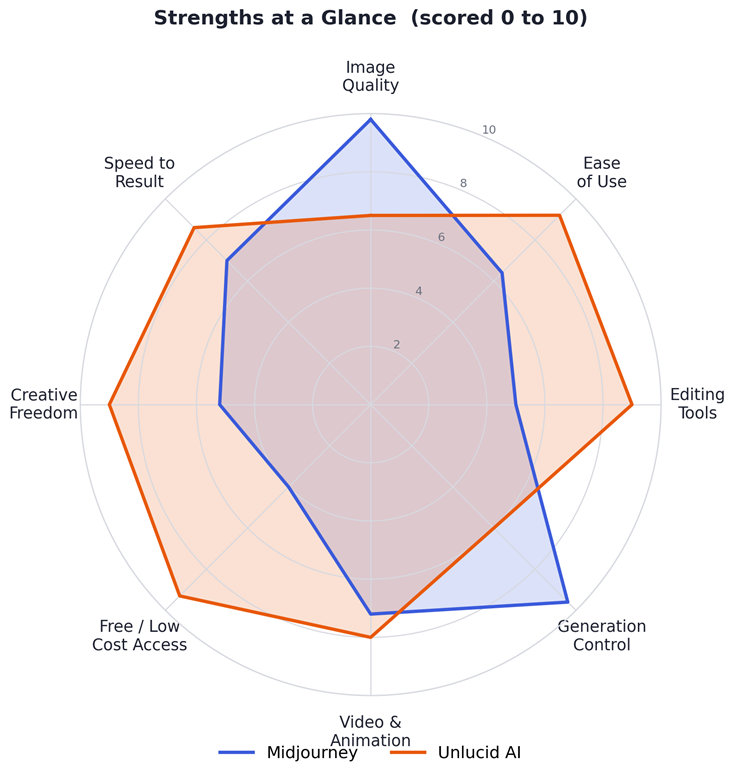
Figure 1. Strengths at a glance. Midjourney leads on quality and control; Unlucid AI leads on ease, editing, price and freedom.
Head to head: 8 decision factors
Here is how the two tools compare on the factors that actually drive a buying decision. Each one ends with a quick “winner” call.
Image quality & realism
This is Midjourney’s home turf. Its latest models are consistently rated among the best for photorealism, lighting, texture, and overall aesthetic polish, which is exactly why so many professionals tolerate its price and learning curve. Unlucid AI produces good, usable images and is more than enough for social posts, thumbnails, and quick concepts, but quality can vary by prompt and source image, and it does not match Midjourney’s top-end fidelity.
Winner: Midjourney
Ease of use & learning curve
Unlucid AI is designed so that a complete beginner can get a result on their first try: pick a tool, type or upload, click. Midjourney has improved with its web app, but it still rewards users who learn prompt structure, parameters, and settings. Early users have also been caught out by usage modes that burn through credits faster than expected. If “I just want it to work” matters most, Unlucid wins comfortably.
Winner: Unlucid AI
Editing power
Editing is where the tools diverge most. Unlucid AI is built for it: object removal, background swaps, colour and detail tweaks, restyling, and upscaling are core features. Midjourney’s in-app editing is comparatively limited; it is a generator first, and serious retouching usually moves to a dedicated editor like Photoshop or Adobe Firefly. For practical “fix this image” work, Unlucid is the natural fit.
Winner: Unlucid AI
Generation control & consistency
If you need the same character across multiple images, precise composition, or a repeatable signature style, Midjourney is far ahead. Features like personalization profiles and character-reference tools give it control that simpler tools cannot match. Unlucid AI offers basic generation that is great for one-off visuals, but it is not built for tightly controlled, consistent series.
Winner: Midjourney
Video & animation
Both can turn still images into short motion clips. Unlucid AI leans into this with a library of 15+ ready-made effects (zooms, reveals, slides) aimed at fast social content, and it is genuinely easy. Midjourney also animates generated or uploaded images, with higher-volume video options on its Pro and Mega tiers. For quick, effect-driven clips Unlucid edges it on simplicity; for premium-looking motion tied to premium stills, Midjourney is strong.
Winner: Unlucid AI (for quick clips)
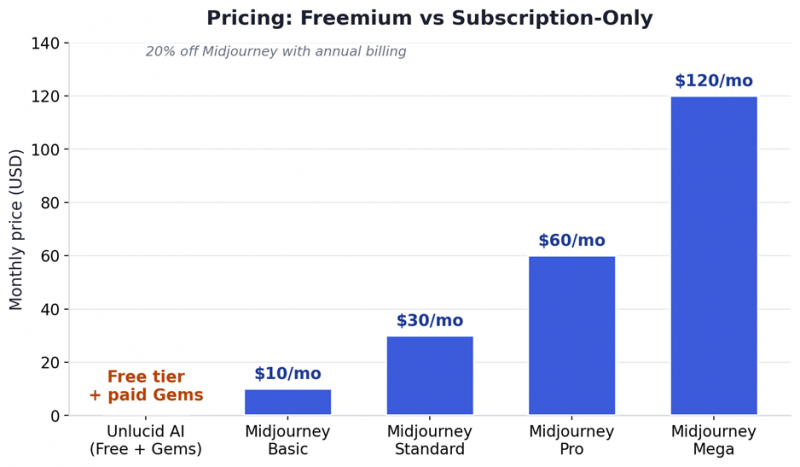
Figure 2. Pricing models compared. Unlucid AI starts free; Midjourney is subscription-only from $10 to $120/month.
Pricing & value
Unlucid AI’s freemium model lets you start for free with daily Gems and top up only when you need more, which is ideal for casual or occasional use. Midjourney has no permanent free tier: plans run from $10/month (Basic) to $120/month (Mega), with roughly 20% off for annual billing. You are paying for quality and volume, and on lower plans, heavy users can exhaust “fast” generation time and hit slower queues. For budget-first users, Unlucid wins; for professionals billing the cost to client work, Midjourney’s price is easy to justify.
Winner: Unlucid AI (on price)
Creative freedom & content safety
Unlucid AI markets itself as having few content restrictions, which gives broad creative latitude but puts responsibility on the user to stay within the law and platform terms. Midjourney applies stricter content moderation, which some find limiting but which also makes it safer for brand-facing and professional work. Neither approach is “better” in the abstract. It depends on your use case and your obligations. Whatever you create, follow applicable laws and each platform’s rules.
Winner: Depends on your needs
Speed to result
For a quick edit or a fast animated clip, Unlucid AI’s simplicity usually gets you to a shareable result faster. Midjourney can be quick too, but achieving a specific, polished outcome often involves iteration and prompt refinement. That is time well spent for quality, but still time. For rapid turnaround, Unlucid leads.
Winner: Unlucid AI
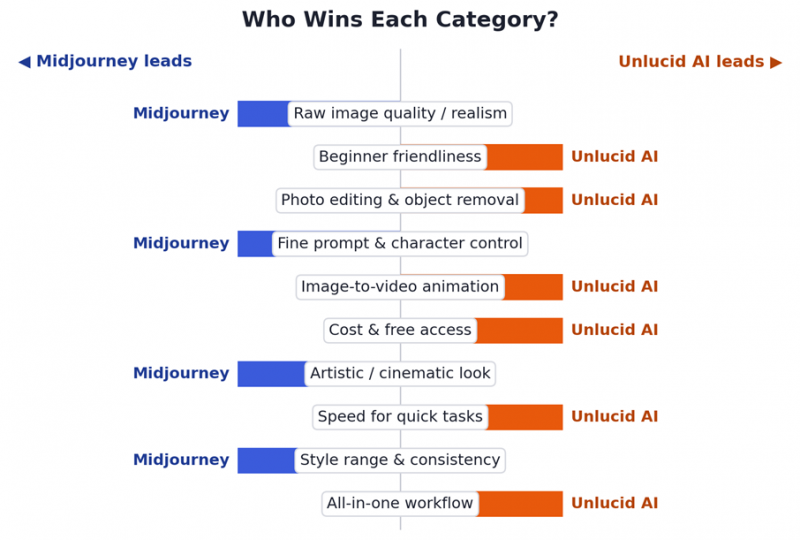
Figure 3. Category-by-category winners across ten common needs.
Feature-by-feature comparison
The full side-by-side, at a glance:
| Factor | Unlucid AI | Midjourney |
|---|---|---|
| Primary strength | Simple editing + animation | High-end image generation |
| Best for | Beginners, social creators | Designers, artists, studios |
| Image quality | Good, can vary | Best-in-class, consistent |
| Learning curve | Very low | Moderate |
| Photo editing | Yes (object/BG removal) | Limited |
| Image-to-video | Yes (15+ effects) | Yes |
| Prompt control | Basic | Advanced + personalization |
| Character consistency | Limited | Strong (Omni Reference) |
| Free option | Yes (daily free Gems) | No free tier |
| Starting paid price | Paid Gem bundles | $10 / month (Basic) |
| Content restrictions | Few (use responsibly) | Moderated |
Table 1. Unlucid AI vs Midjourney across eleven key factors.
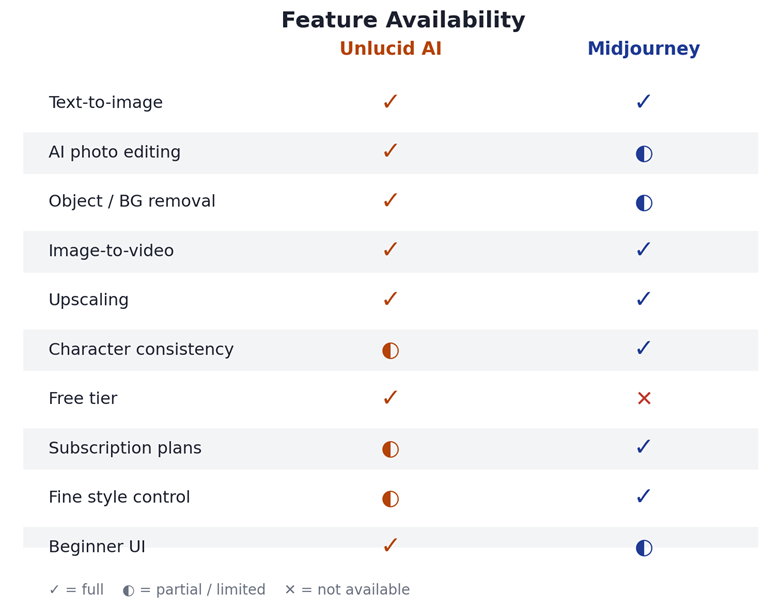
Figure 4. Feature availability. ✓ full · ◐ partial/limited · ✕ not available.
Which one should you choose?
Match the tool to who you are and what you make:
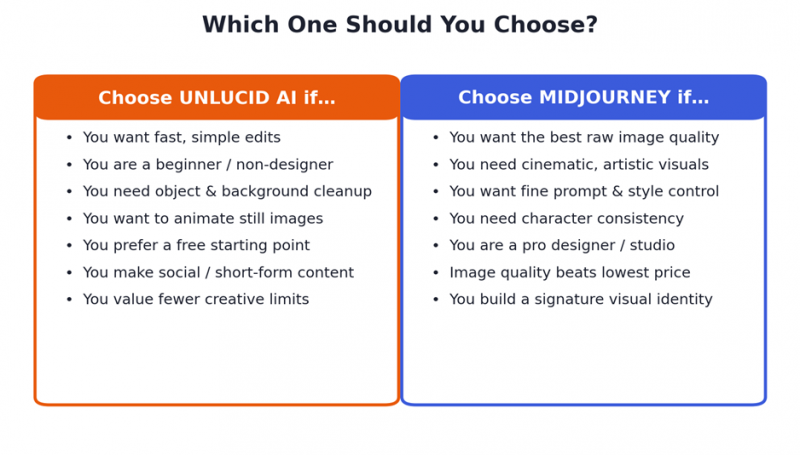
Figure 5. A quick decision guide by user type.
Pick Unlucid AI if you are…
• A beginner or non-designer who wants results without learning prompts
• A social media or short-form creator who needs fast edits and animated clips
• Someone who mainly needs to clean up photos: remove objects, swap backgrounds, restyle
• Cost-conscious and want to start free, paying only when you need more
Pick Midjourney if you are…
• A designer, illustrator, or marketer where image quality is non-negotiable
• Building a consistent character, brand look, or cinematic series
• Comfortable learning prompt craft to unlock fine-grained control
• Able to expense a monthly subscription against professional or client work
Can you use both? The hybrid workflow
The tools are complementary, and the smartest creators often use them together rather than picking a side. A common workflow:
1. Generate in Midjourney. Create the high-quality base image or character with the control and fidelity Midjourney is known for.
2. Edit & finish in Unlucid AI. Remove a stray object, swap the background, restyle, or upscale quickly without opening heavy software.
3. Animate for social. Add motion effects in Unlucid AI to turn the still into a scroll-stopping short clip.
This pairing gives you Midjourney’s quality at the start and Unlucid AI’s speed and simplicity at the finish, often for less total cost than forcing one tool to do everything.
Honest limitations
No tool is perfect. Knowing the weaknesses up front saves disappointment later.
Where Unlucid AI falls short
| Pros | Cons |
| ✓ Free to start with daily Gems | • Top-end quality trails Midjourney |
| ✓ Very easy for beginners | • Output can be inconsistent |
| ✓ Strong editing + object removal | • Few brand/enterprise controls |
| ✓ Built-in image-to-video effects | • Minimal content guardrails |
| ✓ All-in-one, no software install | • Possible queues at peak demand |
Where Midjourney falls short
| Pros | Cons |
| ✓ Best-in-class image quality | • No permanent free tier |
| ✓ Excellent prompt & style control | • Real learning curve |
| ✓ Strong character consistency | • Limited in-app editing |
| ✓ Great for cinematic, artistic work | • Text-in-image still imperfect |
| ✓ Relax mode = unlimited (higher tiers) | • Fast hours can run out on Basic |
Final verdict
Bottom line For most everyday creators, Unlucid AI is the easier, friendlier, and cheaper way to edit images and make quick animations. For anyone whose work lives or dies on image quality, Midjourney is the clear choice, and worth the subscription. Still unsure? Start free with Unlucid AI to cover daily editing, and add Midjourney only when you need premium, consistent, professional-grade generations. Used together, they cover almost every creative need. |
Post Comment
Share your thoughts about this article.
Be the first to post a comment!





