Type the same prompt into Unlucid AI and Leonardo AI on a Tuesday afternoon and the contrast is almost immediate. One returns a polished, slightly templated image with a friendly progress bar. The other opens a workspace that looks closer to a junior version of Photoshop, hands over a model picker, a strength slider, a seed field, and a real-time canvas. Same prompt. Two completely different philosophies of what an AI image generator is supposed to be.
That gap - between sandbox and studio - is the whole story of this comparison. The pages ahead break it down across the three areas that decide which tool actually earns a spot in a workflow: how lifelike the outputs are, how faithfully each platform follows a prompt, and how wide a stylistic range each one can credibly cover. Pricing, real-world quirks, and a clean decision guide follow at the end.
“Leonardo AI is the better tool. Unlucid AI is the easier one. The right pick depends on which problem matters more on a given project.”
- Bottom line, in one sentence
How These Two Tools Got Here
Leonardo AI launched in late 2022 as a Stable-Diffusion-based alternative to Midjourney, found rapid traction with game developers, and was acquired by Canva in July 2024. The founding team and CEO JJ Fiasson stayed on, and the platform has continued shipping aggressively since the acquisition: a proprietary flagship model called Phoenix, the Lucid Realism and Lucid Origin lineup, the Real-time Canvas, Motion 2.0 video, 3D texture generation, and a Creative Engine API that landed in early 2026. Independent estimates put its registered user base somewhere between 19 and 29 million.
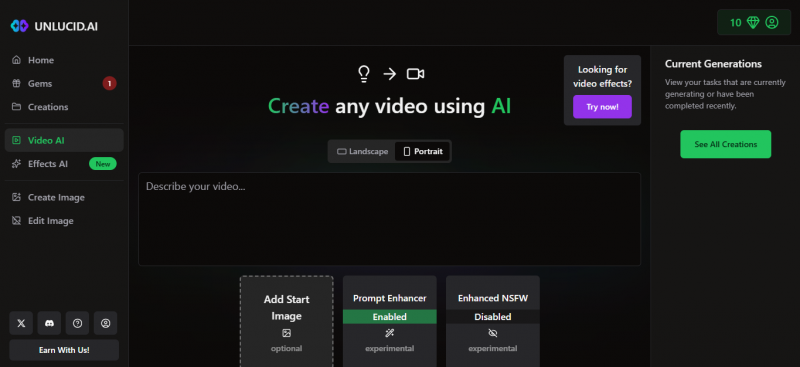
Unlucid AI is a much younger, much smaller story. It positions itself as an “uncensored AI for dreamers” and bundles text-to-image generation, light photo editing, and a library of 15+ animation effects under a single browser interface. The platform does not publicly disclose the underlying models powering its generations, which is unusual for serious creative tooling and a recurring point of caution in independent reviews. It runs on a Gem-based freemium model, with a small daily allowance for free users and Gem packs starting at roughly $29.99 for heavier use.
In other words: one tool entered the market trying to compete with Midjourney on artistic precision and has spent four years deepening that promise. The other entered targeting a casual audience that wants fewer guardrails and faster fun, and has stayed close to that brief.
Same Prompt, Two Worlds
Drop a slightly demanding prompt into both platforms - something with a specific subject, a stated camera angle, a defined lighting direction, and one piece of in-image text - and the differences surface within the first generation.
❖ The reference prompt “A young woman with freckles in a thick wool coat and beanie, lit by neon signs in purple and blue, photographed at 35mm with shallow depth of field. A small handwritten sign in the foreground reads ‘OPEN LATE.’” |
This is a real reference prompt that has been used by independent reviewers to stress-test the same combination of skin detail, colored lighting, depth of field, and in-image typography. Here is roughly what each platform produces.
What Unlucid AI returns A pleasant, slightly soft portrait that gets the broad strokes right - freckles, neon palette, woolly textures - but tends to over-smooth skin, fudge the depth-of-field separation between foreground and background, and either skip the “OPEN LATE” sign entirely or render it as garbled lettering. The result feels like a stylized stock illustration rather than a real photograph. | What Leonardo AI returns A noticeably more photographic image: realistic skin pores, accurate neon falloff on cheekbones, a clean shallow-DOF separation, and - with Phoenix selected - the “OPEN LATE” sign actually rendered as legible text on the first or second generation. Reviewers consistently report Phoenix nailing in-image typography that older models like Midjourney v6 still mangle. |
None of this is a knock on Unlucid AI - the output is fine for what it is. The point is that the two tools are aiming at different finish lines.
The Realism Gap
Photorealism is where the gulf between the two platforms is widest, and it is also the easiest category to verify because every reviewer tests it. Three observations come up consistently across independent 2026 reviews.
1. Texture fidelity. Leonardo's Phoenix and Lucid Realism models render visible pores, fine fabric weave, and natural skin imperfections. Unlucid AI tends toward an airbrushed look that signals “AI image” at a glance.
2. Anatomical accuracy. Phoenix has largely solved the “spooky hands” problem that haunted earlier diffusion models. Unlucid AI still misfires on multi-finger interactions, sleeve-and-wrist boundaries, and complex poses.
3. Light behavior. Cinematic lighting - rim light, golden hour, neon falloff, hard side light - reads as accurate physics on Leonardo. On Unlucid AI it often reads as a filter applied evenly across the frame.
The reason for the gap is structural rather than tactical. Leonardo's realism work sits on top of a flagship model the company built in-house, plus an Alchemy post-processing pipeline that adds detail and contrast. Unlucid AI does not publish what its models are or how they are tuned, which makes it harder to predict when realism will hold up and when it will not.
How Well Each One Actually Listens
“Prompt control” is one of those phrases that sounds vague until a specific prompt blows up. The clearest way to compare is to look at three classic stress tests - ones that have been run on both platforms by independent reviewers - and see which prompts each tool hears, and which it ignores.
Test 1 · The color-binding problem
“A cat wearing a red hat, blue boots, holding a green apple, standing on a purple rug.” Models that handle prompt control well will keep each color attached to the right object. Weaker models swap colors around - a purple hat, red boots, blue apple. Phoenix on Leonardo separates these concepts cleanly. Unlucid AI tends to drift, especially on the third or fourth attribute, and even seed-locked regenerations can produce noticeable drift.
Test 2 · In-image typography
“A vintage travel poster for ‘MARS COLONY’ with the tagline ‘TICKETS ON SALE NOW’ in art deco font.” Almost every general-purpose AI image model spelled this incorrectly until 2025. Phoenix gets every letter right on the first try, which is one of the headline reasons reviewers describe it as a meaningful upgrade. Unlucid AI either skips the text or produces letterforms that approximate words rather than spell them.
Test 3 · The long descriptive prompt
Multi-clause prompts with camera angle, lighting setup, color palette, mood, and subject description in the same sentence are where most generators drop a few constraints. Phoenix maintains coherence across long descriptions, and Leonardo's Real-time Canvas helps debug where the prompt and the image disagree, since the image updates as words are typed. Unlucid AI handles the first one or two clauses well and lets the rest decay into approximation.
Beyond raw adherence, Leonardo also exposes the controls that make precision possible - ControlNet-style pose and depth guidance, an Edit-with-AI inline refinement tool, and custom model training that can lock a specific face or art style into 50+ generations. None of these have direct equivalents on Unlucid AI.
A Tour of the Style Library
Style range is the third axis on which these tools diverge sharply. Unlucid AI offers exactly five baked-in styles: Realistic, Pencil, Cartoon, Anime, and 3D. Each works fine inside its own lane. Crossing lanes is harder. Mixing two styles, attaching a reference image to influence aesthetic without copying composition, or training on a private style library are not part of the toolkit.
Leonardo's library is a different size class entirely. Beyond Phoenix and Lucid Realism for photographic work, it includes specialists for almost every common creative brief:
• DreamShaper for fantasy, painterly, and stylized illustration where mood matters more than realism.
• Anime Pastel Dream for clean Japanese-animation looks with consistent character design.
• Leonardo Diffusion XL as a versatile general-commercial model that handles lifestyle and product imagery.
• Kino XL for cinematic, film-grade compositions with strong directional lighting.
• A long tail of community fine-tunes for niches such as architectural visualization, isometric game assets, fashion editorial, and historical art styles.
On top of the model picker, Leonardo layers Elements (style modifiers that can be dialed up or down on a slider), Image-to-Image with adjustable strength, and the option to train custom LoRA models on as few as 10–20 reference images. The practical effect is that a creator with a defined visual identity can replicate it across hundreds of generations rather than fighting the model on every prompt.
“Five style presets are enough to play. They are not enough to build a brand.”
- Reviewer summary on Unlucid AI's style range
Where the Numbers Land
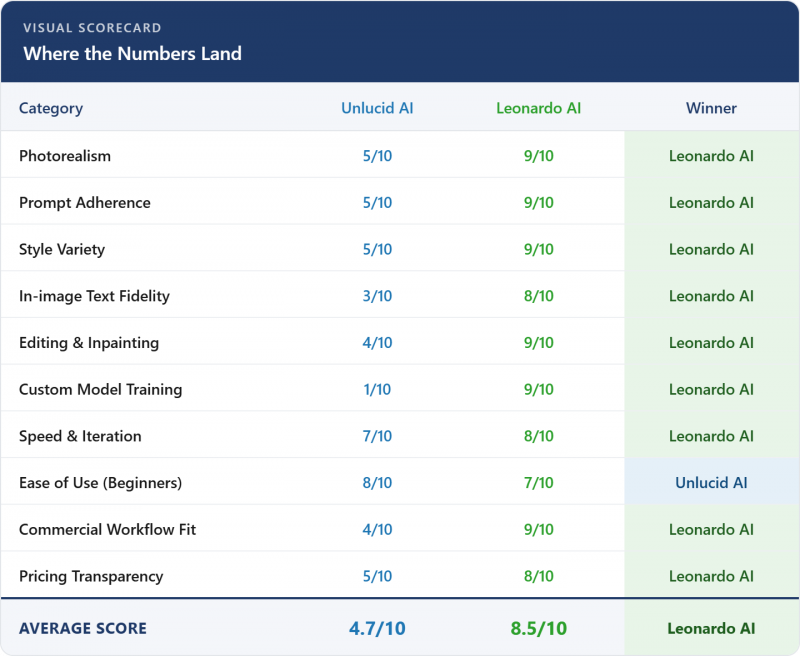
Translating the categories into 0–10 ratings makes the trade-offs easier to see in one glance. Scores below synthesize independent third-party reviews, hands-on tests reported across late 2025 and early 2026, and the platforms’ own published documentation.
What Each Platform Actually Costs to Use
List prices are misleading on their own. The number that matters is what each tool actually costs once a real workload runs through it. The math below takes four common usage profiles and traces what each platform charges in practice.
| Scenario | Volume | Unlucid AI | Leonardo AI |
|---|---|---|---|
| Casual hobbyist | ~30 images / month | Free Gems usually cover it | Comfortably inside the 150-token daily free tier |
| Side-project creator | ~300 images / month | 1 Gem pack (~$29.99) often needed | Apprentice plan ($10/mo) is sufficient |
| Small business / brand | ~1,500 images / month | Multiple Gem packs add up fast | Artisan plan ($24/mo) handles this easily |
| Studio / agency | ~5,000+ images / month | Pricing becomes hard to predict | Maestro plan ($48/mo) plus Relaxed Generation |
Two patterns emerge from the math. First, Leonardo's free tier is genuinely large - 50 to 75 standard images a day on its in-house models. That is more than most casual creators will ever need, which makes the platform effectively free for many users. Second, Unlucid AI's Gem-based pricing rewards light usage but punishes anyone whose workload grows past a few hundred images a month. A reviewer summary captured the dynamic well: great for testing, but anyone planning to use it daily would be better off with a proper subscription elsewhere.
Where Each Tool Breaks
Every AI image generator has a failure mode. Pretending otherwise produces sales copy, not a useful comparison. Both platforms have honest limitations worth naming before subscribing or recommending.
Where Unlucid AI gets uncomfortable
Three concerns surface across user reviews. The platform does not publicly disclose which underlying models it uses, so its behavior is harder to predict than competitors that publish their model lineage. Privacy documentation is thin: it is not always clear how long uploads are stored, whether they are used for model training, or who owns generated outputs. And several reviewers in 2025–2026 reported region-based access blocks in some markets without transparent reasoning. Combined, these are not deal-breakers for casual use, but they are real friction for anyone considering the platform for client work.
Where Leonardo AI gets frustrating
Leonardo's friction looks different. The interface depth that makes it powerful also makes it intimidating for first-time users, with reviewers regularly describing it as a cockpit rather than a chat window. The token system is opaque on premium third-party models, where per-image cost can vary in ways that make budgeting tricky. And the content filters have generated their own sustained complaint in user communities, with paid users occasionally blocked on otherwise mundane prompts. None of these break the platform, but each is worth knowing in advance.
Which One to Pick, by Goal
Most comparisons land on “it depends.” That answer is true and useless. The grid below replaces it with concrete recommendations - read each row as an if/then rule and skip the rest.
| If the goal is... | ...the better pick is | |
|---|---|---|
| A photoreal portrait that holds up at print resolution | → | Leonardo AI (Phoenix or Lucid Realism) |
| A quick meme or shareable visual in under a minute | → | Unlucid AI |
| A poster with a legible headline baked into the image | → | Leonardo AI (Phoenix) |
| An animated effect on a still photo for a reel | → | Unlucid AI |
| A consistent character across 50+ scenes | → | Leonardo AI (custom-trained model) |
| A first-time AI experiment with zero learning curve | → | Unlucid AI |
| 3D textures for a Unity or Unreal scene | → | Leonardo AI (3D Texture Generation) |
| Brand assets that need clear commercial licensing | → | Leonardo AI (paid plan) |
| Programmatic image generation inside a custom app | → | Leonardo AI (Creative Engine API) |
| A casual sandbox for trying “uncensored” creative ideas | → | Unlucid AI |
The pattern is consistent: anything that touches commercial output, brand consistency, or precise control points to Leonardo AI. Anything that prizes speed, low friction, and casual creative play points to Unlucid AI.
So, Which One Wins?
If the question is which of these two tools is the better image generator in 2026, Leonardo AI wins on the merits. It produces more lifelike images, follows prompts more accurately, supports a wider range of styles, exposes professional-grade controls, ships with a generous free tier, and grants clean commercial rights to paid users. Most reviews from late 2025 and early 2026 reach the same conclusion.
If the question is which one is friendlier on a Tuesday night when the goal is to type a silly prompt and watch something fun happen, Unlucid AI is genuinely good at that. Its interface gets out of the way, the daily Gems make experimentation cost nothing, and the built-in animation effects make it easy to share. Treated as a sandbox - not as a production tool - it does its job well.
Most serious creators will end up using Leonardo AI as their primary platform. A meaningful number will keep Unlucid AI bookmarked for the kind of quick, low-stakes generation it does best. That is not a contradiction. It is just two tools with two different purposes, sitting next to each other in the same tab bar.
What are the strongest alternatives to consider alongside these two?
Midjourney remains the benchmark for purely artistic photorealistic portraits. Ideogram is the specialist for graphics with heavy in-image text. Stable Diffusion is the most flexible option for anyone willing to run models locally. Adobe Firefly is the choice when commercially licensed training data is a hard requirement.
Post Comment
Share your thoughts about this article.
Be the first to post a comment!





