One is a free, zero-signup browser tool that punches far above its weight. The other is the open-source engine that quietly powers half the internet's AI art, including Perchance itself. Here is which one you should actually use.
Short answer: they are not really competitors. They are two doors into the same technology. Perchance is a free web front-end built on top of open-source Stable Diffusion family models, while Stable Diffusion is the raw model you download and run yourself. Your choice comes down to convenience versus control.
PICK PERCHANCE IF You want images in seconds, for free, with no signup, no installation, and no GPU. It is ideal for memes, character concepts, thumbnails, and casual art. | PICK STABLE DIFFUSION IF You want maximum quality, total privacy, deep customization through LoRAs and ControlNet, and unlimited local generation, and you own a capable NVIDIA GPU. |
First, the plot twist: Perchance runs on Stable Diffusion
Most “X vs Y” comparisons pit two rival products against each other. This one is different. Perchance's image generators are community-built pages that route your prompt to open-source models, mostly Stable Diffusion and SDXL variants, running behind an extremely simple web interface.
So the real question is not “which model is better.” It is this: do you want someone else to host Stable Diffusion for you (Perchance), or do you want to run it yourself (local Stable Diffusion)? Everything below flows from that single trade-off.
Perchance AI: the zero-friction option
FREE · BROWSER-BASED · NO SIGNUP · AD-SUPPORTED · 5 TO 10 SECONDS PER IMAGE
What it is and how it works
Perchance began life as a general-purpose random text generator platform at perchance.org, a place where anyone could build small generator pages for names, stories, and game content. Its AI image generators grew out of that same community system. Created around templates by developer David Gottesmann and extended by the community, the image tools accept a plain text prompt, apply an art style of your choice, and return finished images without ever asking you to create an account.
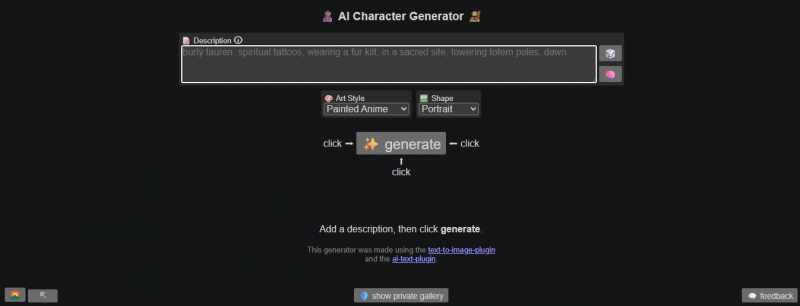
Everything about the experience is built around removing friction. There is no login, no email confirmation, no credit meter counting down, no watermark stamped on your downloads, and no premium tier waiting behind an upgrade button. The whole platform is supported by lightweight banner ads. You visit a URL, type what you want to see, and images appear in roughly 5 to 10 seconds. Because much of the processing happens client-side in your browser, there are no queue times even during busy periods, which makes it one of the fastest tools available for rapid idea iteration.
The platform offers more than 60 art styles, including Painted Anime, Cinematic, Digital Painting, Concept Art, fantasy illustration, and sketch styles. Over time the community has shipped several distinct generator versions. The standard generator is the everyday workhorse. The Professional version is tuned for cleaner, more polished output with better prompt adherence, useful for mockups and concept presentations. The v2 and v3 releases brought major speed gains, with v3 cutting generation time by more than a third compared to v2 while reducing visual artifacts. Finally, the Realistic mode swaps in different model weights to attempt photorealism, and while it noticeably improves faces and environments over the standard mode, it still trails dedicated photorealistic tools. Perchance also lets users adjust content safety settings, with options to relax filters for a fixed time window after an age confirmation, which is unusually permissive compared to mainstream commercial generators.
Strengths in detail
The headline strength is that Perchance is genuinely free and unlimited. Reviewers who set out specifically to find the hidden catch, the credit wall, or the watermark report that there simply is not one. For hobbyists, students, and anyone exploring AI art for the first time, that removes every barrier at once. The zero-signup design also means it works instantly on any device with a browser, including phones, school computers, and older laptops that could never run a local model.
Speed is the second pillar. At 5 to 10 seconds per image with no queue, it is dramatically faster than most cloud tools, which commonly take 20 to 60 seconds per generation. That speed changes how you work: you can fire off ten variations of an idea in the time other tools take to produce one, which is why reviewers consistently recommend it for brainstorming, blog thumbnails, social media visuals, character ideas, and mood boards. Its stylized output, especially anime and illustration work, is widely described as the best you can get without paying, and the huge style library means even vague prompts land somewhere interesting. Community benchmarks place its overall quality around 7.8 out of 10, a genuinely respectable score for a tool that costs nothing.
Weaknesses in detail
The weaknesses are the mirror image of the strengths. Photorealism is the clearest gap: faces, skin, hands, and realistic lighting lag behind premium tools and behind a well-tuned local Stable Diffusion setup, even in Realistic mode. Consistency is the second major complaint. Because you have no seed control or character-locking tools, the same prompt produces a visibly different character every time you run it, which makes Perchance nearly useless for comics, storyboards, or any project that needs the same face twice.
There is also almost no post-generation workflow. Output resolution generally sits between 512 and 1024 pixels, there is no built-in inpainting or upscaling pipeline, and the platform is anonymous by design, so there is no project structure, no generation history, no team sharing, and no asset reuse. If you close the tab without downloading, your images are gone. Output quality also varies run to run, with some renders sharp and others noticeably fuzzy. Finally, and most importantly for anyone doing paid work, the commercial licensing situation is murky. Prompts are routed through community-authored generator pages wrapping various open-source models, and there is no clear, unified commercial license, which most reviewers flag as a real risk for client or business use.
Stable Diffusion: the open-source powerhouse
OPEN SOURCE · RUNS LOCALLY · SD 1.5 / SDXL / SD 3.5 · NVIDIA GPU WITH 8 GB+ VRAM RECOMMENDED
What it is and how it works
Stable Diffusion is a latent diffusion model released by Stability AI in August 2022, and it changed the industry by doing something radical: giving the model away. It converts text prompts into images through a series of denoising steps in a compressed latent space, and unlike closed, API-only rivals such as Midjourney or DALL-E, its full model weights are published openly on Hugging Face. Anyone can download the checkpoint files, run them offline on their own GPU, modify them, fine-tune them on custom datasets, and build products on top of them. Since 2022 Stability AI has shipped successive model families, from the lightweight SD 1.5 through SDXL to the current SD 3 and SD 3.5 generation, with SD 3.5 Large weighing in at about 8.1 billion parameters.

Because the model itself is just a set of weights, you interact with it through a separate interface, and an entire ecosystem of them has grown up. AUTOMATIC1111 is the classic full-featured web UI. ComfyUI is a node-based workflow builder favored by power users for complex multi-step pipelines. Forge is a faster, actively maintained fork built with modern models and memory efficiency in mind, and Fooocus offers a simplified, Midjourney-like experience for people who want good defaults without tinkering. Around these interfaces sits Civitai, the community hub hosting thousands of fine-tuned checkpoints, LoRAs (small add-on models that teach a specific style or character), and embeddings, plus tools like ControlNet that give you precise control over pose, composition, and depth. If you would rather not install anything, Stability AI also offers hosted access through DreamStudio and an API priced at roughly 1 to 3 cents per image.
Hardware is the entry fee. For practical local use in 2026 you want an NVIDIA GPU with at least 8 GB of VRAM for SDXL-class models, with 12 GB considered the comfortable floor. The older SD 1.5 family runs on as little as 4 GB with low-VRAM flags, while SD 3.5 Large wants around 11 GB even with NVIDIA's optimized FP8 build. Setup involves installing a specific Python version (the classic AUTOMATIC1111 interface famously requires Python 3.10.x exactly, since newer versions break its dependencies), configuring GPU drivers, and downloading multi-gigabyte model checkpoints.
Strengths in detail
When properly configured, local Stable Diffusion produces the highest quality output of any free tool and rivals paid frontier services. Community benchmarks place a well-tuned SD 3.5 local setup around 9.5 out of 10, ahead of most commercial generators. More importantly, quality is only the beginning. The customization depth is unmatched anywhere in the industry: you can swap checkpoints to completely change the model's artistic personality, stack LoRAs to lock in a specific character or style, use ControlNet to dictate exact poses and compositions, set seeds to reproduce results precisely, and even fine-tune the model on your own photos or artwork.
Local execution brings two more advantages no cloud tool can match. First, cost: after the one-time hardware investment, every generation is free, forever, with no credits, subscriptions, or rate limits, which makes it the only serious option for high-volume work. Second, privacy and control: your prompts and images never leave your machine, there is no remote content classifier making judgment calls about your legitimate creative work, and no company can change the rules underneath you overnight. The licensing story is also far clearer than Perchance's, since each model publishes explicit open license terms you can actually read, which matters enormously for commercial projects. And because the ecosystem is open, innovation is constant, with the community shipping new models, workflows, and tools every month.
Weaknesses in detail
Everything above costs effort. The learning curve is genuinely steep, and reviewers consistently describe hours of setup, dependency troubleshooting, and experimentation before producing consistently good results. Out of the box, default output can be mediocre until you learn model selection, sampler settings, and prompting technique, which is why first impressions often undersell what the tool can do. There is no official, polished consumer interface; you depend on third-party community tools, each with its own quirks and update cycles.
The hardware requirement is a hard gate. A suitable NVIDIA GPU costs roughly 300 to 1,500 dollars or more, Mac and AMD paths exist but carry extra friction, and if your machine cannot meet the bar, the local option simply is not available to you. Finally, there is organizational risk: Stability AI, the company behind the model, has faced well-publicized financial instability, which raises fair questions about the pace of future flagship releases, even though the open weights already in the community can never be taken back.
Head-to-head scorecard
| Perchance AI | Stable Diffusion (local) | |
|---|---|---|
| PRICE | Free, unlimited, ad-supported [TIE] | Free model; GPU costs $300+ up front [TIE] |
| SETUP | None, just open a URL [WINNER] | Python, drivers, model downloads, hours of tinkering |
| HARDWARE | Any device with a browser [WINNER] | NVIDIA GPU, 8 GB+ VRAM (12 GB comfortable) |
| SPEED | 5 to 10 seconds, no queue [WINNER] | Varies with GPU; fast on strong cards |
| IMAGE QUALITY | About 7.8/10; good stylized art, weak realism | About 9.5/10 when well configured [WINNER] |
| CONTROL | Prompt and style picker only | LoRAs, ControlNet, fine-tuning, custom checkpoints [WINNER] |
| CONSISTENCY | Same prompt gives different results each run | Seeds, LoRAs and workflows make characters repeatable [WINNER] |
| PRIVACY | Anonymous by design, but web-hosted | Fully on-device; nothing leaves your machine [WINNER] |
| COMMERCIAL USE | License clarity is murky | Clear open licenses (check each model) [WINNER] |
| BEST FOR | Memes, concepts, thumbnails, casual fun | Professional, high-volume, or private work |
Quality figures are community benchmark estimates. Your results depend on prompts, models, and settings. Shaded cells mark the winner of each row.
So, which should you use?
USE PERCHANCE AI IF You want images right now, free, with zero setup. You do not own a gaming-class GPU and do not plan to buy one. Your work is memes, blog thumbnails, character ideas, mood boards, or casual experimentation, and you can live with the same character looking different on every run. You are new to AI art and want a pressure-free place to learn prompting. | USE STABLE DIFFUSION IF You need top-tier quality, realism, or fine detail, and you want repeatable characters with precise composition control. You generate at volume and refuse per-image costs. Privacy matters to you and everything must stay on your machine. You do commercial work and need licensing terms you can actually read and rely on. |
THE PRAGMATIC PATH MOST PEOPLE SHOULD TAKE Start on Perchance today. It costs nothing and teaches you prompting. The day you hit its ceiling, whether that is fuzzy realism, inconsistent characters, or the missing editing tools, you will know exactly why local Stable Diffusion is worth the setup effort. And you will already speak its language, because you have been using its models all along. |
The bottom line
Perchance AI is the best free on-ramp to AI image generation in 2026. It is instant, unlimited, and genuinely fun, as long as you accept that it is built for casual creation rather than production work.
Stable Diffusion is the destination. It is the most powerful, private, and customizable image tool you can own, provided you bring the hardware and the patience. And since Perchance already runs on Stable Diffusion's models, moving between them is not switching sides. It is just growing up through the same family tree.
Post Comment
Share your thoughts about this article.
Be the first to post a comment!





