Two names keep coming up whenever someone goes looking for an AI assistant to handle their notes, and the funny thing is that they barely overlap. NoteGPT wants to turn long videos, dense PDFs, and rambling lectures into something you can actually study. Notion AI lives inside a full workspace and helps you write, organize, and pull answers out of everything your team has already saved.
So they get pitted against each other a lot. The honest answer to “which one is better” depends almost entirely on what you are trying to get done. Summarizing a three hour tutorial is a completely different job from drafting a project brief and keeping a team wiki tidy. Below is where each tool shines, where each one comes up short, and the kind of person who walks away happy with each.
The short version Choose NoteGPT if most of your day is spent consuming content: videos, research papers, recorded calls, online courses. Choose Notion AI if your notes already sit inside a bigger system of docs, tasks, and shared knowledge and you want an assistant that writes and searches across all of it. Plenty of people run both, and that is a perfectly sensible setup. |
What NoteGPT is built for
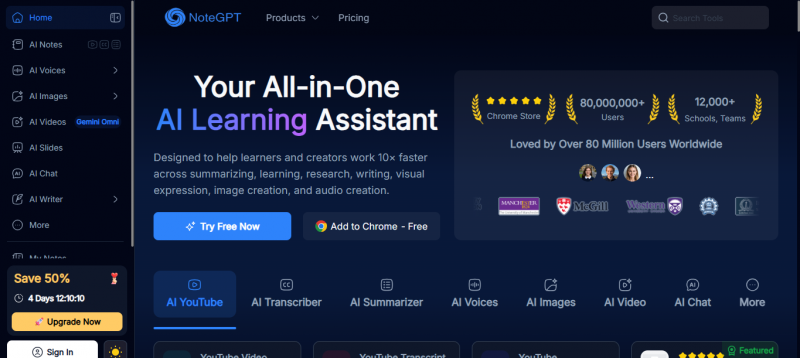
NoteGPT is a learning tool first and a note app second. Drop in a YouTube link, a PDF, a podcast, or a slide deck, and it hands back a structured summary, a full transcript, and notes you can edit. The simple idea behind How NoteGPT AI Works is that it turns long learning material into smaller, usable study formats without forcing you to go through everything manually. From there, it can spin up flashcards, build a mind map, or write quiz questions so you can test yourself.
The whole appeal is speed. Instead of scrubbing through a long video hunting for the one section you need, you read the summary, jump to the timestamp, and move on. Students cramming for exams, researchers skimming a stack of papers, and anyone who watches lectures at 2x speed tend to take to it quickly.
What it is not is a place to run your entire working life. There is no real database, no task management, and collaboration stays light. It does one category of work, and it does that category well.
What Notion AI is built for
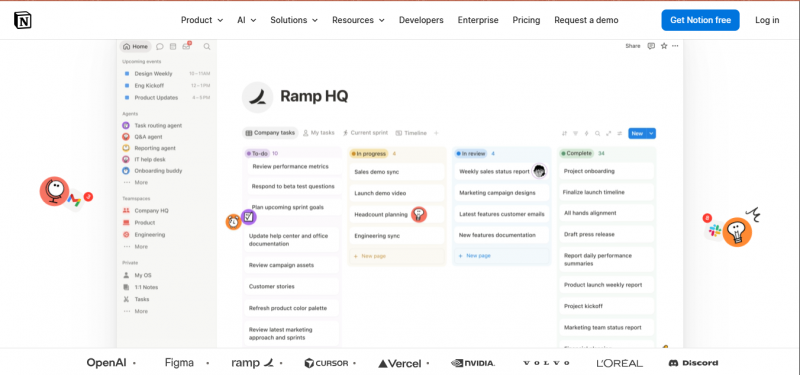
Notion AI tells the opposite story. It is not a product you sign up for on its own. It is an intelligence layer baked into Notion, the workspace app that teams already use for docs, wikis, project trackers, and databases.
Inside that environment the AI can draft and rewrite text, fix tone, translate, condense a long page, and fill in database fields on its own. The feature people rave about most is workspace search. You ask a question in plain language and it pulls an answer from across your pages, and on some plans, from connected tools like Slack and Google Drive too.
The catch is simple. You only get the full payoff if you already work in Notion. If you do, the AI feels like a natural extension of a tool you trust. If you do not, adopting it means adopting a whole workspace, which is a far bigger commitment than installing a summarizer.
Head to head, category by category
This is the part that actually settles the argument. Rather than crown a single winner, it helps to look at the jobs people hire these tools to do.
Capturing and summarizing content
This is the clearest split of the whole comparison. NoteGPT was built around it. Feed it a video or a PDF and get back a clean, timestamped summary, and it handles long media better than almost anything bundled into a general productivity app. Notion AI can summarize a page you have already written or pasted, which is handy, but it does not pull a transcript from a YouTube link or chew through an hour of audio the way NoteGPT does. For raw content digestion, NoteGPT is the stronger pick by a wide margin.
Writing and editing
Flip the comparison and Notion AI takes the lead. It is designed to sit right next to your cursor while you write, suggesting phrasing, tightening paragraphs, shifting tone, and generating first drafts inside a document you control. Writers, marketers, and anyone producing original text get more out of it. NoteGPT can generate notes and answer questions about your source material, but it is not really an everyday writing companion. Its output is shaped around the content you give it, not around helping you craft something new from a blank page.
Organizing your knowledge
Notion takes this one without much of a contest, because organization is the entire point of the platform. Nested pages, linked databases, tags, filtered views, and templates let you build a system as simple or as elaborate as you like. NoteGPT keeps your summaries and notes in folders, which is fine for a personal study library, but it is not trying to be the backbone of a knowledge base. If structure matters to you, the gap here is large.
Working with a team
Same result. Notion was made for collaboration: shared pages, comments, permissions, live editing, and a single source of truth a whole company can lean on. The AI then works on top of that shared knowledge. NoteGPT is mostly a solo experience. You can export and share what it produces, but it is not where teams plan and coordinate. A solo user will not miss the difference. A team absolutely will.
Connecting to other tools
Notion reaches further. Beyond a large library of integrations, its AI can search connected apps so answers come from more than just your Notion pages. NoteGPT focuses on input sources instead: videos, files, web pages, audio, plus a browser extension for grabbing content as you go. Two different philosophies are at work here. NoteGPT pulls content in. Notion plugs into the tools you already run.
Getting started
Ease of use favors NoteGPT. Paste a link, get a summary, done. There is almost nothing to learn. Notion is more capable and, predictably, asks more of you up front. A blank workspace can feel intimidating, and getting comfortable takes time. The reward is a system that grows with you, but the first hour is steeper.
The capability picture at a glance
Scores below are a hands on judgment of each tool across six common jobs, on a ten point scale. The shapes tell the story faster than any paragraph: the two tools cover almost opposite ground.
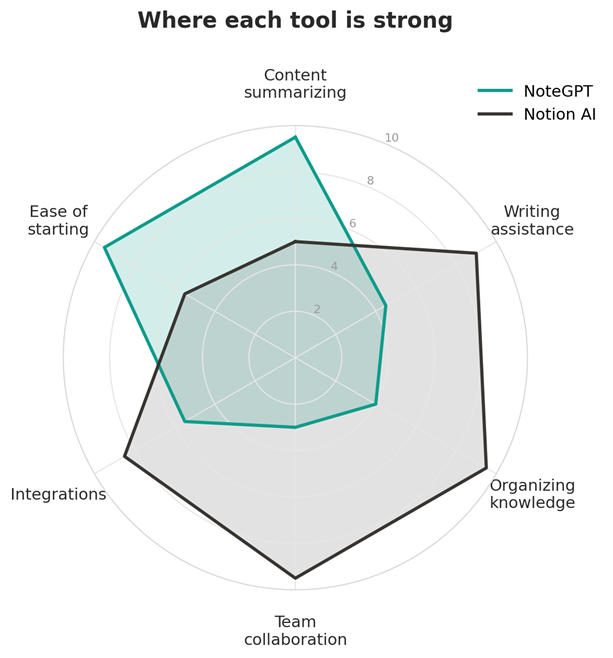
Figure 1. Relative strengths across six common tasks (higher is stronger).
Another way to read the same idea is task by task. Bars to the right lean toward NoteGPT, bars to the left lean toward Notion AI, and the longer the bar, the stronger the fit.
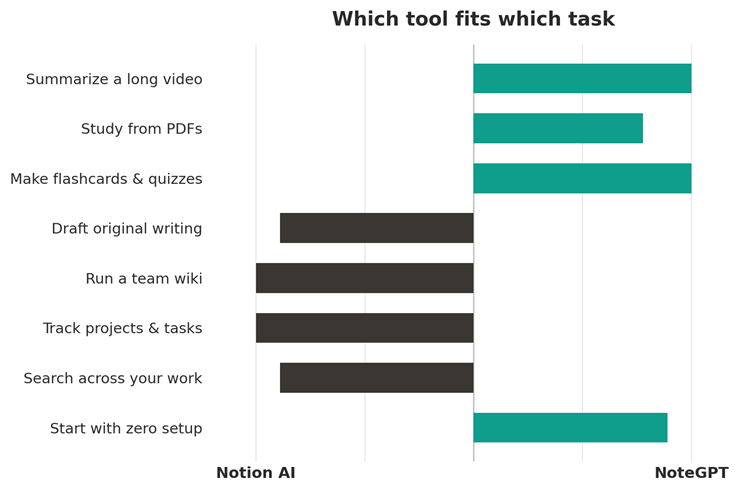
Figure 2. Which tool leans toward which job.
Full feature comparison
If you want the whole thing in one view, here it is.
| Category | NoteGPT | Notion AI |
|---|---|---|
| Main purpose | Summarize and study content | Write and organize in a workspace |
| Best suited for | Students, researchers, learners | Teams, writers, knowledge workers |
| Video and audio summaries | Yes, core feature | No |
| PDF and doc summaries | Yes | Yes, for pages inside Notion |
| Flashcards and quizzes | Yes | No |
| Mind maps | Yes | Not natively |
| Writing assistant | Limited | Strong |
| Databases and trackers | No | Yes |
| Real-time collaboration | Limited | Yes |
| Workspace-wide search | No | Yes |
| Browser extension | Yes | Limited |
| Learning curve | Very easy | Moderate to steep |
| Standalone app | Yes | Only inside Notion |
A quick word on pricing
Both tools offer a free tier, and both keep the better features behind a paywall. NoteGPT runs on a credit system on its free plan, then sells monthly tiers that lift those limits. Notion AI is now folded into Notion’s paid Business plan rather than sold as a separate add on, which means you are paying for the whole platform, not just the AI.
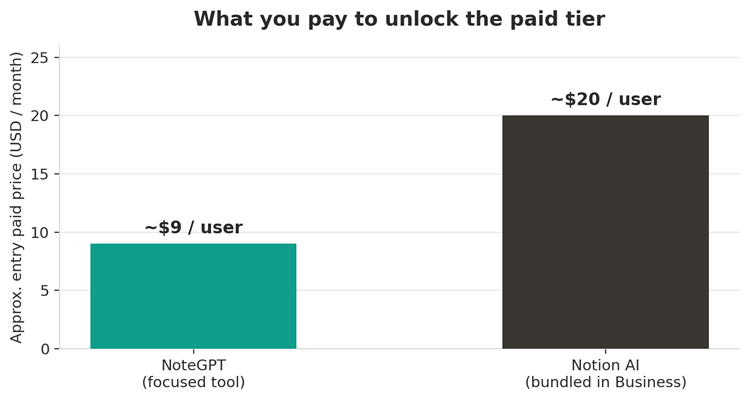
Figure 3. Approximate entry level paid pricing. Figures are illustrative, since both companies change plans often.
The real takeaway is less about the exact dollar figure and more about what you are buying. With NoteGPT you pay for a focused tool. With Notion AI you pay for an entire workspace that happens to include AI. Prices shift regularly, so check each company’s current pricing page before you commit.
So which one should you pick?
Match the tool to your week. The three short lists below cover most people.
Go with NoteGPT if
• You spend real time watching lectures, tutorials, or recorded meetings.
• You study from PDFs and research papers.
• You want flashcards, quizzes, or mind maps generated for you.
• You want something useful in minutes with zero setup.
Go with Notion AI if
• Your notes, docs, and tasks already live in one place.
• You write a lot of original content.
• You work with a team that needs shared, searchable knowledge.
• You want one system to run projects, not just summarize material.
Use both if
• You consume heavily and produce heavily. Summarize your sources in NoteGPT, then write, organize, and share the finished work in Notion. The two cover opposite ends of the same workflow, and they hand off to each other neatly.
The bottom line
“Better” is the wrong question, because these tools are not really chasing the same job. NoteGPT is a sharp instrument for turning information into something you can learn from quickly. Notion AI is a workspace assistant for people who want to write, organize, and collaborate in one place. Work out which half of that sentence describes your typical week, and the choice more or less makes itself.
Post Comment
Share your thoughts about this article.
Be the first to post a comment!





