Table of Content
- My Study Struggles Before Unstuck AI
- Discovering Unstuck AI: First Impressions
- A Week in the Life: How I Actually Used It
- Unexpected Benefits (and Annoyances)
- Comparing My Results: Unstuck AI vs My Old Methods
- Deep Dive: Feature Breakdown
- Strengths & Weaknesses
- Is Unstuck AI Worth It for You? My Verdict
- FAQ
My Study Struggles Before Unstuck AI
I’ll be honest: my study life used to feel like a bad sci-fi loop. I’d show up to lectures, half-listen while typing frantic notes that looked nothing like legible material, then later bounce between PDFs, half-finished flashcards, and late-night YouTube summaries. Despite the effort, I rarely felt exam-ready. Then the cycle repeated.

And I knew something had to change, so when I discovered Unstuck AI, I came in with low expectations but high hope. That jump from the mess of old routines into something clearer is where it all starts.
Discovering Unstuck AI: First Impressions
Halfway through the semester, I stumbled across Unstuck AI while Googling “how to stop drowning in lecture slides.” What caught my attention was the promise: upload anything—lecture recordings, PDFs, PowerPoints, textbook snapshots, even YouTube links—and turn it into searchable study guides, summaries, and a chat where you could ask questions directly.
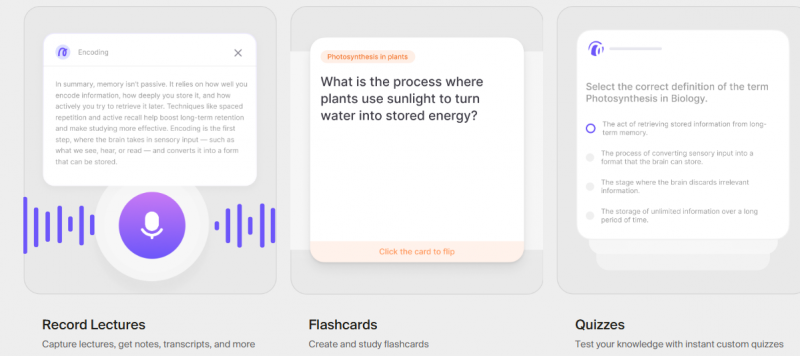
So I signed up. I uploaded my semester’s folder, lecture recordings, slides, and readings, and within minutes, I had a live dashboard that felt like it might actually work. That first “Oh wow” moment set the stage for the rest of the semester.
Because I went in expecting clutter and quickly found clarity, I was primed to lean into the daily use. And that leads us into how I integrated it into my routine.
A Week in the Life: How I Actually Used It
Once the initial excitement faded, the real question was: would I keep coming back? The answer: yes—and here’s how.
- Record & transcribe lectures: I hit record in class. Before I knew it, the lecture was transcribed and summarized, freeing me from frantic note-typing.
- Chat with all my materials: If I wondered, “Why did my professor choose that example?” I typed it in. The chat pointed me to the exact slide or paragraph.
- Auto-flashcards & quizzes: After class, I’d upload readings and get flashcards. On exam week, I’d fire off quick quizzes.
- Planner & focus tools: The app nudged me when I strayed into Instagram or YouTube breaks, making me twice as likely to return to work.
This consistent usage built a rhythm, and that rhythm changed how I felt at the end of each week: more in control.
And with that control, I started noticing real improvements and also some surprises.
Unexpected Benefits (and Annoyances)
What clicked:
- The citations impressed me. Anytime I asked a question, the AI pointed to the exact paragraph or slide where the answer came from—so I trusted it. (Third-party reviewers highlight this.
- The planner/focus combo? It made me start work instead of waiting for a “motivated day.” I had a nudge, and I reacted.
- Chatting across materials meant I could ask, “Where else did this concept appear?” and immediately see all relevant sources. That cross-linking beat my old isolated PDF habit.
What didn’t:
- Android users may feel left behind: for a long time, the mobile app was clearly iOS-focused (see App Store listing).
- Premium features caused hesitation: features like advanced analytics or unlimited quizzes seemed behind a paywall. (Reviews point that out.)
- The AI sometimes needed explicit context. A messy upload or ambiguous question? I’d rephrase. It’s not magic—just very good assistance.
Despite the annoyances, I ended up using it more than I expected—and that says a lot about the value-add.
And the real test? Did it move my results compared to my old method?
Comparing My Results: Unstuck AI vs My Old Methods
Here’s a side-by-side of how I felt each approach stacked up:
| Approach | Preparation Time | Recall Rate | Stress Level | Custom Support | Device Sync | Citation Verification |
| Old: DIY, classic | High | Medium | High | Low | Medium | No |
| Unstuck AI-assisted | Low | High | Low | High | High | Yes |
Using Unstuck instantly trimmed prep time and increased my confidence. I found myself revisiting material less out of panic and more out of eager review.
And that confidence made the next meta-question obvious: What features really matter in a study assistant, and how does Unstuck deliver?
Deep Dive: Feature Breakdown
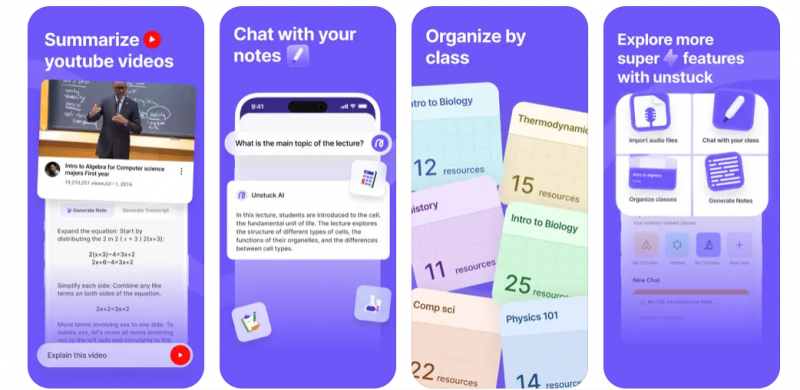
Uploading & Multi-format Ingestion
Unstuck supports PDFs, PPTs, textbook scans, YouTube links, and live lecture recordings. That versatility matters because I’m not studying one type of file.
Chat-with-Your-Materials + Cited Answers
This is the “magic” moment every time: ask a question and get a pinpointed answer with the source location. Makes review efficient.
Flashcards, Quizzes & Spaced Review
By turning uploaded materials into active memory tools, I moved beyond passive rereading. Many reports mention time savings here.
Planner & Focus Features
Where I used to drift into social media black holes, the built-in planner nudged me back. Consistency beats marathon cramming.
Cross-device Sync & Ecosystem
It functioned on my laptop and mobile—with caveats on Android. Check the current status before fully switching.
Pricing, Free Tier & Premium Upsells
The free tier gives meaningful access, but advanced features may require a paid plan. Evaluate what you need.
Data Security & Academic Integrity
Because it cites your own materials rather than pulling from the web alone, trust is higher. Still, always back up important uploads and check the policy.
Each feature built on the last: uploads → chat → review → focus. That chain is how the tool anchored itself into my routine.
Pricing, Plans & What to Know
Unstuck offers a free tier that allows true entry-level use. Many reviews claim a “completely free core.” However, full access to all features (advanced analytics, unlimited quizzes) may require a subscription.
Before investing, ask, “What do I actually need for this semester?” Because paying for features I never used would have defeated the point.
When I compared old costs (time lost, disorganized notes) vs. this one tool, the ROI felt acceptable—but only because I used it daily.
Strengths & Weaknesses
What I Loved:
- Speed: Instant summaries from uploads saved hours.
- Depth with trust: Cited answers meant fewer blind spots.
- Motivation built-in: The focus/planner features kept me on track.
- Single ecosystem: Upload, chat, and review in one place.
What Could Improve:
- Android and cross-device sync: For some users, it lagged behind.
- Premium tier clarity: Some users found the paywall less transparent.
- AI context limitations: Smooth questions needed cleaner uploads.
If you’re the kind of student who values structure over improvisation, this tool aligns. But if you prefer total freedom, or if you’re on a tight budget, you may want to test it before full commitment.
Is Unstuck AI Worth It for You? My Verdict
If you struggle with organization, feel lost in bulky lecture slides, or hate that end-of-term panic, Unstuck AI can become a game-changer. It didn’t eliminate the need to learn, but it eliminated the need to hunt.
For me, the transition from aimless prep to efficient review happened around week 5 of the semester. If you’re willing to upload + engage (not just install and forget), you’ll get value.
On the flip side, if you already have perfect note-taking habits, minimal distractions, and no problems structuring your study time, you might gain less relative to your routine.
In short: yes, I would recommend it, but with caveats: test the free tier, upload your actual materials, and judge the premium only if the features align with your workflow.
FAQ
1. How much does Unstuck AI cost?
Unstuck AI typically offers a free tier with limited usage, and a paid plan around $19.99 per month (or approximately $119/year if billed annually). Paid plans generally include unlimited file uploads, expanded chat interactions, and additional study tools.
2. Is Unstuck AI actually good?
Users report that Unstuck AI can help with understanding material by generating explanations, summaries, and study aids from uploaded documents. Its usefulness depends on how well users format and interact with the tool, it may be more effective for clarifying concepts and organizing study content than replacing active learning.
3. Does Unstuck AI have a free trial?
Unstuck AI operates on a freemium model, meaning there is a free version with limited features that users can access without an upfront payment, rather than a traditional time‑limited free trial.
4. What is an alternative to Unstuck AI?
Possible alternatives include other AI‑based study assistants and tools such as MathGPT, Lunchbreak AI, Paper Pal, Scholar AI, PDF to Brain, and Homeworkify. These vary in pricing, focus, and features, some concentrate on academic Q&A, while others provide content summarization or document analysis.
5. Is Unstuck AI paid?
The platform offers both free access with limited functionality and paid plans for full features. Users can choose not to subscribe and still use basic tools, but advanced capabilities typically require a paid plan.
6. What are the limitations of Unstuck AI?
Some common limitations include:
- Limited integration with LMS systems like Canvas or Blackboard.
- Not all file types may upload or process perfectly.
- Requires an internet connection for full functionality.
- Feature access may be restricted in the free tier.
- Privacy and data‑handling practices are not fully detailed publicly, which may concern some users.
Post Comment
Share your thoughts about this article.
Be the first to post a comment!