A CRM named after the thing it refuses to be. One price, no tiers, nothing locked behind an upgrade. The question this review sets out to answer is whether stripping a CRM down to its essentials is a genuine competitive advantage or just a smaller product with better marketing.
3.5 OUT OF 5 GOOD | The short version: it does contact, lead and task management well, the support is unusually good for the price, and the interface is genuinely easy to learn. Automation and reporting are where it runs out of road, and that ceiling arrives sooner than most buyers expect. |
Testing notes and screen references drawn from PCMag hands-on review, user reviews from G2, Capterra, TrustRadius and GetApp, and vendor documentation, current to July 2026
Pricing
Most CRM reviews bury pricing near the end. Here it belongs at the top, because the pricing model is the product thesis. Less Annoying CRM charges a single rate of $15 per user per month, and that rate includes everything the product does. No tiers, no add-ons, no features held back for an upgrade path.
What comes in that $15: unlimited contacts, unlimited companies, unlimited sales pipelines, unlimited custom fields, integrated calendars and task tools, user permissions, and 25GB of file storage per user. There is a 30-day free trial with no credit card required, and no free tier afterwards.
The vendor's own reasoning for refusing volume discounts is worth quoting because it explains the whole posture: offering discounts to larger companies would mean overcharging the small ones just getting started. Whether that is principle or positioning, it produces a genuinely predictable bill.
| PLAN | PRICE | WHAT IS INCLUDED |
|---|---|---|
| Free trial | $0 for 30 days | Full product, no card required |
| The only plan | $15/user/mo | Everything, plus free upgrades |
| Free tier | None | Trial converts or lapses |
OBSERVATION FROM TESTING
The flat rate reads as a bargain until it is set against the field. Bigin by Zoho has a free single-user plan and starts at $7 per user per month billed annually. Freshsales starts at $9. Zoho CRM runs $14. At $15, Less Annoying CRM is priced alongside tools aimed at larger businesses, including Apptivo at the same rate, while lacking Apptivo app connections and Zoho fully automated workflows.
So the honest framing is not that it is cheap. It is that it is predictable. Nothing gets held hostage behind a tier, and the bill on month eighteen looks like the bill on month one. For a small team that has been burned by a CRM that got expensive as soon as it got useful, that is worth real money.
Setup: seven steps
Seven steps from signup to a working system, in the order a new account actually encounters them. Each step notes the screen worth capturing and roughly how long it takes.
STEP 01 - Sign up and pick an industry
ABOUT 2 MINUTES
Signup asks for a name, an email address, a password, and an industry. The industry selection is doing more work than it appears to: the software uses it to pick the default pipeline templates that populate the Workspace, so choosing carelessly here means rebuilding pipelines later.
There is an optional email tutorial series at this stage. The tutorials are comprehensive and spaced out deliberately to avoid overwhelming new users, which is a small design decision that reflects the wider product philosophy.
STEP 02 - First login and the Workspace
ABOUT 5 MINUTES
The first login opens a video tutorial covering core features, which can be skipped to land directly in the Workspace. That Workspace is the product home screen: upcoming and in-progress tasks, activity and pipeline reports, and the day events in a calendar strip down the right side.
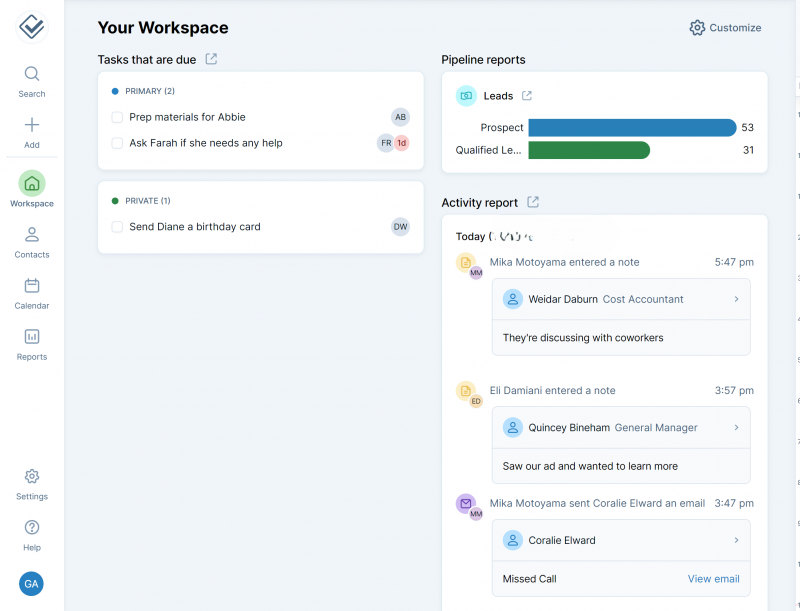
The Workspace on first login: tasks, activity and pipeline reports, with the day’s events in the right-hand calendar strip.
OBSERVATION
The calendar view on the right is highly effective and somewhat awkward aesthetically at the same time. It works, and it looks like it was added after the layout was already settled. That tension shows up repeatedly across the product: function arrives first, polish arrives later or not at all.
STEP 03 - Import your contacts
20 MINUTES TO 1 HOUR
This is the step that decides whether a CRM migration succeeds, and it is handled unusually well. Bulk import accepts spreadsheets in CSV, XLS or XLSX, pulls from Google or Outlook directly, and offers an Import2 integration that moves data from other CRMs including Pipedrive and Zoho CRM in a couple of clicks.
Add > Import contacts > Import a spreadsheet
At the mapping stage the software offers a choice: map the columns manually, or hand the file to a Less Annoying CRM employee who completes it. That second option is included at no extra cost, and the support team will run the first three imports on an account.
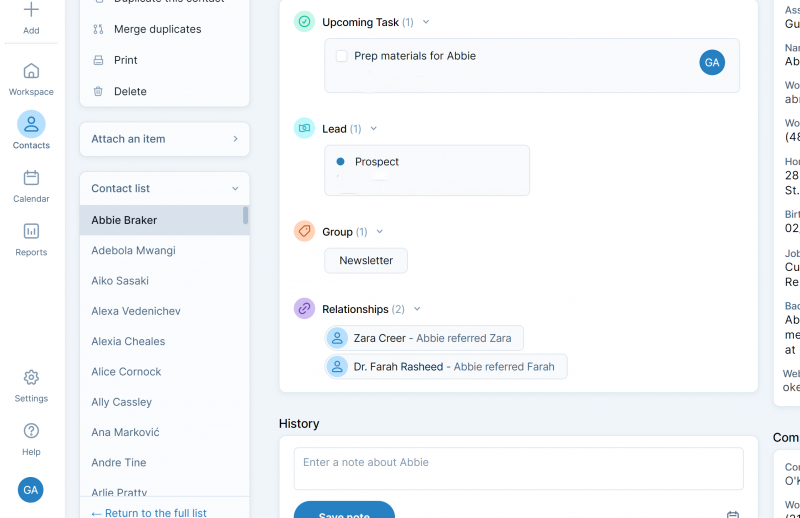
Where imported contacts land: one page holding details, notes, tasks and full interaction history.
OBSERVATION
Handing off a sample spreadsheet produced an email roughly an hour later from a representative who had noticed the contacts were test data and asked for confirmation before proceeding. The import completed twenty minutes after that confirmation. Real contacts, supplied properly, would likely have taken about twenty minutes end to end.
That someone read the file closely enough to spot sample data is the detail worth noting. It is not automation. It is a person doing the job, which is exactly what a small business migrating off spreadsheets tends to need at this specific moment.
STEP 04 - Add your team and set permissions
ABOUT 5 MINUTES PER USER
Users are added through Settings, with permissions controlled by individual buttons and checkboxes rather than assigned roles. Since there are no per-seat feature tiers, every user added gets the complete product at the same $15.
Settings > Users
The granular approach is preferable to the role assignment that Apptivo and similar tools require, because it avoids forcing a person into a template that does not quite fit. The genuine gap is that users cannot be imported in bulk, so onboarding a team of fifteen means fifteen passes through the same screen.
STEP 05 Build your pipelines
10 TO 20 MINUTES
Pipelines are the most interesting design decision in the product. Rather than treating a pipeline as a sales funnel exclusively, Less Annoying CRM defines it as any process through which people need to move. A pipeline for converting customers into reviewers, or into affiliates, is as native a use as a sales cycle.
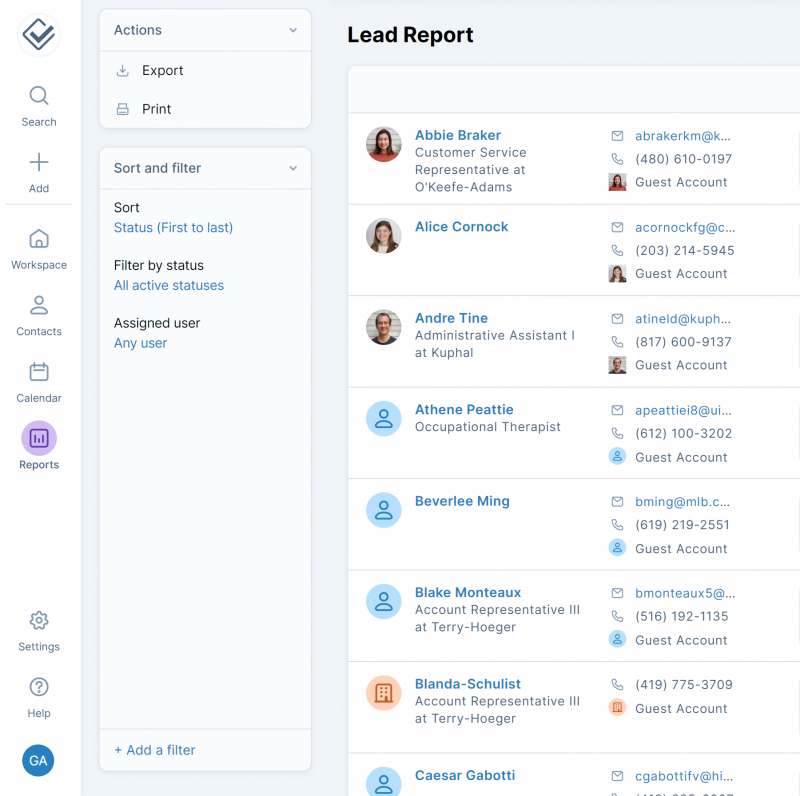
Leads carry pipeline status and custom fields. Pipelines are defined broadly, as any process that moves people through stages.
The editor is visual: steps can be colour-coded and dragged into position, built either from premade steps or from scratch. Once created, pipelines appear in the Reports area with both a table view and a Kanban view that supports dragging leads between stages. The Kanban view is still in beta.
Finished pipelines live in the Reports area, which is not intuitive. A component this central to daily use would reasonably be expected to have a dedicated page in the main navigation rather than sitting inside reporting.
For a team that lives in its pipeline view all day, that extra navigation step repeats hundreds of times a month. It is a small friction that compounds, and it is the clearest signal that this product was designed around contacts rather than around deals.
STEP 06 - Connect email and set up logging
ABOUT 10 MINUTES
Email connects to Google, Microsoft, Yahoo and other providers. Once synced, emails sent to a contact appear automatically on their profile whether they were sent from inside the CRM or from a regular client. Contacts can also be created by forwarding an email into the system.
There is no native bulk emailing. A Mailchimp integration covers newsletters and campaigns, which is a workaround rather than a built-in capability, and worth factoring into the true monthly cost.

STEP 07 Set up automations, within limits
15 MINUTES, PLUS RECURRING EFFORT
The automation builder uses an action-oriented, no-code structure, and restricts what it can do to attaching groups, leads, notes and tasks. For a small business that may be sufficient. Against Zoho CRM near-endless options it is plainly narrow.
Automations can be tied to forms built in the product, so a signup form can sort respondents into groups automatically.
This is the single most consequential finding in the review. The builder does not let you set a trigger. An automation has to be manually attached to a contact profile or a pipeline, and it cannot be attached to multiple contact profiles at once.
That is not a limitation on what the automations do, it is a limitation on the concept of automation itself. A rule you must apply by hand, one record at a time, is a saved template rather than an automation. Testing across other CRMs did not turn up this requirement anywhere else. For a business with few contacts it may not bite. For anyone else it is a significant impediment, and it deserves to be understood before signing up rather than discovered in month three.
This is the natural place to record how the trigger limitation played out in your own workflow, including how many records you attached automations to by hand and how long it took.
Features in daily use
Contacts and leads
Contacts can be added from anywhere via the plus icon in the left sidebar, capturing name, company, job title and other details, with an attachments area for notes, tasks and groups. The contact table supports filters, including custom filters for criteria such as location.
Clicking a name opens a full profile with attached items, interaction history, and contact details in a left sidebar alongside an email link. Lead information is added directly to a contact profile, with fields drawn automatically from the relevant pipeline. Custom fields are unlimited.
The simplicity of the contact table is a real advantage over the detail-heavy and potentially overwhelming equivalents in tools like SugarCRM. The tradeoff is that useful information is missing from the list view, including which pipeline a contact currently sits in. Opening a full page to see contact details also feels dated next to Freshsales and Insightly, which surface the same information without a page change.
Tasks and calendar
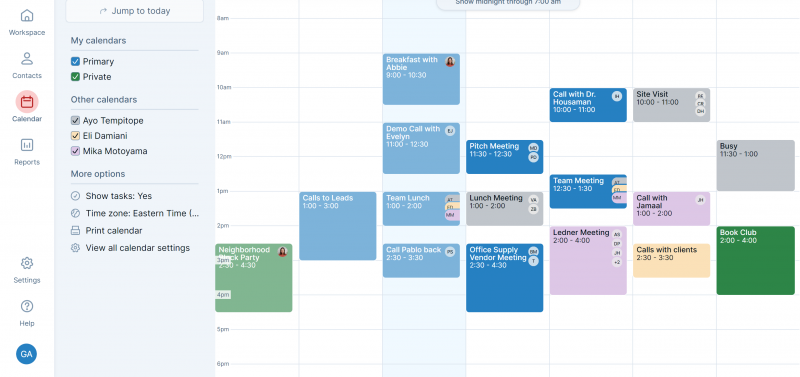
Tasks can be created from any page or from within a contact or company profile, requiring a name and due date with an optional description. They surface at the top of the calendar on their due date, in the Workspace calendar section for the current day, and on the calendar page for the week or month. Events sit alongside tasks and can be attached to contact or lead profiles. Reminders can be set at intervals such as a day and an hour before.
Reporting
The Reports section shows bar graphs per pipeline, with buttons below leading to activity reports and task reports by team or individual. Those use a fixed table format with filtering as the only customisation. Reports export to PDF or spreadsheet in a couple of clicks, but cannot be saved inside the CRM.
Reporting is the weakest area of the product. There is no custom report builder, no chart variety beyond bar graphs, and no summary bar of headline statistics across the top of the screen, which is standard in comparable tools including Bigin by Zoho. Apptivo, Bigin and Freshsales all offer more robust and more customisable reporting at similar or lower prices.
Mobile
Native apps exist for both iOS and Android, launched in early 2026. The Workspace view carries over cleanly, showing essential reports, the day events and upcoming tasks, and nearly everything possible in the browser is possible in the app, including adding contacts, creating automations and scheduling events. The vendor own documentation still describes the app as a work in progress, with push notifications and biometric login listed as pending.
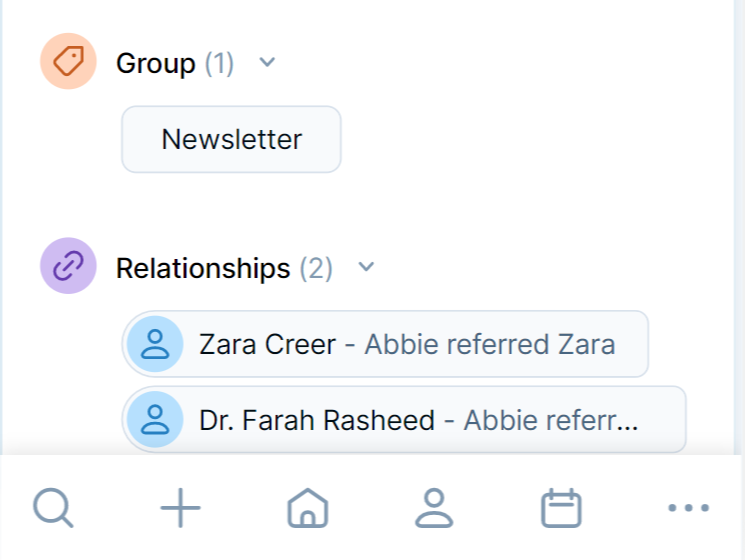
The mobile apps are more capable than expected and are a genuine strength rather than a checkbox. Worth noting for anyone comparing older reviews: several third-party sources still state that no mobile app exists, which was true before early 2026 and is not true now.
User reviews
Verified reviews from G2, Capterra, TrustRadius and GetApp. The ratings are among the highest in the CRM category, and the criticism is unusually consistent about where the ceiling sits.
| PLATFORM | RATING | NOTE |
|---|---|---|
| G2 | 4.7 to 4.9 / 5 | Roughly 660 reviews, 94 percent five-star |
| Capterra | 4.7 to 4.8 / 5 | Customer service rated 4.9 / 5 |
| TrustRadius | 4.7 / 5 | 50-plus reviews |
| GetApp | 4.7 to 4.8 / 5 | Ease of use consistently highest-scored |
Less Annoying CRM maintains ratings between 4.7 and 4.9 out of 5 across major review platforms, placing it among the highest-rated CRM solutions for small businesses. Ease of use is the single most-mentioned praise tag in the review corpus.
Praise
Immediate productivity without training. Users report becoming productive within hours rather than weeks, and non-technical staff manage the product without help.
- It is the simplest CRM I have used in over 40 years. It does not have all the bells and whistles some of the full-blown CRMs have, but what it does have is easy to use and not confusing.
Barry M., Creative and Advisory Consultancy Capterra
- LACRM impressed me from the very first minute with its clear layout and structure. On the homepage, I can see my tasks, appointments, and pipelines. I would not want to live without LACRM anymore.
Dorina Jacob, Healthcare Professional TrustRadius
Support that is staffed by people. Support quality appears in reviews more often than any individual feature, and reviewers consistently emphasise reaching a real person quickly.
- The customer service support has been brilliant even with the time difference. I am in the UK and everyone has been really helpful.
Amanda S., Administrative Manager, Construction Capterra
- The best feature is that the customer service is as advertised, fast, personalized, and available by phone or email.
Jessica M., Office Assistant GetApp
No consultant tax. A recurring theme is escaping the paid implementation consultants that enterprise CRMs effectively require.
I tried a few big name CRM vendors but found them cumbersome and confusing to use. Those vendors have consultants on call who would be happy to set things up for a small fortune. To heck with that. I have been using Less Annoying CRM for years with zero headaches and zero consultants.
Michael McKown, President, Ghostwriters Central TrustRadius
Criticism
Reporting depth. The most common complaint, and it matches the hands-on finding above.
- I think there could be improvements in the reporting capabilities within the LACRM platform but I currently make up for this by connecting the data to Power BI. I also wish there were more advanced capabilities with bulk data uploads and updates.
Lauron F., Project Manager Capterra
- System was too simplistic, did not provide robust categorization, reporting and overall organizing leads, contacts, deals.
Josh A., Co-founder and VP of Marketing Capterra
Integrations and email sync. The second cluster of complaints concerns what the product cannot connect to.
- Does not work with syncing the replied emails to the customer.
Nikos S., Sales Engineer Capterra
- We integrate MailChimp with Less Annoying to send emails and this integration is a bit of a headache.
Yongmei H., Operations Manager Capterra
- It does not integrate accounting software such as QuickBooks and FreshBooks and also project management software like Trello.
Joel B., Administrative Secretary Capterra
OBSERVATION FROM TESTING
The review corpus splits cleanly along one line, and it is the same line this review found in testing. Praise clusters entirely around ease of use, support and predictable pricing. Criticism clusters entirely around reporting depth, integrations and automation. Almost nobody complains that it is hard to use, and almost nobody claims it scales.
That consistency is itself informative. When a product is rated 4.9 by hundreds of users and criticised for exactly the things its makers chose not to build, the rating is measuring fit rather than quality. Buyers who match the target profile are delighted. Buyers who do not match it leave and say so plainly.
Alternatives
Four credible options at or below the same price, each stronger in the exact areas where Less Annoying CRM stops. Prices are annual-billing rates verified to 2026.
| CRM | FROM | STRONGEST AT | WEAKEST AT |
|---|---|---|---|
| Less Annoying | $15/user | Ease of use, support | Reporting, automation |
| Bigin by Zoho | $7/user | Price, pipeline depth | Add-on costs stack |
| Freshsales | $9/user | Reporting, telephony | Steeper learning curve |
| Zoho CRM | $14/user | Automation, AI insights | Support inconsistency |
| Pipedrive | $14/user | Visual pipeline UX | Support responsiveness |
| HubSpot | Free | Free tier, ecosystem | Price cliff above free |
Bigin by Zoho, from $7 per user
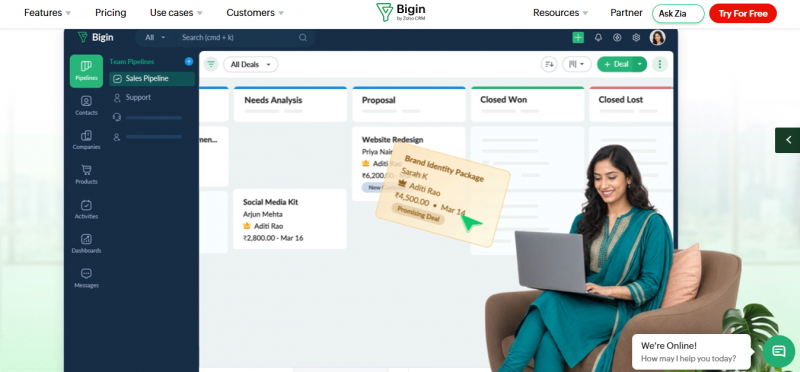
The most direct threat, and the reason this review lands at 3.5 rather than higher. Bigin offers a genuinely functional free single-user plan and paid tiers from $7 billed annually, which is less than half the Less Annoying rate. It undercuts Pipedrive Essential by 50 percent and HubSpot Starter by more than half, delivering pipeline management, contact tracking, email integration and workflow automation. It carries the Editors Choice position in PCMag CRM coverage.
The catch: add-on costs stack, integrations and extra features carry separate fees, and the free tier caps at 500 records. Monthly billing costs 20 to 25 percent more than annual.
Freshsales, from $9 per user
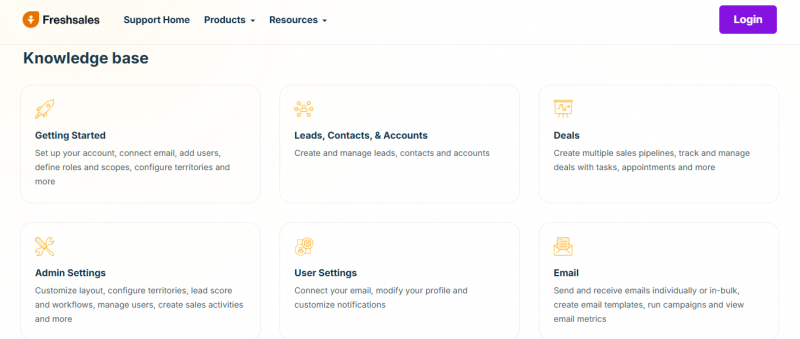
The answer to the reporting complaint. Freshsales starts at $9 per user per month billed annually with essential CRM features and basic automation, and offers substantially more robust and customisable reporting than Less Annoying CRM at a lower entry price. Native bulk email is included rather than requiring Mailchimp.
The catch: the Pro tier jumps to $39 per user for advanced workflows and AI insights, so the low entry price does not hold if the requirement grows.
Zoho CRM, from $14 per user
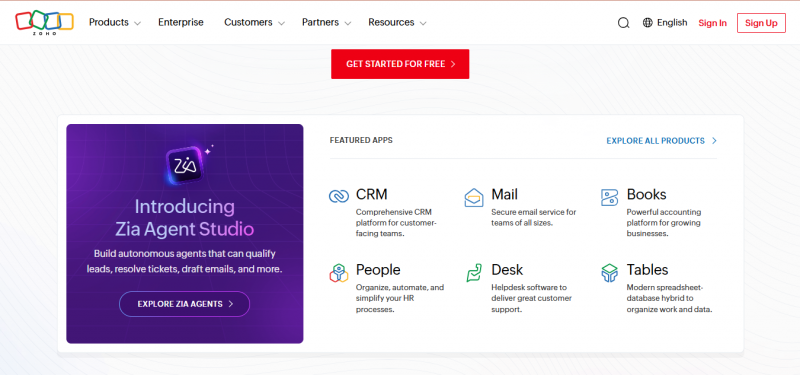
The answer to the automation complaint. Zoho CRM offers advanced automation, AI insights and workflow customisation at $14 per user, a dollar below Less Annoying CRM, with a free tier for up to three users. Where Less Annoying automations cannot be triggered, Zoho workflows are fully automated.
The catch: Capterra reviews show a half-star rating gap against Less Annoying CRM at 4.3 versus 4.8, with users citing steep learning curves and inconsistent support. Support quality issues at Zoho are cited as a common reason for switching to Less Annoying CRM in the first place.
Pipedrive, from $14 per user
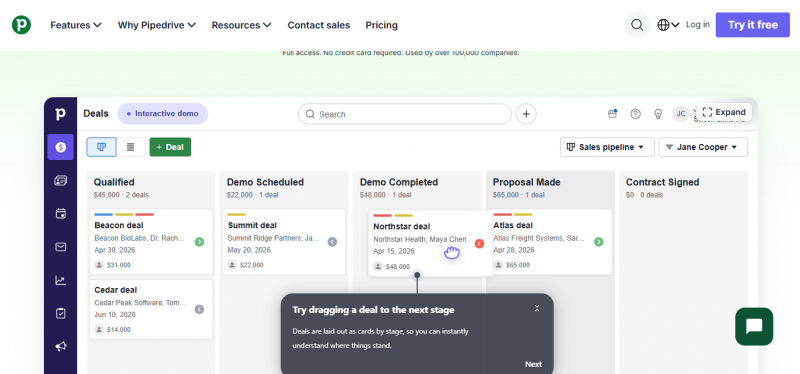
The answer to the buried-pipeline complaint. Pipedrive is built around visual pipeline management, with the drag-and-drop Kanban board as the centre of the product rather than a beta view inside a reports tab. Automation is stronger than Less Annoying CRM offers.
The catch: support is among the most common Pipedrive complaints, where it is among the top Less Annoying CRM strengths. Add-ons also accumulate, with prospecting and campaign tools billed separately, and email automation locked until the $39 tier.
Pros, cons and capability summary
One price at $15 per user with every feature included and free upgrades
Pros
- Assisted contact import handled by a person, free for three files
- Support by phone, email and ticket, including scheduled CRM coach calls
- Pipelines defined broadly enough to model non-sales processes
- Capable native mobile apps on iOS and Android
- Unlimited contacts, pipelines and custom fields with 25GB per user
Cons
- Automations cannot be applied to multiple contacts at once
- No custom report builder and no chart variety beyond bar graphs
- Around 30 integrations, well behind Freshsales and Insightly
- No native bulk email, requiring Mailchimp for campaigns
- Users cannot be imported in bulk
| CAPABILITY | STATUS | DETAIL |
|---|---|---|
| Contact management | Full | Unlimited, with unlimited custom fields |
| Pipelines | Full | Unlimited, visual editor, Kanban in beta |
| Task and calendar | Full | Reminders at set intervals |
| Mobile apps | Full | iOS and Android, called a work in progress |
| Email logging | Partial | Logs automatically, no native bulk send |
| Automation | Partial | No triggers, manual attachment only |
| Reporting | Partial | Bar graphs only, no custom builder |
| Integrations | Limited | Around 30, plus Zapier as a bridge |
| Custom reports | Absent | Filter and export only |
| Bulk user import | Absent | One user at a time |
Verdict
Simplicity is a real strength here. It is just not a durable one.
Less Annoying CRM delivers what its name promises. The interface is intuitive enough to pick up regardless of prior CRM experience, the support resources are comprehensive and staffed by people rather than chatbots, and the integrations that do exist slot into existing workflows without fuss. For a business moving off spreadsheets, it is a soft landing, and hundreds of verified reviewers say exactly that.
The problem is that simplicity and capability are being traded against each other at a price where competitors refuse to make that trade. Bigin by Zoho is cheaper and more capable. Freshsales starts lower and reports better. Zoho CRM automates properly for a dollar less. The automation trigger limitation in particular is not a simplification of a feature, it is the absence of one, described using the word for the thing it is not.
The honest read is that this is a good product with a ceiling, and buyers should know roughly where that ceiling sits before signing up rather than discovering it during a growth spurt. If the answer to whether this business will need triggered automations or custom reports within two years is yes, the migration cost is coming, and paying it later is more expensive than choosing differently now.
Simplicity is the biggest strength here, and the question in the title deserves a straight answer: yes, but only for as long as the business stays simple too. That is a real recommendation with a real expiry date on it.
Post Comment
Share your thoughts about this article.
Be the first to post a comment!





