Both tools let you search the web with a picture instead of a sentence. They just point that idea at very different problems. Here is what each one actually does, and when to reach for which.
How a picture becomes a search query
Reverse image search flips the usual order of a web search. Instead of typing words and hoping they land on the right result, you hand the engine a picture and let it find its own way there.
Under the hood, the tool breaks the photo into visual patterns, shapes, colors, textures, faces, and compares that pattern against a huge index of other images, then returns whatever looks close enough to count as a match. That basic idea now powers a whole category of products, but Lenso AI and Google Lens sit at opposite ends of it. One is a specialist built around finding faces, places and stolen photos. The other is a generalist, wired directly into the search engine most people already use every day.
The real difference between these two tools has less to do with accuracy and more to do with what each one is willing to search for in the first place.
That distinction shapes everything else: what categories of results you get, what it costs, and which one actually solves the problem you started with.
What each tool actually is
Lenso AI, the specialist search platform
Lenso AI is a standalone reverse image search platform built by LENSO AI S.A., a company based in Wroclaw, Poland. Instead of one generic results page, it splits everything into five categories: People, Places, Duplicates and Copyrights, Similar, and Related.
Upload a photo and its facial recognition model tries to find that same face elsewhere on the web, even inside a group shot or a cropped, filtered version. A separate Places mode identifies landmarks and locations, while Duplicates and Copyrights flags exact or edited reuses of an image, which is the feature photographers lean on most to check whether their work has been used without credit.
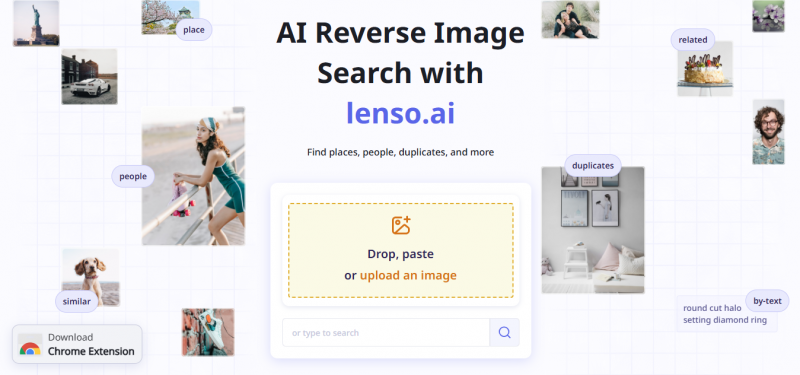
The workflow is built for repeat, professional use. Results can be filtered by keyword or domain, sorted by relevance or indexing date, and saved into collections inside your profile. Email alerts watch for new matches automatically, a Professional tier adds a Research Mode that expands results into the thousands, and a Chrome extension plus a developer API let teams wire the whole thing into their own tools. Searching itself is unlimited and free, but the free tier only shows watermarked previews, so seeing actual source links is what the paid plans sell.
Google Lens, built into Google
Google Lens is Google's visual search layer, reachable from the camera icon in the Google app, the Chrome address bar, Google Photos, and the camera on most Android phones. Point it at almost anything, a product, a plant, a landmark, a page of text, and it tries to identify the subject and hand back an answer, not just a list of pages that contain it.
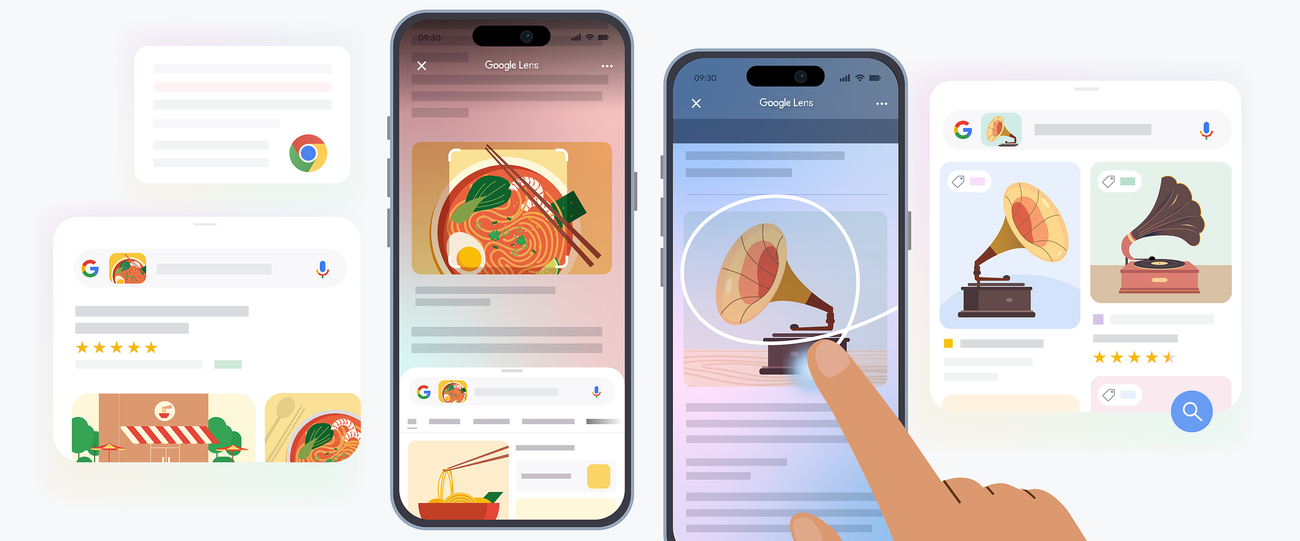
As a reverse image search tool specifically, it takes an uploaded photo or an image already sitting on a webpage and searches Google's index for visually similar pictures, the pages that host them, and shopping listings for anything it recognizes as a product. Because it draws on the same index that powers Google Search, its coverage of the open web is enormous, and results arrive with the surrounding context of a normal Google results page, including AI generated summaries in many regions.
It's also everywhere. You can circle part of a screenshot on Android, long press an image in Chrome, search a paused video frame, translate a menu through the live camera, or copy handwritten text off a whiteboard, all without an account or a payment. What it will not do, by design, is search for a specific person's face across the open web. Google has kept broad facial search out of Lens for privacy reasons, and that single decision is the biggest functional gap between these two tools.
Feature by feature
Same questions, asked of both tools. Where one has a dedicated feature and the other doesn't, that gap is the point.
| Criteria | Lenso AI | Google Lens |
|---|---|---|
| Core focus | Face, place and copyright search | General visual recognition and web search |
| Face search | Yes, a dedicated People category | Not offered, by design |
| Landmark and place ID | Yes, a dedicated Places category | Yes, as part of general recognition |
| Duplicate and copyright tracking | Yes, a dedicated Duplicates and Copyrights tab | Indirect, through visually similar results |
| Shopping and product matching | Not a focus area | Yes, with price comparison across retailers |
| Text recognition and translation | Not offered | Yes, built in |
| Plant and animal identification | Not offered | Yes, built in |
| Monitoring alerts for new matches | Yes, on paid plans | Not offered |
| Saved collections | Yes | Not offered as a dedicated feature |
| Result filtering and sorting | Filter by keyword or domain, sort by relevance or date indexed | Refine by adding text to the visual query, no domain filter |
| Search index | Its own growing image index | Google's full web index, the largest available |
| Live camera search | Not offered, uploads only | Yes, point the camera and search in real time |
| Search inside videos | Not offered | Yes, paused frames on Android and YouTube |
| Account requirement | No account for previews, account for paid features | None at all |
| Platforms | Web app and Chrome extension | Google app, Chrome, Android camera, Google Photos, desktop web |
| Free tier limits | Unlimited searches, but results are watermarked previews | Fully unlocked, nothing gated |
| Homework and question solving | Not offered | Yes, math and homework help built in |
| Browser extension | Official Chrome extension | Built into Chrome, plus third party extensions |
| Developer API | Yes, on a paid developer tier | Not part of Lens itself, that lives under Google Cloud Vision |
| Result presentation | Category tabs with a source URL for every match | Single blended feed of visual matches, pages and products |
| Privacy and regulation | European company operating under GDPR, searches tied to your profile on paid plans | Searches can be linked to your Google account and search history when signed in |
| Cost | Free preview tier, paid plans starting around twenty dollars a month | Free for everyone, no subscription |
| Best suited for | Photographers, investigators, brand and identity monitoring | Everyday lookups, shopping, translation, quick identification |
Four real situations
Your travel photo turns up in an ad you never approved
This is the exact job Lenso AI's Duplicates and Copyrights category was built for. Upload the original file and it looks for exact copies, cropped versions, and re-edited versions across the sites it has indexed, then lets you set an alert so it emails you the moment a new copy appears. Google Lens can surface visually similar images too, but it has no dedicated copyright category and no ongoing monitoring, so you would have to run the same search manually, again and again.
LENSO AI FITS BETTER
You spot a jacket in someone's photo and want to buy it
Point Google Lens at the photo, and if it recognizes the item, it returns listings and price comparisons across retailers directly, no extra step needed. It's free, it works from your phone's camera in real time, and shopping is one of the features it was built around. Lenso AI has no product or shopping category at all, so it simply isn't built to answer this question.
GOOGLE LENS FITS BETTER
You want to know where else a face from a screenshot appears
Only one of these tools will even attempt this. Lenso AI's People category runs facial recognition against its index and returns other photos it believes show the same person, filterable by domain or keyword. Google made a deliberate choice to leave broad face search out of Lens, so it will identify a landmark or an object in the same photo, but it will not try to find that person elsewhere online.
LENSO AI FITS BETTER
You're standing in front of an unfamiliar building or a plant you can't name
This is the everyday case Google Lens is built for. Open the camera, point it at the subject, and it identifies buildings, plants, animals and signage on the spot, translating any text along the way. Lenso AI can identify well known landmarks through its Places category, but it isn't designed as a live, point and shoot identification tool, and it has no built in translation or plant and animal recognition at all.
GOOGLE LENS FITS BETTER
So, which is better

Neither. “Better” depends entirely on what you're trying to find, and these two tools were built to answer different questions.
Reach for Lenso AI when the search is about a person or ownership
If you're chasing down copyright theft, protecting a public identity, or doing investigative work that needs a face traced across the web, Lenso AI's category specific search and monitoring alerts do things Google Lens simply will not attempt. Expect to pay once the free preview isn't enough.
Reach for Google Lens for everything else
If you want a fast, free way to identify an object, translate a menu, price a product, or work out where a photo was taken, Google Lens is already sitting on your phone and costs nothing to use. For most everyday reverse image searches, it's the more practical starting point.
Post Comment
Share your thoughts about this article.
Be the first to post a comment!





