Quick answer: If you want raw image quality, the widest model library, and serious customization (LoRA training, ComfyUI, batch generation), SeaArt AI usually produces better still-image results. If your priority is fast video style transfer, turning real footage into anime, and an interface a complete beginner can use on day one, LensGo AI gives better results for that specific job. They win on different battlegrounds, so the right pick depends on what you actually create.
This guide breaks down both tools across image quality, video, models, pricing, ease of use, safety, and real use cases, so you can decide with facts instead of hype. All pricing and feature details below reflect publicly listed information as of 2026 and can change, so always confirm on each tool's official site before you buy.
LensGo AI vs SeaArt AI: At a Glance
Before the deep dive, here is the fast version. Use this table to spot the headline differences, then read the sections below for the reasoning behind each call.
| Factor | LensGo AI | SeaArt AI |
|---|---|---|
| Core strength | Video style transfer, beginner speed | Image quality, model variety, control |
| Best output | Stylized video (anime, Ghibli, ink) | Photoreal and anime stills |
| AI models | Curated set plus 1,000+ style presets | 700,000+ to 980,000+ community models |
| Custom training | Custom model training (3 to 50/mo by tier) | LoRA training from 20 to 30 images |
| Video | Text-to-video, image-to-video, style transfer | SeaArt Flow plus Kling integration |
| Free plan | Daily free credits, watermarked output | Daily Stamina credits, watermarked |
| Entry paid price | Around $6 to $9 per month | From about $5.99 per month |
| Mobile app | Web only, no dedicated app | Web plus iOS and Android |
| Learning curve | Very easy | Easy to start, deep for power users |
| Advanced control | Limited | ControlNet, ComfyUI, negative prompts |
Verdict in one line: SeaArt is the deeper image powerhouse; LensGo is the quicker video stylizer.
What Is LensGo AI?
LensGo AI is a cloud-based creative platform that generates images and videos from text prompts, images, or existing video. It bundles text-to-image, image-to-image, an AI upscaler, text-to-video, image-to-video, and specialized generators such as talking or singing photos. Its most searched and most distinctive feature is video style transfer, which takes a normal clip and reskins every frame into anime, ink painting, Ghibli, Pixar-style 3D, and more than 1,000 other styles without any editing software.
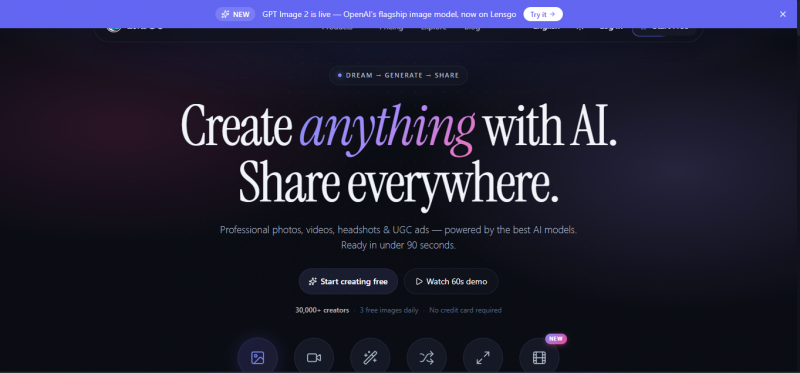
So, should you use LensGo AI for your visual content? The mental model that fits best is a creative transformer rather than a full editor. It is not built to replace CapCut or Premiere for cutting and timeline work. Instead, it takes content that already exists and makes it look dramatically different, or it generates fresh visuals from a written description. The platform leans into travel content too, offering 150-plus destination presets with cinematic and aerial looks.
Who LensGo AI Is Built For
• Content creators and influencers making short, shareable, stylized video for TikTok, Instagram, and YouTube
• Marketers who need quick ad creatives and promo clips without a design team
• Travel creators who want destination imagery without flying anywhere
• Beginners and students who want results on day one with zero design background
Known LensGo AI Limitations
• Outputs can be inconsistent with complex prompts
• No dedicated mobile app, browser only, so a stable connection is required
• Points deplete quickly because video tasks cost far more than simple image prompts
• Style controls are limited for strict brand-specific work
What Is SeaArt AI?
SeaArt AI is a cloud-based AI art platform built around generation plus a large social community. It offers text-to-image, image-to-image, text-to-video and image-to-video, face swap, 4K upscaling, LoRA model training, and ComfyUI node-based workflows for granular control. The headline differentiator is scale: SeaArt hosts a community model library reported in the range of 700,000 to over 980,000 models, covering photorealistic, anime, 3D, digital painting, and sci-fi styles.
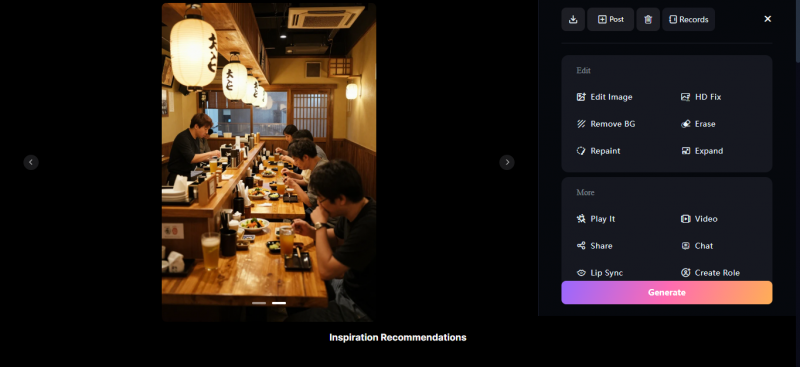
For anyone reading this as a SeaArt review, the bigger point is that the platform is not only a generator. Beyond pure generation, SeaArt runs an open gallery where users share creations and prompts, a model marketplace where creators can upload and monetize custom models, and an interactive AI character section. That community layer means you are rarely short on prompt inspiration or new styles. It has positioned itself as a more affordable, feature-rich alternative to Midjourney for people who want deep customization without managing local hardware.
Who SeaArt AI Is Built For
• Digital artists and game developers who need character design, concept art, and consistent style output
• High-volume creators who value the number of generations and model variety over single-image polish
• Power users who want ControlNet, ComfyUI, and LoRA training for precise results
• Anime and stylized-art creators on a budget
Known SeaArt AI Limitations
• The interface can feel overwhelming for complete beginners because of how many tools it exposes
• Midjourney still generally leads on photorealistic polish, and some rivals offer stronger consistency
• The open community library has carried real content-moderation and safety concerns, covered in the safety section below
Head to Head: The Full Comparison
This is the core of the article. Each round looks at one factor, explains how the two tools differ, and ends with a clear winner for that round.
Round 1: Image Quality
SeaArt's advantage is breadth and depth of models. With hundreds of thousands of community models plus LoRA training and ControlNet, you can dial in a precise look, match a reference, and push toward photoreal or highly stylized output. For still images, that control usually translates into better, more repeatable results, especially for character work and detailed art.
LensGo can produce attractive social visuals and thumbnail art, and its image generator supports negative prompts and over 1,000 style presets. But its strength is breadth across many feature categories at a low entry price rather than category-leading still-image quality. Reviewers consistently note that detailed prompts return much better output and that vague prompts produce generic results, which is true of both tools but more limiting on LensGo when you want fine control.
Round winner: SeaArt AI. More models, more control, stronger still-image results for serious work.
Round 2: Video Generation
LensGo's signature is video style transfer. You upload a real video, choose a style such as anime, Ghibli, or Pixar, and it applies that style to every frame, producing a stylized animated version of your clip. Community feedback frequently calls this the most viral-worthy thing on the platform, and it is a legitimate differentiator. LensGo also offers text-to-video and image-to-video.
SeaArt counters with its own video pipeline, SeaArt Flow, plus integration with Kling for higher-quality video output, and supports both text-to-video and image-to-video. For pure generated video quality and motion, SeaArt's Kling integration is strong. For transforming existing footage into an art style, LensGo's purpose-built style transfer is cleaner and faster.
Round winner: Split. LensGo wins for stylizing real footage; SeaArt wins for higher-end generated video via Kling.
Round 3: Models and Customization
This round is not close on raw numbers. SeaArt's community library is reported between 700,000 and 980,000-plus models, with LoRA training from roughly 20 to 30 reference images and ComfyUI workflows for node-level control. That is one of the most model-diverse ecosystems available in 2026.
LensGo offers a curated set of engines and over 1,000 style presets, plus custom model training where the monthly allowance scales with your plan, from 3 trainings on free up to around 50 on the top tier. That is genuinely useful, but it is a smaller, more guided system by design.
Round winner: SeaArt AI. Vastly larger model selection and deeper customization tooling.
Round 4: Ease of Use and Platforms
LensGo is built for speed and simplicity. The interface is prompt-driven, sign-in takes a couple of minutes, and a student with no design background can produce shareable content on the first day. The trade-off is that it runs in the browser only, with no dedicated mobile app yet, though it works in mobile browsers.
SeaArt is approachable to start but exposes far more, which can overwhelm newcomers. The payoff is reach and power: it is available on web plus iOS and Android, so you can create on a phone, and advanced users get ControlNet and ComfyUI when they are ready.
Round winner: Split. LensGo for the gentlest learning curve; SeaArt for native mobile apps and long-term depth.
Round 5: Pricing and Value
Both tools use credit-based systems with free tiers that watermark output, and both charge more for video than for images. Here is how the publicly listed plans compare. Treat these as reference points, since both platforms adjust pricing and credit costs over time.
LensGo AI Pricing (publicly listed, 2026)
| Plan | Price | What you get |
|---|---|---|
| Free | $0 | Daily free credits, watermarked output, 3 model trainings |
| Standard | ~$6 to $9/mo | About 1,000 points/mo, 30s video transfer, watermark removed |
| Pro | ~$22/mo | About 4,000 points/mo, more features, parallel jobs |
| Mega | ~$49 to $60/mo | About 10,000 points/mo, up to ~50 model trainings, 5 concurrent jobs |
SeaArt AI Pricing (publicly listed, 2026)
| Plan | Price | What you get |
|---|---|---|
| Free | $0 | Daily Stamina credits, watermarked output, gallery access |
| Entry | from ~$5.99/mo | Watermark-free exports, faster queues, more daily generations |
| Standard | ~$29.99/mo | ~1,800 daily Stamina (~116 images/day), batch up to 8, video tools |
| Professional | ~$59.99/mo | ~4,000 daily Stamina (~350 images/day), high-res video, priority |
| Master | ~$149.99/mo | ~12,000 daily Stamina (~583 images/day), all models, top priority |
Reading the value story: SeaArt scales aggressively for heavy image volume. Reports note that at the Standard tier each standard-resolution generation costs roughly half a cent, and that compared with Midjourney's similarly priced plan, SeaArt delivers significantly more generations, though Midjourney still produces superior photorealism. SeaArt credits purchased separately are reported to not expire, while daily Stamina resets and does not roll over. Annual billing can save up to around 30 percent.
LensGo's entry point is cheaper for light, casual use and its lower tiers are friendly for testing, but points drain fast on video, so heavy video users can hit limits quickly. For occasional stylized clips, LensGo is inexpensive; for daily high-volume image work, SeaArt's per-image economics are hard to beat.
Round winner: SeaArt AI for high-volume value; LensGo AI for cheapest casual entry. Pick by your volume, not by sticker price alone.
Round 6: Safety, Content Policy, and Commercial Use
This round matters more than people expect, and it is where the tools diverge sharply. Both allow commercial use of generated content subject to their terms, so review the official terms of service before client work in either case.
LensGo supports commercial use after you agree to its terms and is generally regarded as a legitimate, mainstream creative tool, with the usual AI caveats around deepfakes, copyright, and misuse that apply to any generator.
SeaArt's open community model has drawn documented criticism. Its public library has been associated with provocative and explicit content, and while the platform runs NSFW filters, reporting has described loopholes. Notably, independent research in mid-2025 reported the tool being used to generate unlawful sexual content depicting minors; SeaArt responded by urging the community to report such instances so offending creators could be blocked. If you work in a brand-safe, education, or family context, this is a real consideration and a reason some teams avoid the open gallery side of SeaArt entirely.
Round winner: LensGo AI on content-safety reputation. SeaArt's power comes with a more permissive, harder-to-moderate ecosystem.
Scorecard Summary
Tallying the rounds gives a clear, honest picture: the better tool depends entirely on the job.
| Round | Winner |
|---|---|
| Image quality | SeaArt AI |
| Video generation | Split (LensGo for style transfer, SeaArt for Kling video) |
| Models and customization | SeaArt AI |
| Ease of use and platforms | Split (LensGo easier, SeaArt has mobile apps and depth) |
| Pricing and value | SeaArt for volume, LensGo for casual entry |
| Safety and content policy | LensGo AI |
Reviews
Known SeaArt AI Limitations
• The interface can feel overwhelming for complete beginners because of how many tools it exposes
• Midjourney still generally leads on photorealistic polish, and some rivals offer stronger consistency
• The open community library has carried real content-moderation and safety concerns, covered in the safety section below
• Recurring billing complaints: users report silent charges at the end of the 3-day trial and renewals firing early
What real users and reporting say:
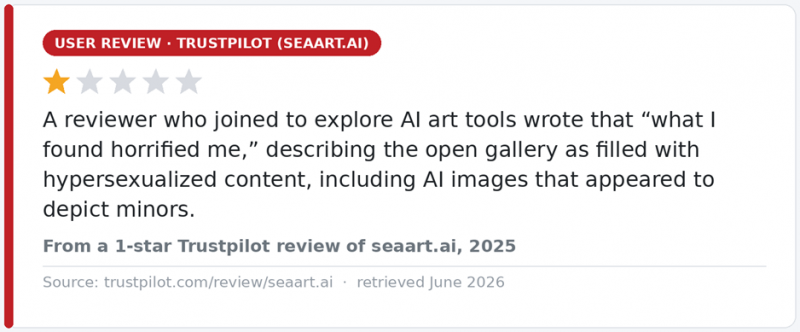
Real user feedback on SeaArt’s open gallery. View the original on Trustpilot
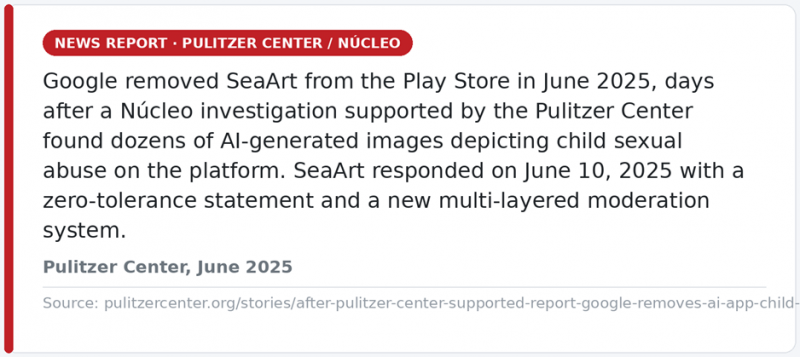
The independent reporting behind the mid-2025 controversy. Read the full story at the Pulitzer Center.
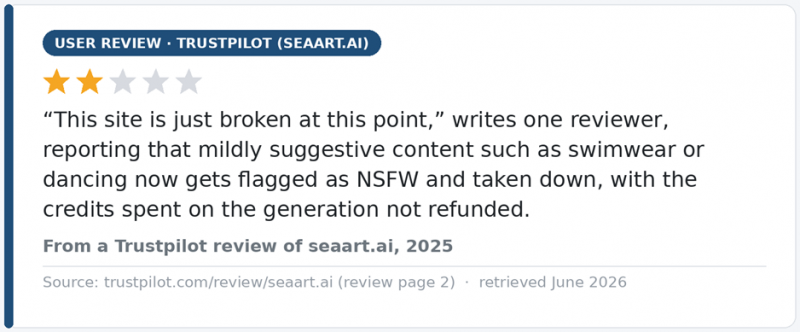
The flip side: since the 2025 crackdown, some users report over-flagging with no credit refunds. Source: Trustpilot.
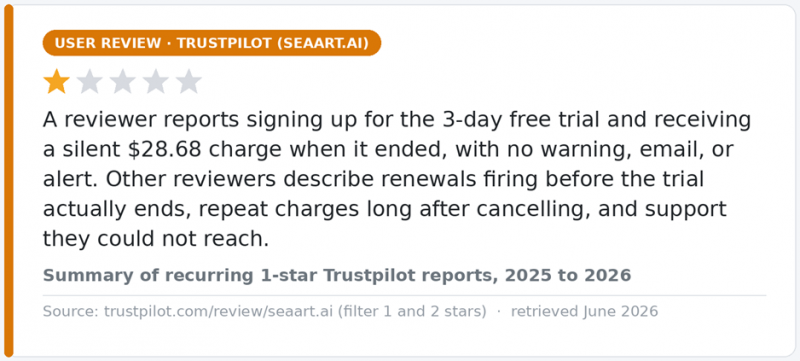
Billing is SeaArt’s most-repeated complaint on Trustpilot, where the site also flags possible review solicitation by the company.
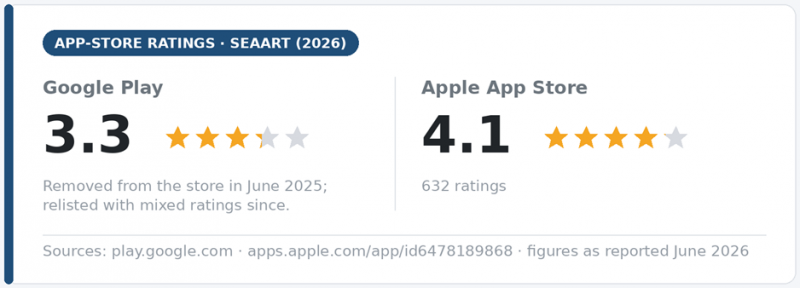
Mixed mobile ratings: Google Play vs the Apple App Store.
Known LensGo AI Limitations
• Outputs can be inconsistent with complex prompts
• No dedicated mobile app, browser only, so a stable connection is required
• Points deplete quickly because video tasks cost far more than simple image prompts
• Style controls are limited for strict brand-specific work
What real users say:
LensGo has a thin public-review footprint (no G2 reviews, no relevant Trustpilot page, no substantive Reddit threads), so the available evidence comes from AlternativeTo user comments:
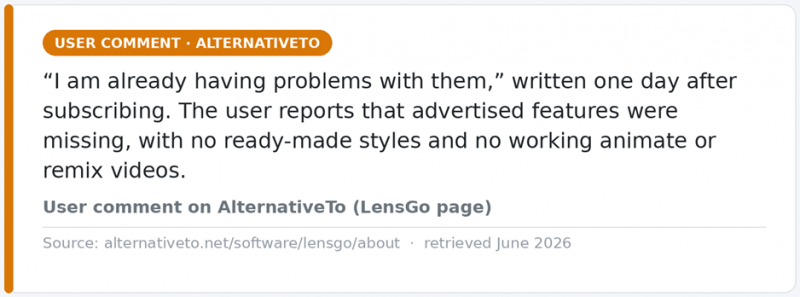
A subscriber reporting problems on day one. View the comment on AlternativeTo.
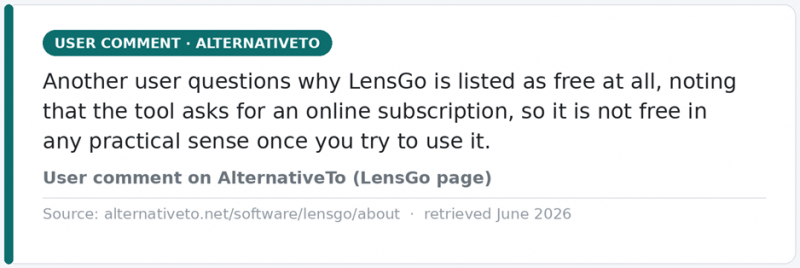
Pricing-expectation criticism from the same page. Source
Which Tool Should You Choose?
Skip the averages and match the tool to your actual workflow.
Choose LensGo AI if you:
• Mainly want to turn real video clips into anime, Ghibli, or other styles
• Are a beginner who wants results on the first day with minimal setup
• Make short, viral-leaning social content and travel visuals
• Want the cheapest entry point for light, occasional use
• Care about working inside a more brand-safe, mainstream tool
Choose SeaArt AI if you:
• Prioritize still-image quality, character consistency, and fine control
• Want the largest model library and LoRA, ControlNet, and ComfyUI tooling
• Generate high volumes of images and care about cost per image
• Need native iOS and Android apps to create on mobile
• Are a digital artist or game developer who will grow into advanced features
Consider Both, or Neither
Many creators run both: SeaArt for the still-image library and detailed art, LensGo for fast video style transfer. If your top need is pure photorealism, Midjourney still leads on that axis; if you want offline control and open-source flexibility, Stable Diffusion is worth a look. The point is that LensGo and SeaArt are not really the same product wearing different logos, so test each on its free tier before committing budget.
Final Verdict
For better image results and serious creative control, SeaArt AI gives better results. For better stylized-video results and the easiest start, LensGo AI gives better results. SeaArt is the deeper, more powerful image engine with unmatched model variety and strong per-image value, balanced against a busier interface and a more permissive content ecosystem that demands caution. LensGo is the focused, friendly video stylizer with a low entry price and a cleaner safety reputation, balanced against shallower depth and fast-draining video credits.
Decide by your main output. Mostly stills and customization, go SeaArt. Mostly stylized video and simplicity, go LensGo. Either way, start on the free plan, run a few real prompts, and let your own results make the final call.
Post Comment
Share your thoughts about this article.
Be the first to post a comment!





