The Shift Toward AI-Driven Creativity
AI has transformed creative workflows, and one tool making waves in the visual content industry is LensGo AI. Unlike traditional design tools, LensGo offers a streamlined, automated way to create videos and images without needing advanced graphic design skills. As businesses continue to prioritize efficient, data-driven content creation, LensGo AI allows both individuals and companies to produce professional-looking results on a budget.
AI-driven creativity is not just about automation but about enhancing creative processes. As Forbes highlights, more businesses are turning to AI tools like LensGo to create innovative visuals quickly, bypassing the traditional complexities of design.
What LensGo AI Brings to the Table
Unlike single-purpose apps, LensGo aimed to be an all-in-one creative hub. According to TopView’s complete review and other sources, it offered:
- Prompt-based generation (images & videos).
- Photo-to-video animation for dynamic marketing.
- Video restyling and filters for a fresh campaign look.
- Custom model training for brands needing consistent output.
This combination meant that even small teams without in-house designers could experiment with professional-looking results.
These capabilities make LensGo an accessible tool for small businesses and startups looking to streamline content creation. However, as discussed in Reddit, users have reported mixed results in terms of quality consistency.
How an Agency Would Use It in Practice
Take a digital agency creating visuals for an online cosmetics brand:
- Upload existing product images into LensGo.
- Select an artistic style, like glossy magazine or anime-inspired.
- Generate motion-based content for TikTok and Instagram ads.
- Export polished creatives in minutes instead of weeks.
This “idea-to-output” workflow was one of LensGo’s biggest selling points before questions of long-term stability emerged.
Pricing: Free vs Paid Plans
LensGo followed a freemium subscription model, with options for different user types :
| Plan | Cost (approx) | What You Get |
| Free | $0 | 50 daily credits, watermarks, limited video length |
| Standard / Pro | $6–7 per month | Higher resolution, more credits, watermark-free outputs |
| Premium | $45+ per month | Extended video duration, custom training, priority support |
For freelancers, the free plan was enough to explore. For agencies or businesses, paid tiers were the only way to achieve professional results.
Strengths Businesses Appreciated
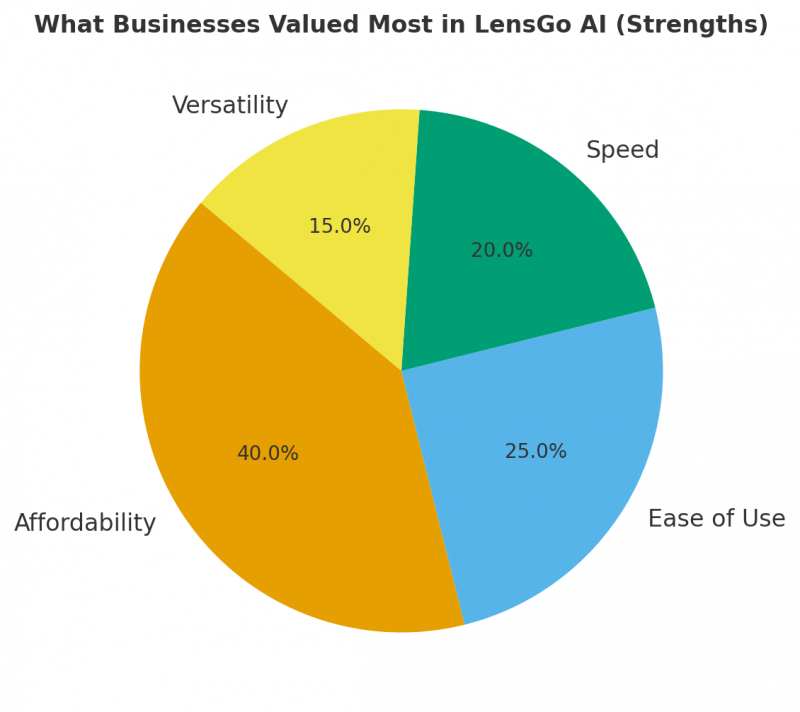
- Affordability compared to traditional editing.
- Ease of use for non-designers.
- Speed in delivering draft visuals for campaigns.
- Versatility across styles and media formats.
Drawbacks That Held It Back
- Inactive domain (lensgo.ai) raises red flags for continuity.
- Inconsistent quality with complex branding needs.
- Commercial rights not always clear.
- Compliance claims (GDPR, SOC 2, ISO) not independently verified.
These limitations mean LensGo could serve as a support tool but not necessarily as a reliable core platform for agencies handling multiple clients.
LensGo AI vs Alternatives
| Tool | Strengths | Weaknesses | Best For |
| LensGo AI | Affordable, beginner-friendly, versatile | Domain uncertainty, limited support | Freelancers, experimental projects |
| RunwayML | Polished video editing, business-ready | Higher pricing | Marketing teams, ad agencies |
| DALL·E 3 | Accurate image generation with text | Weak on video | Brands needing image campaigns |
| Stable Diffusion | Open-source, customizable | Requires tech skills | Agencies with dev resources |
| Pika Labs | Strong short video generation | Narrower feature set | Social-first creators |
This table highlights where LensGo stands: strong for affordability and entry-level use, but lagging behind in stability and reliability.
Practical Tips if You Still Explore LensGo
- Treat it as a drafting tool rather than a final production platform.
- Always back up generated outputs immediately.
- Use it for internal experiments before client-facing work.
- Keep an eye on whether the service re-establishes an active platform.
Final Verdict: A Tool with Potential, but Uncertain Future
LensGo AI stands out for making visual content creation accessible , offering a cost‑effective, beginner‑friendly way to generate images and videos quickly. But given its uncertain platform status (inactive domain) and inconsistent output quality, it’s better suited for experimentation, drafts, or internal previews rather than final client deliverables.
If you’re considering tools for reliable, production‑ready content, you may want to explore established alternatives. That said, LensGo remains a useful option for trial runs or fast prototypes, especially if you backup your work and treat it as a “temp” tool, not a core solution.
For broader context on the evolving world of AI-based creative tools and how they work, see this full step-by-step guide on AI tools and workflows from Techraisal. It offers a helpful framework for understanding when and how to integrate AI into a content‑creation pipeline.
Post Comment
Be the first to post comment!