88/100 SAFE | The short answer: FDOWN.net is safe for public videos, with caveats Zero malware detections across 92 antivirus engines, a two-decade domain history, and a valid SSL certificate. The real danger is not FDOWN itself. It is the fake “Download” buttons in the ads and the extension it pushes for “private” videos. Verdict cross-checked against 9 independent sources: PCrisk, Gridinsoft, Scamadviser, MalwareTips, VirusTotal, Trustpilot and others. |
If you have ever tried to save a Facebook video, you have hit the same wall millions do every month: Facebook deliberately hides any download button. So you search “download Facebook video,” and near the top sits FDOWN.net. Before you paste your link, here is exactly what this tool is, what it does with your data, and whether the safety warnings floating around it are justified.
What FDOWN.net actually is
FDOWN.net is a single-page, web-based Facebook video downloader. You paste a Facebook video URL into one input box, press a button, and it hands you an MP4 file. There is no app to install and no account to create. That one web page is the entire product.
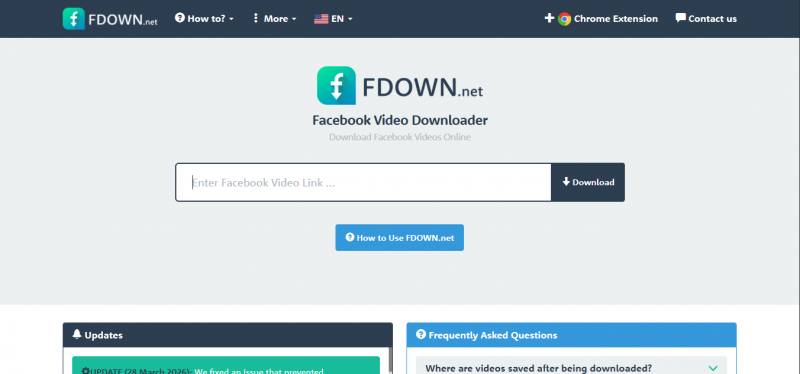
Critically, FDOWN.net does not host any videos. When you paste a link, the site acts as a middleman: it finds the underlying file address on Facebook's own content delivery network (CDN) and passes it straight to you. It does not re-encode anything either. A 1080p upload comes down as 1080p, and a low-quality clip stays low quality.
| FDOWN = FBDOWN. Around 2021 the site rebranded from FBDOWN.net to FDOWN.net, reportedly to sidestep Facebook trademark issues. Both URLs point to the same service. This rebrand to avoid legal friction is actually one of the signals researchers cite in its favor. |
20.7 YEARS DOMAIN AGE | 0 / 92 MALWARE FLAGS | 88 TRUST SCORE | Top 100k GLOBAL TRAFFIC RANK |
The security scan
This is where FDOWN.net earns its “safe” label. Independent security scanners are unusually consistent about it. MalwareTips' automated trust engine gave FDOWN.net an 88/100 and marked it SAFE, while PCrisk, Gridinsoft and Scamadviser reported trust scores between 99 and 100 out of 100. Across a combined network of 92 malware and blacklist engines, including Kaspersky, Bitdefender, Microsoft, Fortinet and Google Safe Browsing, not a single engine flagged the domain.
Chart: Antivirus engine results (92 engines)
| Result | Engines | Share |
|---|---|---|
| ● Clean / Harmless | 92 | 100% |
| ● Malicious | 0 | 0% |
| ● Suspicious | 0 | 0% |
The site sits behind Cloudflare with a valid TLSv1.3 certificate from Let's Encrypt, and its hosting IP shows a 0% abuse confidence score with zero abuse reports on file. It is not listed on Google Safe Browsing, VirusTotal, AbuseIPDB, or any major browser blocklist.
Chart: Trust score across independent scanners (out of 100)
| Scamadviser | ████████████████████████████████████████ 100 | |
| PCrisk | ████████████████████████████████████████ 99 | |
| Gridinsoft | ████████████████████████████████████████ 99 | |
| MalwareTips | ███████████████████████████████████ 88 | |
| Trustpilot (scaled) | ██████████████████████████ 66 | |
| Why the split reputation, then? Security scanners test the domain and code, which are clean. Everyday users judge the experience, the ads and extension prompts. Both are telling the truth about different things. That gap is the whole story of FDOWN.net. | ||
How it technically works
Understanding the mechanics tells you exactly where your data does, and does not, go. When you submit a link, FDOWN's server connects to Facebook's public CDN, fetches the available video streams (Facebook usually stores several quality tiers from SD to HD), parses them, and shows you the download options. The whole handshake takes roughly 2 to 5 seconds, and the video file is pulled directly from Facebook to your device.
| 1 | You paste a Facebook video URL The link is sent to FDOWN's server, not stored as a permanent record. |
| 2 | FDOWN queries Facebook's CDN It locates the real file address behind the video across quality tiers. |
| 3 | Streams are parsed Standard, HD, and (when available) 1080p, 2K, 4K options are surfaced. |
| 4 | You download from Facebook directly The MP4 transfers to your device. FDOWN keeps no copy on its servers. |
According to FDOWN's own statements, it keeps no download history and no copies of downloaded videos, and does not require a Facebook login for public content. That “no login for public video” detail matters: a downloader that never asks for your Facebook password cannot harvest your Facebook password.
★ STEP-BY-STEP GUIDE Want the full click-by-click walkthrough for desktop, mobile, private videos, and the Chrome extension? We have broken down every method in a dedicated guide. |
The 4 real risks
FDOWN.net's code is clean, but “the site will not give you a virus” is not the same as “nothing can go wrong.” Here are the four documented risk factors, in the order they are most likely to affect you.
| Risk | What actually happens | Severity | ||
|---|---|---|---|---|
| Deceptive ad buttons | The site is ad-funded, and some ads are designed to look like the real “Download” button. One wrong click sends you to a third-party page. | High | ||
| Extension pressure | For “private” videos it often reports a privacy error and pushes you to install its Chrome extension. Users find this intrusive. | Medium | ||
| Look-alike domains | Copycats like f-down.net, fdown.vn, fbdown.to and others make it easy to land on a site that is not the real FDOWN. | Medium | ||
| Anonymous operator | No formal business registration or named owner. Common for small utilities, but it means no accountability if something changes. | Low | ||
| The #1 practical danger is the fake download button, not malware. A vision-model inspection of the live FDOWN.net page flagged its ad layout while confirming there were “no immediate deceptive pop-ups or urgency tactics” in the core interface. The threat lives in the ad slots, so where you click matters far more than whether you are on the right site. | ||||
Chart: Where FDOWN.net risk actually concentrates
Relative risk weight (out of 100)
| Deceptive ad buttons | ██████████████████████████████████ 85 |
| Extension pressure | ██████████████████████ 55 |
| Look-alike domains | ████████████████████ 50 |
| Anonymous operator | ██████████ 25 |
| Actual malware | █ 3 |
Data exposure: what actually leaves your device
Worth separating what FDOWN sees from what everyone else sees.
| Party | What they can observe |
|---|---|
| FDOWN's server | The Facebook URL you paste, your IP, your user agent, timestamp |
| Cloudflare (in front of FDOWN) | Same request metadata, as the reverse proxy |
| Facebook's CDN | Your IP, downloading a specific video file, at a specific time |
| Ad networks on the page | Standard ad-tech identifiers, cookies, fingerprinting signals |
| Your ISP / network | That you visited fdown.net (via SNI/DNS), not what you pasted |
The claim that FDOWN keeps no history is a policy statement, not a technical guarantee, and it's unverifiable from the outside. That's true of nearly every free tool of this type. Treat it as the operator's stated intent, weighted by a 20-year track record of no incidents, rather than as a proven fact.
The practical takeaway: the pasted URL is not sensitive when the video is public, since it's already a public address. If you're downloading something from a private group or a personal account, you're handing a third party a link that indicates you had access to it. That's a small disclosure, but it's not zero, and it's the one case where using a browser-native method instead is worth the extra effort.
When to just not use a downloader at all
The safest version of this decision is sometimes not making it.
• Your own uploads: Facebook's "Download Your Information" tool gives you originals directly, no third party involved. Slower, but it's the clean path.
• Watching offline once: Facebook's own save-for-later and offline features cover this on mobile without a file at all.
• Anything you'd repost or monetize: No downloader solves the permission problem. The technical availability of a file has never been the question; the rights are.
• Content from private groups: If you need it, ask the person who posted it. That's not a cop-out, it's the only method that's both reliable and unambiguous.
The honest framing is that FDOWN.net occupies a narrow but real niche: public video, personal use, need it now, don't want to install anything. Inside that lane it's fine, with an ad blocker. Outside it, the tool isn't the right answer and no amount of safety hygiene changes that.
What real users report
Sentiment is genuinely mixed, and it splits along a clean line: people downloading public videos are mostly satisfied; people trying to grab private content run into the extension wall and feel misled. FDOWN.net's Trustpilot sits around 3.3/5 across a small handful of reviews.
★★★★★ “When you need a public Facebook video right now, it delivers in seconds with nothing to install and nothing to pay.” Paraphrased from a 2026 hands-on review of the core tool |
★★☆☆☆ “Fake browser downloader, keeps telling me videos are private and cannot be downloaded without installing their extension. Do not install; just use another service.” Trustpilot reviewer |
★★☆☆☆ “Inflated file size and video length, felt incredibly sketchy. I did not click any download links and now I am worried about where that video went.” Trustpilot reviewer |
Reddit's technical communities land in the middle: they broadly cite FDOWN.net as a functional, reliable tool for public videos, while noting occasional Chrome redirect quirks. The pattern is consistent everywhere: the core downloader works; the monetization around it is the friction.
Chart: FDOWN.net user sentiment by use case
| Use case | Positive |
|---|---|
| Public videos | 82% |
| HD quality | 78% |
| Speed | 80% |
| Private videos | 22% |
| Ad experience | 30% |
The FDOWN.net “private video” trap
This deserves its own section because it is the single biggest source of frustration and confusion. FDOWN.net advertises a “Private Video Downloader,” but here is the reality as of 2026: on FDOWN.net specifically, private-video and Stories attempts frequently return a privacy error with no file, and one early-2026 review found it no longer reliably handles private videos or Stories at all.
Importantly, FDOWN never bypassed Facebook's privacy. The old private method only mirrored a video you already had permission to view (by copying the page source while logged in). It never unlocked content you could not already see. So if a tool ever claims it can grab any private Facebook video you do not have access to, that is a red flag, and not something FDOWN legitimately does.
| Rule of thumb: If FDOWN.net insists a public-looking video is “private” and the only fix is installing its extension, stop. That is the exact pattern users flag as misleading. Try a different tool rather than installing the extension on that prompt alone. |
Pros and cons
What FDOWN.net gets right Zero malware across 92 antivirus engines 20+ year domain history and stable Cloudflare hosting No app, no sign-up, no Facebook login for public videos Preserves original resolution, up to 4K when available Fast: a public download in roughly 2 to 5 seconds Keeps no download history or video copies Works across desktop, Android, and iPhone browsers | Where FDOWN.net falls short Aggressive ads with fake “Download” buttons Pushes a Chrome extension for “private” videos Private video and Stories support is unreliable in 2026 Cluttered interface makes the real button hard to find Many confusing look-alike and copycat domains Anonymous operator, no business registration Third-party downloading violates Facebook's own terms |
How to use FDOWN.net safely
If you decide to use it, these specific habits neutralize almost all of FDOWN.net's documented risks:
| 1 | Verify the exact URL is fdown.net Not f-down.net, fdown.vn, or fbdown.to. Type it yourself instead of clicking a search ad. | |
| 2 | Keep an ad blocker on It removes most of the fake-button ads that cause bad clicks, the single most effective safety step. | |
| 3 | Click only the button directly tied to your video Ignore any “Download” button sitting inside a banner or a separate box. | |
| 4 | Do not install the extension on a “private” prompt If it demands the extension to proceed, switch tools instead. | |
| 5 | Only download content you have rights to Your own videos or public clips for personal, offline use. Never reuse others' content commercially. | |
| Legal note: Downloading via any third-party tool violates Facebook's terms of use, and downloading someone else's content without permission raises copyright and privacy issues. Saving your own uploads or public videos for personal offline viewing is the low-risk lane. This report is informational, not legal advice. | ||
The bottom line on FDOWN.netFDOWN.net is a genuine, non-malicious tool with a remarkably long track record: 20+ years, clean across every antivirus engine, and honest about pulling files straight from Facebook without storing them. For grabbing a public Facebook video quickly, it does exactly what it promises. What holds it back is everything around that core: misleading ad buttons, an extension it over-pushes, unreliable private-video support, and a maze of copycat domains. None of it is fatal. All of it is friction you can sidestep with an ad blocker, a careful click, and a healthy skepticism toward any “private video” prompt. GRADE: B Safe and functional for public videos. Use with an ad blocker and avoid the extension. |
Post Comment
Share your thoughts about this article.
Recent Comments
Nikki
Jul 15, 2026so i have like years of videos on facebook from family trips and stuff and wanted to back them up before i delete my account. tried like 4 different downloader sites and fdown was the only one that actually worked consistently on mobile. the others either wanted me to install sketchy apps or just failed halfway through. yeah theres ads but just close them and youre good. downloaded probably 20+ videos over a week and only had 2 or 3 fail. The quality stayed good too didnt get compressed to garbage like some sites do. I would recommend for anyone trying to save their old facebook stuff"
Login to reply