Table of Content
- What photo do I need before I start?
- How do I actually stage the room?
- Where is the line between staging and misrepresentation?
- Who is responsible if someone else made the images?
- What happens if I do not disclose?
- Why does my staged photo look fake?
- The AI changed something structural. What now?
- A buyer says the room looked different in person. What now?
- Is virtual staging worth doing at all?
- VERDICT
READ THIS BEFORE THE REST Every guide I could find on this subject is published by a company selling virtual staging software. That would be tolerable if they agreed with each other. They do not. Five of them cite five different rule numbers for the same disclosure obligation, and two name different California statutes for the same law. Question 8 sets out what is genuinely consistent, and what you need to confirm with your own MLS rather than trusting any blog, this one included. |
QUESTION 01
What photo do I need before I start?
SHORT ANSWER One well lit photo taken from a corner, camera level, with the whole floor in frame. Most bad results are bad source photos rather than bad tools. |
The tool is placing furniture onto a surface it has to infer from your image. If it cannot work out where the floor ends and the wall begins, the sofa will float, sit at the wrong angle, or bury itself in a skirting board.

What makes a photo work
• Shoot from a corner so two walls and the floor between them are visible. That gives the tool the perspective information it needs.
• Keep the camera at chest height and level. Tilting up or down bends the perspective and the furniture will not sit flat.
• Get the whole floor in frame. If the bottom of the image cuts the floor off, there is nowhere to anchor the front of the room.
• Turn the lights on and open the blinds. Dark corners produce mushy furniture edges.
• Clear the room properly first. A stray box or cable will be built around awkwardly or blended into something odd.
Check your own MLS for minimum image dimensions before shooting. Boards set their own specifications and they vary.
QUESTION 02
Which tool should I use?
SHORT ANSWER For a handful of rooms, use any tool with a free tier and judge the output yourself. For regular listing work, the thing that matters is whether you can edit one item without regenerating the whole image. |
I am not going to rank them, because every comparison I found was published by one of the vendors being compared. What I can tell you is the two features that separate a tool you keep from one you abandon.
Single item editing. A generation is often almost right, with one wrong object. Tools that let you swap or remove that one item save you from regenerating and losing everything that was working.
Batch processing. If you stage whole listings rather than single rooms, uploading twelve photos at once instead of one at a time is the difference between ten minutes and an hour.
One practical warning. Free tiers frequently watermark the output or prohibit commercial use. Check which tier you are on before an image goes on a listing.
QUESTION 03
How do I actually stage the room?
SHORT ANSWER Upload, set the room type and style, generate a batch, pick the best one, then fix individual items rather than starting again. |

1. Upload the photo and set the room type. Telling the tool it is a bedroom rather than a living room changes both the furniture it reaches for and the scale it uses.
2. Pick a style that suits the property, not your taste. Mid century furniture in a period cottage reads as wrong to buyers even when they cannot say why.
3. Generate four or more at once. Single generations waste time. Batches let you compare.
4. Choose the one with the fewest problems, not the prettiest. A slightly plain room with correct perspective beats a beautiful one with a floating chair.
5. Fix single items. Swap the one wrong object rather than regenerating everything.
6. Run the check in question 4 before publishing anything.
Keep the furniture sparse. Overstuffed rooms are the most common giveaway, and they make the space look smaller, which defeats the purpose.
QUESTION 04
How do I know if the result is good enough to publish?
SHORT ANSWER Check shadows, scale, contact points and reflections. Those four catch nearly every failure. |

View the image at full size. Thumbnails hide everything that matters.
• Shadows. Does every object cast one, and do they fall in the same direction as the light from the window? Mismatched shadows are the most obvious tell.
• Scale. Measure against something real in the photo, such as a door or a window. A sofa that reads as nine feet long in a twelve foot room is the sort of thing buyers discover at the viewing.
• Contact points. Where each leg meets the floor, is it resting on the surface, sinking into it, or hovering above it? Zoom in on this specifically.
• Reflections. If the room has a mirror, a dark window or a polished floor, check whether the new furniture appears in the reflection. It usually does not, and once you notice it you cannot unsee it.
If two or more fail, regenerate. If one fails, fix that item.
QUESTION 05
Can I remove furniture that is already there?
SHORT ANSWER Technically yes, and it carries more risk than staging an empty room, because you are now removing something rather than adding it. |
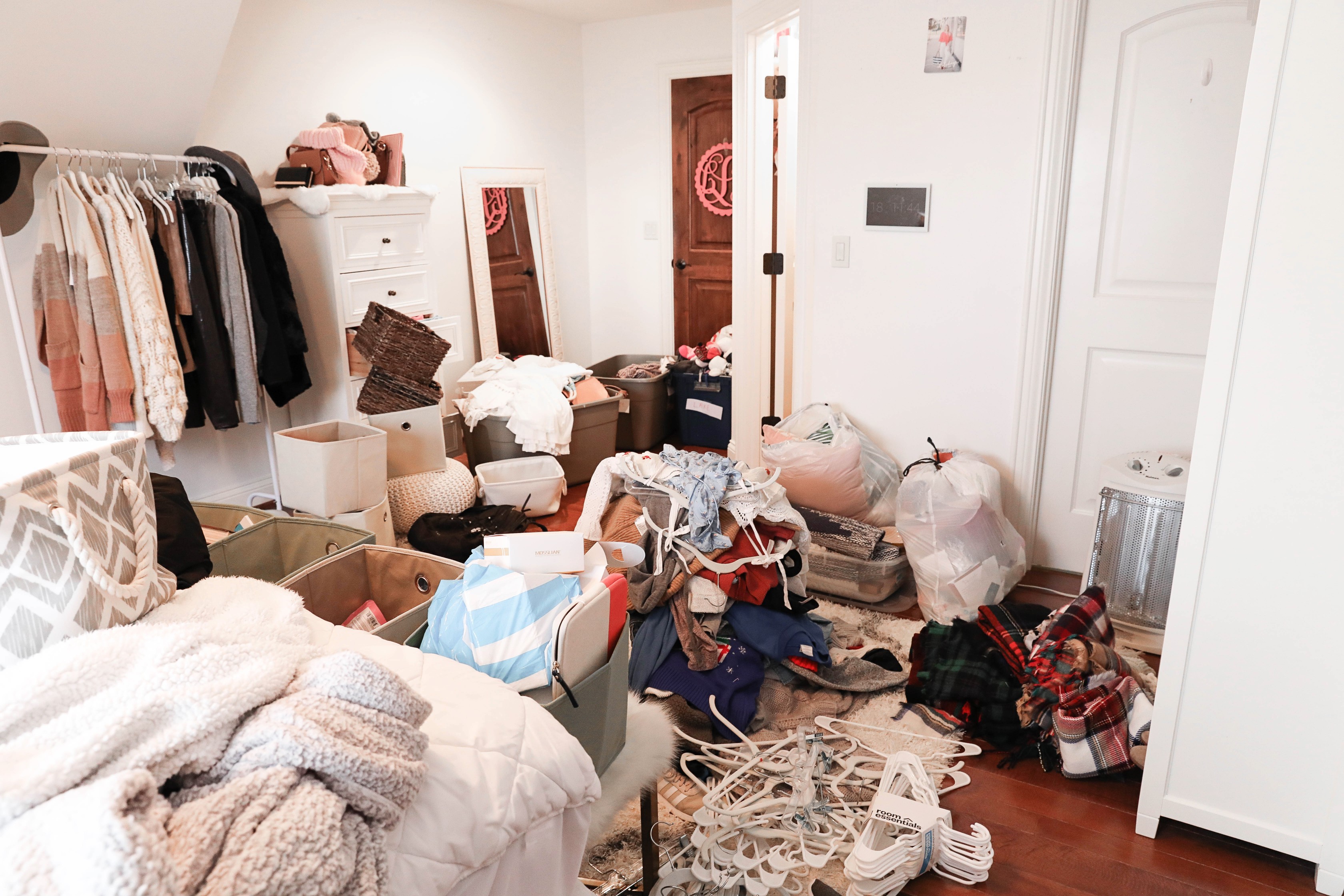
Most tools will empty a room and refurnish it, and the output is usually convincing. The question is what was underneath.
If the seller’s wardrobe was covering damaged plaster, and your staged photo shows a clean wall with a different wardrobe somewhere else, you have removed evidence of a defect. That is materially different from adding a sofa to an empty room, and it is the version that produces complaints.
The safe version is straightforward. Remove clutter, keep the room honest, and never let a removal conceal a condition issue. If something was hiding a problem, either leave it in place or make sure the problem appears elsewhere in the photo set.
QUESTION 06
What does it cost?
SHORT ANSWER Under a dollar to a few dollars per image on AI tools, roughly sixteen to thirty five dollars per image for human designers, and thousands per property for physical staging. |
| APPROACH | INDICATIVE COST | TURNAROUND | BEST FOR |
|---|---|---|---|
| AI tool, subscription | Well under $1 to a few dollars per image | Seconds | Standard listings, volume work |
| Human designed service | Roughly $16 to $35 per image | 24 to 48 hours | Difficult angles, luxury listings |
| Physical staging | Thousands per property | Days | When buyers walk through a furnished home |
Every one of those figures comes from vendor published pricing,3 which is the only source available for this category. They are useful for understanding the shape of the market and unreliable to the dollar. Check current rates directly before budgeting.
QUESTION 07
Do I have to disclose that a photo is virtually staged?
SHORT ANSWER Yes. Every source agrees on this even where they agree on nothing else. |
Virtual staging itself is lawful. What creates exposure is presenting an altered photo as though it shows the property as it is.
For members of the National Association of Realtors, the governing principle is Article 12 of the Code of Ethics, which requires presenting a true picture in advertising and marketing.1 That is consistent across every source I checked. Beyond it, MLS boards set their own rules, and some states have begun legislating specifically on AI altered listing images.
The practical position is simple even where the detail is messy. If a buyer could look at your photo and reasonably believe the furniture is in the house, you must tell them it is not.
QUESTION 08
How exactly should I disclose it?
SHORT ANSWER Watermark the image, say so in the listing text, and keep the original available. Then confirm the specifics with your own MLS, because published guidance contradicts itself badly. |

Figure 1. Five virtual staging vendor guides published between February and July 2026. Two also name different California statutes for the same law.
Given that, here is what is worth doing, ordered by how consistently it is recommended.
1. Put a visible label on the image itself. The words "Virtually Staged" in a consistent corner, legible but not covering the room. This is the item most boards care about most.
2. Say it in the listing description, near the top rather than buried at the end.
3. Keep the original unaltered photo and be ready to provide it. Some rules require you to publish it alongside.
4. Apply the label to every altered image, not only the first.
5. Ring your MLS and ask.2 Two minutes on the phone beats any blog on this subject, this one included.
QUESTION 09
Where is the line between staging and misrepresentation?
SHORT ANSWER Furniture and decor are staging. Anything attached to the building is not, and altering it is where the real trouble lives. |
This is the most useful distinction in the whole subject, and sources agree on it far more consistently than on any procedural detail.
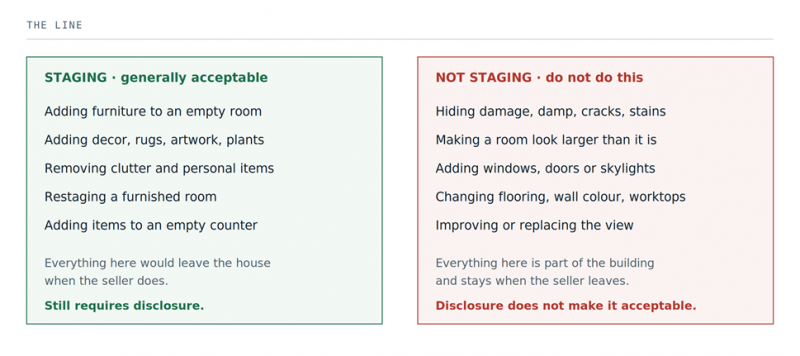
Figure 2. The distinction is furniture versus the fabric of the building.
The test that covers almost every case: would this item leave the house when the seller moves out? If yes, you can stage it. If it stays, you are altering the property, and no watermark makes that acceptable.
Changing flooring or wall colour is sometimes sold as virtual renovation. Showing a buyer what a room could become is legitimate, but it is not staging, and it has to be framed as a proposal rather than a photograph of the house.
QUESTION 10
Who is responsible if someone else made the images?
SHORT ANSWER You are. Outsourcing the work does not outsource the obligation. |
Whether the images came from a photographer, a staging service or an offshore editing team, the agent publishing the listing answers for it. A supplier who does not know your MLS rules will not be the one receiving the complaint.
Two habits close most of that gap. Tell your supplier in writing what they may and may not alter, using the right hand column of figure 2 as the list. Then check what comes back against question 4 before it goes near a listing.
QUESTION 11
What happens if I do not disclose?
SHORT ANSWER Consequences run from a correction request to fines and licensing action. The published penalty figures vary so widely that I would not repeat any of them as fact. |
The categories of consequence are consistent across sources. The numbers attached to them are not.
• Correction requests. The most common outcome. Your MLS asks you to fix or pull the listing.
• MLS fines. Real, and escalating for repeat breaches. Figures quoted in vendor guides range from one hundred dollars to ten thousand, a spread wide enough to tell you nobody quoting it has checked.
• Licensing action. State boards can act on misrepresentation, up to suspension.
• Civil claims. A buyer who believes they were misled can pursue it, and this is far more likely where an alteration hid a defect than where furniture was added.
The realistic risk for someone adding a sofa to an empty room and labelling it properly is close to zero. The risk for someone using AI to tidy away a damp patch is a different matter entirely.
QUESTION 12
Why does my staged photo look fake?
SHORT ANSWER Almost always one of four things: too much furniture, wrong shadows, wrong scale, or a bad source photo. |
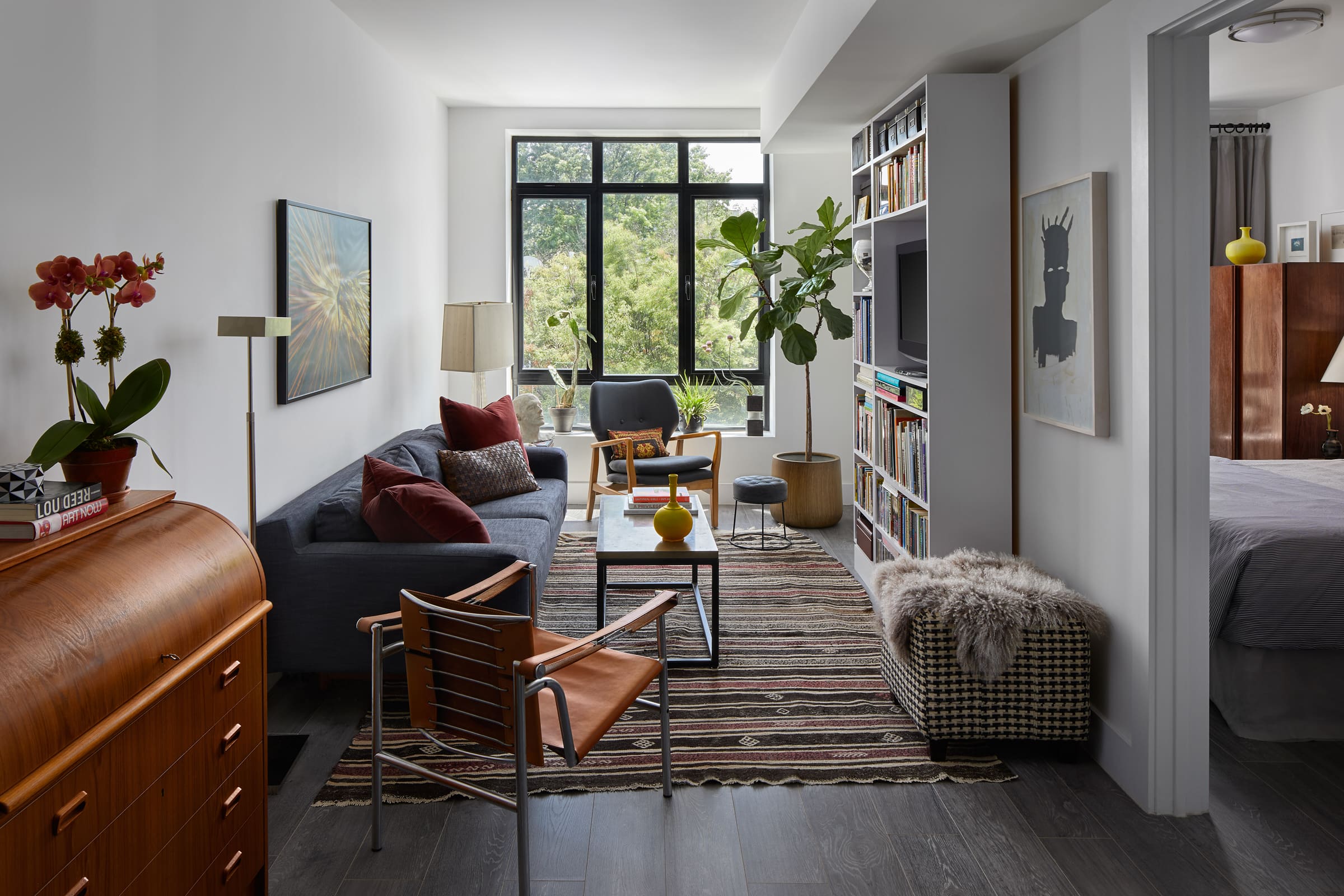
In rough order of frequency:
• Too much furniture. The tool fills the space because it can. Real rooms have gaps. Generate again and ask for a sparser arrangement.
• Shadow direction. If the window is on the left and the shadows fall left, nothing else matters, because every viewer registers it even without naming it.
• Scale drift. Furniture that is subtly too large is common, and it makes the room look smaller, which is the opposite of the goal.
• The source photo. If the perspective was tilted or the floor was cut off, no amount of regenerating fixes it. Go back to question 1 and reshoot.
One more that catches people out. Furniture in a style that does not match the property reads as wrong even when the render is technically perfect, because buyers compare it against the building around it.
QUESTION 13
The AI changed something structural. What now?
SHORT ANSWER Discard the image. Do not publish it and do not try to patch it by hand. |
Generative tools sometimes alter things you did not ask them to touch. Windows shift, a doorway widens, a radiator disappears, a skirting board changes profile. This is not rare, and it is the most serious failure mode in the workflow, because it turns a staged photo into an inaccurate one.
Compare the output against the original side by side before publishing, looking specifically at windows, doors, radiators, sockets, ceiling height and floor material. If anything fixed has moved or vanished, throw the image away and generate again. A hand patched image is harder to defend than one you never used.
QUESTION 14
A buyer says the room looked different in person. What now?
SHORT ANSWER Send the original photo immediately, then work out whether the complaint is about the furniture or about the room. |
If the complaint is that the furniture is not there and the listing was labelled, you have a communication problem rather than a compliance one. Send the original, point to the disclosure, move on.
If the complaint is that the room is smaller, darker or in worse condition than the photos suggested, take it seriously straight away. Pull the images, compare them against the originals, and involve your broker before responding in detail. Complaints about the property rather than the furniture are the ones that escalate.
This is why you keep every original file. Producing the unaltered photo within minutes turns most of these into a non-event.
QUESTION 15
Is virtual staging worth doing at all?
SHORT ANSWER For vacant properties, almost certainly. For occupied ones that already show well, usually not worth the added risk. |
An empty room photographs badly and gives buyers nothing to judge scale against. That is a real problem, and staging solves it cheaply. The cost gap against physical staging is large enough that the decision is straightforward for standard listings.
The claims about faster sales and higher prices circulating in this category all originate from companies selling the service, and I could not find an independent study behind any of them. That does not mean the effect is not real. It means nobody has shown it in a way you can check, so treat those numbers as marketing.
For an occupied property that already shows well, the calculation is different. You would be adding a disclosure obligation and a set of failure modes to solve a problem you may not have.
VERDICTThe staging takes a minute. The discipline around it is the actual job. Generating a convincing staged room is now genuinely easy and getting easier. That is precisely why the interesting part of this subject has moved to what you are allowed to do with the result, and it is the part every vendor guide covers worst, because it is not what they are selling. Two things carry almost all the risk. Altering anything that is part of the building rather than the furniture, and publishing an altered photo without saying so. Get those right and the rest is craft. |
| If you take one thing from this: before publishing, put the original and the staged photo side by side and look only at the windows, doors, floors and walls. If any of them moved, delete the image. That single check catches the failure that turns a marketing decision into a misrepresentation problem. |
Post Comment
Share your thoughts about this article.
Be the first to post a comment!





