A mismatched mouth isn't one bug, it's a break somewhere along the path from source to screen. This teardown walks the five stages where sync is won or lost, with the perception science and the fix for each.
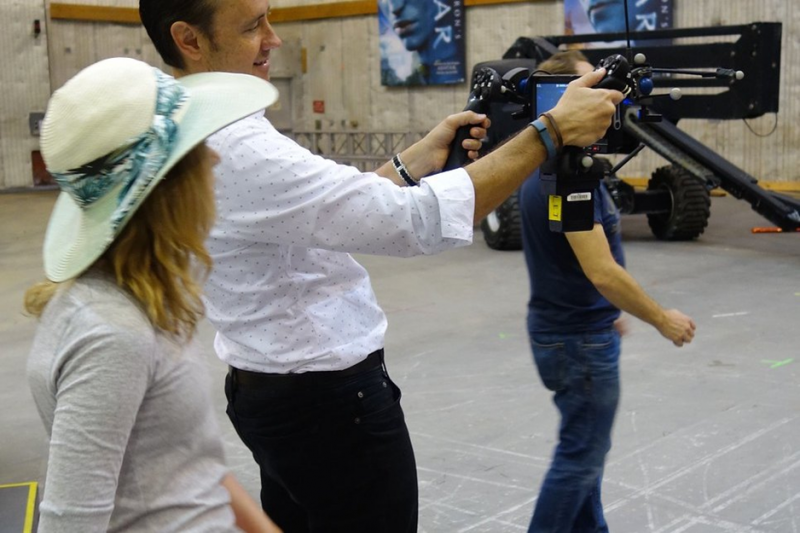
Photo: “Virtual filming Avatar 2 at James Cameron’s production studio” by jurvetson, CC BY 2.0
Most guides hand you a list of fixes. This one hands you a map. Sync survives or fails at five points on the pipeline, and the trick is to repair it where it breaks, not where it happens to show. First, two pieces of science explain why the stakes are so high and how much error you're actually allowed.
Your brain is a compulsive lip-reader
Speech perception isn't audio-only. Your brain fuses what it hears with what it sees into a single percept and vision can override the ears outright. In the classic McGurk effect (McGurk & MacDonald, Nature, 1976), dubbing the sound “ba” onto a face mouthing “ga” makes most people hear a third sound, “da,” that exists in neither track. The takeaway for avatars: viewers don't passively tolerate a mismatched mouth they actively process it, which is why even a fraction of a second off feels instantly wrong.
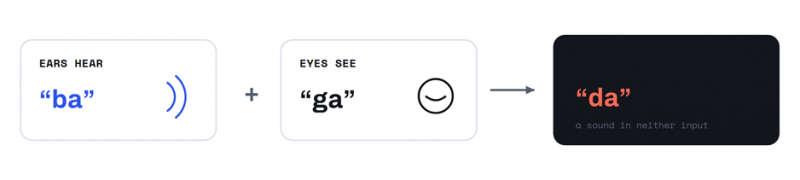
Fig. 1 - The McGurk effect: sight rewrites sound
How much error you're allowed
Broadcast engineers measured the limits decades ago. Under ITU-R BT.1359-1 (1998), a mismatch in a talking head becomes noticeable once audio leads the picture by about +45 ms or lags by about −125 ms, and unacceptable past roughly +90 / −185 ms. The US digital-TV guideline ATSC IS-191 is stricter still: +15 ms lead, −45 ms lag. The window is deliberately lopsided — in nature, sound arrives after a distant sight, so we forgive late audio far more than early audio.
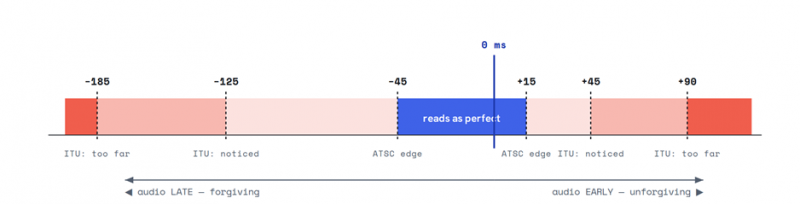
Fig. 2 - The sync tolerance window (audio relative to video) · ITU-R BT.1359-1 & ATSC IS-191
CONVERT IT TO FRAMES A frame is 40 ms at 25 fps and ~33 ms at 30 fps. So one frame of early audio already hits the “noticed” line, while you get two-to-three frames of slack when it runs late. That single number about one frame of lead is the tolerance every stage below has to respect. |
Five stages, five ways to break
Everything from here follows one path. Audio and a face go in at the left; a synced clip comes out at the right. Each stage does one job — and fails in one characteristic way. Find the stage that matches your symptom, then jump to it.
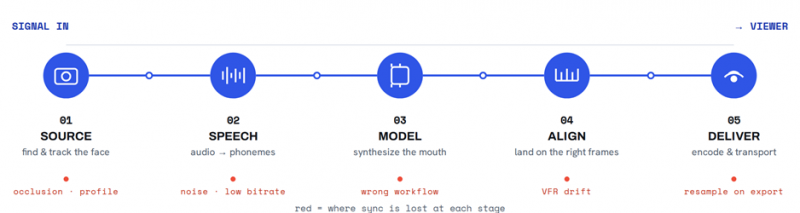
Fig. 3 - The AI-avatar lip-sync pipeline, and the break point at each stage
Stage 01 · Source and Capture
FIND & TRACK THE FACE
WHAT HAPPENS HERE
Before a single mouth shape is drawn, the system has to locate the face. Pipelines run face detection, then landmark tracking the long-standing reference is a 68-point facial-landmark model — to pin the mouth region frame by frame. Everything downstream is anchored to those points.
HOW IT BREAKS
Profiles, tilted or fast-moving heads, motion blur, low resolution, or anything covering the mouth, hair, a hand, a mic, lens glare makes landmarks jump or drop out. The mouth then gets painted in the wrong place, jitters, or freezes.
FIX IT HERE
• Front-facing, sharp, evenly lit the face is well above a handful of pixels.
• Mouth fully visible; nothing crossing it.
• Stable head position for dubbing; avoid extreme angles.
• Start from a neutral expression, not a wide smile.
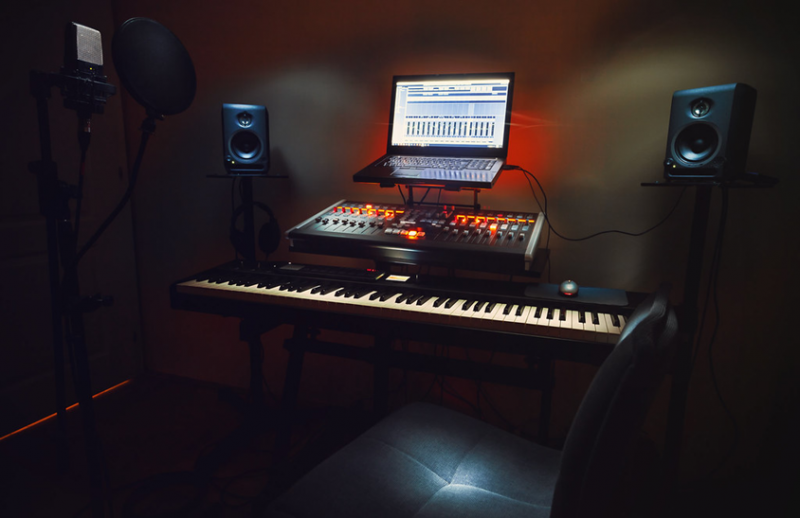
Controlled framing and light is a capture decision, not a post one. Photo: “Small Bedroom Recording Studio” by dejankrsmanovic, CC BY 2.0
Stage 02 · Speech and Audio
AUDIO → PHONEMES → VISEMES
WHAT HAPPENS HERE
The model doesn't “hear words.” It reads acoustic features typically a mel-spectrogram and infers the sequence of phonemes, then maps them to visemes, the visible mouth shapes. Many speech pipelines resample audio to 16 kHz for this analysis even though your delivery track stays 44.1/48 kHz. And English's 40-plus phonemes collapse to only about a dozen visemes several sounds share one shape (p/b/m are one; f/v another), so the visual targets are coarse to begin with.
HOW IT BREAKS
Noise, background music, room echo, or overlapping speakers corrupt phoneme inference → mushy or wrong shapes. Over-compressed, low-bitrate audio smears consonants. Leading silence or a mismatched start offsets the entire track.
FIX IT HERE
• Voice only - strip noise, music, and echo.
• One speaker; normalize levels; trim leading silence.
• Export WAV or high-bitrate MP3, mono, 44.1/48 kHz.
• Need frame-accurate control? A forced aligner (e.g., the Montreal Forced Aligner) times phonemes to audio explicitly.
Clean, single-speaker audio is the model’s raw material. Photo: “Mixer board” by Samuel M. Livingston, CC BY 2.0
Stage 03 · Generation and Model
SYNTHESIZE THE MOUTH
WHAT HAPPENS HERE
With landmarks and phonemes in hand, the generator paints the mouth region to match the audio. The quality jump of recent years came from a lip-sync “expert”: a pretrained audio-visual sync discriminator the SyncNet lineage that scores how well mouth and audio agree and pushes the generator to close the gap, the approach popularized by Wav2Lip (2020). Newer systems swap GAN generators for diffusion ones for sharper detail. Three workflows exist, each tuned differently: photo → talking avatar, persistent avatar, and real-footage dubbing.
HOW IT BREAKS
Picking the wrong workflow a photo model where you needed dubbing or running a fast, low-fidelity model on a hero shot yields blur, generic motion, and poor shape accuracy that no timing tweak will rescue.
FIX IT HERE
• Match the workflow to the goal before anything else.
• Draft on a fast model; render the final on the highest-fidelity one your plan offers.
• For stylized or non-human faces, use a model built for them general lip-sync models assume photoreal humans.
Stage 04 · Alignment and Timing
LAND ON THE RIGHT FRAMES
WHAT HAPPENS HERE
Even a flawless render has to sit on the correct frames. Video is a grid - 40 ms apart at 25 fps, ~33 ms at 30 and audio must land inside the one-frame budget from Fig. 2. Constant frame rate (CFR) keeps that grid even; variable frame rate (VFR) the default from many phones and screen recorders spaces frames unevenly, so audio and video slide apart the longer the clip runs.
HOW IT BREAKS
Constant offset: audio shifted by a fixed amount, all clip. Progressive drift: VFR footage, or a project frame rate that doesn't match the source.
FIX IT HERE
• Convert VFR → CFR and match audio/video frame rates.
• Nudge audio by hand against plosive anchors - p/b/m is the frame the lips shut.
• Can't regenerate? Run a dedicated re-sync pass (e.g., Wav2Lip) that redraws the mouth from the audio.
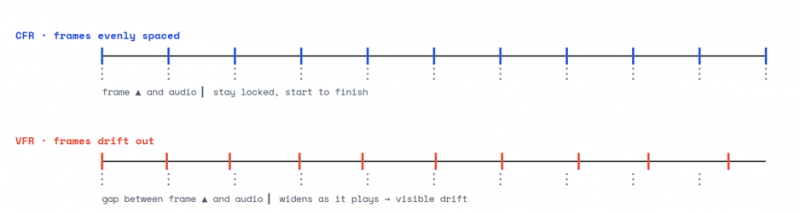
Fig. 4 - Why variable frame rate drifts: even audio, uneven frames
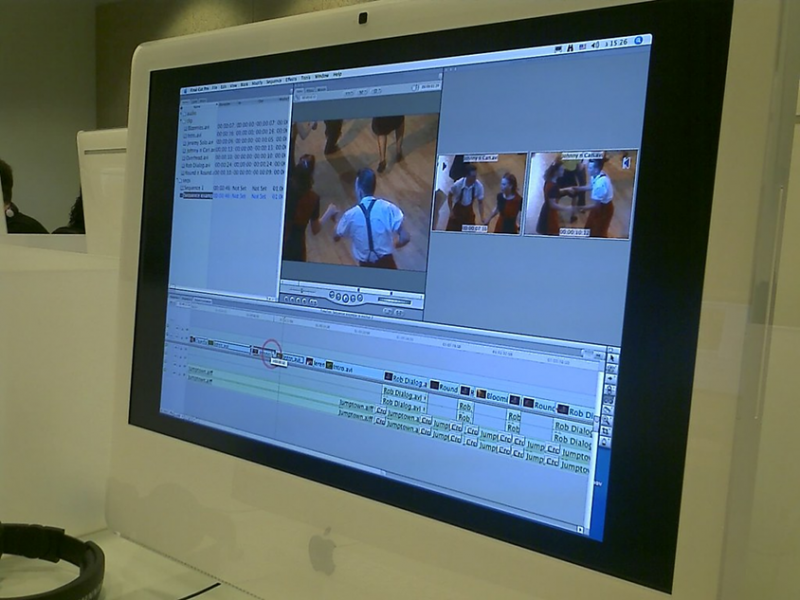
Timing lives on the timeline detach audio and move it a frame at a time. Photo: “Video editing class - I want mac too” by YuvalH, CC BY 2.0
Stage 05 · Encode and Deliver
THE LAST PLACE SYNC DIES
WHAT HAPPENS HERE
The container (MP4, MOV) is a box; inside it a video codec (H.264/H.265) and an audio codec (AAC/PCM) travel with presentation timestamps (PTS) that tell the player exactly when each frame and audio chunk should appear. Sync is only as good as those timestamps survive.
HOW IT BREAKS
An export preset that resamples audio or re-introduces VFR, or a platform's re-transcode on upload, can shift the timestamps the classic “perfect in my editor, off in the uploaded file.” Streaming re-encodes add latency of their own.
FIX IT HERE
• Export constant frame rate; match the project rate to the source.
• Avoid presets that resample audio or switch to VFR.
• Re-check sync on the delivered file after any upload or transcode not just in the editor.
Locate your break
Read the symptom, jump to the stage, check the usual suspects. This is the map in reverse.
| What you see | Inspect | Check first |
|---|---|---|
| Mouth warps, jitters, or sits in the wrong place | Stage 01 | Pose, lighting, occlusion, resolution |
| Mushy or wrong mouth shapes | Stage 02 | Noise, music, bitrate, single speaker |
| Blurry or generic motion, no timing tweak helps | Stage 03 | Workflow choice + model fidelity |
| Constant offset, or drift that grows over time | Stage 04 | VFR→CFR, fps match, audio offset |
| Fine in preview, off in the exported/uploaded file | Stage 05 | Export CFR, audio resample, re-transcode |
The Takeaway
Fix it where it breaks
A mismatched mouth is a downstream symptom of an upstream fault. Nudging audio won't rescue a face the model never tracked, and a pristine render dies on a careless export. Start at the perception budget about one frame of lead, erring late, never early then walk the chain until a stage matches your symptom, and repair it there. Do that, and most clips lock without a single re-generation.
Post Comment
Share your thoughts about this article.
Be the first to post a comment!