Table of Content
- What Dispatch actually is
- The naming confusion worth clearing up
- How the architecture works
- How one thread routes two kinds of work
- What you need before you start
- Setup, step by step
- What people actually use it for
- Dispatch compared to a cloud session
- The security problem you are accepting
- Current limitations
- Whether it is worth setting up
Dispatch is not a new model. It is a workflow layer that turns your phone into a remote control for the Claude app running on your desktop, so work happens on your computer while you are somewhere else.
What Dispatch actually is
Dispatch is a feature inside Claude Cowork that connects the Claude mobile app to the Claude Desktop app. You message Claude from your phone, Claude does the work on your computer using your local files, connectors, plugins and apps, then sends you the finished result.
The important word is layer. Dispatch is not a separate model and not a standalone product. It sits on top of Cowork, which is Anthropic’s agentic workspace for knowledge work, and adds one thing: the ability to reach that workspace from your phone.
Anthropic describes it as one continuous conversation you can reach from either device. Start a task on your phone during a commute, follow up from your desktop when you sit down, and it is the same thread with the same context.
THE CLEAREST WAY TO THINK ABOUT IT Your phone is the interface. Your desktop is the machine. Nothing is processed on the phone itself, which is exactly why Dispatch can do things your phone never could, like reading a spreadsheet buried in a local folder or driving an app that has no mobile version. |
The naming confusion worth clearing up
Search for this term and you will find two different things sharing a name. They are unrelated, and mixing them up leads to following setup instructions that will not work.
| Claude Dispatch | Claude Code Dispatch | |
|---|---|---|
| What it is | Official Anthropic feature inside Claude Cowork | Community-built open-source pattern |
| Who made it | Anthropic | Independent developers |
| How it works | Mobile app talks to desktop app | A relay server wraps the Claude Code CLI and connects it to a messaging bot |
| Who it is for | Knowledge workers, no setup beyond installing apps | Developers comfortable running their own relay |
| Support | Anthropic documentation and support | Whatever the repository maintainer provides |
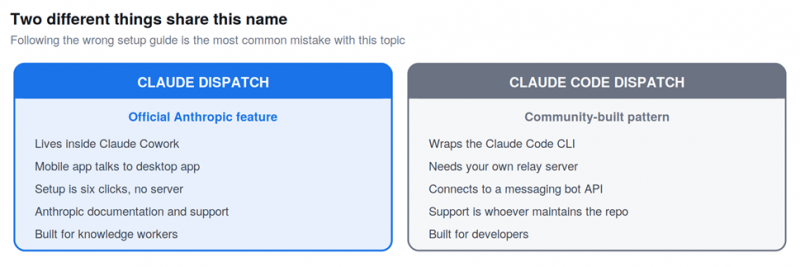
Same word, unrelated products. This article covers the one on the left.
This article covers the first one. If you came here looking for the community CLI pattern, the setup is entirely different and involves running your own relay server.
How the architecture works
Understanding where the work happens explains almost every quirk, requirement and limitation of the feature.
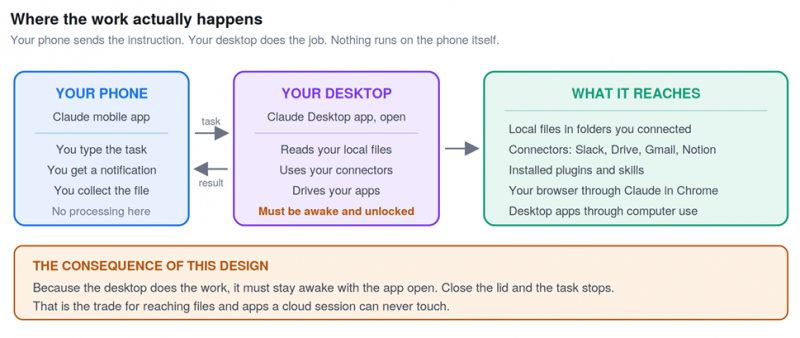
Your phone sends instructions. Your desktop performs the work and reaches everything on your machine.
That design is the reason for the single most awkward requirement: your computer must be awake with the Claude Desktop app open the entire time Claude is working. Let the machine sleep and the task stops.
It is also the reason Dispatch can do things nothing else can. A cloud session runs on Anthropic servers and cannot see the file sitting in your Downloads folder. Dispatch can, because the work is happening on the machine where that file lives.
How one thread routes two kinds of work
Dispatch does not ask you what kind of task you are assigning. Claude reads the request and spins up whichever session type fits.
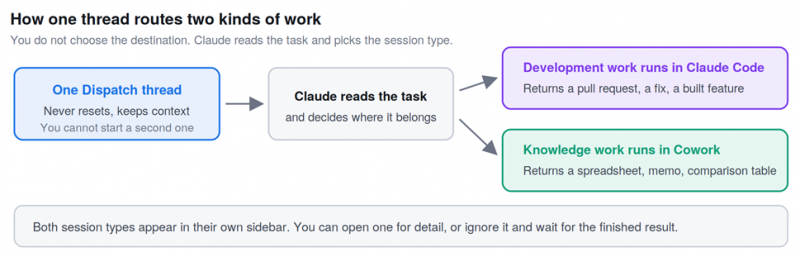
Development tasks go to Claude Code. Knowledge work goes to Cowork. You are not asked to choose.
The routing matters because it means one thread handles both a request to refactor a module and a request to compare three contracts. Each opens in its own sidebar, and you can either click through for detail or ignore the mechanics and wait for the output.
Anthropic is explicit that Claude messages you the outcome rather than narrating every step. You get a spreadsheet, a memo, a comparison table or a pull request, plus a push notification when the task finishes or when Claude needs your approval to continue.
What you need before you start
| Requirement | Detail |
|---|---|
| Claude Desktop app | Latest version, on macOS, Windows x64 or Linux. Must be open and the computer awake |
| Claude mobile app | Latest version on iOS or Android. Existing users must update before it appears |
| A Pro or Max plan | Available in beta on both. Early access was Max only before rolling out to Pro |
| Internet on both devices | The phone and the desktop each need an active connection |
| Somewhere to leave the machine | The practical requirement nobody lists. The desktop stays on and unlocked while you are away from it |
THE REQUIREMENT THAT TRIPS PEOPLE UP Your computer being awake is not a soft recommendation. If your laptop sleeps while you are out, Dispatch stops mid-task. Anthropic offers a toggle during setup to keep the computer awake, and if you want Claude working while your machine is off, you need a cloud session instead, which cannot touch local files. |
Setup, step by step
Setup is short. The whole thing is a handful of clicks once both apps are current.
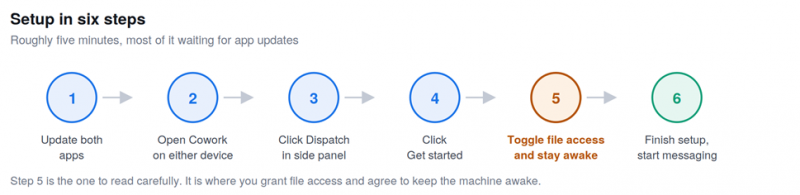
The full sequence. Step five is where the real decisions are made.
1. Download or update Claude Desktop, then do the same for Claude on iOS or Android.
2. Open Cowork on either device.
3. Click Dispatch in the left side panel.
4. You land on a page describing the feature. Click Get started.
5. Toggle on file access and the keep-computer-awake option on the next screen.
6. Click Finish setup, then start messaging Claude in the Dispatch section.
After that the conversation syncs across both surfaces automatically. Claude uses the same connectors, plugins and file permissions you already configured in Cowork, so there is nothing separate to set up for mobile.
What people actually use it for
Published hands-on testing over a month found the useful cases were not ambitious. They were the ordinary things that pile up when you are away from a desk.
| Task type | A real example | What comes back |
|---|---|---|
| Quick pull | Find the deck from the March client meeting | The file, located without you digging through folders |
| Email triage | Tell me what I need to know before my next meeting | The important messages, not a summary of everything |
| Meeting prep | For my 2pm, find the proposal, summarise the thread, list open questions | A short prep memo with talking points |
| Spreadsheet questions | What was revenue last month | The number, without opening an analytics project |
| Comparison work | Compare the three contracts in Downloads by price and renewal terms | A comparison table |
| File organisation | Find PDFs in Downloads from this week and list what each appears to be | An inventory, with changes gated on your approval |
| Expenses | Compile these receipts into an expense summary | A compiled summary from multiple sources |
| Scheduled routines | Check my calendar, email and Slack every morning | A daily briefing, running without being asked again |
THE PATTERN WORTH COPYING Scheduled tasks and Dispatch work best together. Set up a recurring morning briefing in Cowork, then use Dispatch from your phone to ask follow-up questions against it. What changed since the briefing. Which of today’s meetings needs prep. The schedule does the heavy lifting and Dispatch handles the interrogation. |
Dispatch compared to a cloud session
Cowork can run remotely on Anthropic servers or locally through your desktop. These behave differently enough that picking the wrong one wastes an afternoon.
| Dispatch, local | Cloud session, remote | |
|---|---|---|
| Where work runs | On your desktop computer | On Anthropic servers |
| Computer must be awake | Yes, app open | No, close the laptop |
| Local file access | Yes | Only while desktop app is open |
| Computer use, driving apps | Yes, not on Linux | Through the desktop app only |
| Scheduled tasks with no device on | No | Yes |
| Best for | Anything touching your machine | Long jobs while you are offline |
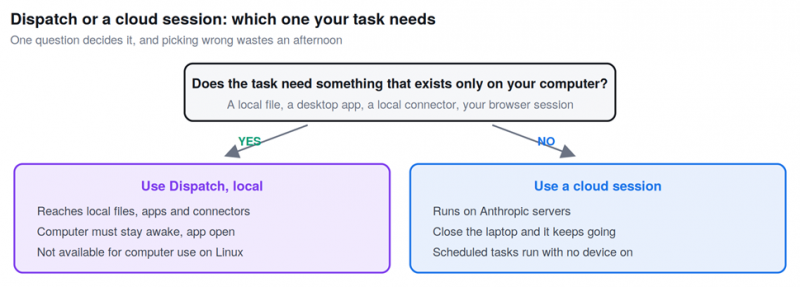
One question decides which session type your task needs.
The short rule: if the task needs something that only exists on your computer, you need Dispatch and the machine stays on. If the task can be done from the open web or connected services, a cloud session is less trouble.
The security problem you are accepting
Anthropic’s own documentation is unusually direct about this, and it deserves reading before you enable anything.
Connecting a mobile agent to a desktop agent creates a chain where an instruction from your phone triggers real actions on your computer. Reading, moving or deleting local files. Interacting with connected services. Controlling your browser. Driving your desktop applications.
WHAT ANTHROPIC SAYS TO CONFIRM FIRST Trust every app and service in the chain. Understand which files and accounts are reachable. Know how to disconnect or revoke access quickly. The guidance is to enable this only if you are comfortable with what it could do, not merely what you intend it to do. |
Two specific risks are worth naming. A manipulated instruction or malicious content the model encounters along the way can cascade into actions that are hard or impossible to undo. And computer use has different safety properties from the rest of Cowork, because Claude clicks and types on your screen directly rather than going through permission-gated file access.
There is also a physical dimension that documentation does not cover. For Dispatch to work while you are out, your computer sits awake and unlocked. Published testing described this as unnerving, and noted that an IT department insisted on a separate test laptop for the trial.
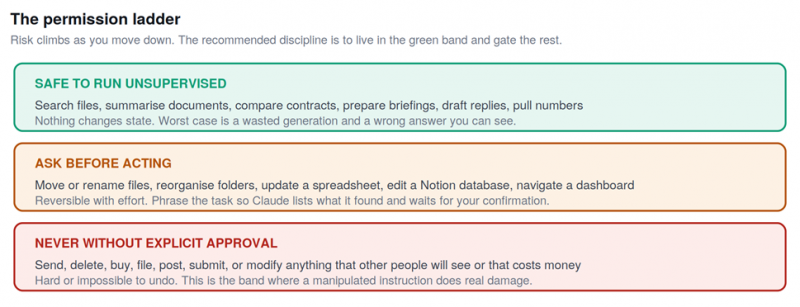
Risk climbs as you move down. Live in the green band and gate everything below it.
THE WORKABLE DISCIPLINE Start read-only. Let Claude search, summarise, compare, prepare and draft freely. Then require your approval before it sends, deletes, buys, files, posts, submits or modifies anything that matters. Phrase risky tasks with the guardrail built in: ask it to list what it found and confirm before moving anything, rather than telling it to move everything. |
Current limitations
• Your desktop must be active. The computer needs to be awake with the app open for the whole task. This is the defining constraint of the local model.
• One thread only. There is no way to start a second thread or manage several. Every message lives in a single conversation, which is elegant for context and awkward if you want to separate work and personal tasks.
• Computer use is unavailable on Linux. File, connector and plugin tasks work normally on the Linux beta, but Claude cannot drive desktop applications there.
• It is still in beta. Available on Pro and Max plans, with the behaviour and availability still changing.
Where it fails in ordinary ways
The failure modes reported from extended use are mundane rather than dramatic, which is more useful to know about.
• It struggles at the edges of the Claude app. Testing found trouble opening Shortcuts and sending a screenshot through channels outside Claude itself.
• Sometimes you are faster. Opening the Downloads folder and grabbing a file takes seconds. Dispatch earns its place when you are away from the machine, not when you are sitting at it.
• File search depends on your keywords. It can find a specific download among hundreds, provided you describe it in terms that actually appear in the file or its context.
• The magic is background work, not speed. It is not that answers arrive instantly. It is that research, documents and code progress while you do something else.
Whether it is worth setting up
| Set it up if | Skip it if |
|---|---|
| You are often away from your desk but need things from it | You work at your computer nearly all day |
| Your work lives in local files and desktop apps | Everything you need is already in cloud services |
| You want scheduled briefings you can interrogate on the move | You would rather not leave a machine awake and unlocked |
| You already pay for Pro or Max | Your IT policy forbids remote desktop agents |
| You can dedicate a machine, or accept the exposure | You handle sensitive data on your only computer |
The honest summary is that Dispatch solves a narrow problem well. It does not make Claude smarter and it does not add capability that Cowork lacked. What it removes is the requirement to be sitting at your computer for Cowork to be useful, and whether that is worth the setup depends entirely on how much time you spend away from it.
The security tradeoff is real and Anthropic does not hide it. Weigh it deliberately rather than clicking through the setup screens, because the convenience is immediate and the exposure is easy to forget about once it is running.
Post Comment
Share your thoughts about this article.
Be the first to post a comment!





