CapCut does not publish one fixed price. It says so itself. Your price depends on your country, your device, and whatever promotion is running, which is why every article you read quotes a different number.
The short answer
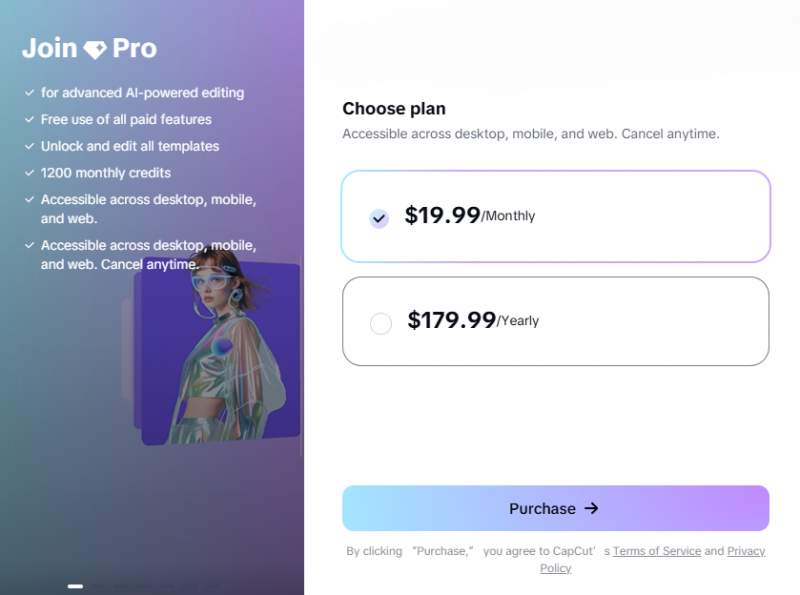
CapCut Pro lists at $19.99 per month or $179.99 per year on web checkout in the US. The Standard plan sits below it at $9.99 per month, and Team pricing starts around $24.99 per user per month. Those figures come from CapCut's own comparison page.
The free version is still free, and it is still good. Most people reading this do not need to pay at all, which is a point I come back to later.
READ THIS BEFORE YOU TRUST ANY PRICE YOU SEE ONLINE CapCut states plainly on its own help page that pricing varies by region, device, and promotion, and that there is no fixed global price. The only number that is true for you is the one on your own upgrade screen. Everything in this article, including the official figures above, is a reference point rather than a quote. |
Why every article quotes a different price
Search for this and you will find $7.99, $9.99, $14.99 and $19.99 all published in 2026, each presented as the current price. They are not all wrong. They are measuring different things.
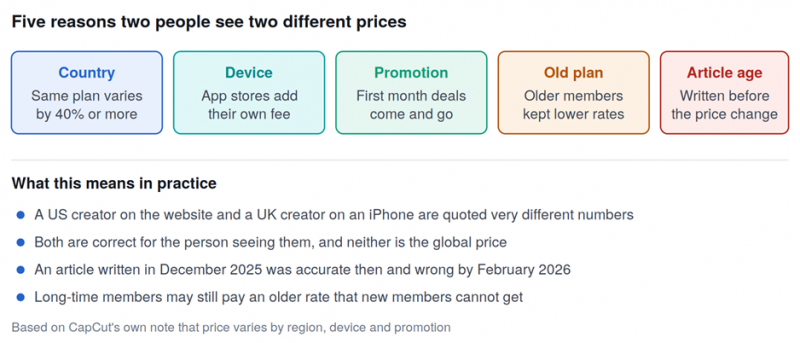
Five separate things move the number you see, which is why published prices disagree so often.
What changed in early 2026
This is the single biggest reason for the confusion. In early 2026, CapCut reorganised its paid plans without making a formal announcement, and the change was not small.
The old Pro plan, the one most creators remember at around $9.99 a month, was renamed Standard. A new and more expensive Pro tier was introduced above it at $19.99 a month, carrying 4K export, the full AI toolkit, around 1TB of cloud storage and desktop access.
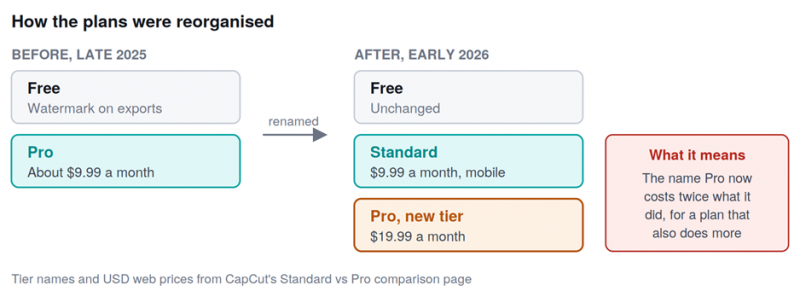
The old Pro became Standard, and a new Pro launched above it. Same name, different product, double the price.
This matters for a practical reason. If someone tells you CapCut Pro costs about ten dollars, they may be remembering the plan that is now called Standard. Both statements were true at different times, which is exactly how the confusion spreads.
IF YOU SUBSCRIBED BEFORE THE CHANGE Reports suggest some annual subscribers moved onto the new rate around February 2026 when their plan renewed. If you signed up under the old pricing, check what your card is actually being charged rather than assuming your old rate held. |
The four plans and what each costs
These are US web checkout prices. Treat them as the reference point, not as your price.
| Plan | Price | What you get | Best for |
|---|---|---|---|
| Free | $0 | Full editing tools, timeline, keyframes, chroma key, free music, basic effects. Watermark on export | Most casual creators, honestly |
| Standard | $9.99 / month | No watermark, more premium templates. Mobile focused, monthly billing only | Phone editors who just want clean exports |
| Pro | $19.99 / month or $179.99 / year | 4K export, full AI toolkit, around 1TB cloud storage, desktop and web access | Frequent creators who hit paywalls weekly |
| Team | From about $24.99 per user | Everything in Pro plus shared projects and collaboration | Agencies and content teams |
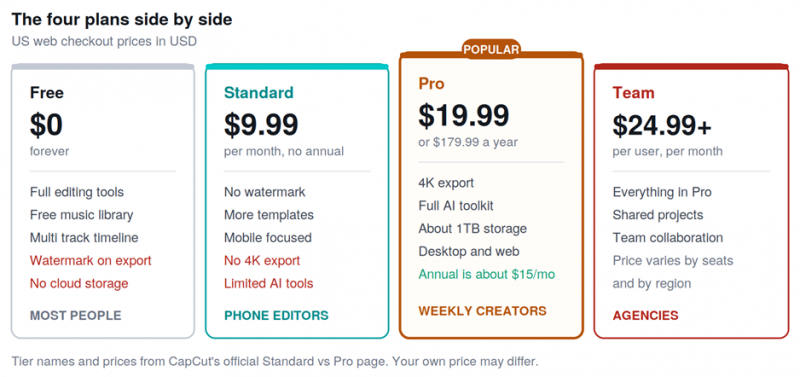
The four tiers at a glance. Pro is the only plan with 4K export and desktop access.
On the annual Pro plan you pay $179.99 up front, which works out to about $15 a month. That is roughly a $60 saving over paying monthly for twelve months.
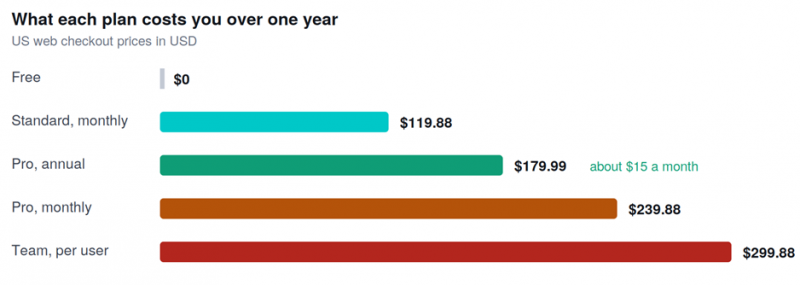
Paying annually for Pro saves about $60 a year compared with paying month to month.
Prices by country
CapCut adjusts pricing to local purchasing power, so the gap between markets is large. The pattern below is consistent across reporting, even where exact numbers differ.
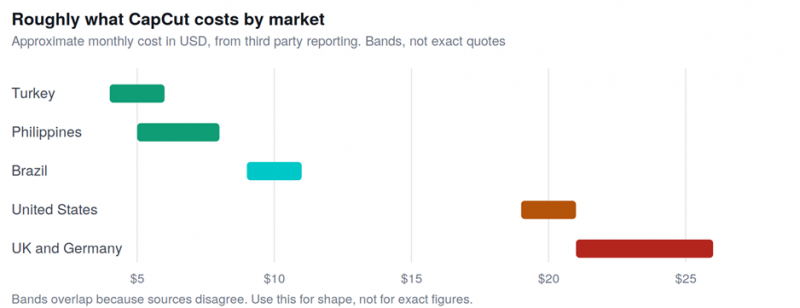
The cheapest and most expensive markets differ by several times over for the same product.
ON VPN AND FOREIGN ACCOUNT TRICKS Guides suggesting you buy through a cheaper country using a VPN or a foreign store account are asking you to break the terms you agree to at checkout. That can mean a lost subscription, a locked account, or a failed payment, and you have little recourse when it goes wrong. The legitimate ways to pay less are in the section below. |
Buy on the web, not in the app
This is the easiest saving available and it takes no effort. Apple and Google both take a cut of in-app purchases, and that cost is passed to you. Reporting consistently puts mobile in-app pricing a few dollars above web checkout for the same plan.
So subscribe at capcut.com in a browser rather than tapping upgrade inside the phone app. Same plan, same account, lower price.
THIS AFFECTS CANCELLING TOO You must cancel through whichever store you bought from. If you subscribed inside the iPhone app, cancelling inside CapCut will not stop the billing. You have to do it in your Apple subscriptions settings. Buying on the web keeps cancellation in one place. |
What you still get for free
Before deciding whether to pay, it is worth knowing how much the free version still does, because it is more than most people expect.
Free covers cutting, trimming, splitting and merging, multi track timeline editing, keyframe animation, chroma key, basic stabilisation, a large free music and sound effects library, text and stickers, and basic audio editing. For everyday social clips that is a complete workflow.
What free does not give you: watermark-free export, most premium templates and effects, the advanced AI tools, higher resolution export, and cloud storage. CapCut also discontinued the old 1GB free cloud storage, so saving projects online now needs a paid plan.
THE HONEST TEST Use the free version for two weeks and count how many times you actually hit a paywall. If the answer is once or twice, stay free. If you are blocked several times a week on templates, effects or exports, the subscription is buying back real time rather than just removing a watermark. |
Is Pro worth it for you
The honest answer depends on how often you edit and what you need from the export. Rather than a generic pros list, here is the split I would apply.
| Your situation | What makes sense |
|---|---|
| You edit a few clips a month for fun | Stay free. The watermark is the only real limit and it does not matter for personal videos |
| You post regularly and only need clean exports | Standard at $9.99 does the job. You are paying to remove the watermark, nothing more |
| You edit weekly, use AI tools, work on desktop | Pro. The annual plan at $179.99 brings it to about $15 a month |
| You need 4K delivery for clients | Pro is the only tier that gives you 4K export |
| Several people work on the same projects | Team, though compare the per user cost against separate Pro accounts first |
| You mainly want stock music and templates | Check what the free library already covers before paying. It is larger than most people realise |
WATCH THE AI CREDITS Pro includes a monthly allowance of AI points rather than unlimited AI use. Heavy generative work can exhaust that allowance and require top ups, which are sold separately. If AI generation is central to your workflow, the subscription may be only part of your monthly cost. |
Ways to pay less
Four approaches that do not involve breaking any terms.
1. Buy annual instead of monthly. On Pro this is the single biggest saving, roughly $60 a year, provided you are confident you will still be editing in six months
2. Subscribe on the web. Skips the app store markup entirely for the same plan
3. Start on the free trial and set a reminder. CapCut has offered trial periods and discounted first months. These are genuine, but they auto convert to full price
4. Check whether Standard is enough. If all you need is watermark removal, paying Pro prices for AI tools you never open is the most common overspend here
How to cancel before it renews
Auto renewal complaints are the most common billing issue reported for CapCut, so treat cancellation as something to plan rather than react to.
Cancel through the platform you bought from. Web purchases are cancelled in your CapCut account settings. iPhone purchases are cancelled in Apple subscriptions. Android purchases are cancelled in Google Play. Cancelling inside the CapCut app does not stop billing that started in an app store.
TWO HABITS WORTH ADOPTING Put the renewal date in your calendar with at least three days of warning the moment you subscribe, since CapCut may not remind you. Also note that cancelling usually takes effect at the end of your current billing period rather than immediately, so you keep access until then but you will not be charged again. |
How to check your own price
This takes twenty seconds and gives you the only number that is actually true for you. CapCut documents all three routes on its own help page.
• On the web: open CapCut Online, log in, click Upgrade in the top right corner, and read the Pro plan pricing
• On desktop: open the CapCut desktop app, log in, click the subscription button under your user ID, and select the Pro plan
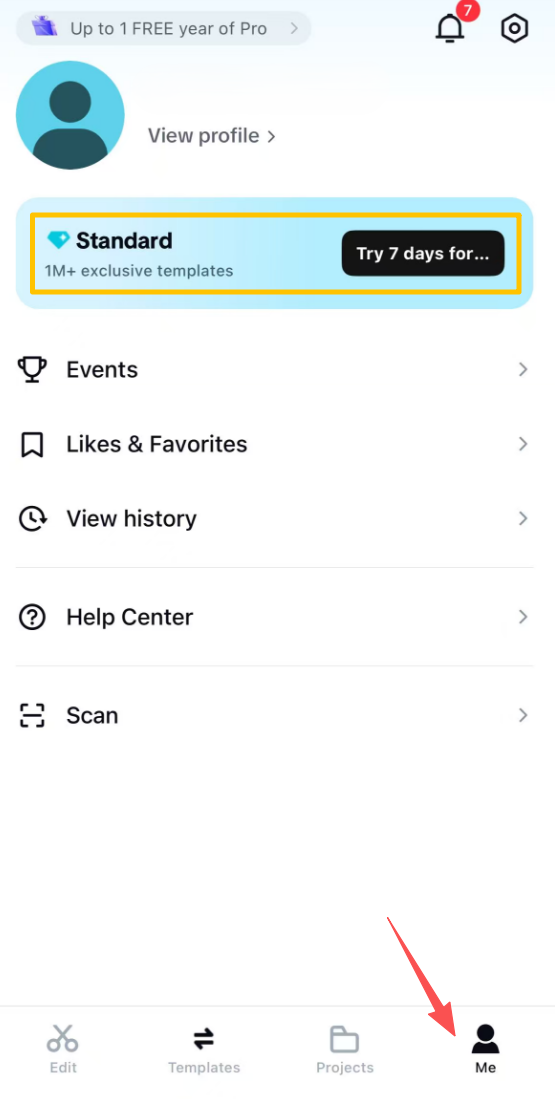
• On mobile: open the app, go to the Me section on the homepage, and tap Join CapCut Pro next to your nickname
The short version CapCut Pro lists at $19.99 a month or $179.99 a year on US web checkout, with Standard at $9.99 and Team from about $24.99 per user. The old $9.99 Pro that people remember is now called Standard, which explains most of the confusion online. Buy on the web rather than in the app, pick annual if you are committing for the year, and check whether Standard covers what you actually need before paying double for AI tools you may not open. Then ignore every price in this article, including mine, and read your own upgrade screen. CapCut says outright that your price depends on your region, device and current promotions, so yours is the only figure that counts. |
Post Comment
Share your thoughts about this article.
Be the first to post a comment!





